


* 겪고 있는 문제 상황을 최대한 자세하게 작성해주세요.ㅠ현
* 문제 해결을 위해 어떤 시도를 해보았는지 구체적으로 함께 알려주세요.
문제점 1. 글씨가 나오지 않고
2. 4번째에 동영상이 나오지가 않으며 크기도 작성을 하였으나 적용이 안되고
3. 밑에 아래영역에서 글씨가 center 쪽에 적용이 안됩니다.
4. 마우스 이벤트 클릭을 해도 되지가 않습니다.
혹시 튜더님깨서 다른곳을 발견하셨으면 그것에 대해좀 알려주셨으면 감사하겠습니다.
잘부탁드리겠습니다.
<!DOCTYPE html>
<html lang="en">
<head>
<meta charset="UTF-8">
<meta http-equiv="X-UA-Compatible" content="IE=edge">
<meta name="viewport" content="width=device-width, initial-scale=1.0">
<title>코딩네컷</title>
<style>
/* 이서윤체 폰트 적용을 위한 코드 */
@font-face {
src: url("https://cdn.jsdelivr.net/gh/projectnoonnu/noonfonts_2202-2@1.0/LeeSeoyun.woff") format("woff");
font-weight: normal;
font-style: normal;
}
/* body태그 자체에 css 요소 부여 */
body {
font-family: "LeeSeoyun";
margin: 0;
display: flex;
justify-content: center;
background-image: url("./background.png");
}
/* 너비는 390픽셀이구, 배경색이 좀 필요하고 부모(body) 높이 전체를 쓸거야 */
.container {
width: 390px;
background-color: #ff9d73;
height: 100%;
}
/* 위로 여유가 30픽셀 정도 있었으면 좋겠네 */
.photos {
margin-top: 30px;
}
/* 배경은 알아보기 쉽게 흰색으로 해주고, 좌우 마진은 20픽셀 */
/* 상하 마진은 15픽셀로 해줘. 높이는 각 사진마다 200픽셀로! */
.photos-frame {
background-color: white;
margin: 15px 20px;
height: 200px;
background-size: cover;
position: relative;
cursor: pointer;
}
.photos-description {
/* 배경은 검게, 글자는 흰 색으로 */
color: white;
background-color: black;
/* 가로 너비는 내부 콘텐츠에 딱 맞게! */
width: fit-content;
padding: 0 20px;
margin-bottom: 10px;
/* 경세선 */
border-radius: 10px;
position: absolute;
bottom: 0;
transform: translate(-50%);
left: 50%;
opacity: 0;
}
/* 아래 영역 전체는 flexible하게 하되 그 내부 아이템들은 세로로 쌓을거야 */
/* 근데 모두 가운데 정렬 했으면 좋겠어!*/
/* 하단 영역 스타일링 */
.footer {
display: flex;
flex-direction: column;
align-items: center;
}
/* 아래 영역의 제목 부분은 폰트가 좀 두껍고, 사이즈는 25픽셀! 흰색으로 */
.f-title {
font-size: 25px;
font-family: 900;
color: white;
}
/* 아래 영역의 날짜 부분은 폰트가 중간 두께고, 사이즈는 15픽셀! 흰색으로 */
.f-date {
font-size: 15px;
font-weight: 500;
color: white;
}
#image1 {
background-image: url("./img1.png");
}
#image2 {
background-image: url("./img2.png");
}
#image3 {
background-image: url("./img3.png");
}
/* #image4 {
background-image: url("img4.png");
} */
/* opacity : 투명도를 의미해요! 0% 투명하다. 즉 다 보인다. */
.showText {
opacity: 0;
}
/* opacity : 투명도를 의미해요! 0% 투명하다. 즉 다 보인다. */
/* transition : 나타날 때 0.5초도안 천천히 나타나는 효과를 주라는 의미에요 */
.hideText{
opacity: 1;
transition: opacity 0.5s linear;
}
.video {
width: 100%;
height: 100%;
}
</style>
<script>
// 텍스트가 보여지는 기능
// 1. 몇 번째 사진에 마우스가 올라갔는지 확인(if문)
// 2. 해당 사진을 찾아 hideText class를 지워주고, showText는 삽입해줌
function showText(number) {
if (number === 1) {
document.querySelector("#desc1").classList.remove("hideText");
document.querySelector("#desc1").classList.add("showText");
} else if (number === 2) {
document.querySelector("#desc2").classList.remove("hideText");
document.querySelector("#desc2").classList.add("showText");
} else {
document.querySelector("#desc3").classList.remove("hideText");
document.querySelector("#desc3").classList.add("showText");
}
}
// 텍스트가 보여지는 기능
// 1. 몇 번째 사진에 마우스가 올라갔는지 확인(if문)
// 2. 해당 사진을 찾아 hideText class를 지워주고, showText는 삽입해줌
function hideText(number) {
if (number === 1) {
document.querySelector("#desc1").classList.remove("hideText");
document.querySelector("#desc1").classList.add("showText");
} else if (number === 2) {
document.querySelector("#desc2").classList.remove("hideText");
document.querySelector("#desc2").classList.add("showText");
} else {
document.querySelector("#desc3").classList.remove("hideText");
document.querySelector("#desc3").classList.add("showText");
}
}
// 클릭 기능
// 1. 선택된 사진의 숫자를 가진 텍스트를 alert 형태로 출력해줌
function alertText(number) {
alert('${number}번째 추억이에요! 눌러주셔서 감사합니다 :)');
}
</script>
</head>
<body>
<div class="container">
<div class="photos">
<div id="image1" class="photos-frame" onmouseover="hideText(1)" onmouseout="showText(1)"
onclikck="alertText(1)">
<span id="desc1" class="photos-description">
우리 작년 1월에 동해 갔을 때:)
</span>
</div>
<div id="image2" class="photos-frame" onmouseover="hideText(2)" onmouseout="showText(2)"
onclikck="alertText(2)">
<span id="desc2" class="photos-description">
작년 할로윈 파티
</span>
</div>
<div id="image3" class="photos-frame" onmouseover="hideText(3)" onmouseout="showText(3)"
onclikck="alertText(3)">
<span id="desc3" class="photos-description">
친구랑 싸웠을 때 위로 해준 너
</span>
</div>
<div class="photos-frame">
<iframe src="https://youtu.be/TWz1btekxfs" frameborder="0"></iframe>
</div>
</div>
<div class="footer">아래 영역</div>
<p class="f-title">Happy Lunch Time</p>
<p class="f-date">2023.01.23</p>
</div>
</body>
</html>
보고 계신 화면 전체를 캡처해
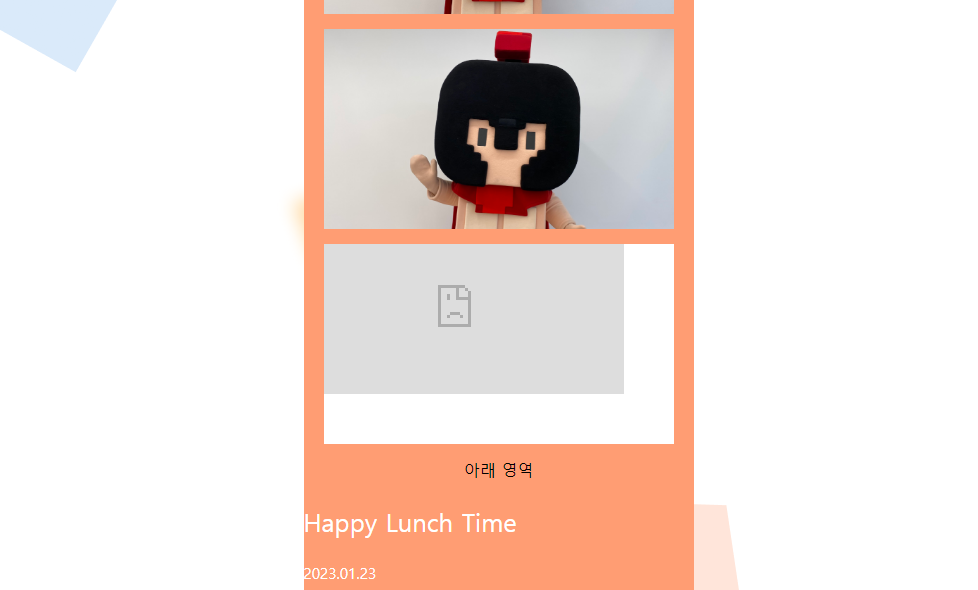
주시면, 튜터님들이 빠르게 상황을 이해할 수 있어요.


