


app.py를 열수 없다고 나오는데 뭐가 문제인지 모르겠어요...

daj04@DESKTOP-2EBT6NI MINGW64 ~ (master)
$ ssh -i /c/Users/daj04/OneDrive/bambee83.pem ubuntu@54.180.114.218
Welcome to Ubuntu 22.04.1 LTS (GNU/Linux 5.15.0-1028-aws x86_64)
* Documentation: https://help.ubuntu.com
* Management: https://landscape.canonical.com
* Support: https://ubuntu.com/advantage
System information as of Fri Feb 3 06:44:28 UTC 2023
System load: 0.0 Processes: 96
Usage of /: 28.3% of 7.57GB Users logged in: 0
Memory usage: 26% IPv4 address for eth0: 172.31.43.46
Swap usage: 0%
* Ubuntu Pro delivers the most comprehensive open source security and
compliance features.
5 updates can be applied immediately.
To see these additional updates run: apt list --upgradable
Last login: Sun Jan 29 02:03:25 2023 from 211.218.208.11
ubuntu@ip-172-31-43-46:~$ ls
sparta
ubuntu@ip-172-31-43-46:~$ cd sparta
ubuntu@ip-172-31-43-46:~/sparta$ exit
logout
Connection to 54.180.114.218 closed.
daj04@DESKTOP-2EBT6NI MINGW64 ~ (master)
$ sudo chmod 400 /c/Users/daj04/OneDrive/bambee83.pem
bash: sudo: command not found
daj04@DESKTOP-2EBT6NI MINGW64 ~ (master)
$ ssh -i /c/Users/daj04/OneDrive/bambee83.pem ubuntu@54.180.114.218
Welcome to Ubuntu 22.04.1 LTS (GNU/Linux 5.15.0-1028-aws x86_64)
* Documentation: https://help.ubuntu.com
* Management: https://landscape.canonical.com
* Support: https://ubuntu.com/advantage
System information as of Fri Feb 3 06:58:20 UTC 2023
System load: 0.0 Processes: 101
Usage of /: 28.3% of 7.57GB Users logged in: 0
Memory usage: 26% IPv4 address for eth0: 172.31.43.46
Swap usage: 0%
* Ubuntu Pro delivers the most comprehensive open source security and
compliance features.
5 updates can be applied immediately.
To see these additional updates run: apt list --upgradable
Last login: Fri Feb 3 06:44:29 2023 from 211.218.208.11
ubuntu@ip-172-31-43-46:~$ ls
sparta
ubuntu@ip-172-31-43-46:~$ cd sparta
ubuntu@ip-172-31-43-46:~/sparta$ cd ..
ubuntu@ip-172-31-43-46:~$ sudo update-alternatives --install /usr/bin/python python /usr/bin/python3 10
ubuntu@ip-172-31-43-46:~$ sudo apt-get update
Hit:1 http://ap-northeast-2.ec2.archive.ubuntu.com/ubuntu jammy InRelease
Get:2 http://ap-northeast-2.ec2.archive.ubuntu.com/ubuntu jammy-updates InRelease [114 kB]
Get:3 http://ap-northeast-2.ec2.archive.ubuntu.com/ubuntu jammy-backports InRelease [107 kB]
Get:4 http://ap-northeast-2.ec2.archive.ubuntu.com/ubuntu jammy-updates/main amd64 Packages [852 kB]
Get:5 http://ap-northeast-2.ec2.archive.ubuntu.com/ubuntu jammy-updates/main amd64 c-n-f Metadata [13.2 kB]
Get:6 http://ap-northeast-2.ec2.archive.ubuntu.com/ubuntu jammy-updates/universe amd64 Packages [797 kB]
Get:7 http://ap-northeast-2.ec2.archive.ubuntu.com/ubuntu jammy-updates/universe Translation-en [142 kB]
Get:8 http://ap-northeast-2.ec2.archive.ubuntu.com/ubuntu jammy-updates/universe amd64 c-n-f Metadata [15.1 kB]
Get:9 http://security.ubuntu.com/ubuntu jammy-security InRelease [110 kB]
Get:10 http://security.ubuntu.com/ubuntu jammy-security/universe amd64 c-n-f Metadata [11.3 kB]
Fetched 2162 kB in 2s (1351 kB/s)
Reading package lists... Done
ubuntu@ip-172-31-43-46:~$ sudo apt-get install -y python3-pip
Reading package lists... Done
Building dependency tree... Done
Reading state information... Done
python3-pip is already the newest version (22.0.2+dfsg-1ubuntu0.1).
0 upgraded, 0 newly installed, 0 to remove and 13 not upgraded.
ubuntu@ip-172-31-43-46:~$ sudo update-alternatives --install /usr/bin/pip pip /usr/bin/pip3 1
update-alternatives: warning: forcing reinstallation of alternative /usr/bin/pip3 because link group pip is broken
update-alternatives: warning: not replacing /usr/bin/pip with a link
ubuntu@ip-172-31-43-46:~$ sudo iptables -t nat -A PREROUTING -i eth0 -p tcp --dport 80 -j REDIRECT --to-port 5000
ubuntu@ip-172-31-43-46:~$ ls
sparta
ubuntu@ip-172-31-43-46:~$ ls sparta
app.py static templates
ubuntu@ip-172-31-43-46:~$ pyrhon app.py
pyrhon: command not found
ubuntu@ip-172-31-43-46:~$ python app.py
python: can't open file '/home/ubuntu/app.py': [Errno 2] No such file or directory
ubuntu@ip-172-31-43-46:~$ ls
sparta
ubuntu@ip-172-31-43-46:~$ ls sparta
app.py static templates
ubuntu@ip-172-31-43-46:~$ python app.py
python: can't open file '/home/ubuntu/app.py': [Errno 2] No such file or directory
ubuntu@ip-172-31-43-46:~$
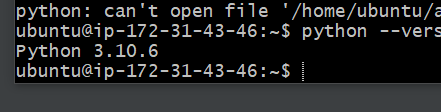
파이썬은 설치되어있는 것 같습니다
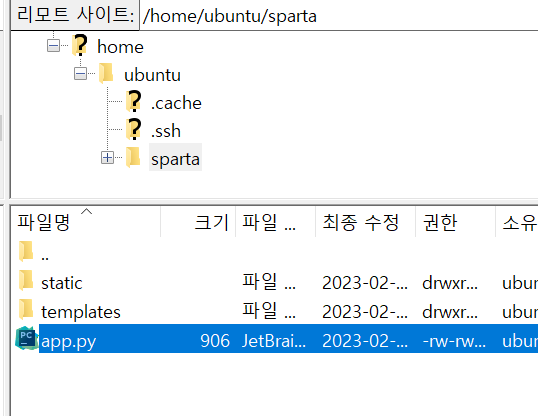
filezila 화면입니다


