


* 겪고 있는 문제 상황을 최대한 자세하게 작성해주세요.
* 문제 해결을 위해 어떤 시도를 해보았는지 구체적으로 함께 알려주세요.
2주차 샤쟘 과제를 하고 있는데요..
사실상 답안을 보면서 이게 이거구나 하면서 보면서 쓰는 수준입니다만 ㅠ
난이도가 낮은 두번째 페이지를 답안대로 다 작성하고 빨간줄도 없는데 핸드폰 화면으로는 흰화면만 뜹니다.
도와주세요
보고 계신 화면 전체를 캡처해 주시면, 튜터님들이 빠르게 상황을 이해할 수 있어요.
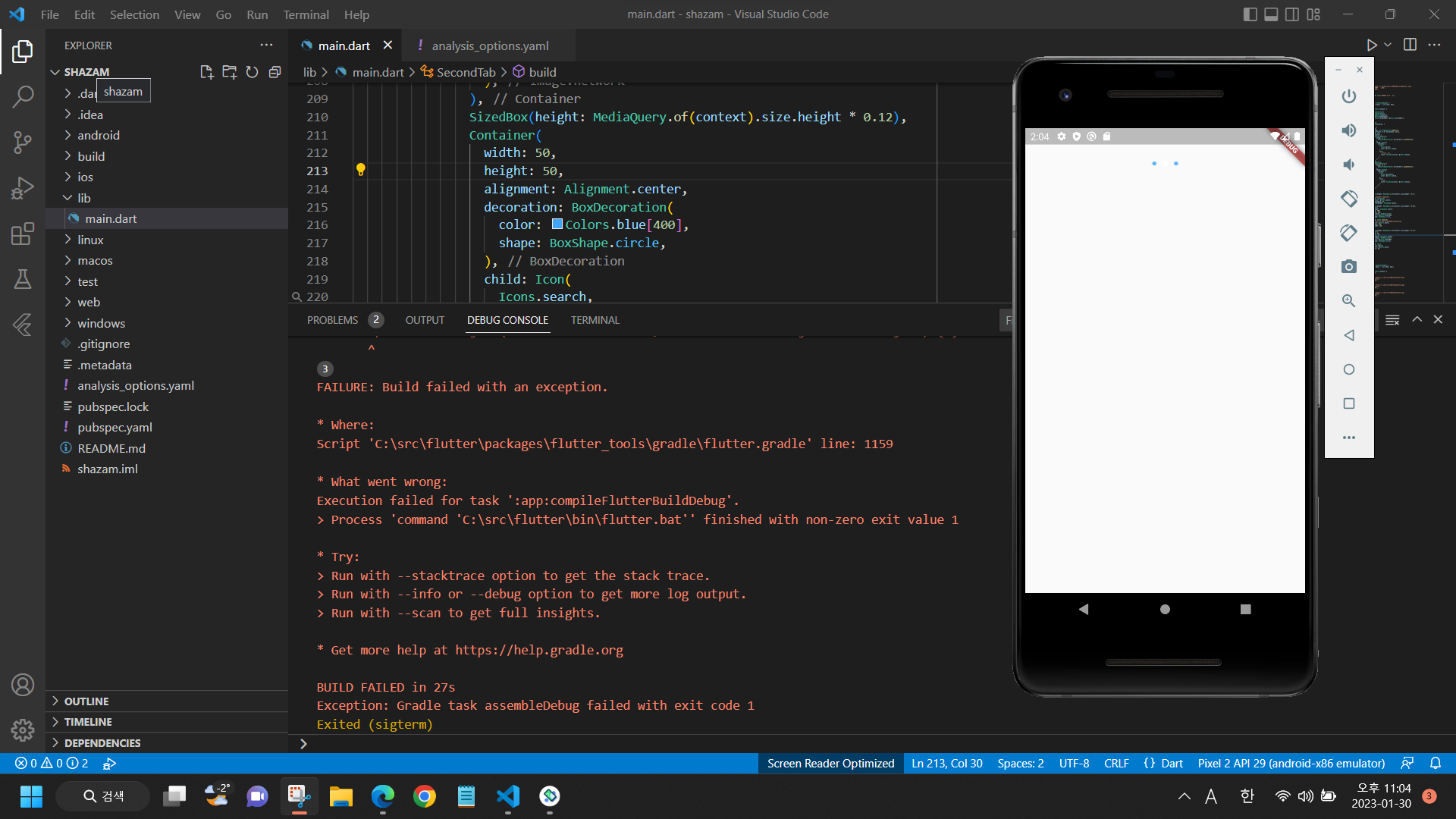
작성한 코드 및 에러 메세지
// 두번째 페이지
class SecondTab extends StatelessWidget {
const SecondTab({Key? key}) : super(key: key);
@override
Widget build(BuildContext context) {
return Container(
decoration: BoxDecoration(
gradient: LinearGradient(
begin: Alignment.topCenter,
end: Alignment.bottomCenter,
colors: [Colors.blue[300]!, Colors.blue[900]!],
),
),
child: SafeArea(
child: Column(children: [
Row(
children: [
Padding(
padding: const EdgeInsets.symmetric(
vertical: 8.0, horizontal: 16.0),
child: Row(
children: [
GestureDetector(
onTap: () {
DefaultTabController.of(context)!.animateTo(0);
},
child: Column(
children: [
Icon(
Icons.person,
color: Colors.white,
),
Text(
"라이브러리",
style: TextStyle(color: Colors.white),
)
],
),
),
Spacer(),
GestureDetector(
onTap: () {
DefaultTabController.of(context)!.animateTo(2);
},
child: Column(
children: [
Icon(
Icons.show_chart,
color: Colors.white,
),
Text(
"차트",
style: TextStyle(color: Colors.white),
),
],
),
),
],
),
),
SizedBox(height: MediaQuery.of(context).size.height * 0.1),
Text(
"Shazam하려면 탭하세요",
style: TextStyle(
color: Colors.white,
fontSize: 24,
fontWeight: FontWeight.bold),
),
SizedBox(height: MediaQuery.of(context).size.height * 0.06),
Container(
alignment: Alignment.center,
width: 200,
height: 200,
decoration: BoxDecoration(
color: Colors.blue[300],
shape: BoxShape.circle,
),
child: Image.network(
"https://i.ibb.co/hxNbZ8p/shazam.png",
color: Colors.white,
width: 130,
height: 130,
),
),
SizedBox(height: MediaQuery.of(context).size.height * 0.12),
Container(
width: 50,
height: 50,
alignment: Alignment.center,
decoration: BoxDecoration(
color: Colors.blue[400],
shape: BoxShape.circle,
),
child: Icon(
Icons.search,
color: Colors.white,
size: 30,
),
)
],
)
]),
));
}
}
-------------------------------------------------------------------------------------
밑에 콘솔에 뜬 오류문구입니다.
FAILURE: Build failed with an exception.
* Where:
Script 'C:\src\flutter\packages\flutter_tools\gradle\flutter.gradle' line: 1159
* What went wrong:
Execution failed for task ':app:compileFlutterBuildDebug'.
> Process 'command 'C:\src\flutter\bin\flutter.bat'' finished with non-zero exit value 1
* Try:
> Run with --stacktrace option to get the stack trace.
> Run with --info or --debug option to get more log output.
> Run with --scan to get full insights.
* Get more help at https://help.gradle.org
BUILD FAILED in 27s
Exception: Gradle task assembleDebug failed with exit code 1
Exited (sigterm)


