


* 겪고 있는 문제 상황을 최대한 자세하게 작성해주세요.
* 문제 해결을 위해 어떤 시도를 해보았는지 구체적으로 함께 알려주세요.
스크롤을 내려야 전체 화면이 보여서
위치를 center가 아니라 상단으로 바꾸고 싶습니다.
화면에 보이는 글자와 그림을 전체적으로 위로 끌어올리려면
어떤 속성을 바꿔줘야 할까요?
이미지 위치 조정은 성공했는데 글자의 위치 조정이 어렵습니다.
제가 진짜 완전 왕 초보에요. (월간 코딩 강의들이 코딩 첫 도전입니다.)
보고 계신 화면 전
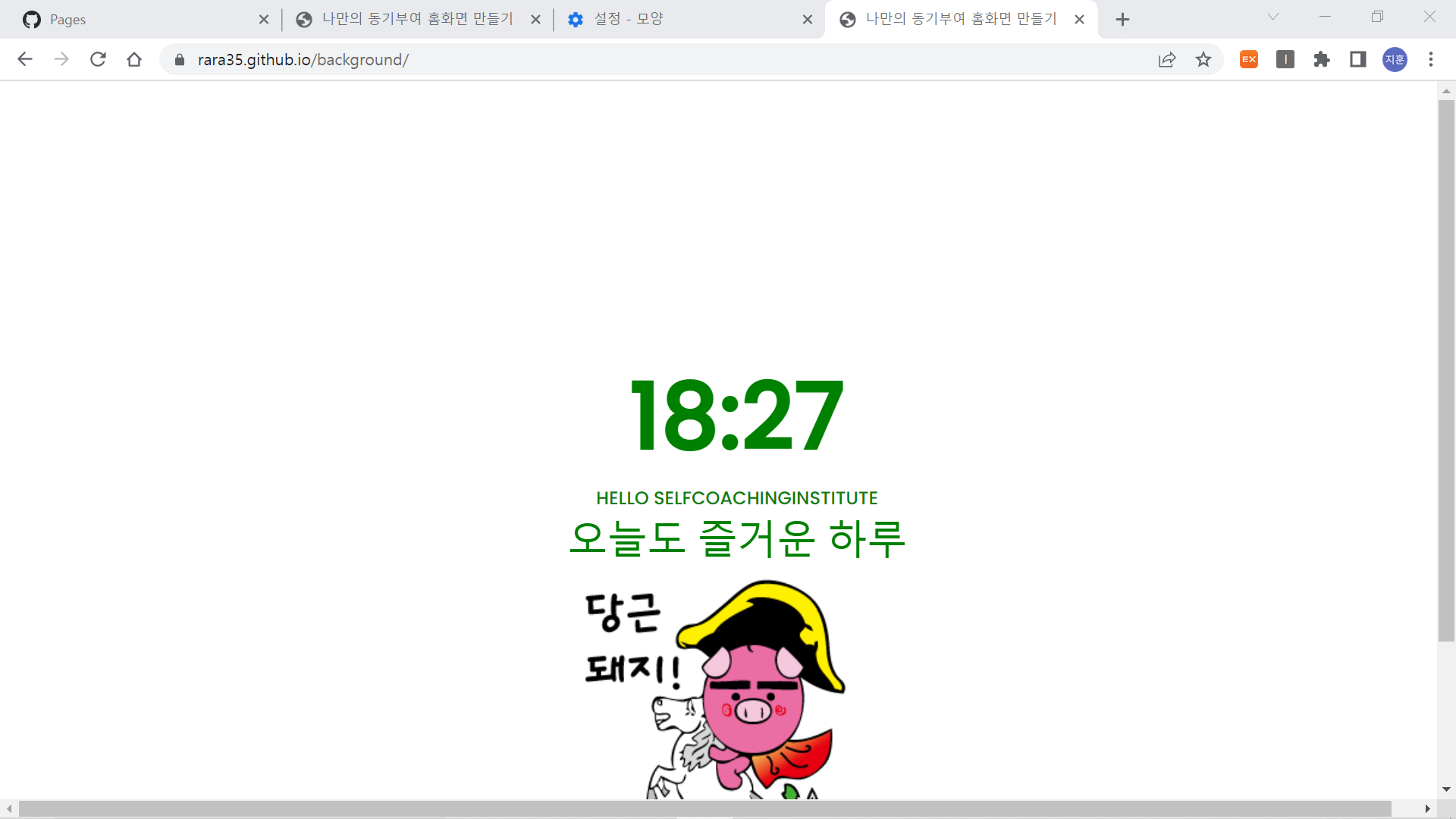
체를 캡처해 주시면, 튜터님들이 빠르게 상황을 이해할 수 있어요.
작성한 코드 및 에러 메세지
<!DOCTYPE html>
<html lang="en">
<head>
<meta charset="UTF-8">
<meta http-equiv="X-UA-Compatible" content="IE=edge">
<meta name="viewport" content="width=device-width, initial-scale=1.0">
<meta http-equiv="Content-Security-Policy" content="upgrade-insecure-requests">
<script src="https://ajax.googleapis.com/ajax/libs/jquery/3.6.0/jquery.min.js"></script>
<title>나만의 동기부여 홈화면 만들기</title>
<script src="index.js"></script>
<style>
@import url('https://fonts.googleapis.com/css2?family=Poppins:wght@500&display=swap');
* {
font-family: 'Poppins', sans-serif;
}
body {
background-image: url("https://stickershop.line-scdn.net/stickershop/v1/product/1635057/LINEStorePC/main.png");
background-position-x: center;
background-position-y: 80%;
background-repeat: no-repeat;
background-size: 20%;
color: green;
}
.time {
font-size: 80px;
font-weight: bold;
}
.greetion {
font-size: 50px;
}
.todo {
font-size: 35px;
}
.author {
font-size: 20px;
font-style: italic;
}
.main {
width: 100vw;
height: 100vh;
display: flex;
flex-direction: column;
align-items: center;
justify-content: center;
}
.quote {
width: 100vw;
height: 20vh;
display: flex;
flex-direction: column;
align-items: center;
justify-content: center;
}
</style>
<script>
</script>
</head>
<body>
<div class="main">
<div id ="time" class="time">12:00</div>
<div class="greeting">HELLO SELFCOACHINGINSTITUTE</div>
<div class="todo">오늘도 즐거운 하루</div>
</div>
<div class="quote">
<div id="author" class="author">- 저자 -</div>
<div id="content" class="content">" 내용 "</div>
</div>
</body>
</html>오류 발생 시, 작성한 코드 전체와 에러 메시지를 첨부해 주세요.
Tip 1) </> 아이콘을 눌러 코드박스를 만들어 보세요.
Tip 2) Ctrl+A(맥의 경우 Command+A) 단축키로 코드를 한 번에 선택할 수 있어요!


