커뮤니티

포인트
쿠폰
내 강의실
국비 신청 내역
증명서
계정
로그아웃
학습 질문
개발 일지
나의 활동
답변 완료
5-3 >> eas build -p android --profile development 시 오류
[왕초보] 나만의 수익성 앱, 앱개발 종합반 v5
5주차


강*진
댓글
5
・
추천
0
・
조회수
32
조회수
32
답변 완료
eas build 하기 ⇒ 앱 파일 만들기 시 빌드 오류가 나고 있어서 문의드립니다.
어떻게 해야할까요?
화면캡쳐
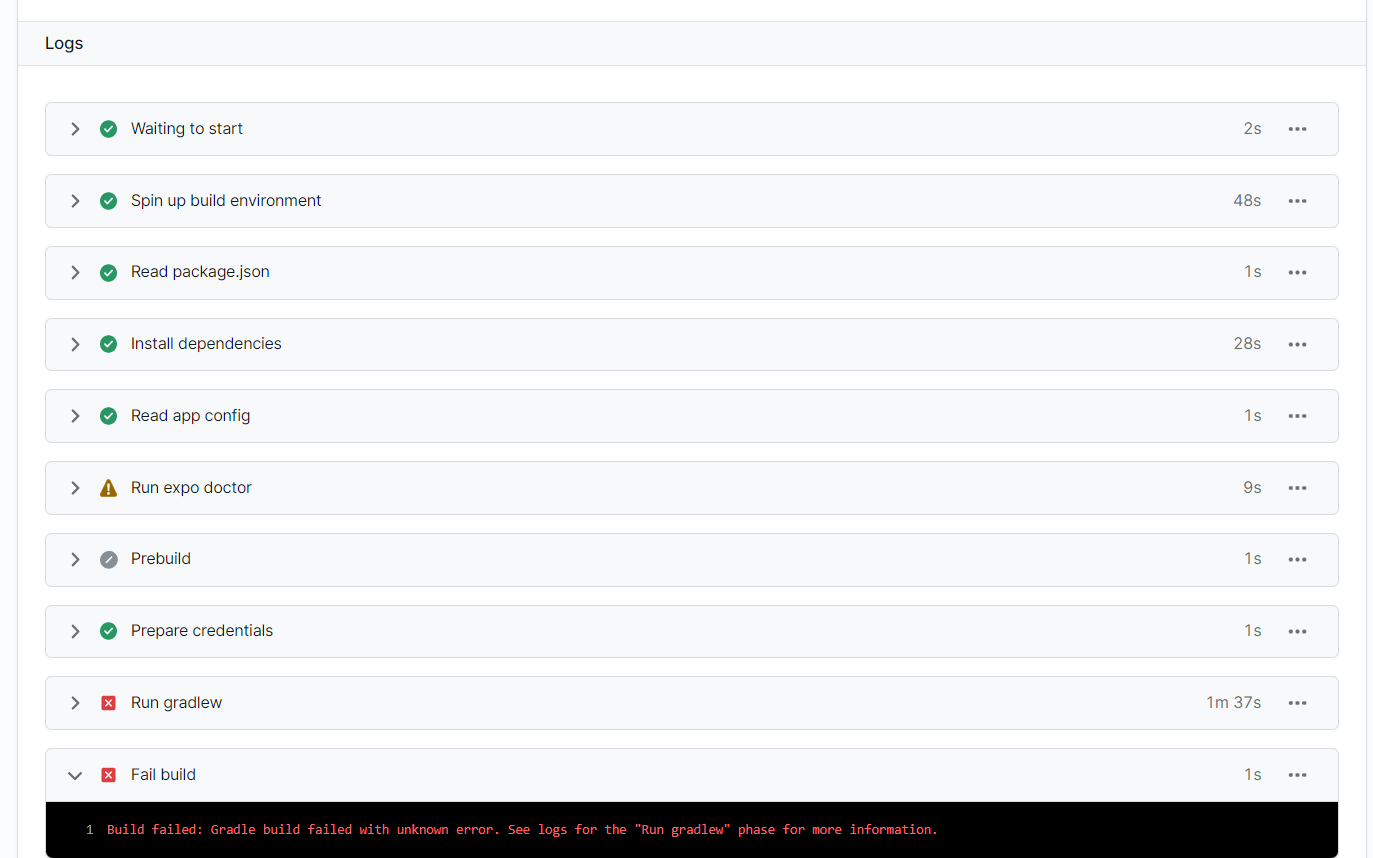
화면 2
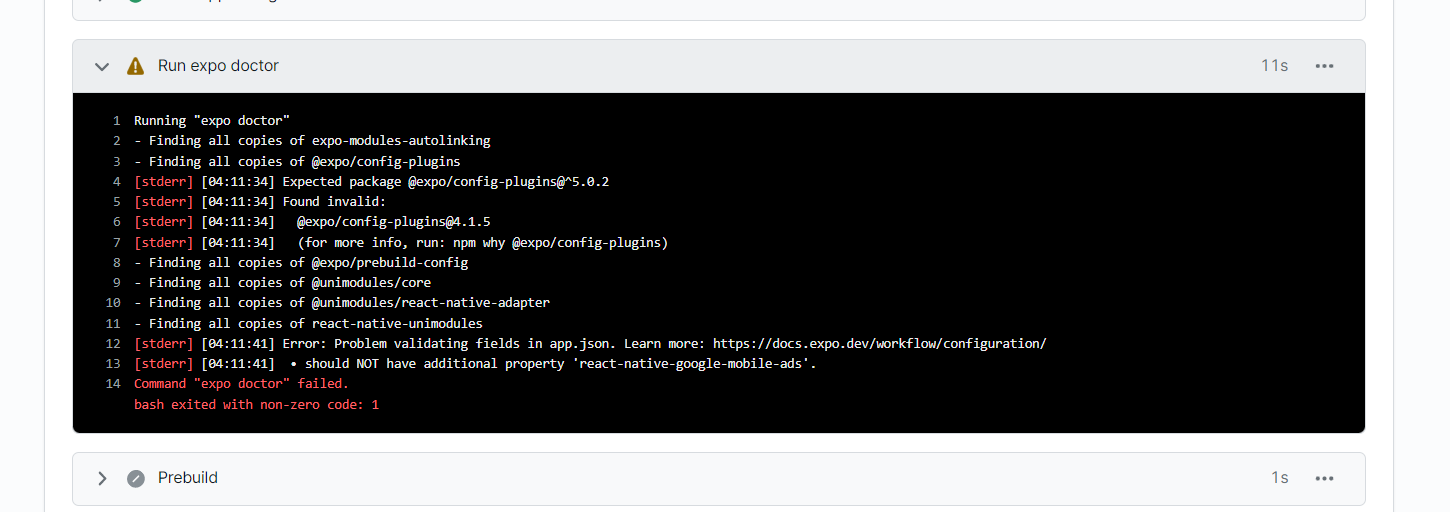
화면 3 - run gradlew
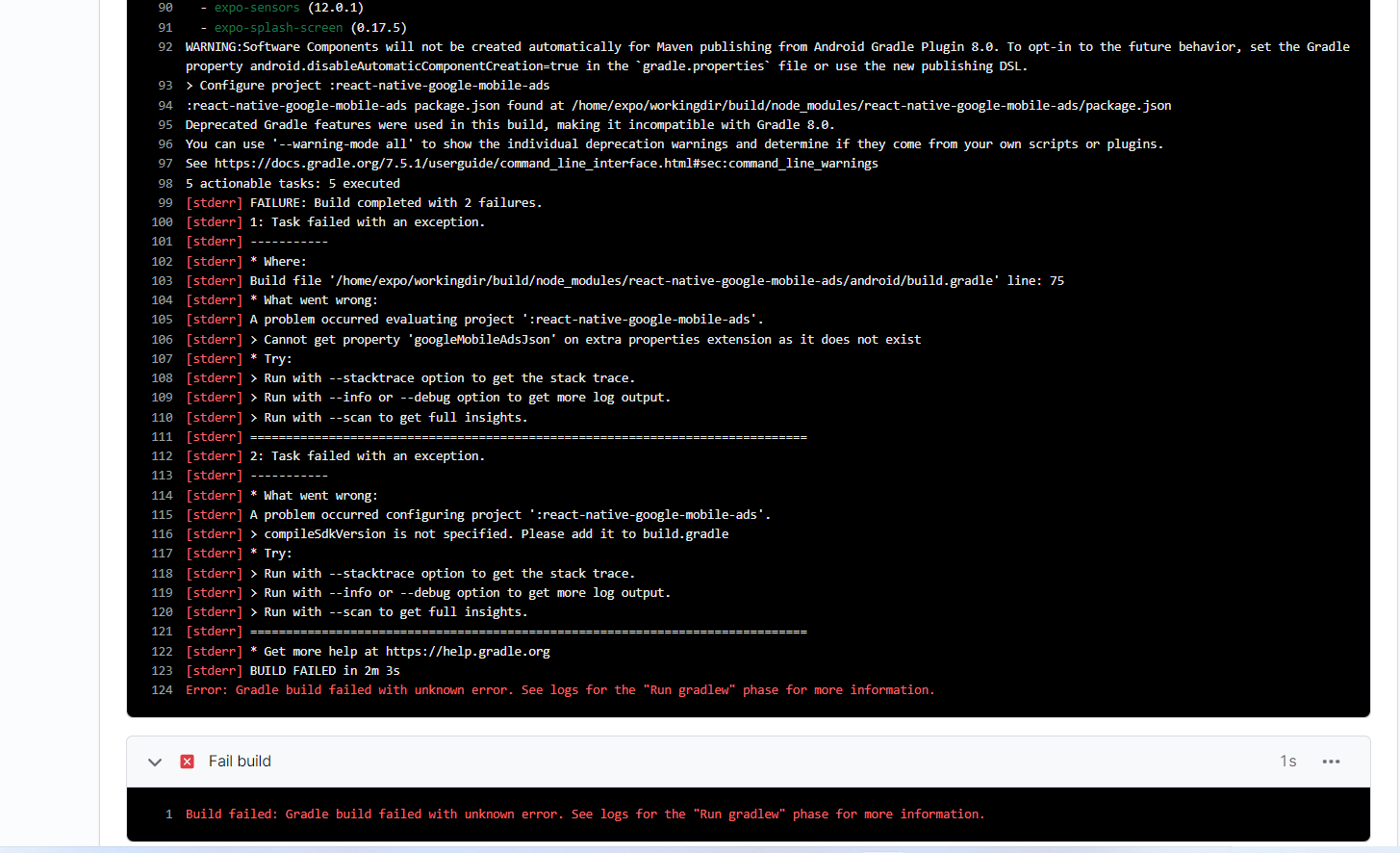
작성한 코드 및 에러 메세지
Desktop\sparta-study\kyj\android\build.gradle
// Top-level build file where you can add configuration options common to all sub-projects/modules.


buildscript {
    ext {
        buildToolsVersion = findProperty('android.buildToolsVersion') ?: '31.0.0'
        minSdkVersion = Integer.parseInt(findProperty('android.minSdkVersion') ?: '21')
        compileSdkVersion = Integer.parseInt(findProperty('android.compileSdkVersion') ?: '31')
        targetSdkVersion = Integer.parseInt(findProperty('android.targetSdkVersion') ?: '31')
        if (findProperty('android.kotlinVersion')) {
            kotlinVersion = findProperty('android.kotlinVersion')
        }
        frescoVersion = findProperty('expo.frescoVersion') ?: '2.5.0'


        if (System.properties['os.arch'] == 'aarch64') {
            // For M1 Users we need to use the NDK 24 which added support for aarch64
            ndkVersion = '24.0.8215888'
        } else {
            // Otherwise we default to the side-by-side NDK version from AGP.
            ndkVersion = '21.4.7075529'
        }
    }
    repositories {
        google()
        mavenCentral()
    }
    dependencies {
        classpath('com.android.tools.build:gradle:7.2.1')
        classpath('com.facebook.react:react-native-gradle-plugin')
        classpath('de.undercouch:gradle-download-task:5.0.1')
        // NOTE: Do not place your application dependencies here; they belong
        // in the individual module build.gradle files
    }
}


def REACT_NATIVE_VERSION = new File(['node', '--print', "JSON.parse(require('fs').readFileSync(require.resolve('react-native/package.json'), 'utf-8')).version"].execute(null, rootDir).text.trim())


allprojects {
    configurations.all {
        resolutionStrategy {
            force "com.facebook.react:react-native:" + REACT_NATIVE_VERSION
        }
    }


    repositories {
        mavenLocal()
        maven {
            // All of React Native (JS, Obj-C sources, Android binaries) is installed from npm
            url(new File(['node', '--print', "require.resolve('react-native/package.json')"].execute(null, rootDir).text.trim(), '../android'))
        }
        maven {
            // Android JSC is installed from npm
            url(new File(['node', '--print', "require.resolve('jsc-android/package.json')"].execute(null, rootDir).text.trim(), '../dist'))
        }


        google()
        mavenCentral {
            // We don't want to fetch react-native from Maven Central as there are
            // older versions over there.
            content {
                excludeGroup 'com.facebook.react'
            }
        }
        maven { url 'https://www.jitpack.io' }
    }
}
// @generated begin expo-camera-import - expo prebuild (DO NOT MODIFY) sync-f244f4f3d8bf7229102e8f992b525b8602c74770
def expoCameraMavenPath = new File(["node", "--print", "require.resolve('expo-camera/package.json')"].execute(null, rootDir).text.trim(), "../android/maven")
allprojects { repositories { maven { url(expoCameraMavenPath) } } }
// @generated end expo-camera-import
Tip 1) </> 아이콘을 눌러 코드박스를 만들어 보세요.
Tip 2) Ctrl+A(맥의 경우 Command+A) 단축키로 코드를 한 번에 선택할 수 있어요!


댓글 알림
