


* 겪고 있는 문제 상황을 최대한 자세하게 작성해주세요.
* 문제 해결을 위해 어떤 시도를 해보았는지 구체적으로 함께 알려주세요.
터미널 cmd 부분에 expo install expo-linking 실행후 핸폰에서 외부링크가 생성되지 않았읍니닫
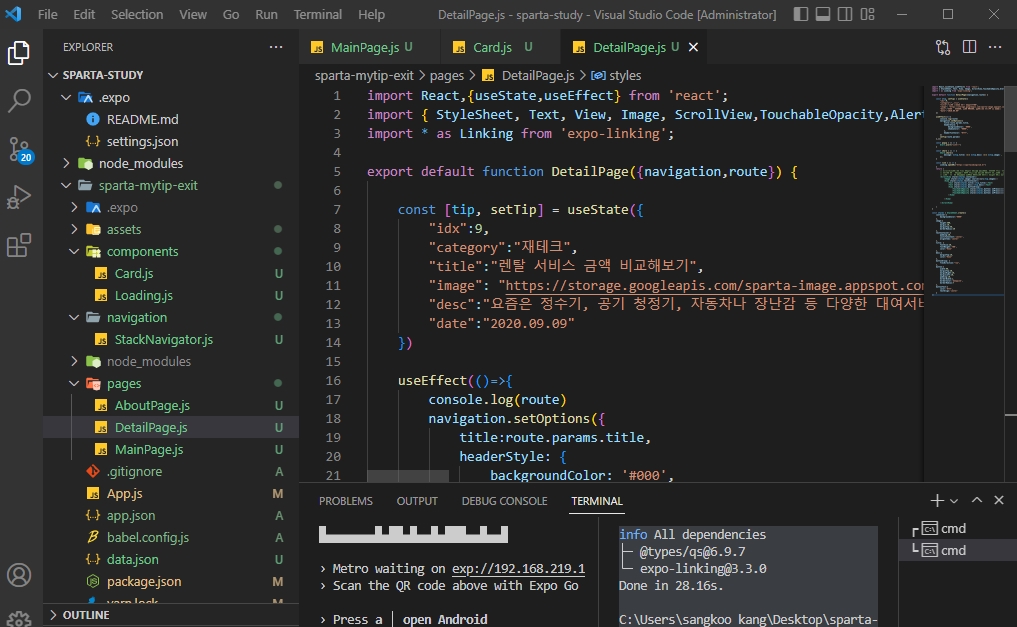
작성한 코드 및 에러 메세지
C:\Users\sangkoo kang\Desktop\sparta-study>cd sparta-mytip-exit
C:\Users\sangkoo kang\Desktop\sparta-study\sparta-mytip-exit>expo install
expo-linking
This command is being executed with the global Expo CLI. Learn more: https://blog.expo.dev/the-new-expo-cli-f4250d8e3421
To use the local CLI instead (recommended in SDK 46 and higher), run:
› npx expo install
Installing 1 SDK 47.0.0 compatible native module using Yarn.
> yarn add expo-linking@~3.3.0
yarn add v1.22.19
warning ..\package.json: No license field
[1/4] Resolving packages...
[2/4] Fetching packages...
[3/4] Linking dependencies...
[4/4] Building fresh packages...
success Saved lockfile.
success Saved 2 new dependencies.
info Direct dependencies
└─ expo-linking@3.3.0
info All dependencies
├─ @types/qs@6.9.7
└─ expo-linking@3.3.0
Done in 28.16s.
C:\Users\sangkoo kang\Desktop\sparta-study\sparta-mytip-exit>
오류 발생 시, 작성한 코드 전체와 에러 메시지를 첨부해 주세요.
Tip 1) </> 아이콘을 눌러 코드박스를 만들어 보세요.
Tip 2) Ctrl+A(맥의 경우 Command+A) 단축키로 코드를 한 번에 선택할 수 있어요!


