커뮤니티

포인트
쿠폰
내 강의실
국비 신청 내역
증명서
계정
로그아웃
학습 질문
개발 일지
나의 활동
답변 완료
페이지에서 검색해서 콘솔창으로 들어갔는데 갑자기 결과값이 나오지 않네요
undefined주차


최*현
댓글
5
・
추천
0
・
조회수
6
조회수
6
답변 완료
* 겪고 있는 문제 상황을 최대한 자세하게 작성해주세요.
* 문제 해결을 위해 어떤 시도를 해보았는지 구체적으로 함께 알려주세요.
페이지에서 검색해서 콘솔창으로 들어갔는데 갑자기 결과값이 나오지 않네요
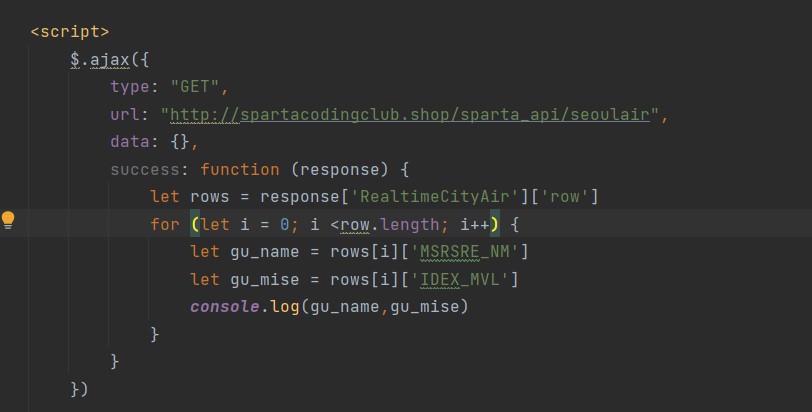
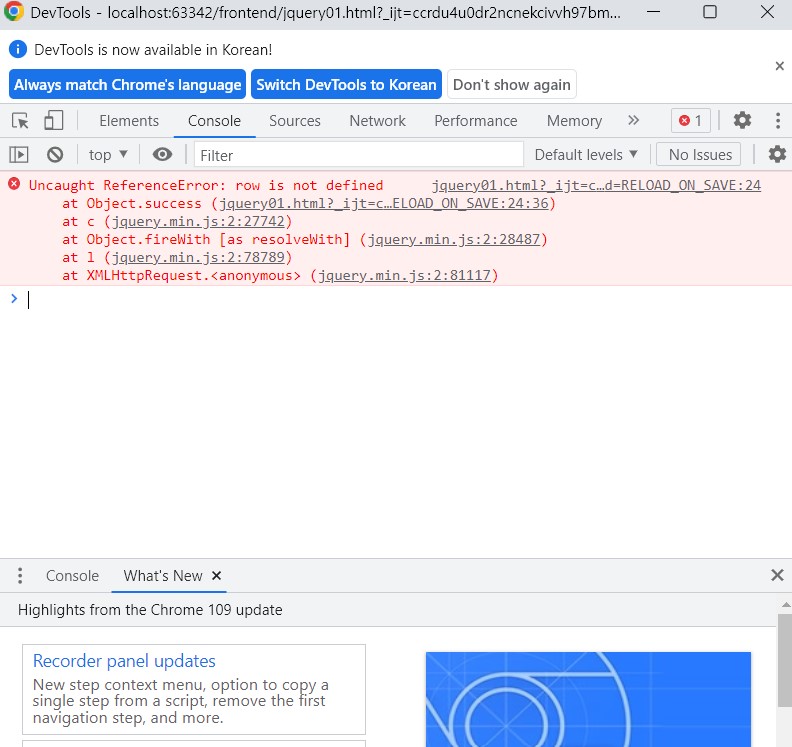
<!doctype html>
<html lang="ko">

<head>
    <meta charset="UTF-8">
    <title>jQuery 연습하고 가기!</title>

    <!-- JQuery를 import 합니다 -->
    <script src="https://ajax.googleapis.com/ajax/libs/jquery/3.4.1/jquery.min.js"></script>

    <style type="text/css">
        div.question-box {
            margin: 10px 0 20px 0;
        }
    </style>

    <script>
        $.ajax({
            type: "GET",
            url: "http://spartacodingclub.shop/sparta_api/seoulair",
            data: {},
            success: function (response) {
                let rows = response['RealtimeCityAir']['row']
                for (let i = 0; i <row.length; i++){
                    let gu_name = rows[i]['MSRSRE_NM']
                    let gu_mise = rows[i]['IDEX_MVL']
                    console.log(gu_name,gu_mise)
                }
            }
        })

        function q1() {
            let txt=$('#input-q1').val()
            if(txt==''){
                alert('빈칸입니다')
            }else
                alert(txt)
        }

        function q2() {
            let txt=$('#input-q2').val()
            if (txt.includes('@')==true){
                alert(txt.split('@')[1].split('.')[0])
            }else {
                alert('이메일이 아닙니다')
            }


            console.log(txt.includes('@'))
        }

        function q3() {
            let txt=$('#input-q3').val()
            let temp_html=`<li>${txt}</li>`
            $('#names-q3').append(temp_html)
        }

        function q3_remove() {
            $('#names-q3').empty(

            )
            // 1. names-q3의 내부 태그를 모두 비운다.(jQuery의 $('....').empty()를 이용하면 굿!)
        }

    </script>

</head>

<body>
    <h1>jQuery + Javascript의 조합을 연습하자!</h1>

    <div class="question-box">
        <h2>1. 빈칸 체크 함수 만들기</h2>
        <h5>1-1. 버튼을 눌렀을 때 입력한 글자로 얼럿 띄우기</h5>
        <h5>[완성본]1-2. 버튼을 눌렀을 때 칸에 아무것도 없으면 "입력하세요!" 얼럿 띄우기</h5>
        <input id="input-q1" type="text" /> <button onclick="q1()">클릭</button>
    </div>
    <hr />
    <div class="question-box">
        <h2>2. 이메일 판별 함수 만들기</h2>
        <h5>2-1. 버튼을 눌렀을 때 입력받은 이메일로 얼럿 띄우기</h5>
        <h5>2-2. 이메일이 아니면(@가 없으면) '이메일이 아닙니다'라는 얼럿 띄우기</h5>
        <h5>[완성본]2-3. 이메일 도메인만 얼럿 띄우기</h5>
        <input id="input-q2" type="text" /> <button onclick="q2()">클릭</button>
    </div>
    <hr />
    <div class="question-box">
        <h2>3. HTML 붙이기/지우기 연습</h2>
        <h5>3-1. 이름을 입력하면 아래 나오게 하기</h5>
        <h5>[완성본]3-2. 다지우기 버튼을 만들기</h5>
        <input id="input-q3" type="text" placeholder="여기에 이름을 입력" />
        <button onclick="q3()">이름 붙이기</button>
        <button onclick="q3_remove()">다지우기</button>
        <ul id="names-q3">
            <li>세종대왕</li>
            <li>임꺽정</li>
        </ul>
    </div>
</body>

</html>


댓글 알림
