커뮤니티

포인트
쿠폰
내 강의실
국비 신청 내역
증명서
계정
로그아웃
학습 질문
개발 일지
나의 활동
답변 완료
5-6 완료 문제입니다
undefined주차


박*진
댓글
5
・
추천
0
・
조회수
10
조회수
10
답변 완료
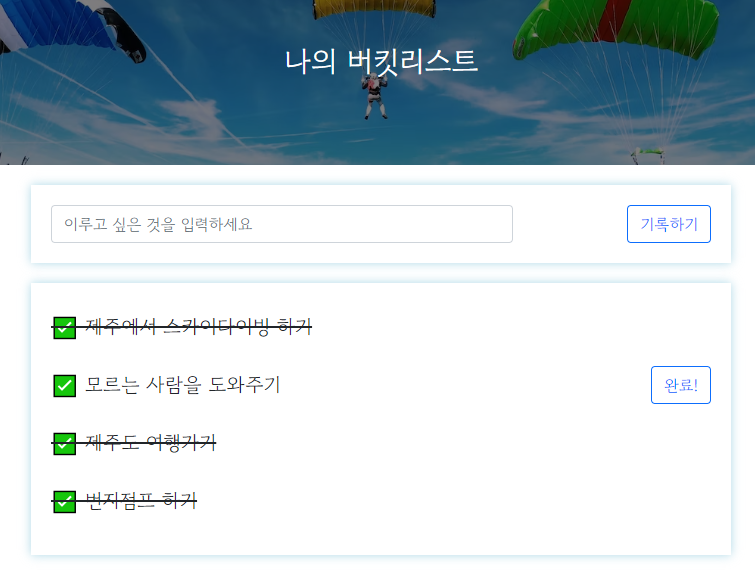
화면처럼 2번째의 모르는 사람을 도와주기만 완료 버튼을 눌러도 완료선이 뜨지 않네요.. 단어 체크도 해보고, 다른 분들 질문 주신거랑 비교해봤는데도 뭐가 문제인지 모르겠어요..
app.py
from flask import Flask, render_template, request, jsonify
app = Flask(__name__)

from pymongo import MongoClient
import certifi
ca = certifi.where()

client = MongoClient('mongodb+srv://test:sparta@cluster0.offinop.mongodb.net/Cluster0?retryWrites=true&w=majority', tlsCAFile = ca)
db = client.dbsparta

@app.route('/')
def home():
   return render_template('index.html')

@app.route("/bucket", methods=["POST"])
def bucket_post():
    bucket_receive = request.form['bucket_give']

    bucket_list = list(db.bucket.find({}, {'_id': False}))
    count = len(bucket_list) + 1

    doc = {
        'num':count,
        'bucket':bucket_receive,
        'done':0
    }
    db.bucket.insert_one(doc)

    return jsonify({'msg': '등록 완료!'})

@app.route("/bucket/done", methods=["POST"])
def bucket_done():
    num_receive = request.form['num_give']
    db.bucket.update_one({'num': int(num_receive)}, {'$set': {'done': 1}})
    # 숫자를 클라이언트에서 받아왔으면 숫자로 써줘야 하므로 int() 사용
    return jsonify({'msg': '버킷 완료!'})

@app.route("/bucket", methods=["GET"])
def bucket_get():
    bucket_list = list(db.bucket.find({}, {'_id': False}))

    return jsonify({'buckets': bucket_list})

if __name__ == '__main__':
   app.run('0.0.0.0', port=5000, debug=True)
index.html
<script>
    $(document).ready(function () {
        show_bucket();
    });
    function show_bucket(){
        $.ajax({
            type: "GET",
            url: "/bucket",
            data: {},
            success: function (response) {
                let rows = response['buckets']
                for(let i = 0; i < rows.length; i++){
                    let bucket = rows[i]['bucket']
                    let num = rows[i]['num']
                    let done = rows[i]['done']

                    let temp_html = ``
                    if(done == 0){
                        temp_html = `<li>
                                        <h2>✅ ${bucket}</h2>
                                        <button onclick="done_bucket(${num})" type="button" class="btn btn-outline-primary">완료!</button>
                                    </li>`
                    } else {
                        temp_html = `<li>
                                        <h2 class="done">✅ ${bucket}</h2>
                                    </li>`
                    }

                    $('#bucket-list').append(temp_html)
                }
                // console.log(response['buckets'])
            }
        });
    }
    function save_bucket(){
        let bucket = $('#bucket').val()

        $.ajax({
            type: "POST",
            url: "/bucket",
            data: {bucket_give:bucket},
            success: function (response) {
                alert(response["msg"])
                window.location.reload()
            }
        });
    }
    function done_bucket(num){
        $.ajax({
            type: "POST",
            url: "/bucket/done",
            data: {num_give:num},
            success: function (response) {
                alert(response["msg"])
                window.location.reload()
            }
        });
    }
</script>


댓글 알림
