커뮤니티

포인트
쿠폰
내 강의실
국비 신청 내역
증명서
계정
로그아웃
학습 질문
개발 일지
나의 활동
답변 완료
게임오버 화면으로 넘어가지 않습니다
게임개발 종합반 v8
3주차


정*영
댓글
1
・
추천
0
・
조회수
10
조회수
10
답변 완료
* 겪고 있는 문제 상황을 최대한 자세하게 작성해주세요.
* 문제 해결을 위해 어떤 시도를 해보았는지 구체적으로 함께 알려주세요.
cat이 fishshop을 지나갈때 retryBtn이 나와야 하지만 cat.cs 26번째 줄에서 오류가 발생하여 넘어가질 않습니다.
보고 계신 화면 전체를 캡처해 주시면, 튜터님들이 빠르게 상황을 이해할 수 있어요.
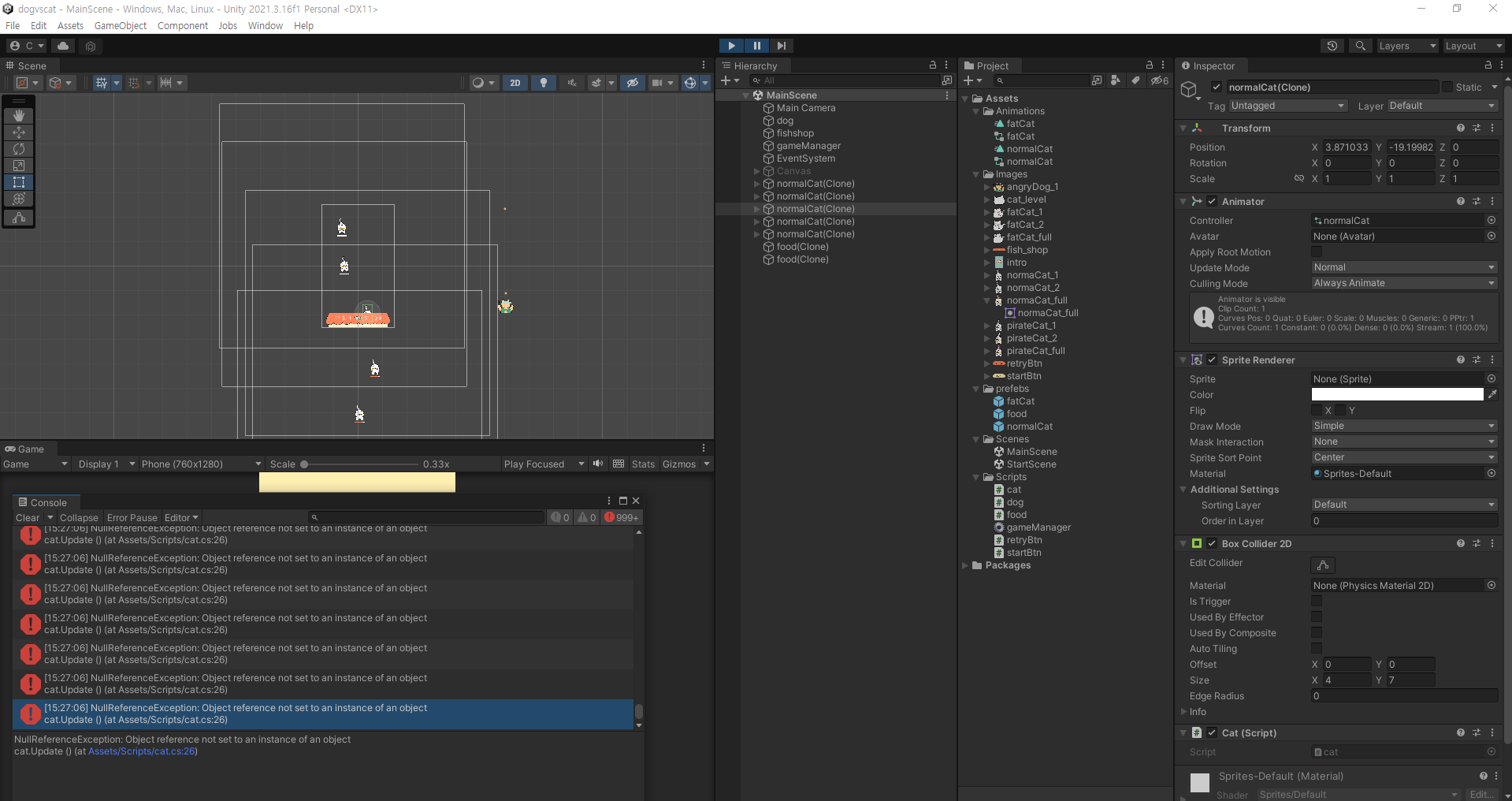
작성한 코드 및 에러 메세지
오류 발생 시, 작성한 코드 전체와 에러 메시지를 첨부해 주세요.
Tip 1) </> 아이콘을 눌러 코드박스를 만들어 보세요.
Tip 2) Ctrl+A(맥의 경우 Command+A) 단축키로 코드를 한 번에 선택할 수 있어요!
cat.cs
using System.Collections;
using System.Collections.Generic;
using UnityEngine;


public class cat : MonoBehaviour
{
    float full = 5f;
    float energy = 0f;
    // Start is called before the first frame update
    void Start()
    {
        float x = Random.Range(-8.5f, 8.5f);
        float y = 30f;
        transform.position = new Vector3(x, y, 0);
    }


    // Update is called once per frame
    void Update()
    {
        if (energy < full)
        {
            transform.position += new Vector3(0.0f, -0.05f, 0.0f);


            if (transform.position.y < -16f )
            {
                gameManager.I.gameOver();
            }
        }
        else
        {
            if (transform.position.x > 0)
            {
                transform.position += new Vector3(0.05f, 0.0f, 0.0f);
            }
            else
            {
                transform.position += new Vector3(-0.05f, 0.0f, 0.0f);
            }
            Destroy(gameObject, 3.0f);
        }
    }


    void OnTriggerEnter2D(Collider2D coll)
    {


        if (coll.gameObject.tag == "food")
        {
            if (energy < full)
            {
                energy += 1f;
                Destroy(coll.gameObject);
                gameObject.transform.Find("hungry/Canvas/front").transform.localScale = new Vector3(energy / full, 1f, 1f);
            }
            else
            {
                gameObject.transform.Find("hungry").gameObject.SetActive(false);
                gameObject.transform.Find("full").gameObject.SetActive(true);
            }
        }
    }
}
gameManager.cs
using System.Collections;
using System.Collections.Generic;
using UnityEngine;


public class gameManager : MonoBehaviour
{
    public GameObject dog;
    public GameObject food;
    public GameObject normalcat;
    public GameObject retryBtn;
    public static gameManager I;
    // Start is called before the first frame update
    void Start()
    {
        InvokeRepeating("makeFood", 0.0f, 0.2f);
        InvokeRepeating("makeCat", 0.0f, 1f);
    }


    // Update is called once per frame
    void Update()
    {

    }
    void makeFood()
    {
        float x = dog.transform.position.x;
        float y = dog.transform.position.y + 2.0f;
        Instantiate(food, new Vector3(x, y, 0), Quaternion.identity);
    }


    void makeCat()
    {
        Instantiate(normalcat);
    }


    public void gameOver()
    {
        retryBtn.SetActive(true);
        Time.timeScale = 0f;
    }
}


댓글 알림
