커뮤니티

포인트
쿠폰
내 강의실
국비 신청 내역
증명서
계정
로그아웃
학습 질문
개발 일지
나의 활동
답변 완료
padding 질문
[왕초보] 나만의 수익성 앱, 앱개발 종합반 v5
2주차


조*진
댓글
1
・
추천
0
・
조회수
5
조회수
5
답변 완료
* 겪고 있는 문제 상황을 최대한 자세하게 작성해주세요.
* 문제 해결을 위해 어떤 시도를 해보았는지 구체적으로 함께 알려주세요.
코드를 보시면, 2층이라고 되어있는 View 태그(흰색배경) 에 저는 TouchableOpacity(주황색버튼) 가 '담겨' 있다고 생각했습니다.
그래서 해당 View 태그에 PaddingBottom 을 줄이면 TouchableOpacity는 흰 배경안에 있는 채로, 주황색 버튼아래와 흰 배경 사이 여백이 더 줄어들 것이라고 생각했는데요
실제 결과는 저렇게 View 태그만 줄고, TouchableOpacity가 화면 밖으로 나갑니다
View 태그안에 Text 나 TouchableOpacity 가 담겨있는 개념이 아닌건가요?
안에 담겨 있는 채로 패딩이나 마진을 주려면 어떻게 해야하나요?
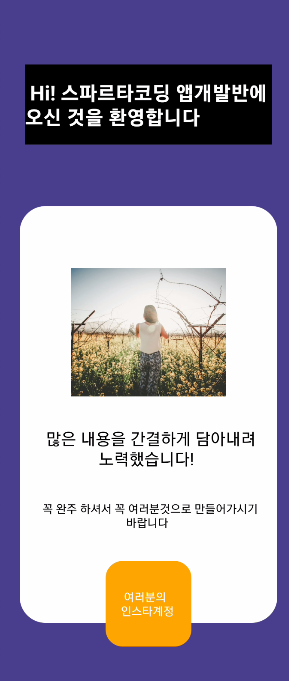
작성한 코드 및 에러 메세지
오류 발생 시, 작성한 코드 전체와 에러 메시지를 첨부해 주세요.
Tip 1) </> 아이콘을 눌러 코드박스를 만들어 보세요.
Tip 2) Ctrl+A(맥의 경우 Command+A) 단축키로 코드를 한 번에 선택할 수 있어요!
import { StatusBar } from 'expo-status-bar';
import { Image, StyleSheet, Text, TouchableOpacity, View } from 'react-native';


export default function App() {
  return (
    <View style={styles.container}>
      {/* 상태바 */}
      <StatusBar backgroundColor="white"/>


      {/* 1층 */}
      <View style={{flex:1, backgroundColor: "black", color: "white", alignItems: "center", justifyContent: "center", marginLeft:'10%', marginRight:'10%', marginTop:'30%'}}>
        <Text style={{color:"white", fontSize:24, fontWeight:'bold'}}> Hi! 스파르타코딩 앱개발반에 오신 것을 환영합니다 </Text>
      </View>


      {/* 2층 */}
      <View style={{flex:2, alignItems:'center', justifyContent:'center', margin: '20%', height: 300, width: 300, backgroundColor: "white", borderRadius: 30, paddingTop:200, paddingBottom:100}}>
        <Image
        source={{uri:'https://images.unsplash.com/photo-1424819827928-55f0c8497861?fit=crop&w=600&h=600%27'}}
        // 사용설명서에 나와 있는 resizeMode 속성 값을 그대로 넣어 적용합니다
        style={{ resizeMode: "cover", height: 150, width: '60%',}}
        />
        <Text> {"\n"} </Text>
        <Text style={{textAlign:'center', fontSize:20}}> 많은 내용을 간결하게 담아내려 노력했습니다! </Text>
        <Text> {"\n"} </Text>
        <Text style={{textAlign:'center'}}> 꼭 완주 하셔서 꼭 여러분것으로 만들어가시기 바랍니다 </Text>
        <Text> {"\n"} </Text>
        <TouchableOpacity style={{width:100, height:100, backgroundColor:'orange', alignItems: 'center', justifyContent: 'center', borderRadius: 20}}>
          <Text style={{ color: "white"}}> 여러분의 인스타계정 </Text>
        </TouchableOpacity>
      </View>


    </View>
  );
}


const styles = StyleSheet.create({
  container: {
    alignItems : 'center',
    flex: 1,
    backgroundColor: 'darkslateblue',
    // alignItems: 'center',
    // justifyContent: 'center',
  },
});


댓글 알림
