


* 겪고 있는 문제 상황을 최대한 자세하게 작성해주세요.
* 문제 해결을 위해 어떤 시도를 해보았는지 구체적으로 함께 알려주세요.
30초가 지나고 게임 종료 후 retry 버튼이 뜨지만 클릭해도 게임 재시작이 되지 않아 문의드립니다.
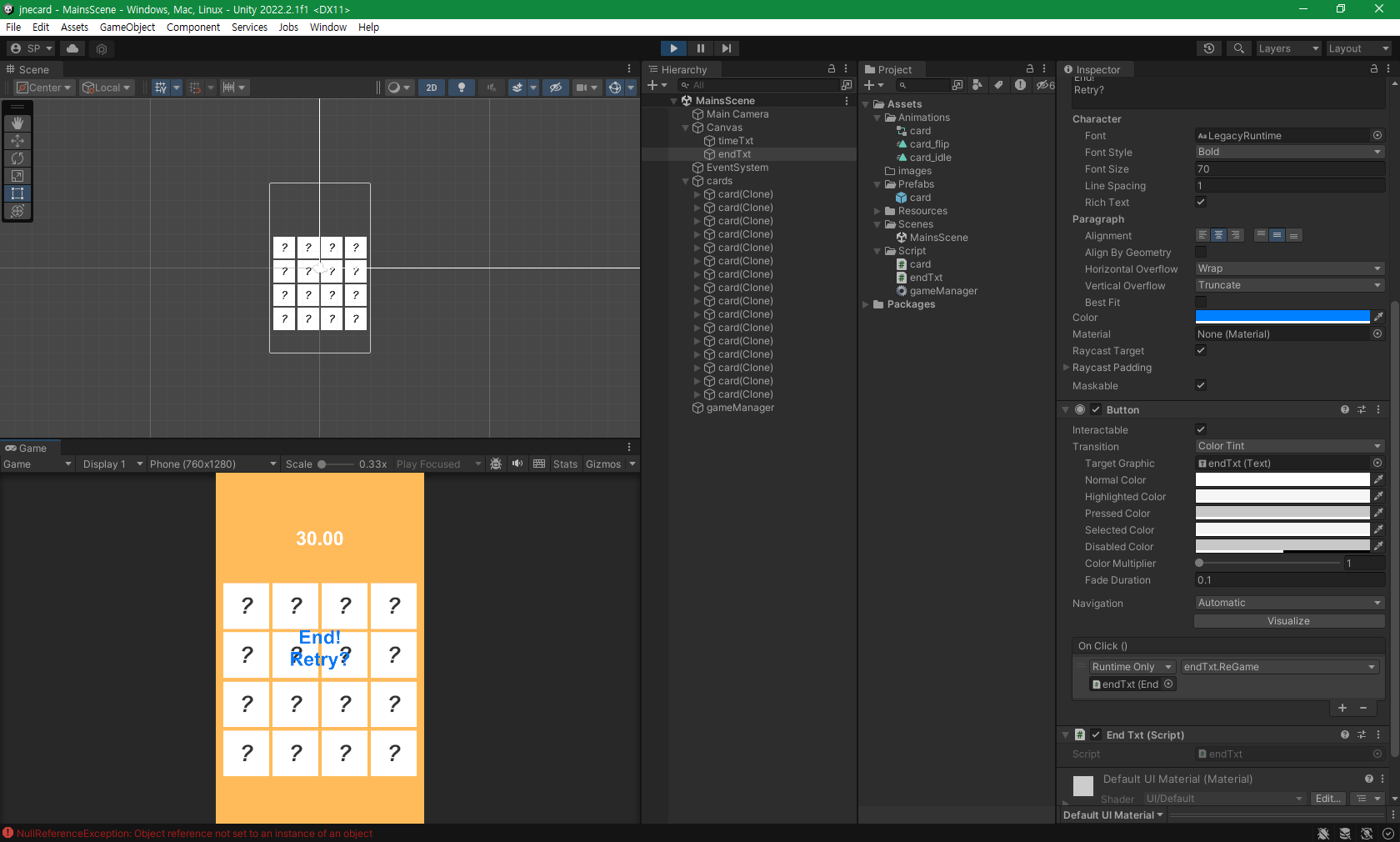
작성한 코드 및 에러 메세지
using System.Collections;
using System.Collections.Generic;
using UnityEngine;
using UnityEngine.UI;
using System.Linq;
public class gameManager : MonoBehaviour
{
public Text timeTxt;
float time = 0.0f;
public GameObject endTxt;
public GameObject card;
public static gameManager I;
public GameObject firstCard;
public GameObject secondCard;
void Awake()
{
I = this;
}
// Start is called before the first frame update
void Start()
{
Time.timeScale = 1.0f;
int[] jnes = { 0, 0, 1, 1, 2, 2, 3, 3, 4, 4, 5, 5, 6, 6, 7, 7 };
jnes = jnes.OrderBy(item => Random.Range(-1.0f, 1.0f)).ToArray();
for (int i = 0; i < 16; i++)
{
GameObject newCard = Instantiate(card);
newCard.transform.parent = GameObject.Find("cards").transform;
float x = (i / 4) * 1.4f - 2.1f;
float y = (i % 4) * 1.4f - 3.0f;
newCard.transform.position = new Vector3(x, y, 0);
string jneName = "jne" + jnes[i].ToString();
newCard.transform.Find("front").GetComponent<SpriteRenderer>().sprite = Resources.Load<Sprite>(jneName);
}
}
// Update is called once per frame
void Update()
{
time += Time.deltaTime;
timeTxt.text = time.ToString("N2");
if (time > 30.0f)
{
endTxt.SetActive(true);
Time.timeScale = 0.0f;
}
}
public void isMatched()
{
string firstCardImage = firstCard.transform.Find("front").GetComponent<SpriteRenderer>().sprite.name;
string secondCardImage = secondCard.transform.Find("front").GetComponent<SpriteRenderer>().sprite.name;
if (firstCardImage == secondCardImage)
{
firstCard.GetComponent<card>().destroyCard();
secondCard.GetComponent<card>().destroyCard();
int cardsLeft = GameObject.Find("cards").transform.childCount;
if (cardsLeft == 2)
{
endTxt.SetActive(true);
Time.timeScale = 0.0f;
Invoke("GameEnd", 1f);
}
}
else
{
firstCard.GetComponent<card>().closeCard();
secondCard.GetComponent<card>().closeCard();
}
firstCard = null;
secondCard = null;
}
void GameEnd()
{
Time.timeScale = 0f;
endTxt.SetActive(true);
}
}
=================================endTxt.cs=========================================
using System.Collections;
using System.Collections.Generic;
using UnityEngine;
using UnityEngine.SceneManagement;
public class endTxt : MonoBehaviour
{
// Start is called before the first frame update
void Start()
{
}
// Update is called once per frame
void Update()
{
}
public void ReGame()
{
SceneManager.LoadScene("MainScene");
}
}


