커뮤니티

포인트
쿠폰
내 강의실
국비 신청 내역
증명서
계정
로그아웃
학습 질문
개발 일지
나의 활동
답변 완료
webview flutter
앱개발 종합반 - 플러터 v8
4주차


박*규
댓글
10
・
추천
0
・
조회수
37
조회수
37
답변 완료
* 겪고 있는 문제 상황을 최대한 자세하게 작성해주세요.
* 문제 해결을 위해 어떤 시도를 해보았는지 구체적으로 함께 알려주세요.
안녕하세요
앱개발 4주차 듣고 있는데 webview 실행이 안되는 것 같아서요ㅜ
quick fix를 눌렀을 때 import webview 가 없습니다ㅜ
이전 즉문즉답들을 보면서 compileSdk, targetSdk 32 로 바꿔서 실행해보고 webview_flutter ^3.0.0 으로도 바꿔서 해봤는데 import가 뜨지 않습니다
코드 확인 부탁 드려요
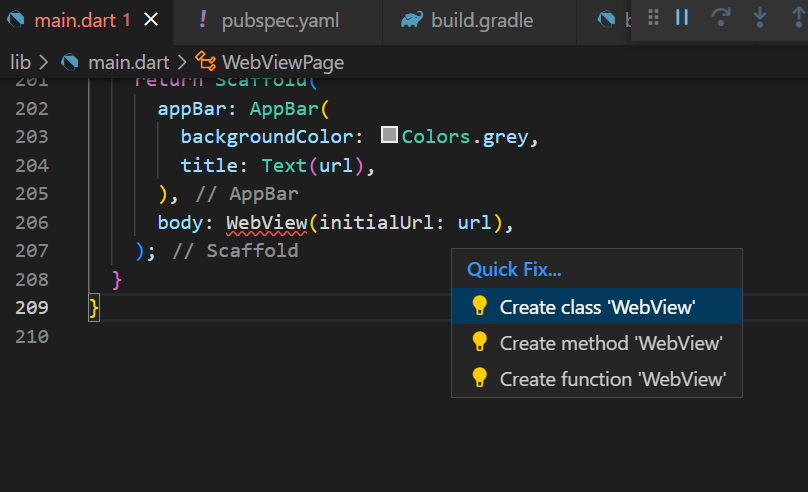
문제 화면
작성한 코드 및 에러 메세지
import 'package:flutter/material.dart';
import 'package:provider/provider.dart';


import 'book.dart';
import 'book_service.dart';


void main() {
  runApp(
    MultiProvider(
      providers: [
        ChangeNotifierProvider(create: (context) => BookService()),
      ],
      child: const MyApp(),
    ),
  );
}


class MyApp extends StatelessWidget {
  const MyApp({Key? key}) : super(key: key);


  @override
  Widget build(BuildContext context) {
    return MaterialApp(
      debugShowCheckedModeBanner: false,
      home: HomePage(),
    );
  }
}


class HomePage extends StatefulWidget {
  HomePage({Key? key}) : super(key: key);


  @override
  State<HomePage> createState() => _HomePageState();
}


class _HomePageState extends State<HomePage> {
  var bottomNavIndex = 0;
  @override
  Widget build(BuildContext context) {
    return Scaffold(
      body: [
        SearchPage(),
        LikedBookPage(),
      ].elementAt(bottomNavIndex),
      bottomNavigationBar: BottomNavigationBar(
        selectedItemColor: Colors.black,
        unselectedItemColor: Colors.grey,
        showUnselectedLabels: true,
        selectedFontSize: 12,
        unselectedFontSize: 12,
        iconSize: 28,
        type: BottomNavigationBarType.fixed,
        onTap: (value) {
          setState(() {
            bottomNavIndex = value;
          });
        },
        items: [
          BottomNavigationBarItem(
            icon: Icon(Icons.search),
            label: '검색',
          ),
          BottomNavigationBarItem(
            icon: Icon(Icons.star),
            label: '좋아요',
          ),
        ],
        currentIndex: bottomNavIndex,
      ),
    );
  }
}


class SearchPage extends StatelessWidget {
  SearchPage({super.key});


  @override
  Widget build(BuildContext context) {
    return Consumer<BookService>(
      builder: (context, bookService, child) {
        return Scaffold(
          appBar: AppBar(
            backgroundColor: Colors.white,
            toolbarHeight: 80,
            title: TextField(
              onSubmitted: (value) {
                bookService.search(value);
              },
              cursorColor: Colors.grey,
              decoration: InputDecoration(
                prefixIcon: Icon(Icons.search, color: Colors.grey),
                hintText: "작품, 감독, 배우, 컬렉션, 유저 등",
                border: OutlineInputBorder(
                  borderSide: BorderSide(color: Colors.white),
                  borderRadius: BorderRadius.all(Radius.circular(10)),
                ),
                focusedBorder: OutlineInputBorder(
                  borderSide: BorderSide(color: Colors.grey),
                  borderRadius: BorderRadius.all(Radius.circular(10)),
                ),
              ),
            ),
          ),
          body: Padding(
            padding: const EdgeInsets.symmetric(horizontal: 12),
            child: ListView.separated(
              itemCount: bookService.bookList.length,
              separatorBuilder: (context, index) {
                return Divider();
              },
              itemBuilder: (context, index) {
                if (bookService.bookList.isEmpty) return SizedBox();
                Book book = bookService.bookList.elementAt(index);
                return BookTile(book: book);
              },
            ),
          ),
        );
      },
    );
  }
}


class BookTile extends StatelessWidget {
  const BookTile({
    Key? key,
    required this.book,
  }) : super(key: key);


  final Book book;


  @override
  Widget build(BuildContext context) {
    BookService bookService = context.read<BookService>();


    return ListTile(
      onTap: () {},
      leading: Image.network(
        book.thumbnail,
        fit: BoxFit.fitHeight,
      ),
      title: Text(
        book.title,
        style: TextStyle(fontSize: 16),
      ),
      subtitle: Text(
        book.subtitle,
        style: TextStyle(color: Colors.grey),
      ),
      trailing: IconButton(
        onPressed: () {
          bookService.toggleLikeBook(book: book);
        },
        icon: bookService.likedBookList.map((book) => book.id).contains(book.id)
            ? Icon(
                Icons.star,
                color: Colors.amber,
              )
            : Icon(Icons.star_border),
      ),
    );
  }
}


class LikedBookPage extends StatelessWidget {
  const LikedBookPage({super.key});


  @override
  Widget build(BuildContext context) {
    return Consumer<BookService>(
      builder: (context, bookService, child) {
        return Scaffold(
          body: Padding(
            padding: const EdgeInsets.symmetric(horizontal: 12),
            child: ListView.separated(
              itemCount: bookService.likedBookList.length,
              separatorBuilder: (context, index) {
                return Divider();
              },
              itemBuilder: (context, index) {
                if (bookService.likedBookList.isEmpty) return SizedBox();
                Book book = bookService.likedBookList.elementAt(index);
                return BookTile(book: book);
              },
            ),
          ),
        );
      },
    );
  }
}


class WebViewPage extends StatelessWidget {
  WebViewPage({super.key, required this.url});


  String url;


  @override
  Widget build(BuildContext context) {
    return Scaffold(
      appBar: AppBar(
        backgroundColor: Colors.grey,
        title: Text(url),
      ),
      body: WebView(initialUrl: url),
    );
  }
}
-main.dart
def localProperties = new Properties()
def localPropertiesFile = rootProject.file('local.properties')
if (localPropertiesFile.exists()) {
    localPropertiesFile.withReader('UTF-8') { reader ->
        localProperties.load(reader)
    }
}


def flutterRoot = localProperties.getProperty('flutter.sdk')
if (flutterRoot == null) {
    throw new GradleException("Flutter SDK not found. Define location with flutter.sdk in the local.properties file.")
}


def flutterVersionCode = localProperties.getProperty('flutter.versionCode')
if (flutterVersionCode == null) {
    flutterVersionCode = '1'
}


def flutterVersionName = localProperties.getProperty('flutter.versionName')
if (flutterVersionName == null) {
    flutterVersionName = '1.0'
}


apply plugin: 'com.android.application'
apply plugin: 'kotlin-android'
apply from: "$flutterRoot/packages/flutter_tools/gradle/flutter.gradle"


android {
    compileSdkVersion 32
    ndkVersion flutter.ndkVersion


    compileOptions {
        sourceCompatibility JavaVersion.VERSION_1_8
        targetCompatibility JavaVersion.VERSION_1_8
    }


    kotlinOptions {
        jvmTarget = '1.8'
    }


    sourceSets {
        main.java.srcDirs += 'src/main/kotlin'
    }


    defaultConfig {
        // TODO: Specify your own unique Application ID (https://developer.android.com/studio/build/application-id.html).
        applicationId "com.example.watcha_pedia"
        // You can update the following values to match your application needs.
        // For more information, see: https://docs.flutter.dev/deployment/android#reviewing-the-build-configuration.
        minSdkVersion 19
        targetSdkVersion 32
        versionCode flutterVersionCode.toInteger()
        versionName flutterVersionName
    }


    buildTypes {
        release {
            // TODO: Add your own signing config for the release build.
            // Signing with the debug keys for now, so `flutter run --release` works.
            signingConfig signingConfigs.debug
        }
    }
}


flutter {
    source '../..'
}


dependencies {
    implementation "org.jetbrains.kotlin:kotlin-stdlib-jdk7:$kotlin_version"
}
-build.gradle
name: watcha_pedia
description: A new Flutter project.


# The following line prevents the package from being accidentally published to
# pub.dev using `flutter pub publish`. This is preferred for private packages.
publish_to: 'none' # Remove this line if you wish to publish to pub.dev


# The following defines the version and build number for your application.
# A version number is three numbers separated by dots, like 1.2.43
# followed by an optional build number separated by a +.
# Both the version and the builder number may be overridden in flutter
# build by specifying --build-name and --build-number, respectively.
# In Android, build-name is used as versionName while build-number used as versionCode.
# Read more about Android versioning at https://developer.android.com/studio/publish/versioning
# In iOS, build-name is used as CFBundleShortVersionString while build-number is used as CFBundleVersion.
# Read more about iOS versioning at
# https://developer.apple.com/library/archive/documentation/General/Reference/InfoPlistKeyReference/Articles/CoreFoundationKeys.html
# In Windows, build-name is used as the major, minor, and patch parts
# of the product and file versions while build-number is used as the build suffix.
version: 1.0.0+1


environment:
  sdk: '>=2.18.5 <3.0.0'


# Dependencies specify other packages that your package needs in order to work.
# To automatically upgrade your package dependencies to the latest versions
# consider running `flutter pub upgrade --major-versions`. Alternatively,
# dependencies can be manually updated by changing the version numbers below to
# the latest version available on pub.dev. To see which dependencies have newer
# versions available, run `flutter pub outdated`.
dependencies:
  flutter:
    sdk: flutter


  # The following adds the Cupertino Icons font to your application.
  # Use with the CupertinoIcons class for iOS style icons.
  cupertino_icons: ^1.0.2
  provider: ^6.0.5
  dio: ^4.0.6
  webview_flutter: ^4.0.1


dev_dependencies:
  flutter_test:
    sdk: flutter


  # The "flutter_lints" package below contains a set of recommended lints to
  # encourage good coding practices. The lint set provided by the package is
  # activated in the `analysis_options.yaml` file located at the root of your
  # package. See that file for information about deactivating specific lint
  # rules and activating additional ones.
  flutter_lints: ^2.0.0


# For information on the generic Dart part of this file, see the
# following page: https://dart.dev/tools/pub/pubspec


# The following section is specific to Flutter packages.
flutter:


  # The following line ensures that the Material Icons font is
  # included with your application, so that you can use the icons in
  # the material Icons class.
  uses-material-design: true


  # To add assets to your application, add an assets section, like this:
  # assets:
  #   - images/a_dot_burr.jpeg
  #   - images/a_dot_ham.jpeg


  # An image asset can refer to one or more resolution-specific "variants", see
  # https://flutter.dev/assets-and-images/#resolution-aware


  # For details regarding adding assets from package dependencies, see
  # https://flutter.dev/assets-and-images/#from-packages


  # To add custom fonts to your application, add a fonts section here,
  # in this "flutter" section. Each entry in this list should have a
  # "family" key with the font family name, and a "fonts" key with a
  # list giving the asset and other descriptors for the font. For
  # example:
  # fonts:
  #   - family: Schyler
  #     fonts:
  #       - asset: fonts/Schyler-Regular.ttf
  #       - asset: fonts/Schyler-Italic.ttf
  #         style: italic
  #   - family: Trajan Pro
  #     fonts:
  #       - asset: fonts/TrajanPro.ttf
  #       - asset: fonts/TrajanPro_Bold.ttf
  #         weight: 700
  #
  # For details regarding fonts from package dependencies,
  # see https://flutter.dev/custom-fonts/#from-packages
-pubspec.yaml


댓글 알림
