커뮤니티

포인트
쿠폰
내 강의실
국비 신청 내역
증명서
계정
로그아웃
학습 질문
개발 일지
나의 활동
답변 완료
1주차 과제
undefined주차


권*재
댓글
5
・
추천
0
・
조회수
10
조회수
10
답변 완료
- 네이버에 돌아다니는 어떤 사이즈를 가져와도 똑같이 하얀색으로 없어집니다..
- 폰트도 스타일에 mytitle 안에 font 명령어도 넣었는데 똑같아요..
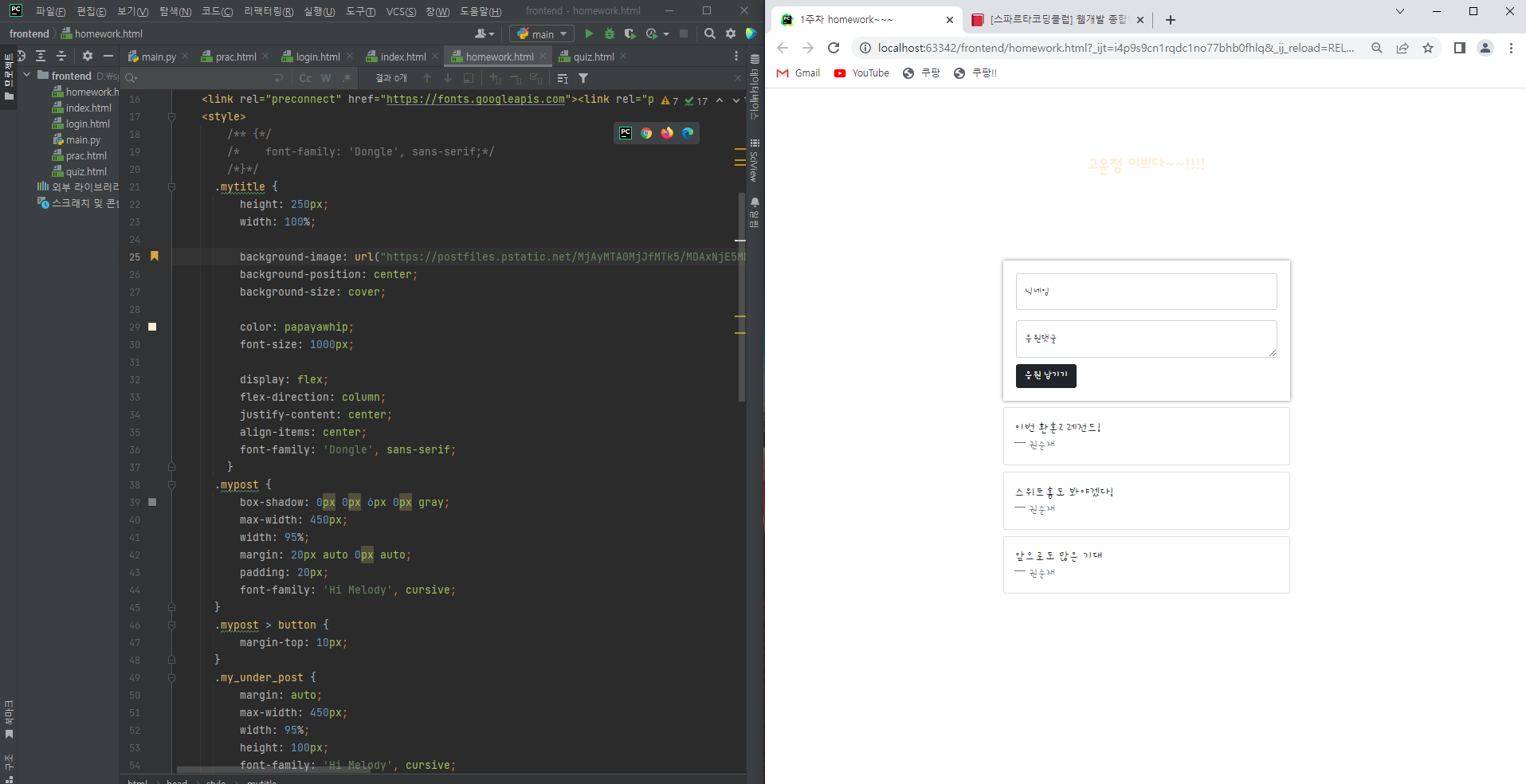
작성한 코드 및 에러 메세지
네이버에 돌아다니는 어떤 사이즈를 가져와도 똑같이 하얀색으로 없어집니다..
폰트도 스타일에 mytitle 안에 font 명령어도 넣었는데 똑같아요..
<!doctype html>
<html lang="en">

<head>
    <meta charset="utf-8">
    <meta name="viewport" content="width=device-width, initial-scale=1, shrink-to-fit=no">

    <link href="https://cdn.jsdelivr.net/npm/bootstrap@5.0.2/dist/css/bootstrap.min.css" rel="stylesheet"
        integrity="sha384-EVSTQN3/azprG1Anm3QDgpJLIm9Nao0Yz1ztcQTwFspd3yD65VohhpuuCOmLASjC" crossorigin="anonymous">
    <script src="https://ajax.googleapis.com/ajax/libs/jquery/3.5.1/jquery.min.js"></script>
    <script src="https://cdn.jsdelivr.net/npm/bootstrap@5.0.2/dist/js/bootstrap.bundle.min.js"
        integrity="sha384-MrcW6ZMFYlzcLA8Nl+NtUVF0sA7MsXsP1UyJoMp4YLEuNSfAP+JcXn/tWtIaxVXM"
        crossorigin="anonymous"></script>

    <title>1주차 homework~~~</title>
    <link rel="preconnect" href="https://fonts.googleapis.com"><link rel="preconnect" href="https://fonts.gstatic.com" crossorigin><link href="https://fonts.googleapis.com/css2?family=Dongle&family=Hi+Melody&display=swap" rel="stylesheet">
    <style>
        /** {*/
        /*    font-family: 'Dongle', sans-serif;*/
        /*}*/
      .mytitle {
          height: 250px;
          width: 100%;

          background-image: url("https://postfiles.pstatic.net/MjAyMTA0MjJfMTk5/MDAxNjE5MDY4MDcwMjUw.sA1GuCcQtmgiV4z25o-1W5McgCvjgPRRTjhoA2WjAhog.KltVIsmbYdwCtM93oxrEGwKc74lSv3LE3ZH_wGREYegg.PNG.choibade/%EA%B3%A0%EC%9C%A4%EC%A0%951.png?type=w966");
          background-position: center;
          background-size: cover;

          color: papayawhip;
          font-size: 1000px;

          display: flex;
          flex-direction: column;
          justify-content: center;
          align-items: center;
          font-family: 'Dongle', sans-serif;
        }
      .mypost {
          box-shadow: 0px 0px 6px 0px gray;
          max-width: 450px;
          width: 95%;
          margin: 20px auto 0px auto;
          padding: 20px;
          font-family: 'Hi Melody', cursive;
      }
      .mypost > button {
          margin-top: 10px;
      }
      .my_under_post {
          margin: auto;
          max-width: 450px;
          width: 95%;
          height: 100px;
          font-family: 'Hi Melody', cursive;


      }
      .my_under_post > .card {
          margin-top: 10px;
          margin-bottom: 10px;
      }
    </style>
</head>

<body>
    <div class="mytitle">
        <h1>고윤정 이쁘다~~!!!!</h1>
    </div>
    <div class="mypost">
        <div class="form-floating mb-3">
            <input type="email" class="form-control" id="floatingInput" placeholder="name@example.com">
            <label for="floatingInput">닉네임</label>
        </div>
        <div class="form-floating">
            <textarea class="form-control" placeholder="Leave a comment here" id="floatingTextarea"></textarea>
            <label for="floatingTextarea">응원댓글</label>
        </div>
        <button type="button" class="btn btn-dark">응원 남기기</button>
    </div>

    <div class="my_under_post">

        <div class="card">
            <div class="card-body">
                <blockquote class="blockquote mb-0">
                    <p>이번 환혼2 레전드!</p>
                    <footer class="blockquote-footer">권순재
                    </footer>
                </blockquote>
            </div>
        </div>
        <div class="card">
            <div class="card-body">
                <blockquote class="blockquote mb-0">
                    <p>스위트홈도 봐야겠다!</p>
                    <footer class="blockquote-footer">권순재
                    </footer>
                </blockquote>
            </div>
        </div>
        <div class="card">
            <div class="card-body">
                <blockquote class="blockquote mb-0">
                    <p>앞으로도 많은 기대</p>
                    <footer class="blockquote-footer">권순재
                    </footer>
                </blockquote>
            </div>
        </div>
    </div>
</body>

</html>

<!--질문사항-->
<!--1. 이미지 파일 링크 걸면 사진 안나옴-->
<!--2. 텍스트 크기만 크고 작게 설정-->


댓글 알림
