커뮤니티

포인트
쿠폰
내 강의실
국비 신청 내역
증명서
계정
로그아웃
학습 질문
개발 일지
나의 활동
답변 완료
index.html 응용
undefined주차


김*림
댓글
7
・
추천
0
・
조회수
18
조회수
18
답변 완료
* 겪고 있는 문제 상황을 최대한 자세하게 작성해주세요.
* 문제 해결을 위해 어떤 시도를 해보았는지 구체적으로 함께 알려주세요.
안녕하세요 덕분에 재미있고 유익하게 배웠습니다. 여기서 더 응용을..해보고 싶어 다음과 같이 내용 올립니다.
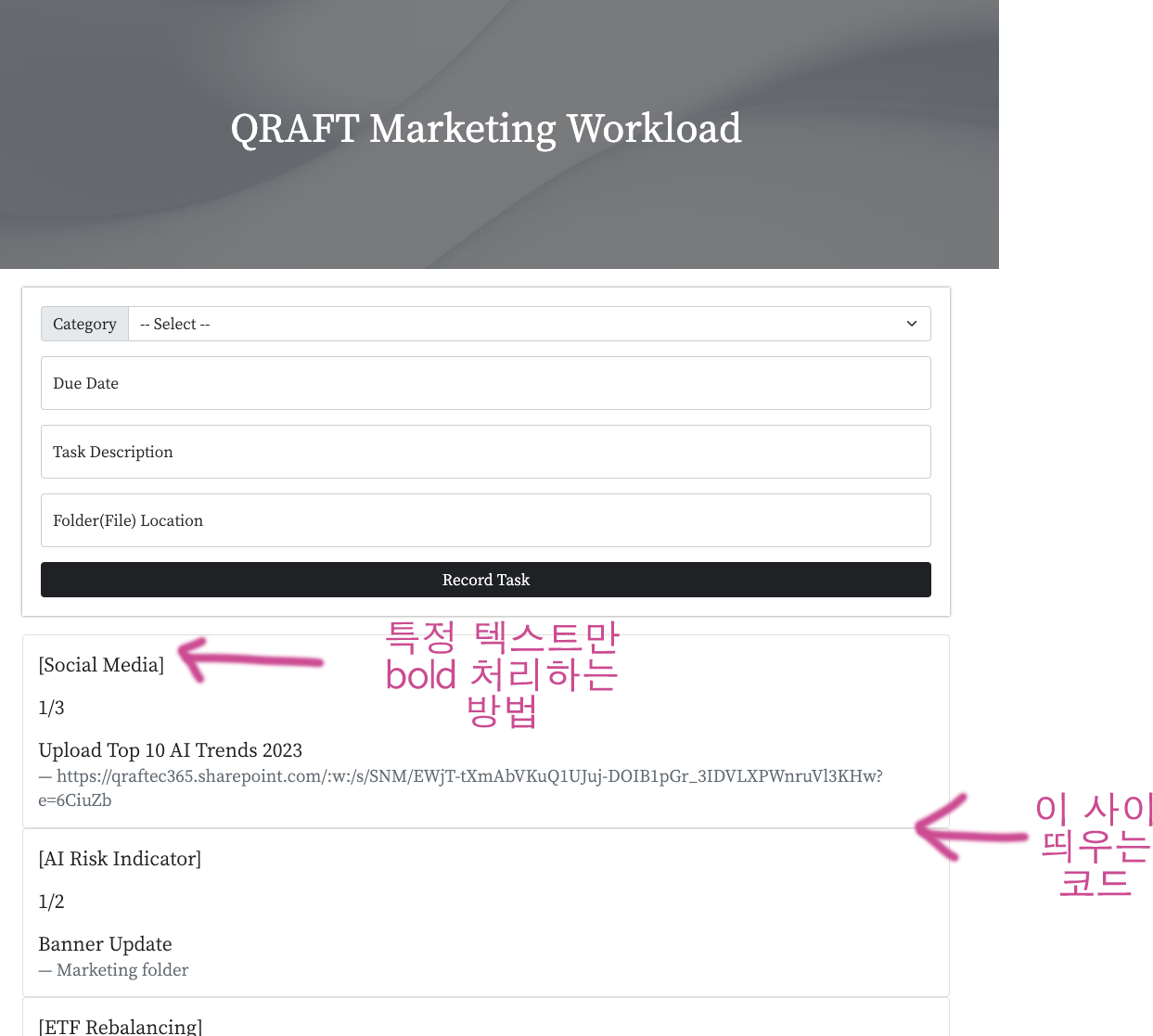
두 가지가 궁금한데요, 하나는 특정 텍스트만 볼드 처리하는 방법 다른 하나는 박스 사이에 간격을 주는 코드가 궁금합니다.
.mycards > .card {
위 코드에서 수정한다 생각했는데 반영이 안되더라고요.. 찾아봐도 약간 헷갈려서 문의드리며 마지막까지 잘 부탁드립니다!
스타일만 첨부했습니다.
<style>
    * {
        font-family: 'Noto Serif KR', serif;
    }
    .mypic {
        width: 100%;
        height: 300px;

        background-image: linear-gradient(0deg, rgba(0, 0, 0, 0.5), rgba(0, 0, 0, 0.5)), url('https://images.unsplash.com/photo-1619252584172-a83a949b6efd?ixlib=rb-4.0.3&ixid=MnwxMjA3fDB8MHxwaG90by1wYWdlfHx8fGVufDB8fHx8&auto=format&fit=crop&w=1974&q=80.png');
        background-position: center 30%;
        background-size: cover;

        color: white;

        display: flex;
        flex-direction: column;
        align-items: center;
        justify-content: center;
    }

    .mypost {
        width: 95%;
        max-width: 1000px;
        align-items: center;
        margin: 20px auto 20px auto;
        box-shadow: 0px 0px 3px 0px grey;
        padding: 20px;
    }

    .mypost > button {
        margin-top: 15px;
        margin: auto;
        width: 100%;
    }

    .mycards {
        width: 100%;
        max-width: 1000px;
        align-items: center;
        margin: 20px auto 20px auto;
        box-shadow: 3px 3px 3px 3px white;
    }

    .mycards > .card {
        margin-top: 10px;
        margin-bottom: 30px;
    }


</style>


댓글 알림
