커뮤니티

포인트
쿠폰
내 강의실
국비 신청 내역
증명서
계정
로그아웃
학습 질문
개발 일지
나의 활동
답변 완료
4주차 숙제 오류가 나서 강의자료 그대로 붙였는데 뭐가 잘못됐나봐요 ㅠㅠ
[왕초보] 나만의 수익성 앱, 앱개발 종합반
4주차


김*
댓글
6
・
추천
0
・
조회수
38
조회수
38
답변 완료
* 겪고 있는 문제 상황을 최대한 자세하게 작성해주세요.
* 문제 해결을 위해 어떤 시도를 해보았는지 구체적으로 함께 알려주세요.
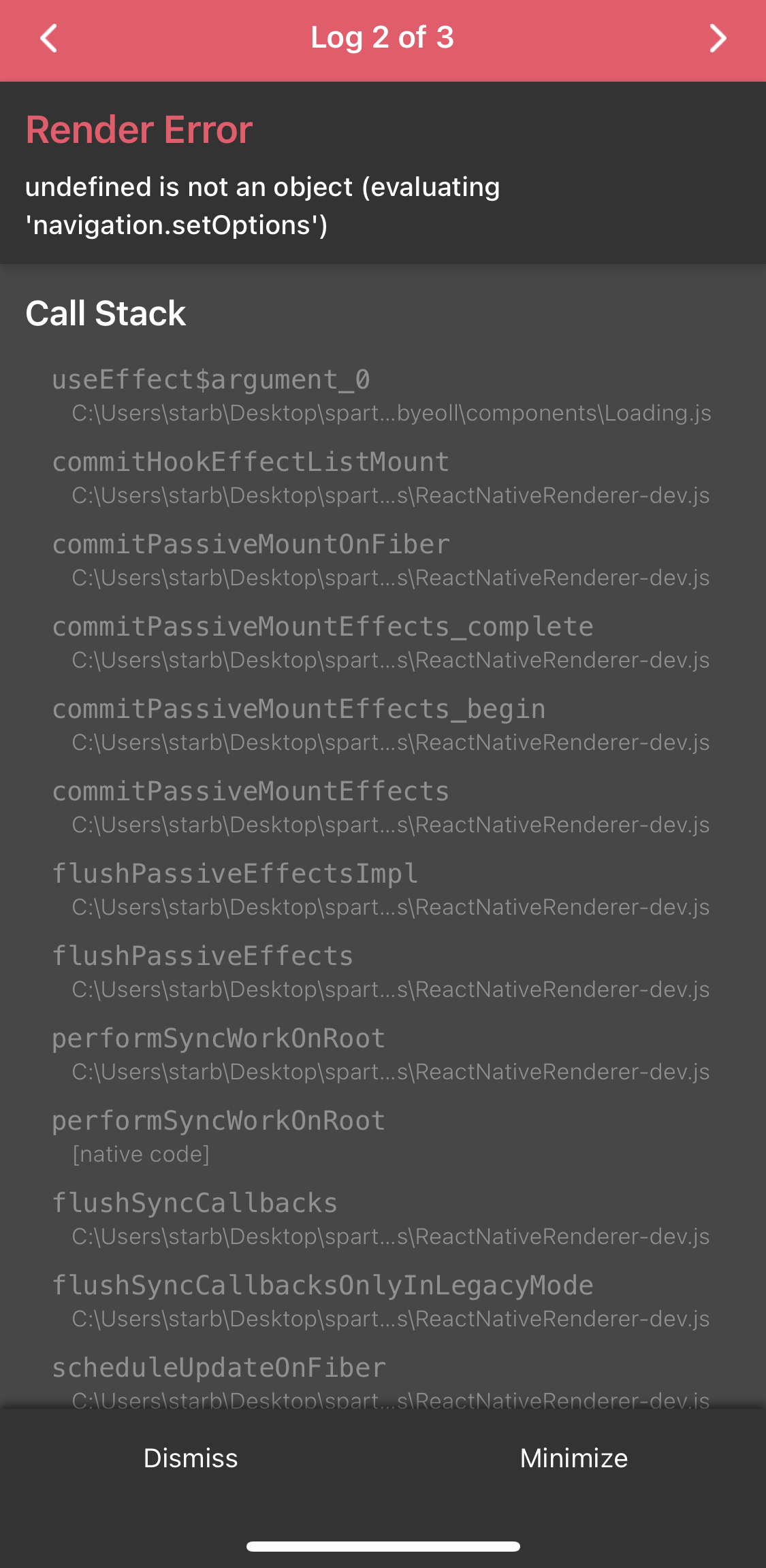
숙제 마치고 확인하던 중에 오류가 나서 강의자료 그대로 붙였는데 뭐가 잘못됐나봐요 ㅠㅠ
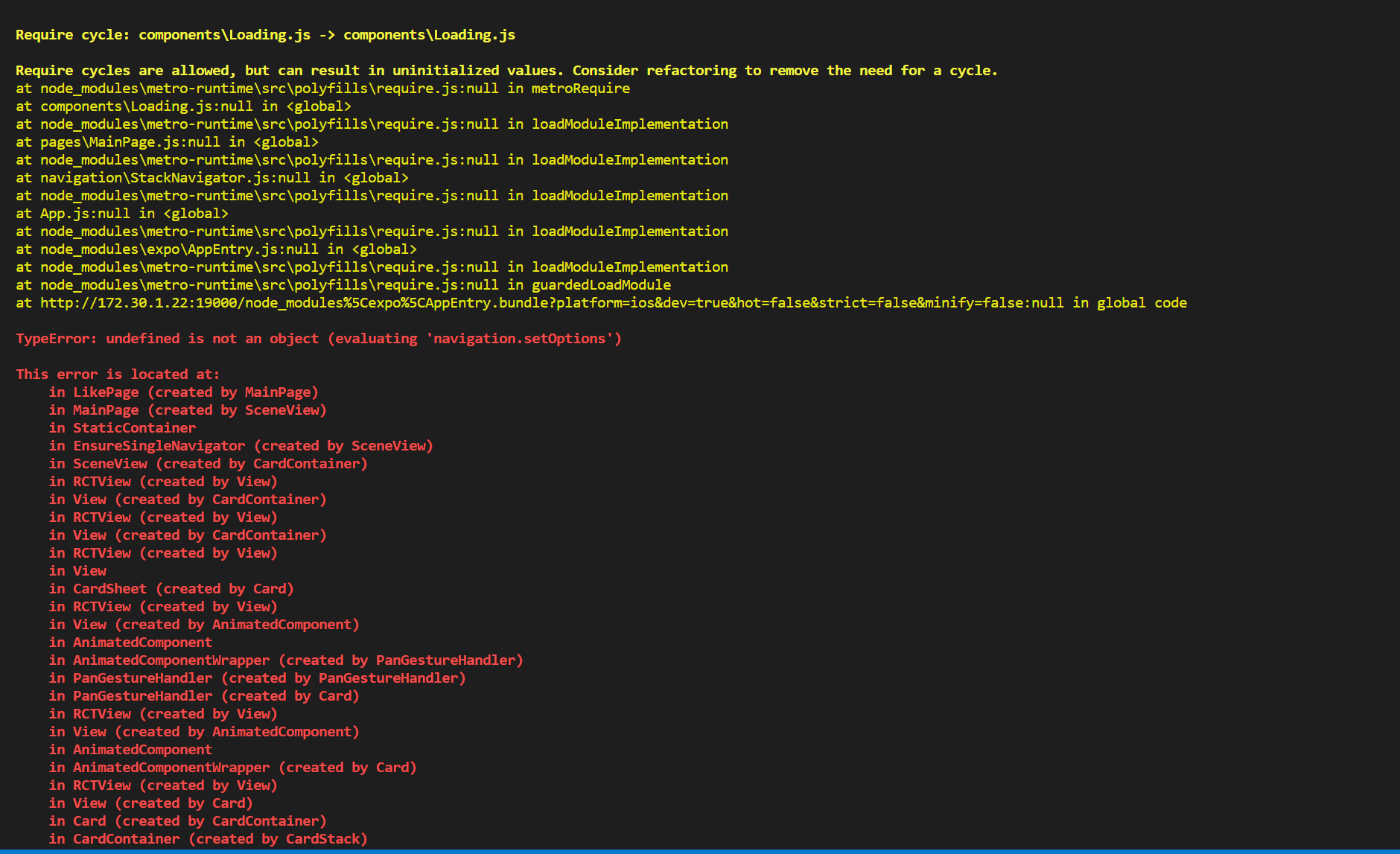
Require cycle: components\Loading.js -> components\Loading.js


Require cycles are allowed, but can result in uninitialized values. Consider refactoring to remove the need for a cycle.
at node_modules\metro-runtime\src\polyfills\require.js:null in metroRequire
at components\Loading.js:null in <global>
at node_modules\metro-runtime\src\polyfills\require.js:null in loadModuleImplementation
at pages\MainPage.js:null in <global>
at node_modules\metro-runtime\src\polyfills\require.js:null in loadModuleImplementation
at navigation\StackNavigator.js:null in <global>
at node_modules\metro-runtime\src\polyfills\require.js:null in loadModuleImplementation
at App.js:null in <global>
at node_modules\metro-runtime\src\polyfills\require.js:null in loadModuleImplementation
at node_modules\expo\AppEntry.js:null in <global>
at node_modules\metro-runtime\src\polyfills\require.js:null in loadModuleImplementation
at node_modules\metro-runtime\src\polyfills\require.js:null in guardedLoadModule
at http://172.30.1.22:19000/node_modules%5Cexpo%5CAppEntry.bundle?platform=ios&dev=true&hot=false&strict=false&minify=false:null in global code


TypeError: undefined is not an object (evaluating 'navigation.setOptions')


This error is located at:
    in LikePage (created by MainPage)
    in MainPage (created by SceneView)
    in StaticContainer
    in EnsureSingleNavigator (created by SceneView)
    in SceneView (created by CardContainer)
    in RCTView (created by View)
    in View (created by CardContainer)
    in RCTView (created by View)
    in View (created by CardContainer)
    in RCTView (created by View)
    in View
    in CardSheet (created by Card)
    in RCTView (created by View)
    in View (created by AnimatedComponent)
    in AnimatedComponent
    in AnimatedComponentWrapper (created by PanGestureHandler)
    in PanGestureHandler (created by PanGestureHandler)
    in PanGestureHandler (created by Card)
    in RCTView (created by View)
    in View (created by AnimatedComponent)
    in AnimatedComponent
    in AnimatedComponentWrapper (created by Card)
    in RCTView (created by View)
    in View (created by Card)
    in Card (created by CardContainer)
    in CardContainer (created by CardStack)
    in RNSScreen (created by AnimatedComponent)
    in AnimatedComponent
    in AnimatedComponentWrapper (created by InnerScreen)
    in Suspender (created by Freeze)
    in Suspense (created by Freeze)
    in Freeze (created by DelayedFreeze)
    in DelayedFreeze (created by InnerScreen)
    in InnerScreen (created by Screen)
    in Screen (created by MaybeScreen)
    in MaybeScreen (created by CardStack)
    in RNSScreenContainer (created by ScreenContainer)
    in ScreenContainer (created by MaybeScreenContainer)
    in MaybeScreenContainer (created by CardStack)
    in RCTView (created by View)
    in View (created by Background)
    in Background (created by CardStack)
    in CardStack (created by HeaderShownContext)
    in RNCSafeAreaProvider (created by SafeAreaProvider)
    in SafeAreaProvider (created by SafeAreaInsetsContext)
    in SafeAreaProviderCompat (created by StackView)
    in RCTView (created by View)
    in View (created by GestureHandlerRootView)
    in GestureHandlerRootView (created by StackView)
    in StackView (created by StackNavigator)
    in PreventRemoveProvider (created by NavigationContent)
    in NavigationContent
    in Unknown (created by StackNavigator)
    in StackNavigator (created by StackNavigator)
    in StackNavigator (created by App)
    in EnsureSingleNavigator
    in BaseNavigationContainer
    in ThemeProvider
    in NavigationContainerInner (created by App)
    in App (created by withDevTools(App))
    in withDevTools(App)
    in RCTView (created by View)
    in View (created by AppContainer)
    in RCTView (created by View)
    in View (created by AppContainer)
    in AppContainer
    in main(RootComponent)
at node_modules\react-native\Libraries\Core\ExceptionsManager.js:null in reportException
at node_modules\react-native\Libraries\Core\ExceptionsManager.js:null in handleException
at node_modules\react-native\Libraries\Core\ReactFiberErrorDialog.js:null in showErrorDialog
at node_modules\react-native\Libraries\Renderer\implementations\ReactNativeRenderer-dev.js:null in logCapturedError
at node_modules\react-native\Libraries\Renderer\implementations\ReactNativeRenderer-dev.js:null in update.callback
at node_modules\react-native\Libraries\Renderer\implementations\ReactNativeRenderer-dev.js:null in callCallback
at node_modules\react-native\Libraries\Renderer\implementations\ReactNativeRenderer-dev.js:null in commitUpdateQueue
at node_modules\react-native\Libraries\Renderer\implementations\ReactNativeRenderer-dev.js:null in commitLayoutEffectOnFiber
at node_modules\react-native\Libraries\Renderer\implementations\ReactNativeRenderer-dev.js:null in commitLayoutMountEffects_complete
at node_modules\react-native\Libraries\Renderer\implementations\ReactNativeRenderer-dev.js:null in commitLayoutEffects_begin
at node_modules\react-native\Libraries\Renderer\implementations\ReactNativeRenderer-dev.js:null in commitLayoutEffects
at node_modules\react-native\Libraries\Renderer\implementations\ReactNativeRenderer-dev.js:null in commitRootImpl
at node_modules\react-native\Libraries\Renderer\implementations\ReactNativeRenderer-dev.js:null in commitRoot
at node_modules\react-native\Libraries\Renderer\implementations\ReactNativeRenderer-dev.js:null in performSyncWorkOnRoot
at node_modules\react-native\Libraries\Renderer\implementations\ReactNativeRenderer-dev.js:null in flushSyncCallbacks
at node_modules\react-native\Libraries\Renderer\implementations\ReactNativeRenderer-dev.js:null in flushSyncCallbacksOnlyInLegacyMode
at node_modules\react-native\Libraries\Renderer\implementations\ReactNativeRenderer-dev.js:null in scheduleUpdateOnFiber
at node_modules\react-native\Libraries\Renderer\implementations\ReactNativeRenderer-dev.js:null in updateContainer
at node_modules\react-native\Libraries\Renderer\implementations\ReactNativeRenderer-dev.js:null in render
at node_modules\react-native\Libraries\ReactNative\renderApplication.js:null in renderApplication
at node_modules\react-native\Libraries\ReactNative\AppRegistry.js:null in runnables.appKey.run
at node_modules\react-native\Libraries\ReactNative\AppRegistry.js:null in runApplication
at node_modules\react-native\Libraries\BatchedBridge\MessageQueue.js:null in __callFunction
at node_modules\react-native\Libraries\BatchedBridge\MessageQueue.js:null in __guard$argument_0
at node_modules\react-native\Libraries\BatchedBridge\MessageQueue.js:null in __guard
at node_modules\react-native\Libraries\BatchedBridge\MessageQueue.js:null in callFunctionReturnFlushedQueue


TypeError: undefined is not an object (evaluating 'navigation.setOptions')


This error is located at:
    in LikePage (created by MainPage)
    in MainPage (created by SceneView)
    in StaticContainer
    in EnsureSingleNavigator (created by SceneView)
    in SceneView (created by CardContainer)
    in RCTView (created by View)
    in View (created by CardContainer)
    in RCTView (created by View)
    in View (created by CardContainer)
    in RCTView (created by View)
    in View
    in CardSheet (created by Card)
    in RCTView (created by View)
    in View (created by AnimatedComponent)
    in AnimatedComponent
    in AnimatedComponentWrapper (created by PanGestureHandler)
    in PanGestureHandler (created by PanGestureHandler)
    in PanGestureHandler (created by Card)
    in RCTView (created by View)
    in View (created by AnimatedComponent)
    in AnimatedComponent
    in AnimatedComponentWrapper (created by Card)
    in RCTView (created by View)
    in View (created by Card)
    in Card (created by CardContainer)
    in CardContainer (created by CardStack)
    in RNSScreen (created by AnimatedComponent)
    in AnimatedComponent
    in AnimatedComponentWrapper (created by InnerScreen)
    in Suspender (created by Freeze)
    in Suspense (created by Freeze)
    in Freeze (created by DelayedFreeze)
    in DelayedFreeze (created by InnerScreen)
    in InnerScreen (created by Screen)
    in Screen (created by MaybeScreen)
    in MaybeScreen (created by CardStack)
    in RNSScreenContainer (created by ScreenContainer)
    in ScreenContainer (created by MaybeScreenContainer)
    in MaybeScreenContainer (created by CardStack)
    in RCTView (created by View)
    in View (created by Background)
    in Background (created by CardStack)
    in CardStack (created by HeaderShownContext)
    in RNCSafeAreaProvider (created by SafeAreaProvider)
    in SafeAreaProvider (created by SafeAreaInsetsContext)
    in SafeAreaProviderCompat (created by StackView)
    in RCTView (created by View)
    in View (created by GestureHandlerRootView)
    in GestureHandlerRootView (created by StackView)
    in StackView (created by StackNavigator)
    in PreventRemoveProvider (created by NavigationContent)
    in NavigationContent
    in Unknown (created by StackNavigator)
    in StackNavigator (created by StackNavigator)
    in StackNavigator (created by App)
    in EnsureSingleNavigator
    in BaseNavigationContainer
    in ThemeProvider
    in NavigationContainerInner (created by App)
    in App (created by withDevTools(App))
    in withDevTools(App)
    in RCTView (created by View)
    in View (created by AppContainer)
    in RCTView (created by View)
    in View (created by AppContainer)
    in AppContainer
    in main(RootComponent)
at node_modules\react-native\Libraries\Core\ExceptionsManager.js:null in reportException
at node_modules\react-native\Libraries\Core\ExceptionsManager.js:null in handleException
at node_modules\react-native\Libraries\Core\setUpErrorHandling.js:null in handleError
at node_modules\expo\build\errors\ExpoErrorManager.js:null in errorHandler
at node_modules\expo\build\errors\ExpoErrorManager.js:null in <anonymous>
at node_modules\@react-native\polyfills\error-guard.js:null in ErrorUtils.reportFatalError
at node_modules\react-native\Libraries\BatchedBridge\MessageQueue.js:null in __guard
at node_modules\react-native\Libraries\BatchedBridge\MessageQueue.js:null in callFunctionReturnFlushedQueue


파이어베이스에서 데이터 가져왔습니다!!
Object {
  "coords": Object {
    "accuracy": 5.310090017244529,
    "altitude": 32.348615646362305,
    "altitudeAccuracy": 15.169244766235352,
    "heading": -1,
    "latitude": 37.297126068053224,
    "longitude": 126.86618081386466,
    "speed": -1,
  },
  "timestamp": 1671820201728.9949,
}
37.297126068053224
126.86618081386466
Object {
  "config": Object {
    "adapter": Array [
      "xhr",
      "http",
    ],
    "data": undefined,
    "env": Object {
      "Blob": [Function Blob],
      "FormData": [Function FormData],
    },
    "headers": Object {
      "Accept": "application/json, text/plain, */*",
    },
    "maxBodyLength": -1,
    "maxContentLength": -1,
    "method": "get",
    "timeout": 0,
    "transformRequest": Array [
      [Function transformRequest],
    ],
    "transformResponse": Array [
      [Function transformResponse],
    ],
    "transitional": Object {
      "clarifyTimeoutError": false,
      "forcedJSONParsing": true,
      "silentJSONParsing": true,
    },
    "url": "http://api.openweathermap.org/data/2.5/weather?lat=37.297126068053224&lon=126.86618081386466&appid=cfc258c75e1da2149c33daffd07a911d&units=metric",
    "validateStatus": [Function validateStatus],
    "xsrfCookieName": "XSRF-TOKEN",
    "xsrfHeaderName": "X-XSRF-TOKEN",
  },
  "data": Object {
    "base": "stations",
    "clouds": Object {
      "all": 88,
    },
    "cod": 200,
    "coord": Object {
      "lat": 37.2971,
      "lon": 126.8662,
    },
    "dt": 1671819648,
    "id": 1846918,
    "main": Object {
      "feels_like": -19.84,
      "grnd_level": 1015,
      "humidity": 73,
      "pressure": 1018,
      "sea_level": 1018,
      "temp": -13.57,
      "temp_max": -11.1,
      "temp_min": -15.16,
    },
    "name": "Ansan-si",
    "sys": Object {
      "country": "KR",
      "id": 8099,
      "sunrise": 1671835444,
      "sunset": 1671869971,
      "type": 1,
    },
    "timezone": 32400,
    "visibility": 10000,
    "weather": Array [
      Object {
        "description": "overcast clouds",
        "icon": "04n",
        "id": 804,
        "main": "Clouds",
      },
    ],
    "wind": Object {
      "deg": 344,
      "gust": 4.51,
      "speed": 3.03,
    },
  },
  "headers": Object {
    "access-control-allow-credentials": "true",
    "access-control-allow-methods": "GET, POST",
    "access-control-allow-origin": "*",
    "connection": "keep-alive",
    "content-length": "525",
    "content-type": "application/json; charset=utf-8",
    "date": "Fri, 23 Dec 2022 18:30:28 GMT",
    "server": "openresty",
    "x-cache-key": "/data/2.5/weather?lat=37.3&lon=126.87&units=metric",
  },
  "request": XMLHttpRequest {
    "DONE": 4,
    "HEADERS_RECEIVED": 2,
    "LOADING": 3,
    "OPENED": 1,
    "UNSENT": 0,
    "_aborted": false,
    "_cachedResponse": undefined,
    "_hasError": false,
    "_headers": Object {
      "accept": "application/json, text/plain, */*",
    },
    "_incrementalEvents": false,
    "_lowerCaseResponseHeaders": Object {
      "access-control-allow-credentials": "true",
      "access-control-allow-methods": "GET, POST",
      "access-control-allow-origin": "*",
      "connection": "keep-alive",
      "content-length": "525",
      "content-type": "application/json; charset=utf-8",
      "date": "Fri, 23 Dec 2022 18:30:28 GMT",
      "server": "openresty",
      "x-cache-key": "/data/2.5/weather?lat=37.3&lon=126.87&units=metric",
    },
    "_method": "GET",
    "_perfKey": "network_XMLHttpRequest_http://api.openweathermap.org/data/2.5/weather?lat=37.297126068053224&lon=126.86618081386466&appid=cfc258c75e1da2149c33daffd07a911d&units=metric",
    "_performanceLogger": PerformanceLogger {
      "_closed": false,
      "_extras": Object {},
      "_pointExtras": Object {},
      "_points": Object {
        "initializeCore_end": 219908780.108625,
        "initializeCore_start": 219908747.070708,
      },
      "_timespans": Object {
        "network_XMLHttpRequest_http://172.30.1.22:19000/logs": Object {
          "endExtras": undefined,
          "endTime": 219909090.044041,
          "startExtras": undefined,
          "startTime": 219909028.835333,
          "totalTime": 61.2087080180645,
        },
        "network_XMLHttpRequest_http://172.30.1.22:19000/symbolicate": Object {
          "endExtras": undefined,
          "endTime": 219909027.459083,
          "startExtras": undefined,
          "startTime": 219908937.166666,
          "totalTime": 90.29241698980331,
        },
        "network_XMLHttpRequest_http://api.openweathermap.org/data/2.5/weather?lat=37.297126068053224&lon=126.86618081386466&appid=cfc258c75e1da2149c33daffd07a911d&units=metric": Object {
          "endExtras": undefined,
          "endTime": 219910743.655333,
          "startExtras": undefined,
          "startTime": 219910514.936375,
          "totalTime": 228.71895802021027,
        },
      },
    },
    "_requestId": null,
    "_response": "{\"coord\":{\"lon\":126.8662,\"lat\":37.2971},\"weather\":[{\"id\":804,\"main\":\"Clouds\",\"description\":\"overcast clouds\",\"icon\":\"04n\"}],\"base\":\"statio69971},\"timezone\":32400,\"id\":1846918,\"name\":\"Ansan-si\",\"cod\":200}",    "_responseType": "",    "_sent": true,
    "_subscriptions": Array [],
    "_timedOut": false,
    "_trackingName": "unknown",
    "_url": "http://api.openweathermap.org/data/2.5/weather?lat=37.297126068053224&lon=126.86618081386466&appid=cfc258c75e1da2149c33daffd07a911d&units=metric",
    "readyState": 4,
    "responseHeaders": Object {
      "Access-Control-Allow-Credentials": "true",
      "Access-Control-Allow-Methods": "GET, POST",
      "Access-Control-Allow-Origin": "*",
      "Connection": "keep-alive",
      "Content-Length": "525",
      "Content-Type": "application/json; charset=utf-8",
      "Date": "Fri, 23 Dec 2022 18:30:28 GMT",
      "Server": "openresty",
      "X-Cache-Key": "/data/2.5/weather?lat=37.3&lon=126.87&units=metric",
    },
    "responseURL": "http://api.openweathermap.org/data/2.5/weather?lat=37.297126068053224&lon=126.86618081386466&appid=cfc258c75e1da2149c33daffd07a911d&units=metric",
    "status": 200,
    "timeout": 0,
    "upload": XMLHttpRequestEventTarget {},
    "withCredentials": true,
  },
  "status": 200,
  "statusText": undefined,
}
-13.57
Clouds
App.js
import React from 'react';
//이제 모든 페이지 컴포넌트들이 끼워져있는 책갈피를 메인에 둘예정이므로
//컴포넌트를 더이상 불러오지 않아도 됩니다.
// import MainPage from './pages/MainPage';
// import DetailPage from './pages/DetailPage';
import { StatusBar } from 'expo-status-bar';


//메인에 세팅할 네비게이션 도구들을 가져옵니다.
import {NavigationContainer} from '@react-navigation/native';
import StackNavigator from './navigation/StackNavigator'


export default function App() {


  console.disableYellowBox = true;


  return (
  <NavigationContainer>
    <StatusBar style="black" />
    <StackNavigator/>
 </NavigationContainer>);
}
MainPage.js
import React,{useState,useEffect} from 'react';
import { StyleSheet, Text, View, Image, TouchableOpacity, ScrollView} from 'react-native';


const main = 'https://storage.googleapis.com/sparta-image.appspot.com/lecture/main.png'
import data from '../data.json';
import Card from '../components/Card';
import Loading from '../components/Loading';
import { StatusBar } from 'expo-status-bar';
import * as Location from "expo-location";
import axios from "axios"
import {firebase_db} from "../firebaseConfig"


export default function MainPage({navigation,route}) {
  //useState 사용법
  //[state,setState] 에서 state는 이 컴포넌트에서 관리될 상태 데이터를 담고 있는 변수
  //setState는 state를 변경시킬때 사용해야하는 함수


  //모두 다 useState가 선물해줌
  //useState()안에 전달되는 값은 state 초기값
  const [state,setState] = useState([])
  const [cateState,setCateState] = useState([])
  //날씨 데이터 상태관리 상태 생성!
  const [weather, setWeather] = useState({
    temp : 0,
    condition : ''
  })


  //하단의 return 문이 실행되어 화면이 그려진다음 실행되는 useEffect 함수
  //내부에서 data.json으로 부터 가져온 데이터를 state 상태에 담고 있음
  const [ready,setReady] = useState(true)


  useEffect(()=>{
    navigation.setOptions({
      title:'나만의 꿀팁'
    })
    //뒤의 1000 숫자는 1초를 뜻함
    //1초 뒤에 실행되는 코드들이 담겨 있는 함수
    setTimeout(()=>{
        firebase_db.ref('/tip').once('value').then((snapshot) => {
          console.log("파이어베이스에서 데이터 가져왔습니다!!")
          let tip = snapshot.val();

          setState(tip)
          setCateState(tip)
          getLocation()
          setReady(false)
        });
        // getLocation()
        // setState(data.tip)
        // setCateState(data.tip)
        // setReady(false)
    },1000)


  },[])


  const getLocation = async () => {
    //수많은 로직중에 에러가 발생하면
    //해당 에러를 포착하여 로직을 멈추고,에러를 해결하기 위한 catch 영역 로직이 실행
    try {
      //자바스크립트 함수의 실행순서를 고정하기 위해 쓰는 async,await
      await Location.requestForegroundPermissionsAsync();
      const locationData= await Location.getCurrentPositionAsync();
      console.log(locationData)
      console.log(locationData['coords']['latitude'])
      console.log(locationData['coords']['longitude'])
      const latitude = locationData['coords']['latitude']
      const longitude = locationData['coords']['longitude']
      const API_KEY = "cfc258c75e1da2149c33daffd07a911d";
      const result = await axios.get(
        `http://api.openweathermap.org/data/2.5/weather?lat=${latitude}&lon=${longitude}&appid=${API_KEY}&units=metric`
      );


      console.log(result)
      const temp = result.data.main.temp;
      const condition = result.data.weather[0].main

      console.log(temp)
      console.log(condition)


      //오랜만에 복습해보는 객체 리터럴 방식으로 딕셔너리 구성하기!!
      //잘 기억이 안난다면 1주차 강의 6-5를 다시 복습해보세요!
      setWeather({
        temp,condition
      })


    } catch (error) {
      //혹시나 위치를 못가져올 경우를 대비해서, 안내를 준비합니다
      Alert.alert("위치를 찾을 수가 없습니다.", "앱을 껏다 켜볼까요?");
    }
  }


  const category = (cate) => {
    if(cate == "전체보기"){
        //전체보기면 원래 꿀팁 데이터를 담고 있는 상태값으로 다시 초기화
        setCateState(state)
    }else{
        setCateState(state.filter((d)=>{
            return d.category == cate
        }))
    }
}


  //data.json 데이터는 state에 담기므로 상태에서 꺼내옴
  // let tip = state.tip;
  let todayWeather = 10 + 17;
  let todayCondition = "흐림"
  //return 구문 밖에서는 슬래시 두개 방식으로 주석
  return ready ? <Loading/> :  (
    /*
      return 구문 안에서는 {슬래시 + * 방식으로 주석
    */


    <ScrollView style={styles.container}>
      <StatusBar style="light" />
      {/* <Text style={styles.title}>나만의 꿀팁</Text> */}
      <Text style={styles.weather}>오늘의 날씨: {weather.temp + '°C   ' + weather.condition} </Text>
       <TouchableOpacity style={styles.aboutButton} onPress={()=>{navigation.navigate('AboutPage')}}>
          <Text style={styles.aboutButtonText}>소개 페이지</Text>
        </TouchableOpacity>
      <Image style={styles.mainImage} source={{uri:main}}/>
      <ScrollView style={styles.middleContainer} horizontal indicatorStyle={"white"}>
      <TouchableOpacity style={styles.middleButtonAll} onPress={()=>{category('전체보기')}}><Text style={styles.middleButtonTextAll}>전체보기</Text></TouchableOpacity>
        <TouchableOpacity style={styles.middleButton01} onPress={()=>{category('생활')}}><Text style={styles.middleButtonText}>생활</Text></TouchableOpacity>
        <TouchableOpacity style={styles.middleButton02} onPress={()=>{category('재테크')}}><Text style={styles.middleButtonText}>재테크</Text></TouchableOpacity>
        <TouchableOpacity style={styles.middleButton03} onPress={()=>{category('반려견')}}><Text style={styles.middleButtonText}>반려견</Text></TouchableOpacity>
        <TouchableOpacity style={styles.middleButton04} onPress={()=>{navigation.navigate('LikePage')}}><Text style={styles.middleButtonText}>꿀팁 찜</Text></TouchableOpacity>
      </ScrollView>
      <View style={styles.cardContainer}>
         {/* 하나의 카드 영역을 나타내는 View */}
         {
          cateState.map((content,i)=>{
            return (<Card content={content} key={i} navigation={navigation}/>)
          })
        }

      </View>

    </ScrollView>)
}


const styles = StyleSheet.create({
  container: {
    //앱의 배경 색
    backgroundColor: '#fff',
  },
  title: {
    //폰트 사이즈
    fontSize: 20,
    //폰트 두께
    fontWeight: '700',
    //위 공간으로 부터 이격
    marginTop:50,
    //왼쪽 공간으로 부터 이격
    marginLeft:20
  },
weather:{
    alignSelf:"flex-end",
    paddingRight:20
  },
  mainImage: {
    //컨텐츠의 넓이 값
    width:'90%',
    //컨텐츠의 높이 값
    height:200,
    //컨텐츠의 모서리 구부리기
    borderRadius:10,
    marginTop:20,
    //컨텐츠 자체가 앱에서 어떤 곳에 위치시킬지 결정(정렬기능)
    //각 속성의 값들은 공식문서에 고대로~ 나와 있음
    alignSelf:"center"
  },
  middleContainer:{
    marginTop:20,
    marginLeft:10,
    height:60
  },
  middleButtonAll: {
    width:100,
    height:50,
    padding:15,
    backgroundColor:"#20b2aa",
    borderColor:"deeppink",
    borderRadius:15,
    margin:7
  },
  middleButton01: {
    width:100,
    height:50,
    padding:15,
    backgroundColor:"#fdc453",
    borderColor:"deeppink",
    borderRadius:15,
    margin:7
  },
  middleButton02: {
    width:100,
    height:50,
    padding:15,
    backgroundColor:"#fe8d6f",
    borderRadius:15,
    margin:7
  },
  middleButton03: {
    width:100,
    height:50,
    padding:15,
    backgroundColor:"#9adbc5",
    borderRadius:15,
    margin:7
  },
  middleButton04: {
    width:100,
    height:50,
    padding:15,
    backgroundColor:"#f886a8",
    borderRadius:15,
    margin:7
  },
  middleButtonText: {
    color:"#fff",
    fontWeight:"700",
    //텍스트의 현재 위치에서의 정렬
    textAlign:"center"
  },
  middleButtonTextAll: {
    color:"#fff",
    fontWeight:"700",
    //텍스트의 현재 위치에서의 정렬
    textAlign:"center"
  },
  cardContainer: {
    marginTop:10,
    marginLeft:10
  },
  aboutButton: {
    backgroundColor:"pink",
    width:100,
    height:40,
    borderRadius:10,
    alignSelf:"flex-end",
    marginRight:20,
    marginTop:10
  },
  aboutButtonText: {
    color:"#fff",
    textAlign:"center",
    marginTop:10
  }


});
Card.js
import React from 'react';
import {View, Image, Text, StyleSheet,TouchableOpacity} from 'react-native'


//MainPage로 부터 navigation 속성을 전달받아 Card 컴포넌트 안에서 사용
export default function Card({content,navigation}){
    return(
        //카드 자체가 버튼역할로써 누르게되면 상세페이지로 넘어가게끔 TouchableOpacity를 사용
        <TouchableOpacity style={styles.card} onPress={()=>{navigation.navigate('DetailPage',content)}}>
            <Image style={styles.cardImage} source={{uri:content.image}}/>
            <View style={styles.cardText}>
                <Text style={styles.cardTitle} numberOfLines={1}>{content.title}</Text>
                <Text style={styles.cardDesc} numberOfLines={3}>{content.desc}</Text>
                <Text style={styles.cardDate}>{content.date}</Text>
            </View>
        </TouchableOpacity>
    )
}


const styles = StyleSheet.create({

    card:{
      flex:1,
      flexDirection:"row",
      margin:10,
      borderBottomWidth:0.5,
      borderBottomColor:"#eee",
      paddingBottom:10
    },
    cardImage: {
      flex:1,
      width:100,
      height:100,
      borderRadius:10,
    },
    cardText: {
      flex:2,
      flexDirection:"column",
      marginLeft:10,
    },
    cardTitle: {
      fontSize:20,
      fontWeight:"700"
    },
    cardDesc: {
      fontSize:15
    },
    cardDate: {
      fontSize:10,
      color:"#A6A6A6",
    }
});


댓글 알림
