커뮤니티

포인트
쿠폰
내 강의실
국비 신청 내역
증명서
계정
로그아웃
학습 질문
개발 일지
나의 활동
답변 완료
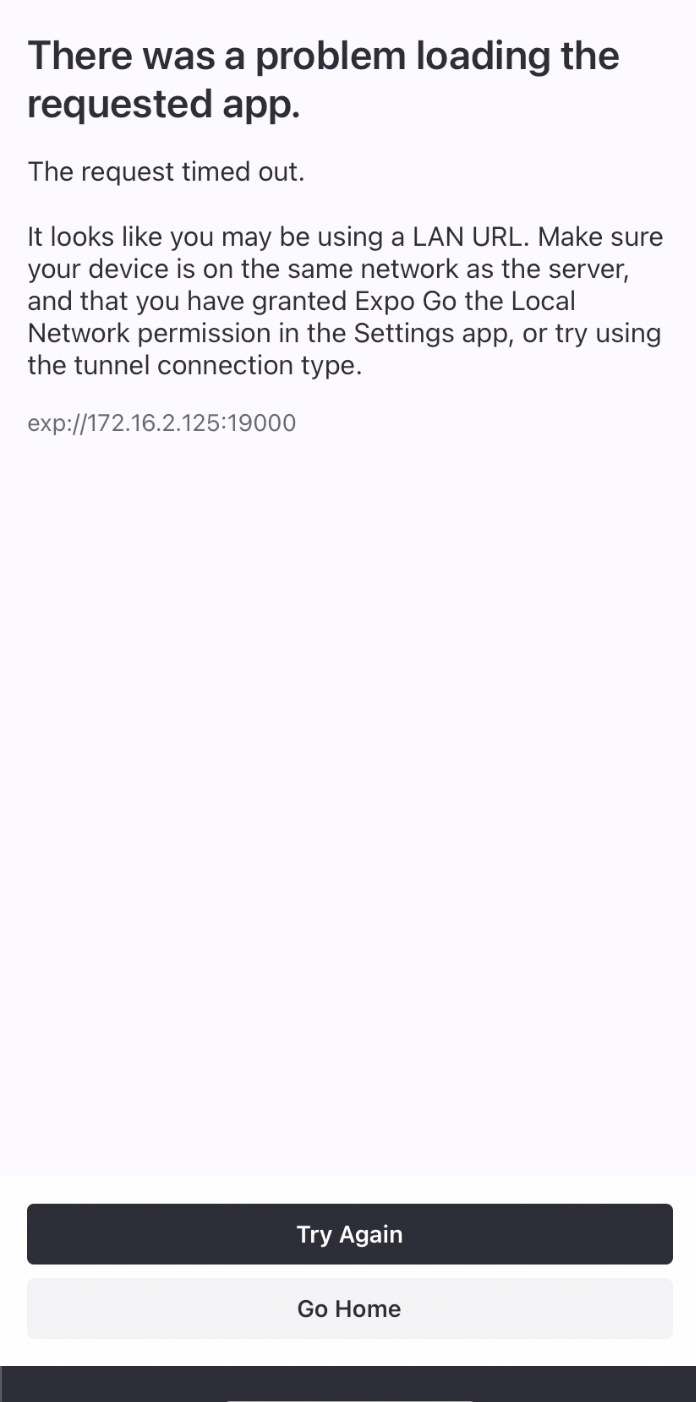
expo 네트 워크 에러
[왕초보] 나만의 수익성 앱, 앱개발 종합반
3주차


김*민
댓글
3
・
추천
0
・
조회수
13
조회수
13
답변 완료
- 네트 워크 에러로 해당 화면이 노출 됩니다.
- Commend + C 클릭 후, expo start —tunnel 입력했습니다.
- 모바일 PC 모두 같은 네트워크에 연결되어있습니다.
- 저는 현재 해외입니다.
- 정상적으로 뜨다가 자리를 이탈하고나서 다시 재접속을 시도했지만 위 현상이 나타나고 있습니다.
▄▄▄▄▄▄▄▄▄▄▄▄▄▄▄▄▄▄▄▄▄▄▄▄▄▄▄
█ ▄▄▄▄▄ █ ██▀▀ █▄██ ▄▄▄▄▄ █
█ █   █ █  ▀█ ▀▄▀▄█ █   █ █
█ █▄▄▄█ █▀  █▄█▀▄▀█ █▄▄▄█ █
█▄▄▄▄▄▄▄█▄█ ▀▄█▄▀ █▄▄▄▄▄▄▄█
█ ▄▀█▄ ▄█▀█▄█▄▀▄▀▄██ ▀▄▄ ▄█
██▄█ ▄▀▄█▀ ▄█▀█▀▄▄▀ █▄  ▀██
█▀▀█ ▄ ▄▀▄█▀▄▀█▄ █▀▄▀▀▄ ▀██
███ █▀█▄ ▄█▀ ▄█▀▄ ▄█ ▄ ▀███
█▄▄▄███▄█ █▀█▄▀▄▀ ▄▄▄ ▀ ▄▄█
█ ▄▄▄▄▄ █▀▄ █▀██▀ █▄█ ▀▀▀██
█ █   █ █▄ ▄▄ ▀▄█ ▄ ▄▄▀ ▀▀█
█ █▄▄▄█ █▀▄▄ ███▀██▄▀█▀▀ ██
█▄▄▄▄▄▄▄█▄▄████▄████▄▄▄▄▄▄█


› Metro waiting on exp://172.16.2.125:19000
› Scan the QR code above with Expo Go (Android) or the Camera app (iOS)


› Press a │ open Android
› Press i │ open iOS simulator
› Press w │ open web


› Press r │ reload app
› Press m │ toggle menu


› Press ? │ show all commands


› Dev Tools Web UI has been removed. Learn more.
› Opening on Android...


› Dev Tools Web UI has been removed. Learn more.
No Android connected device found, and no emulators could be started automatically.
Please connect a device or create an emulator (https://docs.expo.dev/workflow/android-studio-emulator).
Then follow the instructions here to enable USB debugging:
https://developer.android.com/studio/run/device.html#developer-device-options. If you are using Genymotion go to Settings -> ADB, select "Use custom Android SDK tools", and point it at your Android SDK directory.
Error: No Android connected device found, and no emulators could be started automatically.
Please connect a device or create an emulator (https://docs.expo.dev/workflow/android-studio-emulator).
Then follow the instructions here to enable USB debugging:
https://developer.android.com/studio/run/device.html#developer-device-options. If you are using Genymotion go to Settings -> ADB, select "Use custom Android SDK tools", and point it at your Android SDK directory.
    at getAllAvailableDevicesAsync (/usr/local/lib/node_modules/expo-cli/node_modules/xdl/src/Android.ts:118:11)
    at processTicksAndRejections (node:internal/process/task_queues:95:5)
    at Object.openProjectAsync (/usr/local/lib/node_modules/expo-cli/node_modules/xdl/src/Android.ts:938:21)
    at handleKeypressAsync (/usr/local/lib/node_modules/expo-cli/src/commands/start/TerminalUI.ts:305:27)
    at ReadStream.handleKeypress (/usr/local/lib/node_modules/expo-cli/src/commands/start/TerminalUI.ts:269:7)
kimsumin@MacBook-Pro-3 lets-play-heart % export start
kimsumin@MacBook-Pro-3 lets-play-heart % ls
App.js          app.json        assets          babel.config.js components      data.json       my-app          node_modules    package.json    pages           yarn.lock       —tunnel
kimsumin@MacBook-Pro-3 lets-play-heart % expo start
WARNING: expo-cli has not yet been tested against Node.js v18.12.1.
If you encounter any issues, please report them to https://github.com/expo/expo-cli/issues


expo-cli supports following Node.js versions:
* >=12.13.0 <15.0.0 (Maintenance LTS)
* >=16.0.0 <17.0.0 (Active LTS)


This command is being executed with the global Expo CLI. Learn more.
To use the local CLI instead (recommended in SDK 46 and higher), run:
› npx expo start


Starting project at /Users/kimsumin/Desktop/sparta-study/lets-play-heart
Starting Metro Bundler
▄▄▄▄▄▄▄▄▄▄▄▄▄▄▄▄▄▄▄▄▄▄▄▄▄▄▄
█ ▄▄▄▄▄ █ ██▀▀ █▄██ ▄▄▄▄▄ █
█ █   █ █  ▀█ ▀▄▀▄█ █   █ █
█ █▄▄▄█ █▀  █▄█▀▄▀█ █▄▄▄█ █
█▄▄▄▄▄▄▄█▄█ ▀▄█▄▀ █▄▄▄▄▄▄▄█
█ ▄▀█▄ ▄█▀█▄█▄▀▄▀▄██ ▀▄▄ ▄█
██▄█ ▄▀▄█▀ ▄█▀█▀▄▄▀ █▄  ▀██
█▀▀█ ▄ ▄▀▄█▀▄▀█▄ █▀▄▀▀▄ ▀██
███ █▀█▄ ▄█▀ ▄█▀▄ ▄█ ▄ ▀███
█▄▄▄███▄█ █▀█▄▀▄▀ ▄▄▄ ▀ ▄▄█
█ ▄▄▄▄▄ █▀▄ █▀██▀ █▄█ ▀▀▀██
█ █   █ █▄ ▄▄ ▀▄█ ▄ ▄▄▀ ▀▀█
█ █▄▄▄█ █▀▄▄ ███▀██▄▀█▀▀ ██
█▄▄▄▄▄▄▄█▄▄████▄████▄▄▄▄▄▄█


› Metro waiting on exp://172.16.2.125:19000
› Scan the QR code above with Expo Go (Android) or the Camera app (iOS)


› Press a │ open Android
› Press i │ open iOS simulator
› Press w │ open web


› Press r │ reload app
› Press m │ toggle menu


› Press ? │ show all commands


Logs for your project will appear below. Press Ctrl+C to exit.
Started Metro Bundler
› Stopped server
kimsumin@MacBook-Pro-3 lets-play-heart % expo start —tunnel
WARNING: expo-cli has not yet been tested against Node.js v18.12.1.
If you encounter any issues, please report them to https://github.com/expo/expo-cli/issues


expo-cli supports following Node.js versions:
* >=12.13.0 <15.0.0 (Maintenance LTS)
* >=16.0.0 <17.0.0 (Active LTS)


The expected package.json path: /Users/kimsumin/Desktop/sparta-study/lets-play-heart/—tunnel/package.json does not exist
kimsumin@MacBook-Pro-3 lets-play-heart % expo start
WARNING: expo-cli has not yet been tested against Node.js v18.12.1.
If you encounter any issues, please report them to https://github.com/expo/expo-cli/issues


expo-cli supports following Node.js versions:
* >=12.13.0 <15.0.0 (Maintenance LTS)
* >=16.0.0 <17.0.0 (Active LTS)


This command is being executed with the global Expo CLI. Learn more.
To use the local CLI instead (recommended in SDK 46 and higher), run:
› npx expo start


Starting project at /Users/kimsumin/Desktop/sparta-study/lets-play-heart
Starting Metro Bundler
▄▄▄▄▄▄▄▄▄▄▄▄▄▄▄▄▄▄▄▄▄▄▄▄▄▄▄
█ ▄▄▄▄▄ █ ██▀▀ █▄██ ▄▄▄▄▄ █
█ █   █ █  ▀█ ▀▄▀▄█ █   █ █
█ █▄▄▄█ █▀  █▄█▀▄▀█ █▄▄▄█ █
█▄▄▄▄▄▄▄█▄█ ▀▄█▄▀ █▄▄▄▄▄▄▄█
█ ▄▀█▄ ▄█▀█▄█▄▀▄▀▄██ ▀▄▄ ▄█
██▄█ ▄▀▄█▀ ▄█▀█▀▄▄▀ █▄  ▀██
█▀▀█ ▄ ▄▀▄█▀▄▀█▄ █▀▄▀▀▄ ▀██
███ █▀█▄ ▄█▀ ▄█▀▄ ▄█ ▄ ▀███
█▄▄▄███▄█ █▀█▄▀▄▀ ▄▄▄ ▀ ▄▄█
█ ▄▄▄▄▄ █▀▄ █▀██▀ █▄█ ▀▀▀██
█ █   █ █▄ ▄▄ ▀▄█ ▄ ▄▄▀ ▀▀█
█ █▄▄▄█ █▀▄▄ ███▀██▄▀█▀▀ ██
█▄▄▄▄▄▄▄█▄▄████▄████▄▄▄▄▄▄█


› Metro waiting on exp://172.16.2.125:19000
› Scan the QR code above with Expo Go (Android) or the Camera app (iOS)


› Press a │ open Android
› Press i │ open iOS simulator
› Press w │ open web


› Press r │ reload app
› Press m │ toggle menu


› Press ? │ show all commands


Logs for your project will appear below. Press Ctrl+C to exit.
Started Metro Bundler
› Reloading apps
warn No apps connected. Sending "reload" to all React Native apps failed. Make sure your app is running in the simulator or on a phone connected via USB.
› Stopped server
kimsumin@MacBook-Pro-3 lets-play-heart % expo start —tunnel
WARNING: expo-cli has not yet been tested against Node.js v18.12.1.
If you encounter any issues, please report them to https://github.com/expo/expo-cli/issues


expo-cli supports following Node.js versions:
* >=12.13.0 <15.0.0 (Maintenance LTS)
* >=16.0.0 <17.0.0 (Active LTS)


The expected package.json path: /Users/kimsumin/Desktop/sparta-study/lets-play-heart/—tunnel/package.json does not exist


댓글 알림
