커뮤니티

포인트
쿠폰
내 강의실
국비 신청 내역
증명서
계정
로그아웃
학습 질문
개발 일지
나의 활동
답변 완료
링크연결이 1시간이 지나도 안 떠요..
undefined주차


김*연
댓글
8
・
추천
0
・
조회수
20
조회수
20
답변 완료
* 겪고 있는 문제 상황을 최대한 자세하게 작성해주세요.
* 문제 해결을 위해 어떤 시도를 해보았는지 구체적으로 함께 알려주세요.
페이지에 html과 png를 넣고 모든 과정 다 그대로 하고 링크 연결 기다리는데 계속 오류만 뜨고 어디가 문제인지 모르겠어요..ㅠㅠ
보고
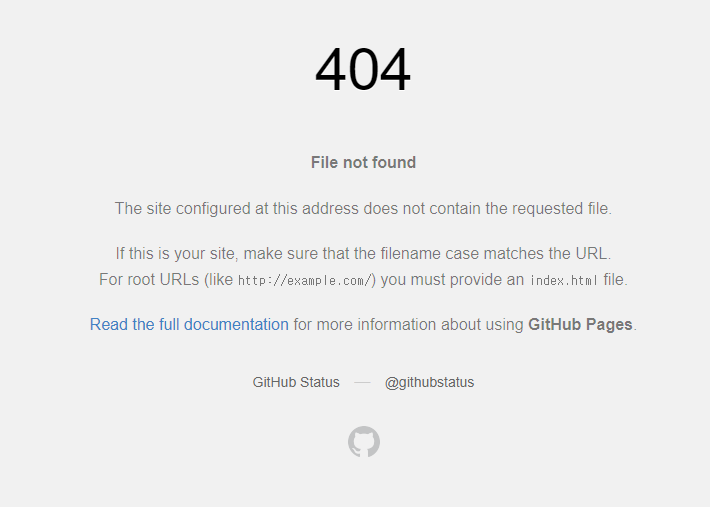
계신 화면 전체를 캡처해 주시면, 튜터님들이 빠르게 상황을 이해할 수 있어요.
<!DOCTYPE html>
<html>
    <head>
        <!-- 웹페이지 보이지는 않지만, 필요한 설정을 해두는 곳이에요.
             우리가 집을 위해 미리 생각 해놓은 것을 적어두는 곳이라고 할 수 있죠!-->
        <meta charset="UTF-8" />
        <meta http-equiv="X-UA-Compatible" content="IE=edge" />
        <meta name="viewport" content="width=device-width, initial-scale=1.0" />
        <meta property="og:title" content="TEMIZ" />
        <meta property="og:description" content="단체 유니폼/위생복/작업복 대량생산 전문업체" />
        <meta property="og:image" content="temiz.png" />


        <title>테미즈 - 프로필 링크</title>
        <style>
           @import url('https://cdn.jsdelivr.net/gh/orioncactus/pretendard/dist/web/static/pretendard.css');
                * {font-family: "Pretendard",serif;}

           body{background-color: white;}


           .wrap{   margin: 30px auto 0px auto;

                    display: flex;
                    flex-direction: column;
                    justify-content: center;
                    align-items: center;}


            .wrap>a{width: 300px; height: 50px;
                    background-color: #0b0d44;
                    border-radius: 8px;
                    margin-bottom: 10px;

                    color: white;
                    font-size: 16px;
                    font-weight: 500;


                    display: flex;
                    flex-direction: column;
                    justify-content: center;
                    align-items: center;
                    text-decoration: none;

                    box-shadow: 0px 2px 3px 0px rgb(207, 207, 207); }


            .wrap>a:hover{background-color: #474757;
                        font-size: 17px;}


           .profile{width: 100px;
                    height: 100px;

                    border-radius: 100px;
                    border: 2px solid #0b0d44;

                    background-image: url(temiz.png);
                    background-position: center;
                    background-size: cover;}


            .main{
                    color: #0b0d44;
                    font-size: 50px;


                    margin-top: 10px;
                    margin-bottom: 10px;}


            .sub{color: #696969;
                 font-size: 16px;
                 margin-top: 0px;
                 margin-bottom: 30px;
                 }


        </style>
    </head>
    <body>
        <!-- 우리가 웹페이지에서 볼 수 있는 부분을 세팅하는 곳이죠.
             우리가 집에서 눈에 볼 수 있는 집 구조들을 설정하는 곳이죠.-->
        <div class="wrap">
            <div class="profile"></div>
            <h1 class="main">TEMIZ</h1>
            <P class="sub">단체 유니폼/위생복/작업복 대량생산 전문업체</P>
            <a target="_blank" href="http://pf.kakao.com/_xfxfxbxfxj/chat">주문제작 & 대량주문 상담하기💬</a>
            <a target="_blank" href="https://smartstore.naver.com/dongac">스토어 구매하러가기🛒</a>
            <a target="_blank" href="https://www.instagram.com/temiz_d.a/">인스타그램🌼</a>
            <a target="_blank" href="https://www.youtube.com/@temiz_d.a/">유튜브(준비중)🔔</a>
                    </div>

    </body>
</html>
Tip1) </> 아이콘을 눌러 코드박스를 만들어 보세요.
Tip 2) Ctrl+A(맥의 경우 Command+A) 단축키로 코드를 한 번에 선택할 수 있어요!


댓글 알림
