


* 겪고 있는 문제 상황을 최대한 자세하게 작성해주세요.
* 문제 해결을 위해 어떤 시도를 해보았는지 구체적으로 함께 알려주세요.
$ expo init is not supported in the local CLI, please use npx create-expo-app instead
라는 문구와 함께 expo 설치가 되지 않습니다.
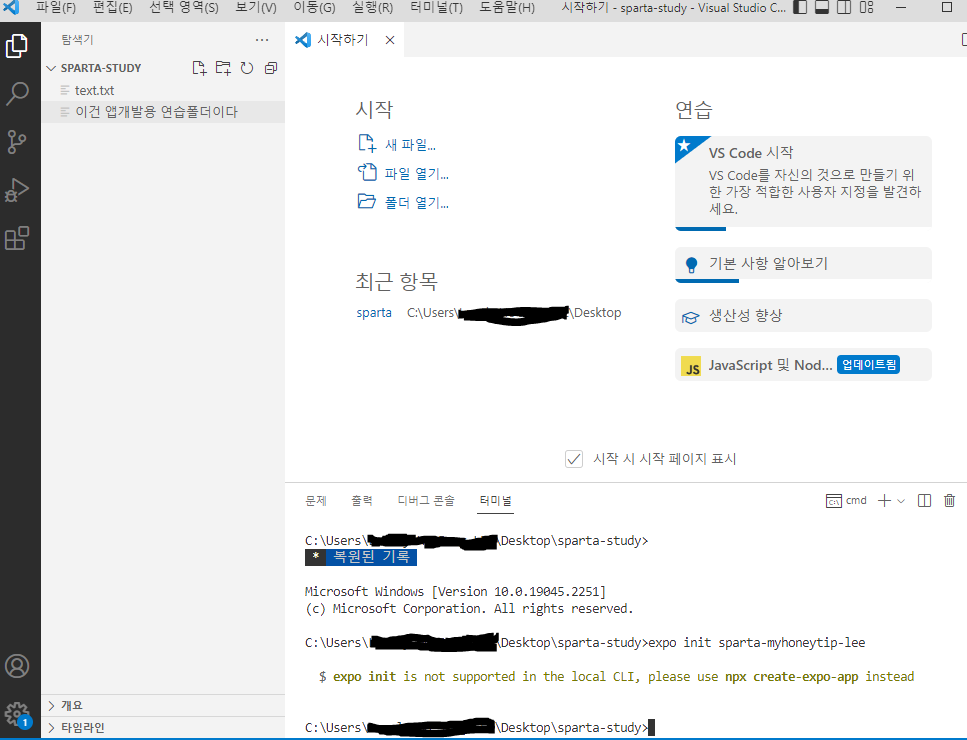
작성한 코드 및 에러 메세지
다음은 커멘트 창에서 영상에 나온대로 진행한 코드입니다.
C:\Users\Lovely Ho Jung LEE>yarn -v
1.22.19
C:\Users\Lovely Ho Jung LEE>node -v
v16.16.0
C:\Users\Lovely Ho Jung LEE>npm install -g expo-cli
npm WARN config global `--global`, `--local` are deprecated. Use `--location=global` instead.
npm WARN config global `--global`, `--local` are deprecated. Use `--location=global` instead.
npm WARN deprecated @npmcli/move-file@1.1.2: This functionality has been moved to @npmcli/fs
npm WARN deprecated source-map-url@0.4.1: See https://github.com/lydell/source-map-url#deprecated
npm WARN deprecated stable@0.1.8: Modern JS already guarantees Array#sort() is a stable sort, so this library is deprecated. See the compatibility table on MDN: https://developer.mozilla.org/en-US/docs/Web/JavaScript/Reference/Global_Objects/Array/sort#browser_compatibility
npm WARN deprecated urix@0.1.0: Please see https://github.com/lydell/urix#deprecated
npm WARN deprecated source-map-resolve@0.5.3: See https://github.com/lydell/source-map-resolve#deprecated
npm WARN deprecated chokidar@2.1.8: Chokidar 2 does not receive security updates since 2019. Upgrade to chokidar 3 with 15x fewer dependencies
npm WARN deprecated chokidar@2.1.8: Chokidar 2 does not receive security updates since 2019. Upgrade to chokidar 3 with 15x fewer dependencies
npm WARN deprecated resolve-url@0.2.1: https://github.com/lydell/resolve-url#deprecated
npm WARN deprecated querystring@0.2.0: The querystring API is considered Legacy. new code should use the URLSearchParams API instead.
npm WARN deprecated uuid@3.4.0: Please upgrade to version 7 or higher. Older versions may use Math.random() in certain circumstances, which is known to be problematic. See https://v8.dev/blog/math-random for details.
npm WARN deprecated uuid@3.4.0: Please upgrade to version 7 or higher. Older versions may use Math.random() in certain circumstances, which is known to be problematic. See https://v8.dev/blog/math-random for details.
npm WARN deprecated uuid@3.4.0: Please upgrade to version 7 or higher. Older versions may use Math.random() in certain circumstances, which is known to be problematic. See https://v8.dev/blog/math-random for details.
npm WARN deprecated uuid@3.4.0: Please upgrade to version 7 or higher. Older versions may use Math.random() in certain circumstances, which is known to be problematic. See https://v8.dev/blog/math-random for details.
npm WARN deprecated uuid@3.4.0: Please upgrade to version 7 or higher. Older versions may use Math.random() in certain circumstances, which is known to be problematic. See https://v8.dev/blog/math-random for details.
npm WARN deprecated uuid@3.4.0: Please upgrade to version 7 or higher. Older versions may use Math.random() in certain circumstances, which is known to be problematic. See https://v8.dev/blog/math-random for details.
npm WARN deprecated svgo@1.3.2: This SVGO version is no longer supported. Upgrade to v2.x.x.
npm ERR! code EEXIST
npm ERR! path C:\Users\Lovely Ho Jung LEE\AppData\Roaming\npm\expo
npm ERR! EEXIST: file already exists
npm ERR! File exists: C:\Users\Lovely Ho Jung LEE\AppData\Roaming\npm\expo
npm ERR! Remove the existing file and try again, or run npm
npm ERR! with --force to overwrite files recklessly.
npm ERR! A complete log of this run can be found in:
npm ERR! C:\Users\Lovely Ho Jung LEE\AppData\Local\npm-cache\_logs\2022-12-15T15_58_42_441Z-debug-0.log
C:\Users\Lovely Ho Jung LEE>expo --version
0.4.10
C:\Users\Lovely Ho Jung LEE>expo help
Invalid project root: C:\Users\Lovely Ho Jung LEE\help
C:\Users\Lovely Ho Jung LEE> expo --help
Usage
$ npx expo <command>
Commands
start, export, export:web
run:ios, run:android, prebuild
install, customize, config
login, logout, whoami, register
Options
--version, -v Version number
--help, -h Usage info
For more info run a command with the --help flag
$ npx expo start --help
C:\Users\Lovely Ho Jung LEE>expo login
Log in to EAS
√ Email or username ... hjunglee
√ Password ... *********
C:\Users\Lovely Ho Jung LEE>오류 발생 시, 작성한 코드 전체와 에러 메시지를 첨부해 주세요.
Tip 1) </> 아이콘을 눌러 코드박스를 만들어 보세요.
Tip 2) Ctrl+A(맥의 경우 Command+A) 단축키로 코드를 한 번에 선택할 수 있어요!


