커뮤니티

포인트
쿠폰
내 강의실
국비 신청 내역
증명서
계정
로그아웃
학습 질문
개발 일지
나의 활동
답변 완료
temp html연습중
undefined주차


김*범
댓글
1
・
추천
0
・
조회수
7
조회수
7
답변 완료
* 겪고 있는 문제 상황을 최대한 자세하게 작성해주세요.
* 문제 해결을 위해 어떤 시도를 해보았는지 구체적으로 함께 알려주세요.
temp_html연습하고 있는데 저렇게 다 출력하는게 아니라 0번째 배열 1번째 배열 이런식으로 배열한개씩만 출력할 수 있게 하고 싶은데 방법이 없나요??
보고 계신 화
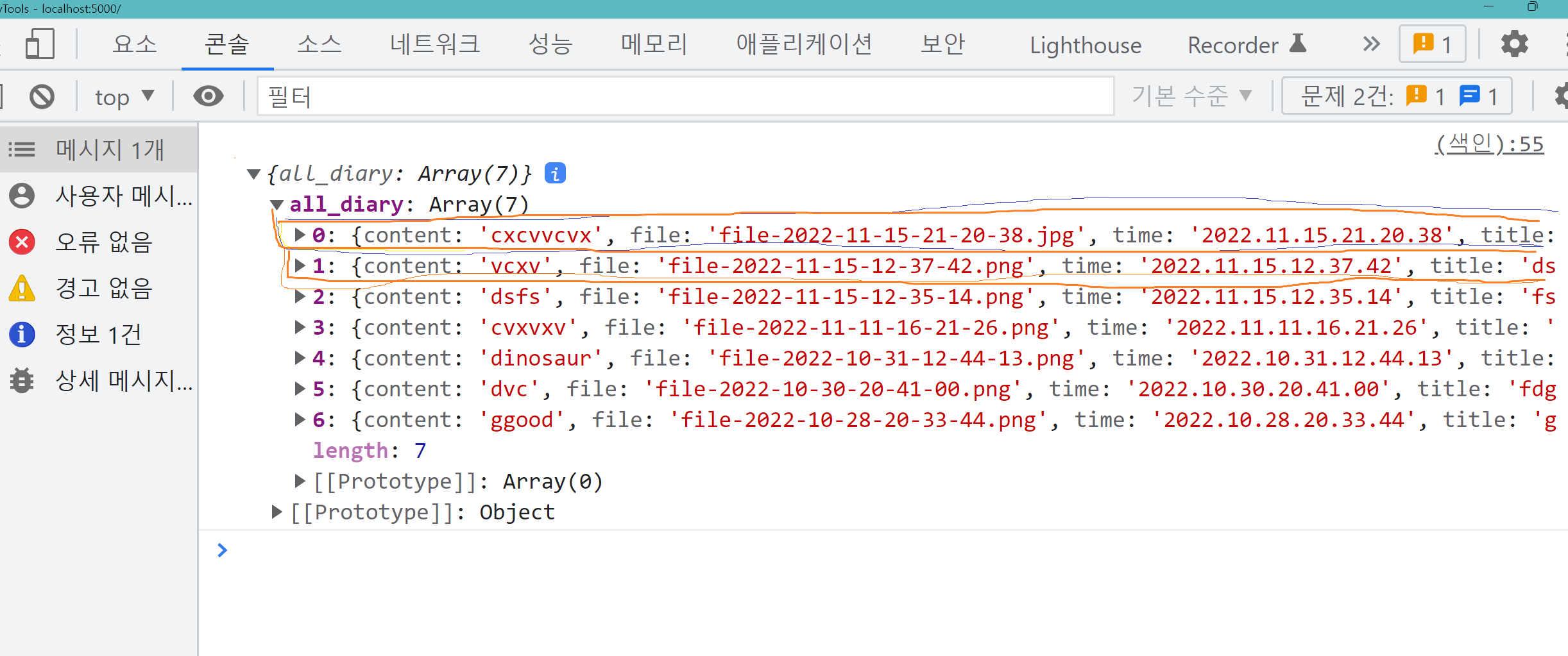
면 전체를 캡처해 주시면, 튜터님들이 빠르게 상황을 이해할 수 있어요.
<!DOCTYPE html>
<html lang="en">
<head>
    <meta charset="UTF-8">
    <meta name="viewport" content="width=device-width, initial-scale=1, shrink-to-fit=no">
    <meta name="viewport" content="width=device-width, initial-scale=1.0">
    <!-- Bootstrap CSS -->
    <link rel="stylesheet" href="https://maxcdn.bootstrapcdn.com/bootstrap/4.0.0/css/bootstrap.min.css"
          integrity="sha384-Gn5384xqQ1aoWXA+058RXPxPg6fy4IWvTNh0E263XmFcJlSAwiGgFAW/dAiS6JXm" crossorigin="anonymous">

    <!-- Optional JavaScript -->
    <!-- jQuery first, then Popper.js, then Bootstrap JS -->
    <script src="https://ajax.googleapis.com/ajax/libs/jquery/3.5.1/jquery.min.js"></script>
    <script src="https://cdnjs.cloudflare.com/ajax/libs/popper.js/1.12.9/umd/popper.min.js"
            integrity="sha384-ApNbgh9B+Y1QKtv3Rn7W3mgPxhU9K/ScQsAP7hUibX39j7fakFPskvXusvfa0b4Q"
            crossorigin="anonymous"></script>
    <script src="https://maxcdn.bootstrapcdn.com/bootstrap/4.0.0/js/bootstrap.min.js"
            integrity="sha384-JZR6Spejh4U02d8jOt6vLEHfe/JQGiRRSQQxSfFWpi1MquVdAyjUar5+76PVCmYl"
            crossorigin="anonymous"></script>

    <title>공지사항</title>
    <script src="https://cdn.jsdelivr.net/npm/bs-custom-file-input/dist/bs-custom-file-input.js"></script>
    <link rel="preconnect" href="https://fonts.gstatic.com">
    <link href="https://fonts.googleapis.com/css2?family=Jua&display=swap" rel="stylesheet">

</head>
<style>
    raper {
        height: 550px;
        width: 100%;
    }

    .size {
        width: 100%;

    }
</style>

<script>

    $(document).ready(function () {
        bsCustomFileInput.init()
        listing()
    })

    function listing() {
        $.ajax({
            type: "GET",
            url: "/diaryy",
            data: {},
            success: function (response) {


                let diaries = response['all_diary']
                let i = ''

                for (i = 0; i < diaries.length; ++i) {
                    let title = diaries[i]['title']
                    let content = diaries[i]['content']
                    // let file = diaries[i]['file']
                    let time = diaries[i]['time']
                    let temp_html = `<tr>
                                            <td>${title}</td>

                                            <td onclick="window.location.href=''">${content}</td>

                                            <td>${time}</td>
                                          </tr>`
                    $('#order-box').append(temp_html)


                }


            }
        })
    }


</script>

<body>

<center>
    <h1>공지사항</h1>
    <!--    <button onclick="window.location.href='/detaill'"></button>-->
</center>


<table class='table'>
    <thead>
    <tr>
        <th>작성자</th>
        <th>제목</th>
        <th>날짜</th>
    </tr>
    </thead>
    <tbody id="order-box">
    </tbody>


</table>

</body>
</html>
import pymongo
import requests
from flask import Flask, render_template, jsonify, request, session, redirect, url_for

app = Flask(__name__)

from pymongo import MongoClient

client = MongoClient('localhost', 27017)
client = pymongo.MongoClient('mongodb+srv://test:sparta@cluster0.cxfj3.mongodb.net/?retryWrites=true&w=majority', 27017)
db = client.dbsparta_plus_week5


@app.route('/')
def home():
    return render_template('index.html')


@app.route('/detaill')
def detaill():
    diaries = list(db.diaryy.find({}, {'_id': False}).sort('time', -1))

    return render_template('detaill.html')


@app.route('/viewv')
def viewv():
    return render_template('viewv.html')


@app.route('/diaryy', methods=['GET'])
def show_diary():
    diaries = list(db.diaryy.find({}, {'_id': False}).sort('time', -1))
    return jsonify({'all_diary': diaries})


# posting해서 다시 전체 get 으로 불러오자


if __name__ == '__main__':
    app.run('0.0.0.0', port=5000, debug=True)


댓글 알림
