


코드를 완성 했어요
완료 버튼을 클릭하면 첫번째는 삭제가 되는데 두번째 부터는 아무 변화 없음
원래 순서가 0,1,2,3가 되어야 하는거 아닌지요?
콘솔창에 0,0,4,5 번이 나오는데... 뭔가 조금 잘못한거 같은데.. 찾을수가 없네요
보고 계
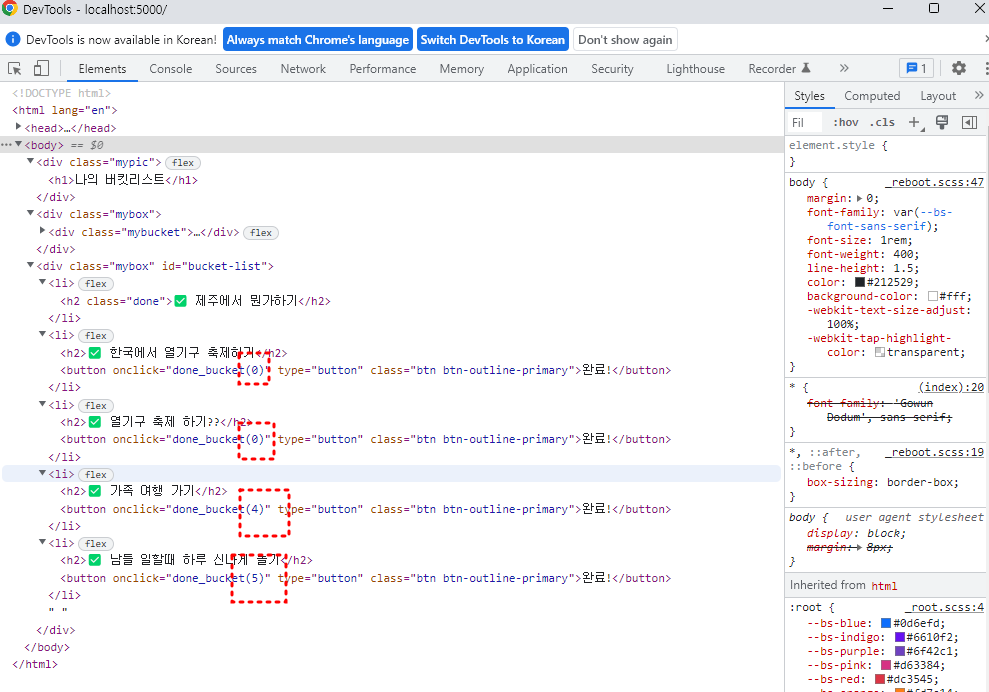
신 화면 전체를 캡처해 주시면, 튜터님들이 빠르게 상황을 이해할 수 있어요.
<!DOCTYPE html>
<html lang="en">
<head>
<meta charset="UTF-8">
<meta http-equiv="X-UA-Compatible" content="IE=edge">
<meta name="viewport" content="width=device-width, initial-scale=1.0">
<link href="https://cdn.jsdelivr.net/npm/bootstrap@5.0.2/dist/css/bootstrap.min.css" rel="stylesheet"
integrity="sha384-EVSTQN3/azprG1Anm3QDgpJLIm9Nao0Yz1ztcQTwFspd3yD65VohhpuuCOmLASjC" crossorigin="anonymous">
<script src="https://ajax.googleapis.com/ajax/libs/jquery/3.5.1/jquery.min.js"></script>
<script src="https://cdn.jsdelivr.net/npm/bootstrap@5.0.2/dist/js/bootstrap.bundle.min.js"
integrity="sha384-MrcW6ZMFYlzcLA8Nl+NtUVF0sA7MsXsP1UyJoMp4YLEuNSfAP+JcXn/tWtIaxVXM"
crossorigin="anonymous"></script>
<link href="https://fonts.googleapis.com/css2?family=Gowun+Dodum&display=swap" rel="stylesheet">
<title>인생 버킷리스트</title>
<style>
* {
font-family: 'Gowun Dodum', sans-serif;
}
.mypic {
width: 100%;
height: 200px;
background-image: linear-gradient(0deg, rgba(0, 0, 0, 0.5), rgba(0, 0, 0, 0.5)), url('https://images.unsplash.com/photo-1601024445121-e5b82f020549?ixid=MnwxMjA3fDB8MHxwaG90by1wYWdlfHx8fGVufDB8fHx8&ixlib=rb-1.2.1&auto=format&fit=crop&w=1189&q=80');
background-position: center;
background-size: cover;
color: white;
display: flex;
flex-direction: column;
align-items: center;
justify-content: center;
}
.mypic > h1 {
font-size: 30px;
}
.mybox {
width: 95%;
max-width: 700px;
padding: 20px;
box-shadow: 0px 0px 10px 0px lightblue;
margin: 20px auto;
}
.mybucket {
display: flex;
flex-direction: row;
align-items: center;
justify-content: space-between;
}
.mybucket > input {
width: 70%;
}
.mybox > li {
display: flex;
flex-direction: row;
align-items: center;
justify-content: center;
margin-bottom: 10px;
min-height: 48px;
}
.mybox > li > h2 {
max-width: 75%;
font-size: 20px;
font-weight: 500;
margin-right: auto;
margin-bottom: 0px;
}
.mybox > li > h2.done {
text-decoration:line-through
}
</style>
<script>
$(document).ready(function () {
show_bucket();
});
function show_bucket(){
$.ajax({
type: "GET",
url: "/bucket",
data: {},
success: function (response) {
let rows = response['buckets']
for (let i = 0; i < rows.length; i++) {
let bucket = rows[i]['bucket']
let num = rows[i]['num']
let done = rows[i]['done']
let temp_html = ``
if (done == 0) {
temp_html = `<li>
<h2>✅ ${bucket}</h2>
<button onclick="done_bucket(${num})" type="button" class="btn btn-outline-primary">완료!</button>
</li>`
} else {
temp_html = `<li>
<h2 class="done">✅ ${bucket}</h2>
</li>`
}
$('#bucket-list').append(temp_html)
}
}
});
}
function save_bucket(){
let bucket = $('#bucket').val()
$.ajax({
type: "POST",
url: "/bucket",
data: {bucket_give:bucket},
success: function (response) {
alert(response["msg"])
window.location.reload()
}
});
}
function done_bucket(num){
$.ajax({
type: "POST",
url: "/bucket/done",
data: { num_give:num },
success: function (response) {
alert(response["msg"])
window.location.reload()
}
});
}
</script>
</head>
<body>
<div class="mypic">
<h1>나의 버킷리스트</h1>
</div>
<div class="mybox">
<div class="mybucket">
<input id="bucket" class="form-control" type="text" placeholder="이루고 싶은 것을 입력하세요">
<button onclick="save_bucket()" type="button" class="btn btn-outline-primary">기록하기</button>
</div>
</div>
<div class="mybox" id="bucket-list">
</div>
</body>
</html>


