커뮤니티

포인트
쿠폰
내 강의실
국비 신청 내역
증명서
계정
로그아웃
학습 질문
개발 일지
나의 활동
답변 완료
미세먼지 페이지_ 모바일 화면
undefined주차


김*경
댓글
1
・
추천
0
・
조회수
6
조회수
6
답변 완료
* 겪고 있는 문제 상황을 최대한 자세하게 작성해주세요.
* 문제 해결을 위해 어떤 시도를 해보았는지 구체적으로 함께 알려주세요.
서울시 미세먼지 구하는 화면을 지난 1주차에 배운 html과css를 활용해서 꾸며봤습니다.
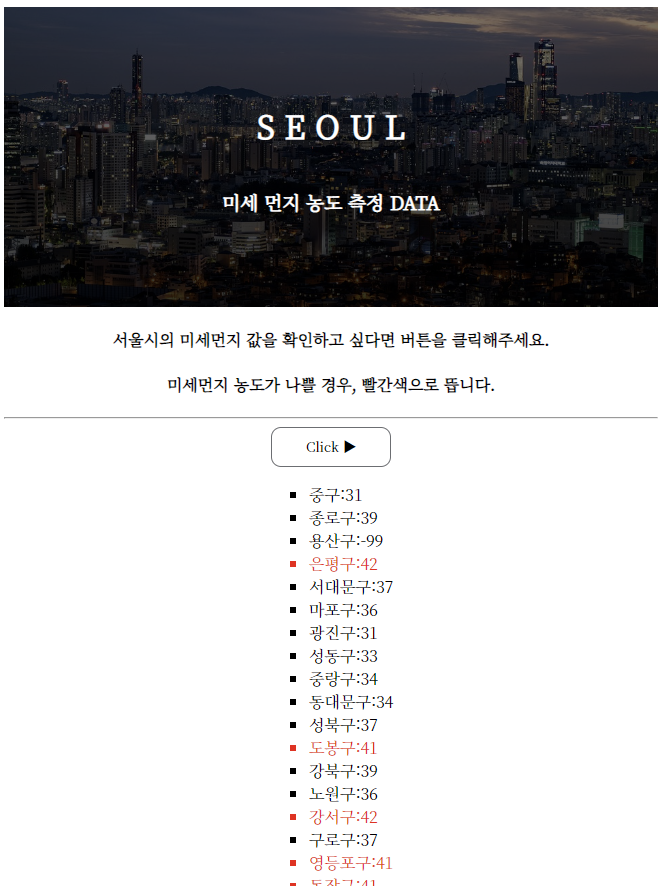
모바일로 보려고 가져오니까 메인 사진이 너무 크게 보여서 이걸 모바일 화면에서는 조금 줄이고 싶은데
1주차에 알려주신대로 max-width도 써보고 해도 잘 안되네요 ㅡㅜㅜ
코드 한번 확인해주세요~!
(첨부된 코드는 max-width 적용 안 한 코드입니다)
- 지금 코드로 보이는 화면(메인 이미지가 크게 보여서 결과값이 작게 보임
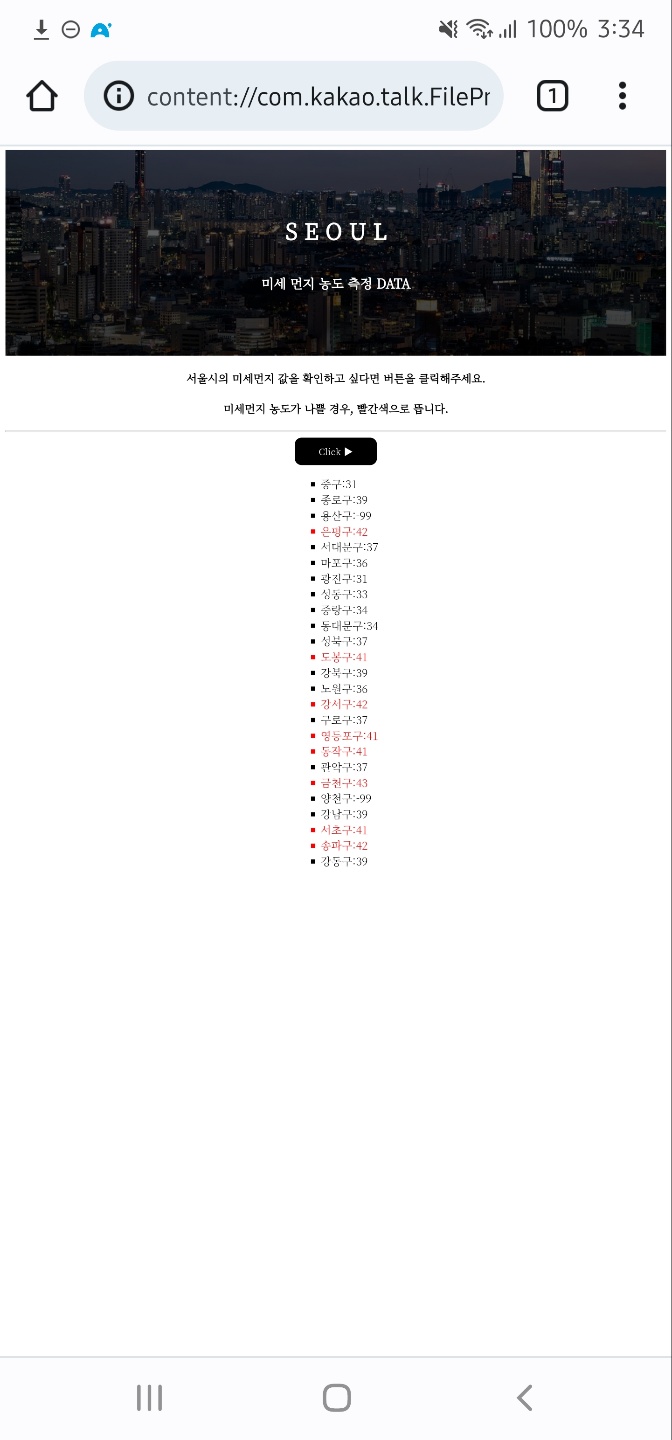
2.원하는 화면
-메인 사진이 작게 보이면서 결과값(이름,수치값)이 크게보임
작성한 코드 및 에러 메세지
<!DOCTYPE html>
<html lang="ko">

<head>
    <meta charset="UTF-8">
    <title>서울시 미세먼지 농도</title>
    <script src="https://ajax.googleapis.com/ajax/libs/jquery/3.4.1/jquery.min.js"></script>
    <link href="https://fonts.googleapis.com/css2?family=Noto+Serif+KR:wght@200;300&display=swap" rel="stylesheet">

    <style>
    *{font-family: 'Noto Serif KR', serif;}
    .mainbox{
        height: 300px;
        color: white;

        background-image: linear-gradient(0deg, rgba(0, 0, 0, 0.8), rgba(0, 0, 0, 0.5)), url('https://cdn.pixabay.com/photo/2022/09/16/17/07/city-7459162_960_720.jpg');
        background-position: center;
        background-size: cover;

        display: flex;
        flex-direction: column;
        align-items: center;
        justify-content: center;
    }
    .comment {
        text-align: center;
    }

    .mise_contents>button{
        background-color: white;

        width: 120px;
        height: 40px;
        border-radius: 10px;
        border: 1px solid #6b6e72;
        }
    .mise_contents>button:hover {
         border: 2px solid black;
         background-color: black;
         color: white;
            }
    .mise_contents{
        display: flex;
        flex-direction: column;
        align-items: center;
        justify-content: center;
    }
    .bad{
        color: red;
            }
    </style>
    <script>
        function c1() {
            $('#list_up').empty()
            $.ajax({
                type: "GET",
                url: "http://spartacodingclub.shop/sparta_api/seoulair",
                data: {},
                success: function (response) {
                    let rows = response['RealtimeCityAir']['row']
                    for (let i = 0; i < rows.length; i++) {
                        let gu_name = rows[i]['MSRSTE_NM']
                        let gu_mise = rows[i]['IDEX_MVL']
                        let temp_html=``
                        if(gu_mise > 40) {
                            temp_html=`<li class="bad">${gu_name}:${gu_mise}</li>`
                            }else{
                            temp_html=`<li>${gu_name}:${gu_mise}</li>`
                        }
                        $('#list_up').append(temp_html)
                    }
                }
            })
        }


    </script>
</head>


<body>
    <div class="mainbox">
        <h1>S E O U L</h1>
        <h3> 미세 먼지 농도 측정 DATA</h3>
    </div>

    <div class="comment">
        <h4>서울시의 미세먼지 값을 확인하고 싶다면 버튼을 클릭해주세요.</h4>
        <h4>미세먼지 농도가 나쁠 경우, 빨간색으로 뜹니다.</h4>
    </div>
    <hr>


    <div class="mise_contents">
        <button onclick="c1()" > Click ▶ </button>
        <ul id="list_up" style="list-style-type: square;">
        </ul>
    </div>


</body>
</html>


댓글 알림
