커뮤니티

포인트
쿠폰
내 강의실
국비 신청 내역
증명서
계정
로그아웃
학습 질문
개발 일지
나의 활동
답변 완료
4주차 숙제 중 console창에 찍는 도중 오류
undefined주차


김*영
댓글
20
・
추천
0
・
조회수
35
조회수
35
답변 완료
4주차 숙제해설 3분 12초 부분에서
name과 comment를 콘솔에 찍는 과정인데요
이전 강의들에서는 오류가 안났었는데 팬명록 만들기에서 오류가 나서 질문드립니다 ㅠㅠ
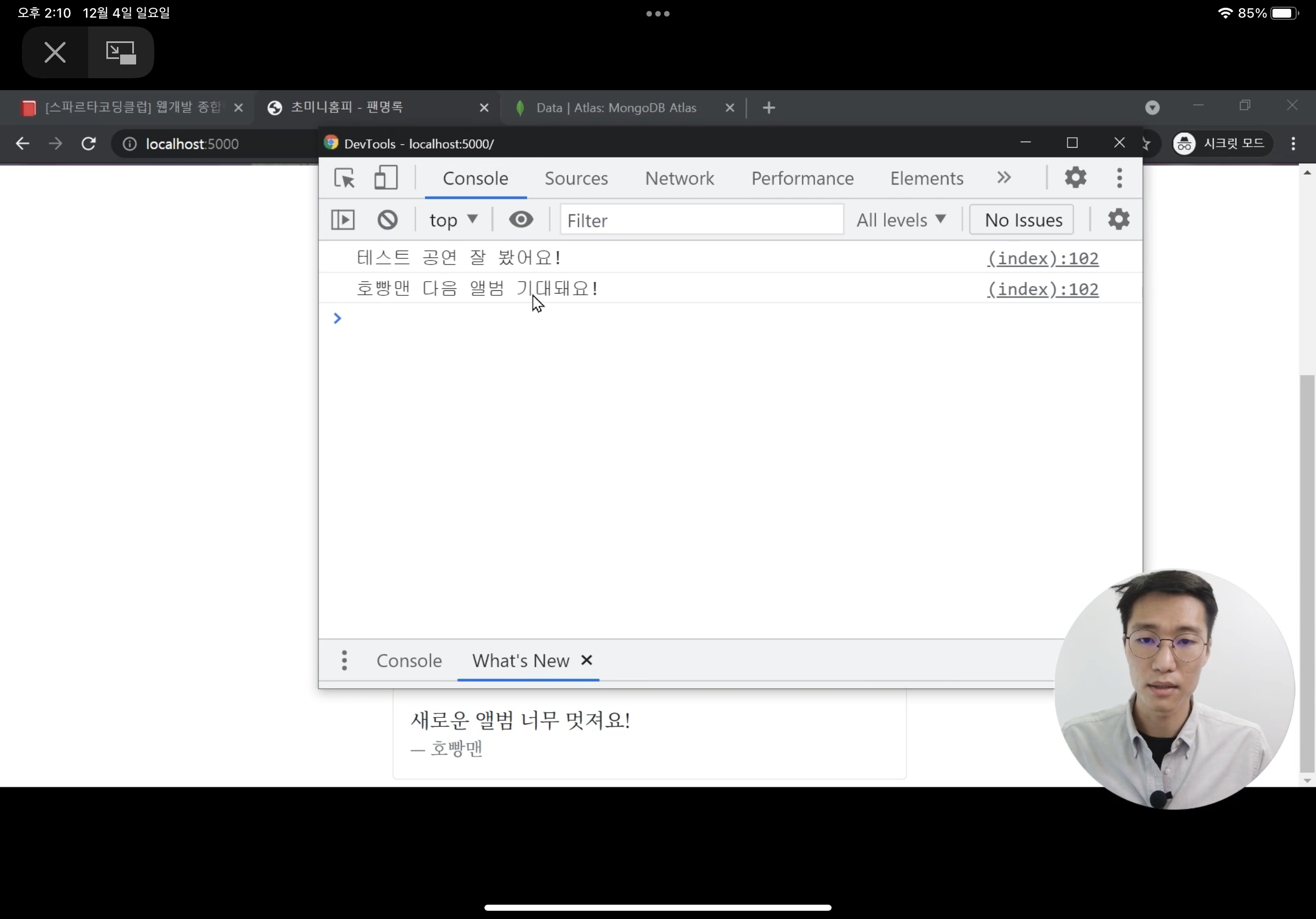
이부분인데 저는
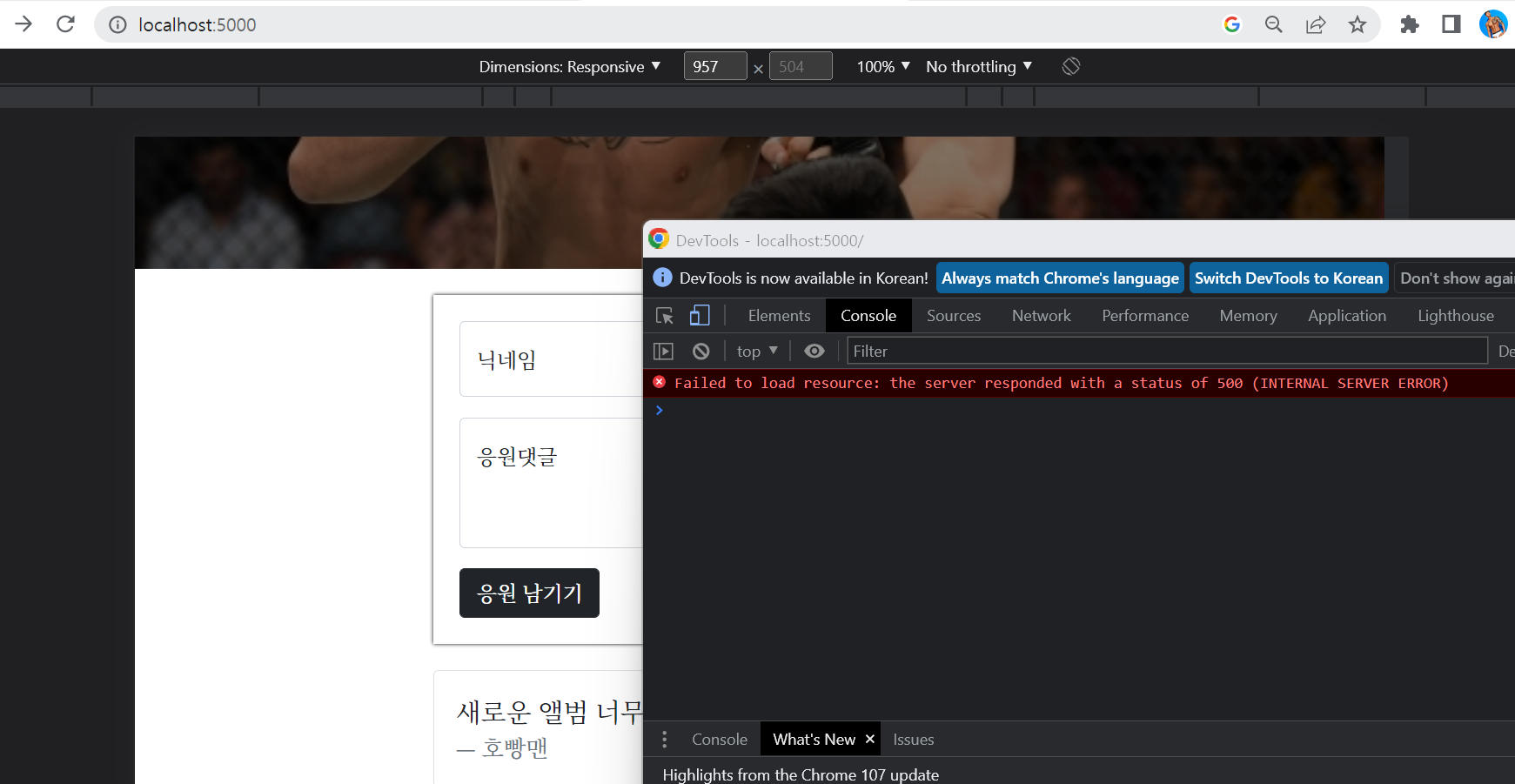
이렇게 오류가 나고 있구요
현재 코드는
[app.py]
from flask import Flask, render_template, request, jsonify
app = Flask(__name__)

from pymongo import MongoClient
import certifi
ca = certifi.where()
client = MongoClient('mongodb+srv://superganzidaeyoung:whwrkswl12@cluster0.mt22j27.mongodb.net/Cluster0?retryWrites=true&w=majority', tlsCAFile = ca)
db = client.dbsparta

@app.route('/')
def home():
   return render_template('index.html')

@app.route("/homework", methods=["POST"])
def homework_post():
    name_receive = request.form['name_give']
    comment_receive = request.form['comment_give']

    doc = {
        'name' :name_receive,
        'comment':comment_receive
    }

    db.homework.insert_one(doc)

    return jsonify({'msg':'응원 완료!'})

@app.route("/homework", methods=["GET"])
def homework_get():
    comment_list = list(db.homework.find({}, {'_id' : False}))
    return jsonify({'comments' : comment_list })

if __name__ == '__main__':
   app.run('0.0.0.0', port=5000, debug=True)
[index.html]
<!DOCTYPE html>
<html lang="en">
<head>
    <meta charset="UTF-8">
    <meta http-equiv="X-UA-Compatible" content="IE=edge">
    <meta name="viewport" content="width=device-width, initial-scale=1.0">

    <link href="https://cdn.jsdelivr.net/npm/bootstrap@5.0.2/dist/css/bootstrap.min.css" rel="stylesheet"
        integrity="sha384-EVSTQN3/azprG1Anm3QDgpJLIm9Nao0Yz1ztcQTwFspd3yD65VohhpuuCOmLASjC" crossorigin="anonymous">
    <script src="https://ajax.googleapis.com/ajax/libs/jquery/3.5.1/jquery.min.js"></script>
    <script src="https://cdn.jsdelivr.net/npm/bootstrap@5.0.2/dist/js/bootstrap.bundle.min.js"
        integrity="sha384-MrcW6ZMFYlzcLA8Nl+NtUVF0sA7MsXsP1UyJoMp4YLEuNSfAP+JcXn/tWtIaxVXM"
        crossorigin="anonymous"></script>

    <title>초미니홈피 - 팬명록</title>

    <link href="https://fonts.googleapis.com/css2?family=Noto+Serif+KR:wght@200;300;400;500;600;700;900&display=swap" rel="stylesheet">
    <style>
        * {
            font-family: 'Noto Serif KR', serif;
        }
        .mypic {
            width: 100%;
            height: 300px;

            background-image: linear-gradient(0deg, rgba(0, 0, 0, 0.5), rgba(0, 0, 0, 0.5)), url('http://www.sportsq.co.kr/news/photo/201906/402578_404947_045.jpg');
            background-position: center 30%;
            background-size: cover;

            color: white;

            display: flex;
            flex-direction: column;
            align-items: center;
            justify-content: center;
        }

        .mypost {
            width: 95%;
            max-width: 500px;
            margin: 20px auto 20px auto;

            box-shadow: 0px 0px 3px 0px black;
            padding: 20px;
        }

        .mypost > button {
            margin-top: 15px;
        }

        .mycards {
            width: 95%;
            max-width: 500px;
            margin: auto;
        }

        .mycards > .card {
            margin-top: 10px;
            margin-bottom: 10px;
        }
    </style>
    <script>
        $(document).ready(function(){
            set_temp()
            show_comment()
        });
        function set_temp(){
            $.ajax({
                type: "GET",
                url: "http://spartacodingclub.shop/sparta_api/weather/seoul",
                data: {},
                success: function (response) {
                    $('#temp').text(response['temp'])
                }
            })
        }
        function save_comment(){
            $.ajax({
                type: 'POST',
                url: '/homework',
                data: {sample_give:'데이터전송'},
                success: function (response) {
                    alert(response['msg'])
                    window.location.reload()
                }
            })
        }
        function show_comment(){
            $.ajax({
                type: "GET",
                url: "/homework",
                data: {},
                success: function (response) {
                    let rows = response['comments']
                    for (let i = 0; i < rows.length; i++) {
                        let name = rows[i]['name']
                        let comment = rows[i]['comment']

                        console.log(name, comment)
                    }
                }
            });
        }
    </script>
</head>
<body>
    <div class="mypic">
        <h1>정찬성 팬명록</h1>
        <p>현재기온: <span id="temp">36</span>도</p>
    </div>
    <div class="mypost">
        <div class="form-floating mb-3">
            <input type="text" class="form-control" id="name" placeholder="url">
            <label for="floatingInput">닉네임</label>
        </div>
        <div class="form-floating">
            <textarea class="form-control" placeholder="Leave a comment here" id="comment"
                style="height: 100px"></textarea>
            <label for="floatingTextarea2">응원댓글</label>
        </div>
        <button onclick="save_comment()" type="button" class="btn btn-dark">응원 남기기</button>
    </div>
    <div class="mycards" id="comment-list">
        <div class="card">
            <div class="card-body">
                <blockquote class="blockquote mb-0">
                    <p>새로운 앨범 너무 멋져요!</p>
                    <footer class="blockquote-footer">호빵맨</footer>
                </blockquote>
            </div>
        </div>
        <div class="card">
            <div class="card-body">
                <blockquote class="blockquote mb-0">
                    <p>새로운 앨범 너무 멋져요!</p>
                    <footer class="blockquote-footer">호빵맨</footer>
                </blockquote>
            </div>
        </div>
        <div class="card">
            <div class="card-body">
                <blockquote class="blockquote mb-0">
                    <p>새로운 앨범 너무 멋져요!</p>
                    <footer class="blockquote-footer">호빵맨</footer>
                </blockquote>
            </div>
        </div>
    </div>
</body>
</html>
이렇게 되구 있습니다 ㅠㅠㅠ
뭐가 문제일가요?


댓글 알림
