커뮤니티

포인트
쿠폰
내 강의실
국비 신청 내역
증명서
계정
로그아웃
학습 질문
개발 일지
나의 활동
답변 완료
2주차 복습 중인데 팝업이 뜨는 이유를 모르겠어요
undefined주차


이*아
댓글
1
・
추천
0
・
조회수
6
조회수
6
답변 완료
* 겪고 있는 문제 상황을 최대한 자세하게 작성해주세요.
* 문제 해결을 위해 어떤 시도를 해보았는지 구체적으로 함께 알려주세요.
2주차 숙제 복기하고 있는데 아래 같은 팝업이 뜹니다.
제가 원하는 자리에 페이지 새로 고침 시 온도 업데이트가 잘 되는데요.
팝업이 뜨는 이유를 모르겠어요.
보고 계신 화면
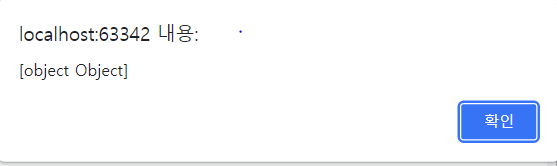
전체를 캡처해 주시면, 튜터님들이 빠르게 상황을 이해할 수 있어요.
작성한 코드 및 에러 메세지
<!doctype html>
<html lang="ko">
  <head>
    <meta charset="UTF-8">
    <title>JQuery 연습하고 가기!</title>
    <!-- JQuery를 import 합니다 -->
    <script src="https://ajax.googleapis.com/ajax/libs/jquery/3.4.1/jquery.min.js"></script>

    <style type="text/css">
      div.question-box {
        margin: 10px 0 20px 0;
      }
      div.question-box > div {
        margin-top: 30px;
      }

    </style>

    <script>

      $(document).ready
      (function()
      {
        alert($.ajax({
                  type: "GET",
                  url: "http://spartacodingclub.shop/sparta_api/weather/seoul",
                  data: {},
                  success: function (response) {
                    let temp = response['temp']
                    $('#temp').text(temp)
                  }
                })
        )
      });


    </script>

  </head>
  <body>
    <h1>지금 이곳의 날씨는?</h1>
    <p> 현재 온도 : <span id="temp">00.00</span></p>
    <hr/>
      <div>
        <img id="img-rtan" width="300" src="http://spartacodingclub.shop/static/images/rtans/SpartaIcon11.png"/>
        <h1 id="text-rtan">공부하는 모습이 머시썽</h1>
      </div>
    </div>
  </body>
</html>
한 코드 전체와 에러 메시지를 첨부해 주세요.
Tip 1) </> 아이콘을 눌러 코드박스를 만들어 보세요.
Tip 2) Ctrl+A(맥의 경우 Command+A) 단축키로 코드를 한 번에 선택할 수 있어요!


댓글 알림
