


* 겪고 있는 문제 상황을 최대한 자세하게 작성해주세요.
* 문제 해결을 위해 어떤 시도를 해보았는지 구체적으로 함께 알려주세요.
마지막 버튼안의 텍스트를 박스 안에서 위아래 정렬을 하고싶습니다,
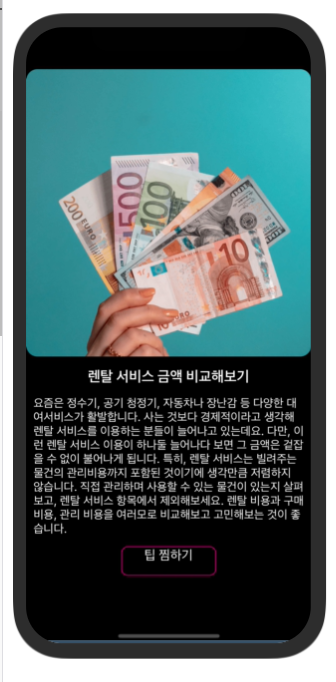
작성한 코드 및 에러 메세지
import { StatusBar } from "expo-status-bar"
import { View, Text, Image, SafeAreaView, StyleSheet, TouchableOpacity } from "react-native"
const tip = {
"idx": 9,
"category": "재테크",
"title": "렌탈 서비스 금액 비교해보기",
"image": "https://storage.googleapis.com/sparta-image.appspot.com/lecture/money1.png",
"desc": "요즘은 정수기, 공기 청정기, 자동차나 장난감 등 다양한 대여서비스가 활발합니다. 사는 것보다 경제적이라고 생각해 렌탈 서비스를 이용하는 분들이 늘어나고 있는데요. 다만, 이런 렌탈 서비스 이용이 하나둘 늘어나다 보면 그 금액은 겉잡을 수 없이 불어나게 됩니다. 특히, 렌탈 서비스는 빌려주는 물건의 관리비용까지 포함된 것이기에 생각만큼 저렴하지 않습니다. 직접 관리하며 사용할 수 있는 물건이 있는지 살펴보고, 렌탈 서비스 항목에서 제외해보세요. 렌탈 비용과 구매 비용, 관리 비용을 여러모로 비교해보고 고민해보는 것이 좋습니다. ",
"date": "2020.09.09"
}
export default function DetailPage() {
return (
<View style={styles.container}>
<StatusBar style='light'></StatusBar>
<SafeAreaView></SafeAreaView>
<Image
source={{ uri: tip.image }}
resizeMode={"cover"}
style={styles.image}
/>
<View style={styles.bottom}>
<Text style={styles.title}>{tip.title}</Text>
<Text style={styles.desc}>{tip.desc}</Text>
<TouchableOpacity style={styles.buttoncontainer}>
<Text style={styles.button}>팁 찜하기</Text>
</TouchableOpacity>
</View>
</View>
)
}
const styles = StyleSheet.create({
container: {
flex: 1,
backgroundColor: 'black',
},
image: {
flex: 1,
borderRadius: 15,
marginTop: 10
},
bottom: {
flex: 1,
},
title: {
color: 'white',
fontSize: 20,
alignSelf: 'center',
marginTop: 15,
fontWeight: "600",
},
desc: {
color: 'white',
fontSize: 16,
width: '95%',
alignSelf: 'center',
marginTop: 15,
},
buttoncontainer: {
marginTop: 15,
alignSelf: 'center',
borderStyle: 'solid',
borderColor: '#ff1493',
borderWidth: 1,
borderRadius: 9,
width: 130,
height: 40,
backgroundColor: 'black',
},
button: {
flex: 1,
fontSize: 18,
color: 'white',
alignSelf: 'center',
fontWeight: "400",
justifyContent: 'center',
}
})


