


* 겪고 있는 문제 상황을 최대한 자세하게 작성해주세요.
* 문제 해결을 위해 어떤 시도를 해보았는지 구체적으로 함께 알려주세요.
4강에 흰색 배경 버튼을 똑같이 만들었는데 흰색버튼이 안만들어져요 ㅠ
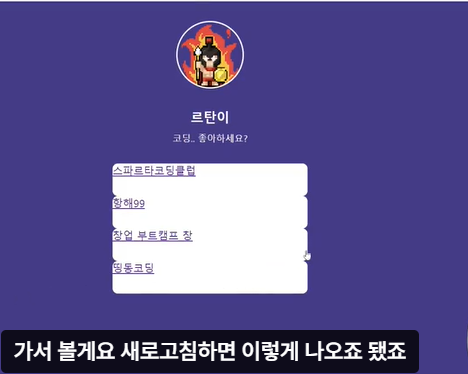
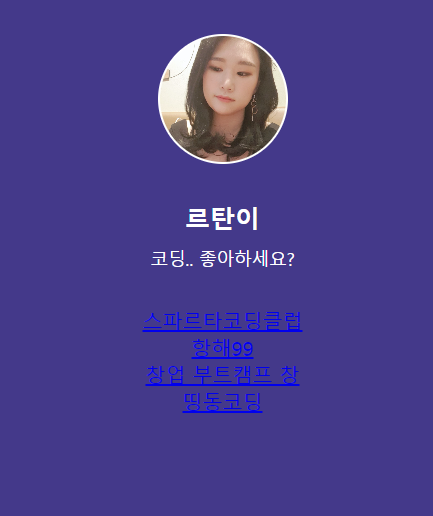
작성한 코드 및 에러 메세지
<!DOCTYPE html>
<html lang="en">
<head>
<meta charset="UTF-8" />
<meta http-equiv="X-UA-Compatible" content="IE=edge" />
<meta name="viewport" content="width=device-width, initial-scale=1.0" />
<meta property="og:title" content="르탄이 - 프로필 링크" />
<meta property="og:description" content="어서와 코딩은 처음이지?" />
<meta property="og:image" content="공유할 이미지" />
<title>르탄이 - 프로필 링크</title>
<style>
body {
background-color: #44398A;
}
.profile {
width: 100px;
height: 100px;
border-radius: 100%;
border : 2px solid white;
background-image:url('규빈사진.jpg');
background-position: center;
background-size: cover;
}
.main {
color: white;
font-size: 20px;
margin-top: 30px;
margin-bottom: 10px;
}
.sub {
color: white;
font-size: 14px;
margin-top: 0px;
margin-bottom: 30px;
}
.wrap {
width: 300px;
margin: 30px auto 0px auto;
display: flex;
flex-direction: column;
justify-content: center;
align-items: center;
}
.warp > a {
width: 300px;
height: 50px;
background-color: white;
border-radius: 8px;
}
</style>
</head>
<body>
<div class="wrap">
<div class="profile"></div>
<h1 class="main">르탄이</h1>
<p class="sub">코딩.. 좋아하세요?</p>
<a target="_blank" href="https://spartacodingclub.kr/">스파르타코딩클럽</a>
<a target="_blank" href="https://hanghae99.spartacodingclub.kr/">항해99</a>
<a target="_blank" href="https://chang.spartacodingclub.kr/">창업 부트캠프 창</a>
<a target="_blank" href="https://ddingdong.spartacodingclub.kr/">띵동코딩</a>
</div>
</body>
</html>
오류 발생 시, 작성한 코드 전체와 에러 메시지를 첨부해 주세요.
Tip 1) </> 아이콘을 눌러 코드박스를 만들어 보세요.
Tip 2) Ctrl+A(맥의 경우 Command+A) 단축키로 코드를 한 번에 선택할 수 있어요!


