커뮤니티

포인트
쿠폰
내 강의실
국비 신청 내역
증명서
계정
로그아웃
학습 질문
개발 일지
나의 활동
답변 완료
2주차 숙제에서 그대로 했는데 오류가 발생합니다.
[왕초보] 나만의 수익성 앱, 앱개발 종합반
2주차


김*규
댓글
5
・
추천
0
・
조회수
19
조회수
19
답변 완료
* 겪고 있는 문제 상황을 최대한 자세하게 작성해주세요.
* 문제 해결을 위해 어떤 시도를 해보았는지 구체적으로 함께 알려주세요.
안녕하세요. 현재 앱개발 2주차 숙제를 하고 있습니다.
- pages 폴더를 만들고
- Aboutpage.js , Mainpage.js 를 만들고
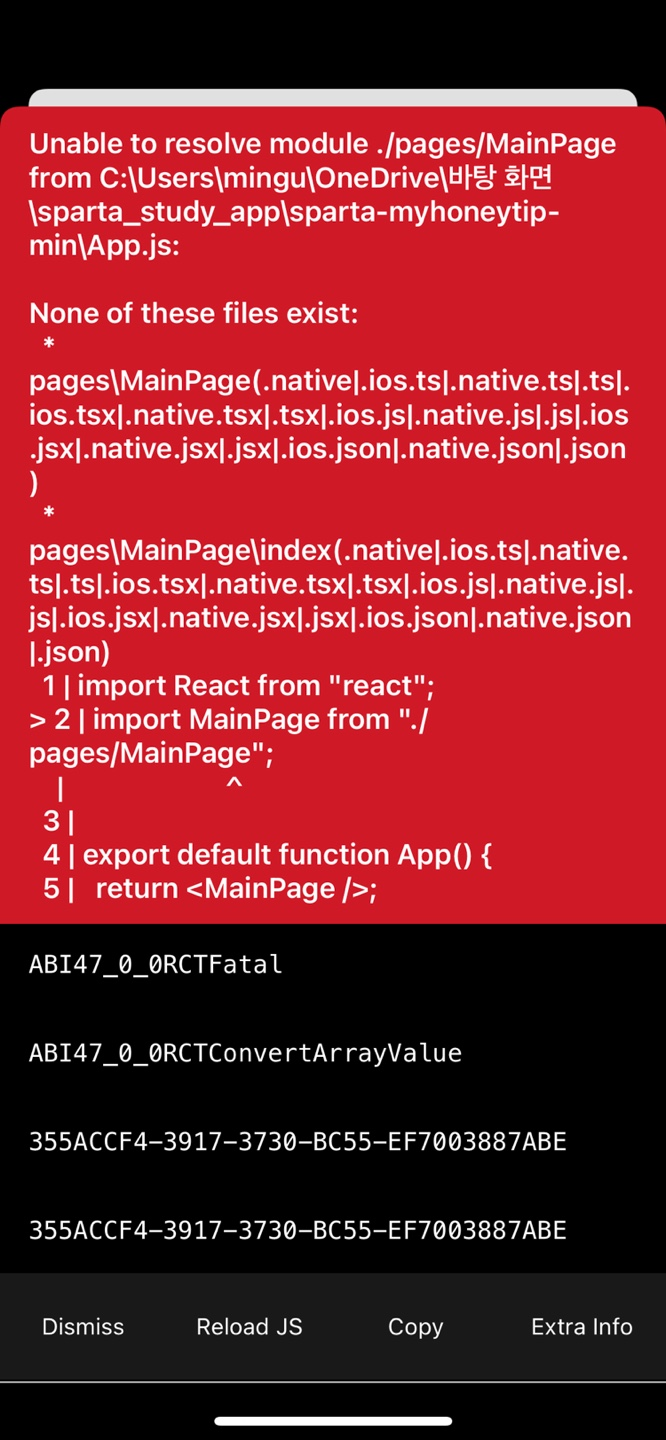
- 강의 자료에서 하는 대로 그대로 따라했는데 이런 오류가 떴습니다.
보고 계신 화면 전체를 캡처해 주시면, 튜터님들이 빠르게 상황을 이해할 수 있어요
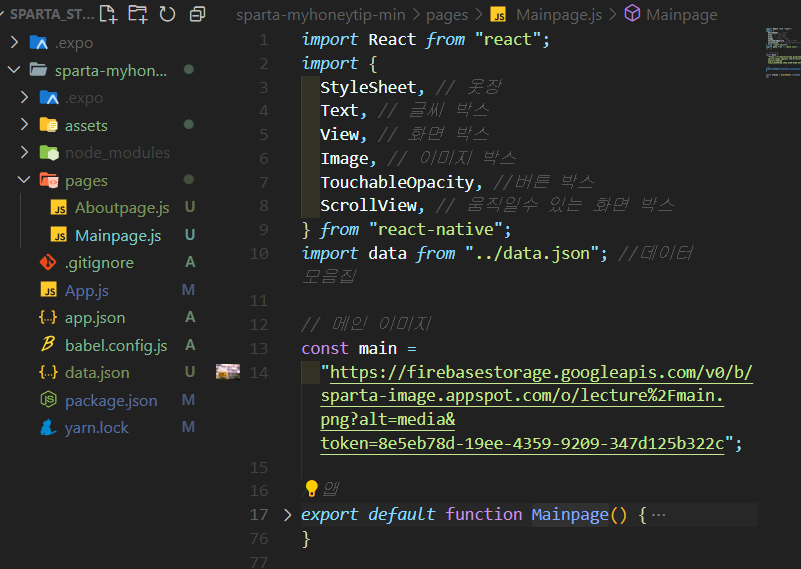
Mainpage.js 코드.
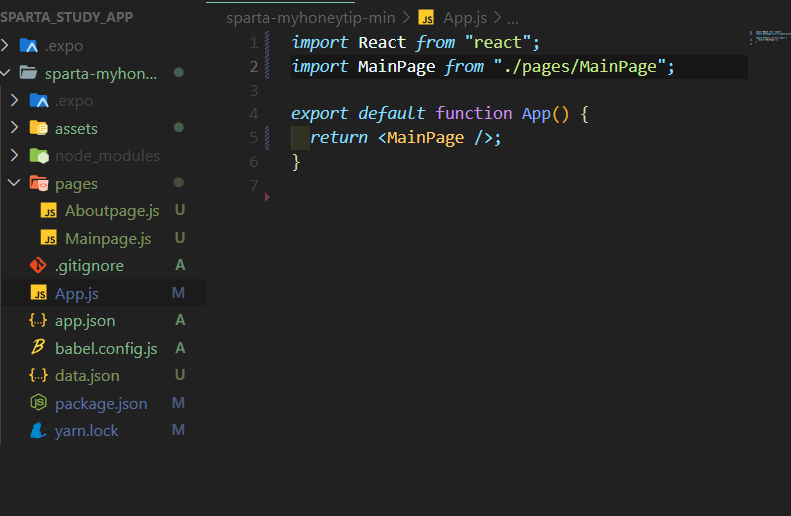
- App.js코드
Mainpage.js
import React from "react";
import {
  StyleSheet, // 옷장
  Text, // 글씨 박스
  View, // 화면 박스
  Image, // 이미지 박스
  TouchableOpacity, //버튼 박스
  ScrollView, // 움직일수 있는 화면 박스
} from "react-native";
import data from "../data.json"; //데이터 모음집


// 메인 이미지
const main =
  "https://firebasestorage.googleapis.com/v0/b/sparta-image.appspot.com/o/lecture%2Fmain.png?alt=media&token=8e5eb78d-19ee-4359-9209-347d125b322c";


//앱
export default function Mainpage() {
  // 데이터 모음집에서 팁
  let tip = data.tip;
  // 오늘의 날씨
  let todayWeather = 10 + 17;
  let todayCondition = "흐림";


  //앱 화면 송출
  return (
    //전체 화면 박스
    <ScrollView style={styles.container} indicatorStyle={"white"}>
      <Text style={styles.title}>나만의 꿀팁</Text>
      <Text style={styles.weather}>
        오늘의 날씨: {todayWeather + "°C " + todayCondition}
        {""}
      </Text>
      <Image style={styles.mainImage} source={{ uri: main }} />
      <ScrollView
        style={styles.middleContainer}
        horizontal
        //스크롤 색깔
        indicatorStyle={"white"}
      >
        {/* 버튼박스1 */}
        <TouchableOpacity style={styles.middleButton01}>
          {/* 글자 */}
          <Text style={styles.middleButtonText}>생활</Text>
        </TouchableOpacity>
        <TouchableOpacity style={styles.middleButton02}>
          <Text style={styles.middleButtonText}>재테크</Text>
        </TouchableOpacity>
        <TouchableOpacity style={styles.middleButton03}>
          <Text style={styles.middleButtonText}>반려견</Text>
        </TouchableOpacity>
        <TouchableOpacity style={styles.middleButton04}>
          <Text style={styles.middleButtonText}>꿀팁 찜</Text>
        </TouchableOpacity>
      </ScrollView>
      <View style={styles.cardContainer}>
        {/* 하나의 카드 영역을 나타내는 View */}
        {tip.map((content, i) => {
          return (
            <View style={styles.card} key={i}>
              <Image style={styles.cardImage} source={{ uri: content.image }} />
              <View style={styles.cardText}>
                <Text style={styles.cardTitle} numberOfLines={1}>
                  {content.title}
                </Text>
                <Text style={styles.cardDesc} numberOfLines={3}>
                  {content.desc}
                </Text>
                <Text style={styles.cardDate}>{content.date}</Text>
              </View>
            </View>
          );
        })}
      </View>
    </ScrollView>
  );
}


const styles = StyleSheet.create({
  container: {
    //앱의 배경 색
    backgroundColor: "#fff",
  },
  title: {
    //폰트 사이즈
    fontSize: 20,
    //폰트 두께
    fontWeight: "700",
    //위 공간으로 부터 이격
    marginTop: 50,
    //왼쪽 공간으로 부터 이격
    marginLeft: 20,
  },
  weather: {
    alignSelf: "flex-end",
    paddingRight: 20,
  },
  mainImage: {
    //컨텐츠의 넓이 값
    width: "90%",
    //컨텐츠의 높이 값
    height: 200,
    //컨텐츠의 모서리 구부리기
    borderRadius: 10,
    marginTop: 20,
    //컨텐츠 자체가 앱에서 어떤 곳에 위치시킬지 결정(정렬기능)
    //각 속성의 값들은 공식문서에 고대로~ 나와 있음
    alignSelf: "center",
  },
  middleContainer: {
    marginTop: 20,
    marginLeft: 10,
    height: 60,
  },
  middleButton01: {
    width: 100,
    height: 50,
    padding: 15,
    backgroundColor: "#fdc453",
    borderColor: "deeppink",
    borderRadius: 15,
    margin: 7,
  },
  middleButton02: {
    width: 100,
    height: 50,
    padding: 15,
    backgroundColor: "#fe8d6f",
    borderRadius: 15,
    margin: 7,
  },
  middleButton03: {
    width: 100,
    height: 50,
    padding: 15,
    backgroundColor: "#9adbc5",
    borderRadius: 15,
    margin: 7,
  },
  middleButtonText: {
    color: "#fff",
    fontWeight: "700",
    //텍스트의 현재 위치에서의 정렬
    textAlign: "center",
  },
  middleButton04: {
    width: 100,
    height: 50,
    padding: 15,
    backgroundColor: "#f886a8",
    borderRadius: 15,
    margin: 7,
  },
  cardContainer: {
    marginTop: 10,
    marginLeft: 10,
  },
  card: {
    flex: 1,
    //컨텐츠들을 가로로 나열
    //세로로 나열은 column <- 디폴트 값임
    flexDirection: "row",
    margin: 10,
    borderBottomWidth: 0.5,
    borderBottomColor: "#eee",
    paddingBottom: 10,
  },
  cardImage: {
    flex: 1,
    width: 100,
    height: 100,
    borderRadius: 10,
  },
  cardText: {
    flex: 2,
    flexDirection: "column",
    marginLeft: 10,
  },
  cardTitle: {
    fontSize: 20,
    fontWeight: "700",
  },
  cardDesc: {
    fontSize: 15,
  },
  cardDate: {
    fontSize: 10,
    color: "#A6A6A6",
  },
});
App.js
import React from "react";
import MainPage from "./pages/MainPage";


export default function App() {
  return <MainPage />;
}
오류 메세지
None of these files exist:
  * pages\MainPage(.native|.ios.ts|.native.ts|.ts|.ios.tsx|.native.tsx|.tsx|.ios.js|.native.js|.js|.ios.jsx|.native.jsx|.jsx|.ios.json|.native.json|.json)
  * pages\MainPage\index(.native|.ios.ts|.native.ts|.ts|.ios.tsx|.native.tsx|.tsx|.ios.js|.native.js|.js|.ios.jsx|.native.jsx|.jsx|.ios.json|.native.json|.json)
  1 | import React from "react";
> 2 | import MainPage from "./pages/MainPage";
    |                       ^
  3 |
  4 | export default function App() {
  5 |   return <MainPage />;
iOS Bundling failed 1041ms
Unable to resolve module ../pages/MainPage from C:\Users\mingu\OneDrive\바탕 화면\sparta_study_app\sparta-myhoneytip-min\App.js:


None of these files exist:
  * ..\pages\MainPage(.native|.ios.ts|.native.ts|.ts|.ios.tsx|.native.tsx|.tsx|.ios.js|.native.js|.js|.ios.jsx|.native.jsx|.jsx|.ios.json|.native.json|.json)
  * ..\pages\MainPage\index(.native|.ios.ts|.native.ts|.ts|.ios.tsx|.native.tsx|.tsx|.ios.js|.native.js|.js|.ios.jsx|.native.jsx|.jsx|.ios.json|.native.json|.json)


댓글 알림
