


* 겪고 있는 문제 상황을 최대한 자세하게 작성해주세요.
* 문제 해결을 위해 어떤 시도를 해보았는지 구체적으로 함께 알려주세요.
아래와 같은 cs 오류가 발생하네요.
검색해보니 cs0117은 ~에 대한 정의가 없어서 발생하고
cs 1601은 무언가 누락되었다고하는데
무엇이 빠졋고 문제인지 잘 모르겠습니다.
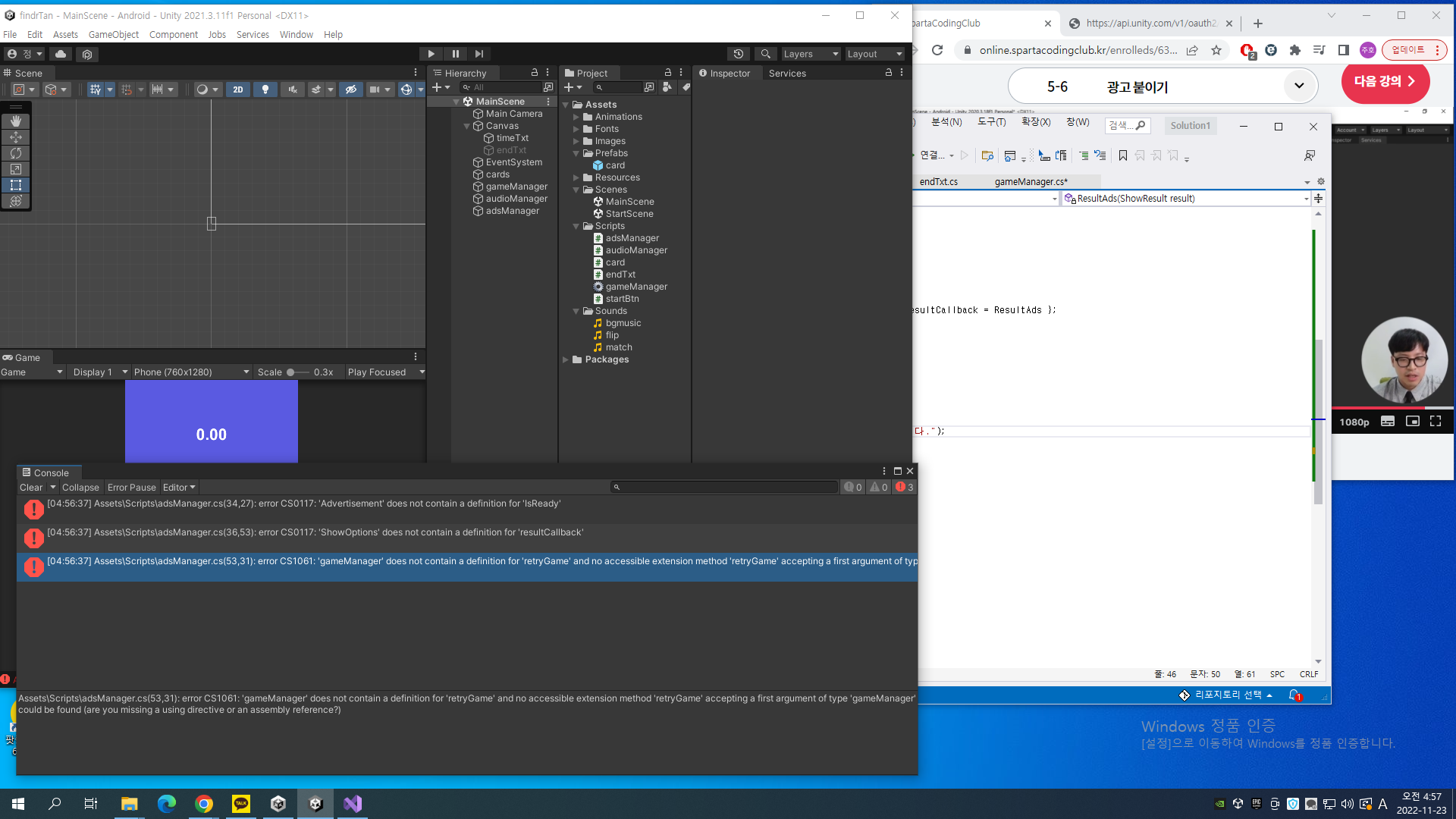
작성한 코드 및 에러 메세지
오류 발생 시, 작성한 코드 전체와 에러 메시지를 첨부해 주세요.
Tip 1) </> 아이콘을 눌러 코드박스를 만들어 보세요.
(adsManager.cs)
using System.Collections;
using System.Collections.Generic;
using UnityEngine;
using UnityEngine.Advertisements;
public class adsManager : MonoBehaviour
{
public static adsManager I;
string adType;
string gameId;
void Awake()
{
I = this;
if (Application.platform == RuntimePlatform.IPhonePlayer)
{
adType = "Rewarded_iOS";
gameId = "5032642";
}
else
{
adType = "Rewarded_Android";
gameId = "5032643";
}
Advertisement.Initialize(gameId, true);
}
public void ShowRewardAd()
{
if (Advertisement.IsReady())
{
ShowOptions options = new ShowOptions { resultCallback = ResultAds };
Advertisement.Show(adType, options);
}
}
void ResultAds(ShowResult result)
{
switch (result)
{
case ShowResult.Failed:
Debug.LogError("광고 보기에 실패했습니다.");
break;
case ShowResult.Skipped:
Debug.Log("광고를 스킵했습니다.");
break;
case ShowResult.Finished:
// 광고 보기 보상 기능
gameManager.I.retryGame();
Debug.Log("광고 보기를 완료했습니다.");
break;
}
}
// Start is called before the first frame update
}
--------------------------------
(endTxt.cs)
using System.Collections;
using System.Collections.Generic;
using UnityEngine;
using UnityEngine.SceneManagement;
public class endTxt : MonoBehaviour
{
// Start is called before the first frame update
void Start()
{
}
// Update is called once per frame
void Update()
{
}
public void ReGame()
{
adsManager.I.ShowRewardAd();
}
}
--------------------------------
(gameManager.cs)
using System.Collections;
using System.Collections.Generic;
using UnityEngine;
using UnityEngine.UI;
using System.Linq;
using UnityEngine.SceneManagement;
public class gameManager : MonoBehaviour
{
public Text timeTxt;
public GameObject endTxt;
public GameObject card;
float time = 0.0f;
public static gameManager I;
public GameObject firstCard;
public GameObject secondCard;
public AudioSource audioSource;
public AudioClip match;
void Awake()
{
I = this;
}
// Start is called before the first frame update
void Start()
{
Time.timeScale = 1f;
int[] rtans = { 0, 0, 1, 1, 2, 2, 3, 3, 4, 4, 5, 5, 6, 6, 7, 7 };
rtans = rtans.OrderBy(item => Random.Range(-1.0f, 1.0f)).ToArray();
for (int i = 0; i < 16; i++)
{
GameObject newCard = Instantiate(card);
newCard.transform.parent = GameObject.Find("cards").transform;
float x = (i / 4) * 1.4f - 2.1f;
float y = (i % 4) * 1.4f - 3.0f;
newCard.transform.position = new Vector3(x, y, 0);
string rtanName = "rtan" + rtans[i].ToString();
newCard.transform.Find("front").GetComponent<SpriteRenderer>().sprite = Resources.Load<Sprite>(rtanName);
}
}
// Update is called once per frame
void Update()
{
time += Time.deltaTime;
timeTxt.text = time.ToString("N2");
if (time > 3f)
{
endTxt.SetActive(true);
Time.timeScale = 0.0f;
}
}
public void isMatched()
{
string firstCardImage = firstCard.transform.Find("front").GetComponent<SpriteRenderer>().sprite.name;
string secondCardImage = secondCard.transform.Find("front").GetComponent<SpriteRenderer>().sprite.name;
if(firstCardImage == secondCardImage)
{
audioSource.PlayOneShot(match);
firstCard.GetComponent<card>().destroyCard();
secondCard.GetComponent<card>().destroyCard();
int cardsLeft = GameObject.Find("cards").transform.childCount;
if(cardsLeft == 2)
{
Time.timeScale = 0f;
endTxt.SetActive(true);
}
}
else
{
firstCard.GetComponent<card>().closeCard();
secondCard.GetComponent<card>().closeCard();
}
firstCard = null;
secondCard = null;
}
void GameEnd()
{
Time.timeScale = 0f;
endTxt.SetActive(true);
}
public void retryGame()
{
SceneManager.LoadScene("MainScene");
}
}
Tip 2) Ctrl+A(맥의 경우 Command+A) 단축키로 코드를 한 번에 선택할 수 있어요!


