커뮤니티

포인트
쿠폰
내 강의실
국비 신청 내역
증명서
계정
로그아웃
학습 질문
개발 일지
나의 활동
답변 완료
1-20 숙제 질문
undefined주차


이*호
댓글
3
・
추천
0
・
조회수
9
조회수
9
답변 완료
* 겪고 있는 문제 상황을 최대한 자세하게 작성해주세요.
* 문제 해결을 위해 어떤 시도를 해보았는지 구체적으로 함께 알려주세요.
후기남기는 박스를 세로로 키우고 싶은데 어떻게 하죠?
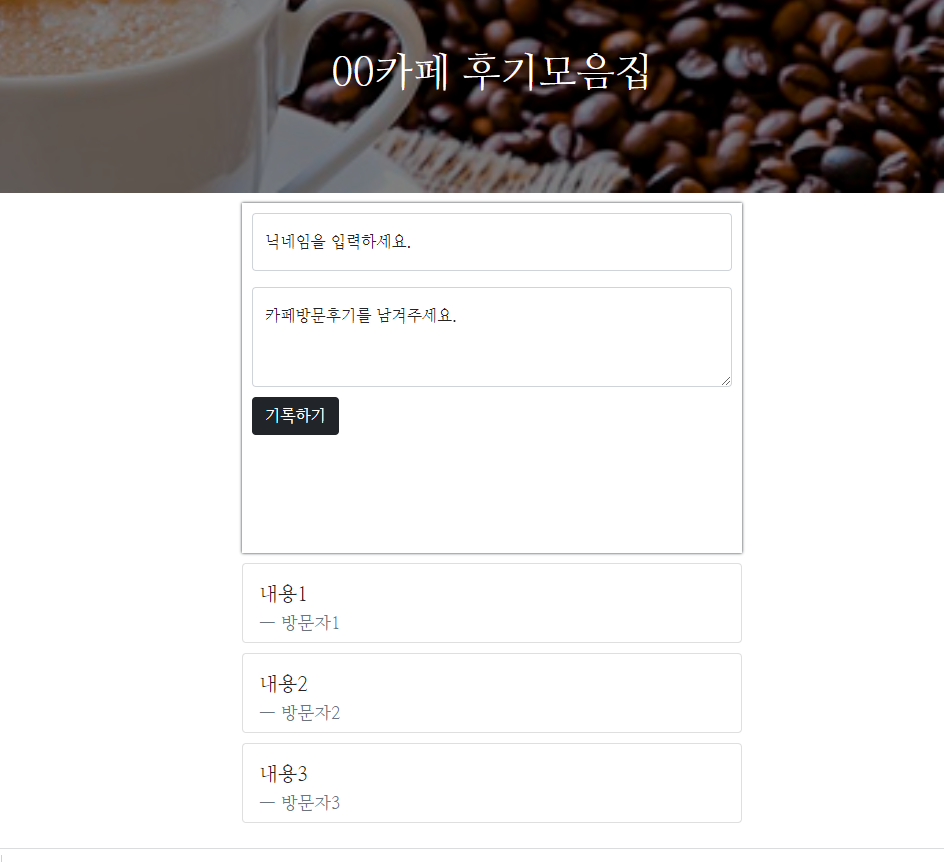
<!doctype html>
<html lang="en">

<head>

    <meta charset="utf-8">
    <meta name="viewport" content="width=device-width, initial-scale=1, shrink-to-fit=no">

    <link href="https://cdn.jsdelivr.net/npm/bootstrap@5.0.2/dist/css/bootstrap.min.css" rel="stylesheet"
        integrity="sha384-EVSTQN3/azprG1Anm3QDgpJLIm9Nao0Yz1ztcQTwFspd3yD65VohhpuuCOmLASjC" crossorigin="anonymous">
    <script src="https://ajax.googleapis.com/ajax/libs/jquery/3.5.1/jquery.min.js"></script>
    <script src="https://cdn.jsdelivr.net/npm/bootstrap@5.0.2/dist/js/bootstrap.bundle.min.js"
        integrity="sha384-MrcW6ZMFYlzcLA8Nl+NtUVF0sA7MsXsP1UyJoMp4YLEuNSfAP+JcXn/tWtIaxVXM"
        crossorigin="anonymous"></script>

    <title>스파르타코딩클럽 | 부트스트랩 연습하기</title>

    <link href="https://fonts.googleapis.com/css2?family=Nanum+Myeongjo&display=swap" rel="stylesheet">
    <style>
        *{
            font-family: 'Nanum Myeongjo', serif;
        }
        .주제목 {

            height: 225px;
            width:100%;
            max-width: 2000px;
            background-image: linear-gradient(0deg, rgba(0, 0, 0, 0.5), rgba(0, 0, 0, 0.5)), url(https://cdn.thescoop.co.kr/news/photo/202001/37882_51286_3655.jpg);
            background-position: center;
            background-size: cover;
            color: white;
            padding-bottom: 10px;

            display: flex;
            flex-direction: column;
            justify-content: center;
            align-items: center;
        }

        .쓰는곳 {
                max-width: 500px;
                        width:95%;
                       height:350px;
                        margin: 10px auto 10px auto ;
                        box-shadow: 0px 0px 3px 0px;
                        padding:10px;
        }
        .card {
            max-width: 500px;
                        width:95%;
                       height: 80px;
                        margin: 10px auto 10px auto ;

        }
        .myb {
            margin-top: 10px;
        }
        .form-floating {
            ;
        }


    </style>
</head>

<body>
    <div class="주제목">
          <h1 class="글씨1">00카페 후기모음집 </h1>
    </div>

        <div class="쓰는곳">
                <div class="form-floating mb-3">
                  <input type="email" class="form-control" id="작성2" placeholder="name@example.com">
                  <label for="작성2">닉네임을 입력하세요.</label>
                </div>

                    <div class="form-floating">
                      <textarea class="form-control" placeholder="Leave a comment here" id="floatingTextarea2" style="height: 100px"></textarea>
                      <label for="floatingTextarea2">카페방문후기를 남겨주세요.</label>
                    </div>

                <div class="myb">
                                <button type="button" class="btn btn-dark">기록하기</button>
                </div>
        </div>

        <div class="card">
          <div class="card-body">
            <blockquote class="blockquote mb-0">
              <p>내용1</p>
              <footer class="blockquote-footer">방문자1 </footer>
            </blockquote>
          </div>
        </div>
        <div class="card">
          <div class="card-body">
            <blockquote class="blockquote mb-0">
              <p>내용2</p>
              <footer class="blockquote-footer">방문자2</footer>
            </blockquote>
          </div>
        </div>
        <div class="card">
          <div class="card-body">
            <blockquote class="blockquote mb-0">
              <p>내용3</p>
              <footer class="blockquote-footer">방문자3 </footer>
            </blockquote>
          </div>
        </div>

</body>


댓글 알림
