


* 겪고 있는 문제 상황을 최대한 자세하게 작성해주세요.
* 문제 해결을 위해 어떤 시도를 해보았는지 구체적으로 함께 알려주세요.
detailpage.js 복사 붙이기 하고 ctrl+s 하고 난 이후 휴대폰에 원만 떠있고, 화면변화가 없는데 무엇이 문제입니까...
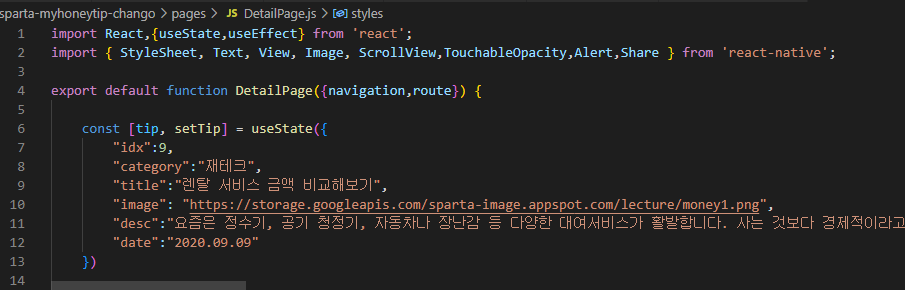
작성한 코드 및 에러 메세지
Windows PowerShell
Copyright (C) Microsoft Corporation. All rights reserved.
새로운 크로스 플랫폼 PowerShell 사용 https://aka.ms/pscore6
PS C:\Users\user\OneDrive\바탕 화면\sparta-study> cd sparta-myhoneytip-chango
PS C:\Users\user\OneDrive\바탕 화면\sparta-study\sparta-myhoneytip-chango> expo start
This command is being executed with the global Expo CLI. Learn more: https://blog.expo.dev/the-new-expo-cli-f4250d8e3421
To use the local CLI instead (recommended in SDK 46 and higher), run:
› npx expo start
Starting project at C:\Users\user\OneDrive\바탕 화면\sparta-study\sparta-myhoneytip-chango
Starting Metro Bundler
▄▄▄▄▄▄▄▄▄▄▄▄▄▄▄▄▄▄▄▄▄▄▄▄▄▄▄
█ ▄▄▄▄▄ █▀▄█▀ ▄█ ▄▄▄▄▄ █
█ █ █ █▄ ▄███ █ █ █ █
█ █▄▄▄█ █ ▀█▀█ ▀ ▀█ █▄▄▄█ █
█▄▄▄▄▄▄▄█ ▀▄█ █ ▀ █▄▄▄▄▄▄▄█
█▄ █ █▀▄▄▀█ ▀▄ ▀██▀ ▄▀▄▄▀█
██▀ ▀▄▀▀▄▄█▄ ██▄▀ ▀▀█▄▄█
██▄▄▀▄ ▄▀▀█▀██▄ █▀█ ▄█ ██▀█
█▄▀█ ▀▄▄ ▄ ██ ▄▄ ▀▀██▄█
█▄▄█▄██▄█▀▀▀▀██▄ ▄▄▄ █ ▄ █
█ ▄▄▄▄▄ █▄█▀▀▄▄▄ █▄█ ▀▄ █
█ █ █ █▀▀█▄█ ▀▀▄ ▄▄ █▀▄██
█ █▄▄▄█ █▀ ▀██ ▄█ █▄ ▄█▄█
█▄▄▄▄▄▄▄█▄██▄█▄▄█▄███▄▄█▄▄█
› Metro waiting on exp://192.168.219.102:19000
› Scan the QR code above with Expo Go (Android) or the Camera app (iOS)
› Press a │ open Android
› Press w │ open web
› Press r │ reload app
› Press m │ toggle menu
› Press ? │ show all commands
Logs for your project will appear below. Press Ctrl+C to exit.
› Detected a change in babel.config.js. Restart the server to see the new results.
Started Metro Bundler오류 발생 시, 작성한 코드 전체와 에러 메시지를 첨부해 주세요.
Tip 1) </> 아이콘을 눌러 코드박스를 만들어 보세요.
Tip 2) Ctrl+A(맥의 경우 Command+A) 단축키로 코드를 한 번에 선택할 수 있어요!


