


* 겪고 있는 문제 상황을 최대한 자세하게 작성해주세요.
* 문제 해결을 위해 어떤 시도를 해보았는지 구체적으로 함께 알려주세요.
강사님 코드를 그대로 붙여넣어 봤는데 Expo Go에서 사진처럼 오류가 뜹니다! 비주얼 스튜디오 problems에는 문제가 없다고 뜨는데 터미널에는 빨간 글씨가 뜨고요!
보고 계신 화
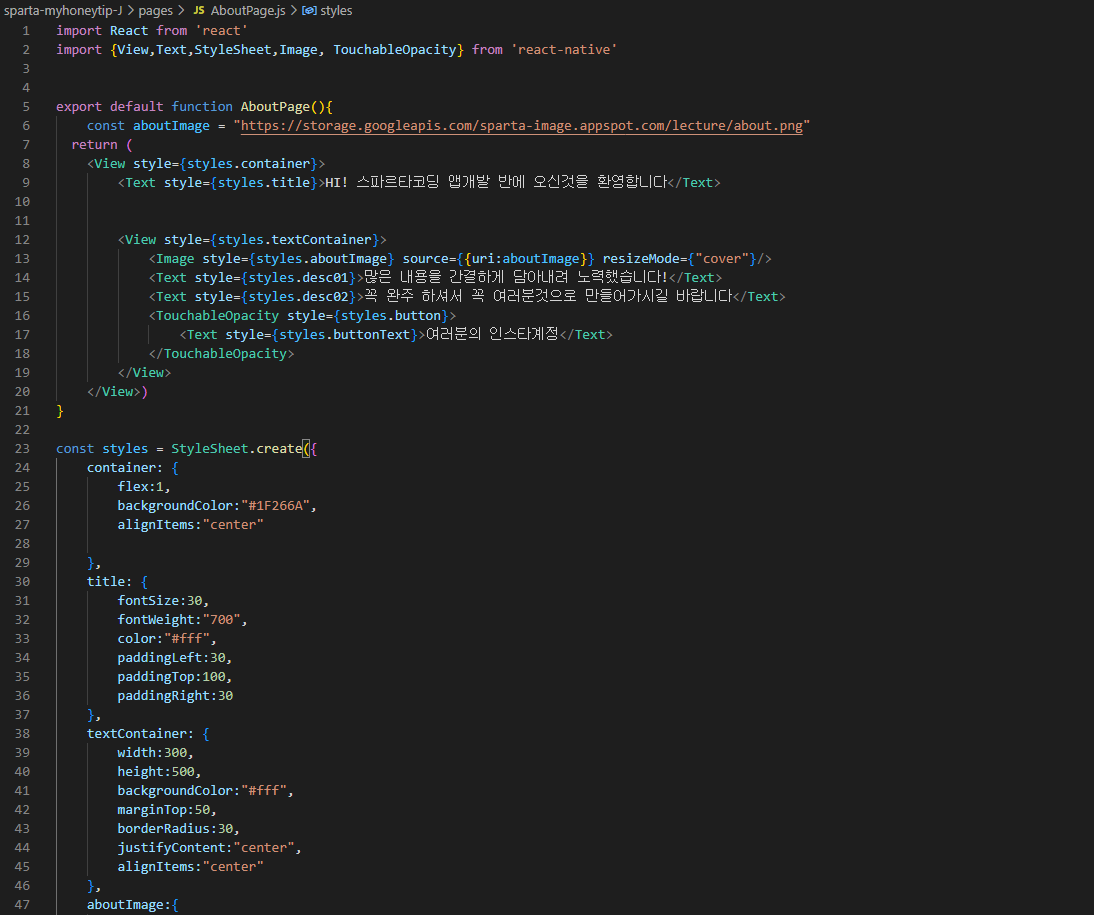
면 전체를 캡처해 주시면, 튜터님들이 빠르게 상황을 이해할 수 있어요.
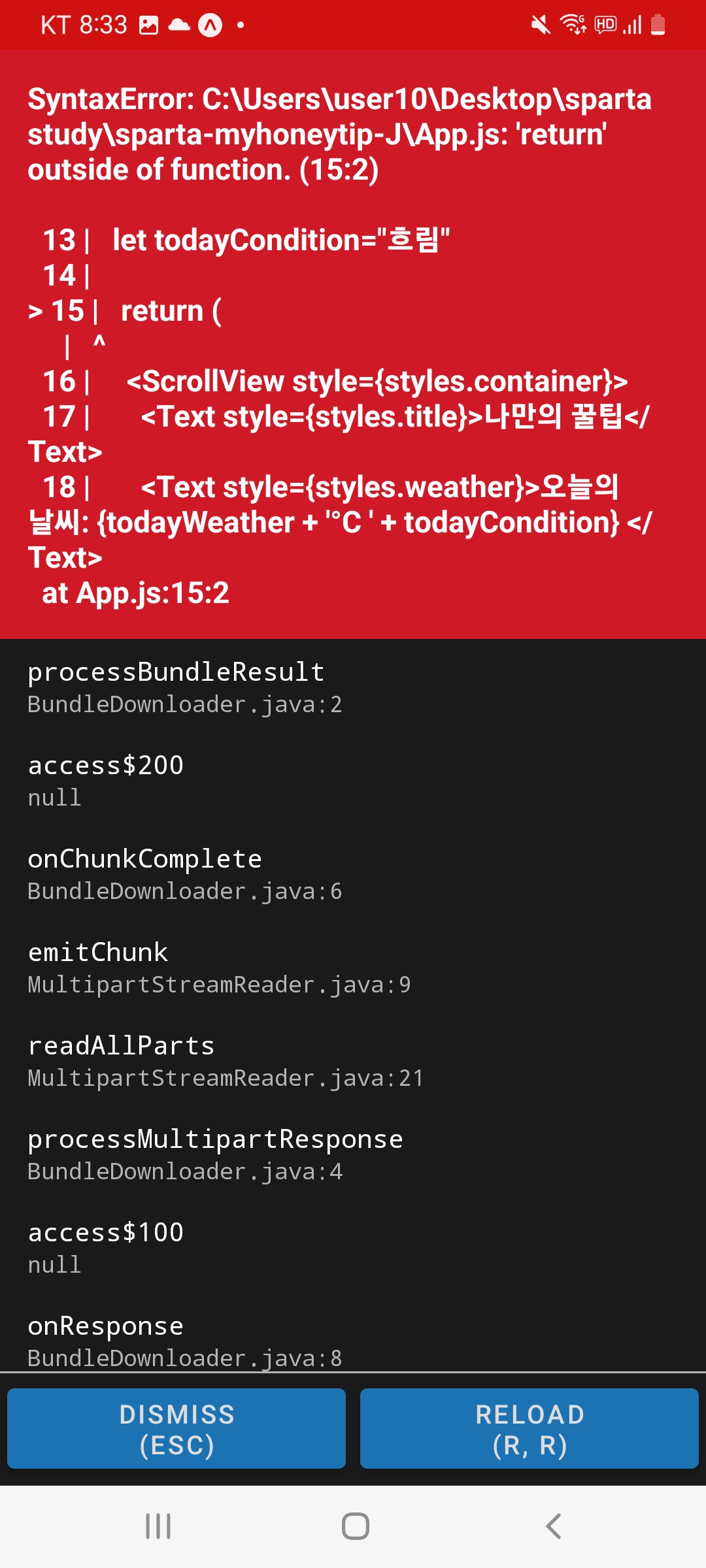
작성한 코드 및 에러 메세지
Error: Software caused connection abort
at node_modules\react-native\Libraries\Utilities\HMRClient.js:null in setHMRUnavailableReason
at node_modules\react-native\Libraries\Utilities\HMRClient.js:null in client.on$argument_1
at node_modules\metro-runtime\src\modules\vendor\eventemitter3.js:null in emit
at node_modules\metro-runtime\src\modules\HMRClient.js:null in _ws.onerror
at node_modules\event-target-shim\dist\event-target-shim.js:null in EventTarget.prototype.dispatchEv
ent
at node_modules\react-native\Libraries\WebSocket\WebSocket.js:null in _eventEmitter.addListener$argu
ment_1
at node_modules\react-native\Libraries\vendor\emitter\EventEmitter.js:null in emit
at node_modules\react-native\Libraries\BatchedBridge\MessageQueue.js:null in __callFunction
at node_modules\react-native\Libraries\BatchedBridge\MessageQueue.js:null in __guard$argument_0
at node_modules\react-native\Libraries\BatchedBridge\MessageQueue.js:null in __guard
at node_modules\react-native\Libraries\BatchedBridge\MessageQueue.js:null in callFunctionReturnFlush
edQueue
* History restored
Microsoft Windows [Version 10.0.19045.2130]
(c) Microsoft Corporation. All rights reserved.
C:\Users\user10\Desktop\sparta study>sparta-myhoneytip-J
'sparta-myhoneytip-J'은(는) 내부 또는 외부 명령, 실행할 수 있는 프로그램, 또는
배치 파일이 아닙니다.
C:\Users\user10\Desktop\sparta study>cd sparta-myhoneytip-J
C:\Users\user10\Desktop\sparta study\sparta-myhoneytip-J>expo start
WARNING: expo-cli has not yet been tested against Node.js v19.0.0.
If you encounter any issues, please report them to https://github.com/expo/expo-cli/issues
expo-cli supports following Node.js versions:
* >=12.13.0 <15.0.0 (Maintenance LTS)
* >=16.0.0 <17.0.0 (Active LTS)
This command is being executed with the global Expo CLI. Learn more: https://blog.expo.dev/the-new-expo-cli-f4
250d8e3421
To use the local CLI instead (recommended in SDK 46 and higher), run:
› npx expo start
Starting project at C:\Users\user10\Desktop\sparta study\sparta-myhoneytip-J
Starting Metro Bundler
▄▄▄▄▄▄▄▄▄▄▄▄▄▄▄▄▄▄▄▄▄▄▄▄▄▄▄
█ ▄▄▄▄▄ █▀▄█▀ █ █ ▄▄▄▄▄ █
█ █ █ █▄ ▄██▀ █ █ █ █
█ █▄▄▄█ █ ▀█▀█ ▀ ▀█ █▄▄▄█ █
█▄▄▄▄▄▄▄█ ▀▄█ █ ▀ █▄▄▄▄▄▄▄█
█ ▀▄▀▀▄ ██ ▀█▄▀██▀ ▄▀▄▄▀█
█▄ █▀▄▀▄▀▀▄▄██ ▄█▀▄▀ ▀▀█▄▄█
█▄▀ █▀█▄█ ▀▀▀ ▄ ▄ █ ▄█ ██▀█
█▄▀ ▄█ ██ ▀█▀█▄ ▄▄▀██▄█
█▄▄▄█▄█▄▄▀▀█▄█▀▄█ ▄▄▄ █ ▄ █
█ ▄▄▄▄▄ █▄█ ▀██▄ █▄█ ▀▄ █
█ █ █ █▀▀▀ ▀▀ ▄▄ █▀█▄█
█ █▄▄▄█ █▀ ▀ ▄█▄ ▄█▄█
█▄▄▄▄▄▄▄█▄▄▄▄▄█▄█▄█▄█▄▄█▄▄█
› Metro waiting on exp://172.30.1.10:19000
› Scan the QR code above with Expo Go (Android) or the Camera app (iOS)
› Press a │ open Android
› Press w │ open web
› Press r │ reload app
› Press m │ toggle menu
› Press ? │ show all commands
Logs for your project will appear below. Press Ctrl+C to exit.
Started Metro Bundler
Android Bundling complete 4077ms
Android Bundling complete 54ms
Android Bundling complete 50ms
Android Bundling complete 44ms
Android Bundling complete 40ms
Android Bundling complete 67ms
Android Bundling complete 39ms
Android Bundling failed 31ms
SyntaxError: C:\Users\user10\Desktop\sparta study\sparta-myhoneytip-J\App.js: 'return' outside of function. (1
5:2)
13 | let todayCondition = "흐림"
14 | //return 구문 밖에서는 슬래시 두개 방식으로 주석
> 15 | return (
| ^
16 | /*
17 | return 구문 안에서는 {슬래시 + * 방식으로 주석
18 | */
Android Bundling failed 17ms
SyntaxError: C:\Users\user10\Desktop\sparta study\sparta-myhoneytip-J\App.js: 'return' outside of function. (1
5:2)
5:2)
5:2)
5:2)
13 | let todayCondition = "흐림"
14 |
> 15 | return (
| ^
16 |
17 | <ScrollView style={styles.container}> 18 | <Text style={styles.title}>나만의 꿀팁</Text>Android Bundling failed 15msSyntaxError: C:\Users\user10\Desktop\sparta study\sparta-myhoneytip-J\App.js: 'return' outside of function.
(15:2)
13 | let todayCondition = "흐림"
14 |
> 15 | return (
| ^
16 |
17 | <ScrollView style={styles.container}>
18 | <Text style={styles.title}>나만의 꿀팁</Text>
* History restored
Microsoft Windows [Version 10.0.19045.2130]
(c) Microsoft Corporation. All rights reserved.
C:\Users\user10\Desktop\sparta study>cd sparta-myhoneytip-J
C:\Users\user10\Desktop\sparta study\sparta-myhoneytip-J>expo start
WARNING: expo-cli has not yet been tested against Node.js v19.0.0.
If you encounter any issues, please report them to https://github.com/expo/expo-cli/issues
expo-cli supports following Node.js versions:
* >=12.13.0 <15.0.0 (Maintenance LTS)
* >=16.0.0 <17.0.0 (Active LTS)
This command is being executed with the global Expo CLI. Learn more: https://blog.expo.dev/the-new-expo-cli-f4250d8e3421
To use the local CLI instead (recommended in SDK 46 and higher), run:
› npx expo start
Starting project at C:\Users\user10\Desktop\sparta study\sparta-myhoneytip-J
Starting Metro Bundler
▄▄▄▄▄▄▄▄▄▄▄▄▄▄▄▄▄▄▄▄▄▄▄▄▄▄▄
█ ▄▄▄▄▄ █▀▄█▀ █ █ ▄▄▄▄▄ █
█ █ █ █▄ ▄██▀ █ █ █ █
█ █▄▄▄█ █ ▀█▀█ ▀ ▀█ █▄▄▄█ █
█▄▄▄▄▄▄▄█ ▀▄█ █ ▀ █▄▄▄▄▄▄▄█
█ ▀▄▀▀▄ ██ ▀█▄▀██▀ ▄▀▄▄▀█
█▄ █▀▄▀▄▀▀▄▄██ ▄█▀▄▀ ▀▀█▄▄█
█▄▀ █▀█▄█ ▀▀▀ ▄ ▄ █ ▄█ ██▀█
█▄▀ ▄█ ██ ▀█▀█▄ ▄▄▀██▄█
█▄▄▄█▄█▄▄▀▀█▄█▀▄█ ▄▄▄ █ ▄ █
█ ▄▄▄▄▄ █▄█ ▀██▄ █▄█ ▀▄ █
█ █ █ █▀▀▀ ▀▀ ▄▄ █▀█▄█
█ █▄▄▄█ █▀ ▀ ▄█▄ ▄█▄█
█▄▄▄▄▄▄▄█▄▄▄▄▄█▄█▄█▄█▄▄█▄▄█
› Metro waiting on exp://172.30.1.10:19000
› Scan the QR code above with Expo Go (Android) or the Camera app (iOS)
› Press a │ open Android
› Press w │ open web
› Press r │ reload app
› Press m │ toggle menu
› Press ? │ show all commands
Logs for your project will appear below. Press Ctrl+C to exit.
Started Metro Bundler
Android Bundling failed 2320ms
SyntaxError: C:\Users\user10\Desktop\sparta study\sparta-myhoneytip-J\App.js: 'return' outside of function. (15:2)
13 | let todayCondition="흐림"
14 |
> 15 | return (
| ^
16 | <ScrollView style={styles.container}>
17 | <Text style={styles.title}>나만의 꿀팁</Text>
18 | <Text style={styles.weather}>오늘의 날씨: {todayWeather + '°C ' + todayCondition} </Text>ion} </Text>오류 발생 시, 작성한 코드 전체와 에러 메시지를 첨부해 주세요.
Tip 1) </> 아이콘을 눌러 코드박스를 만들어 보세요.
Tip 2) Ctrl+A(맥의 경우 Command+A) 단축키로 코드를 한 번에 선택할 수 있어요!


