커뮤니티

포인트
쿠폰
내 강의실
국비 신청 내역
증명서
계정
로그아웃
학습 질문
개발 일지
나의 활동
답변 완료
가온데 정렬 (1주차 2주차)
undefined주차


나*세
댓글
3
・
추천
0
・
조회수
8
조회수
8
답변 완료
* 겪고 있는 문제 상황을 최대한 자세하게 작성해주세요.
* 문제 해결을 위해 어떤 시도를 해보았는지 구체적으로 함께 알려주세요.
- 블로그의 상자들과 내용들을 가온데 정렬하여 이쁘게 나타내고 싶은데 화면으로 보면 왼쪽정렬로 치우쳐저 있어요.
(따라서 한건데 튜터님의 화면은 가온데 정렬이 잘 되어 있지만 제 화면은 그렇지가 못하네요 ..)
- 'name', 'leave a comment to bts' 박스 크기도 이쁘게, 그리고 width 가 같게 나타내고 싶어요.
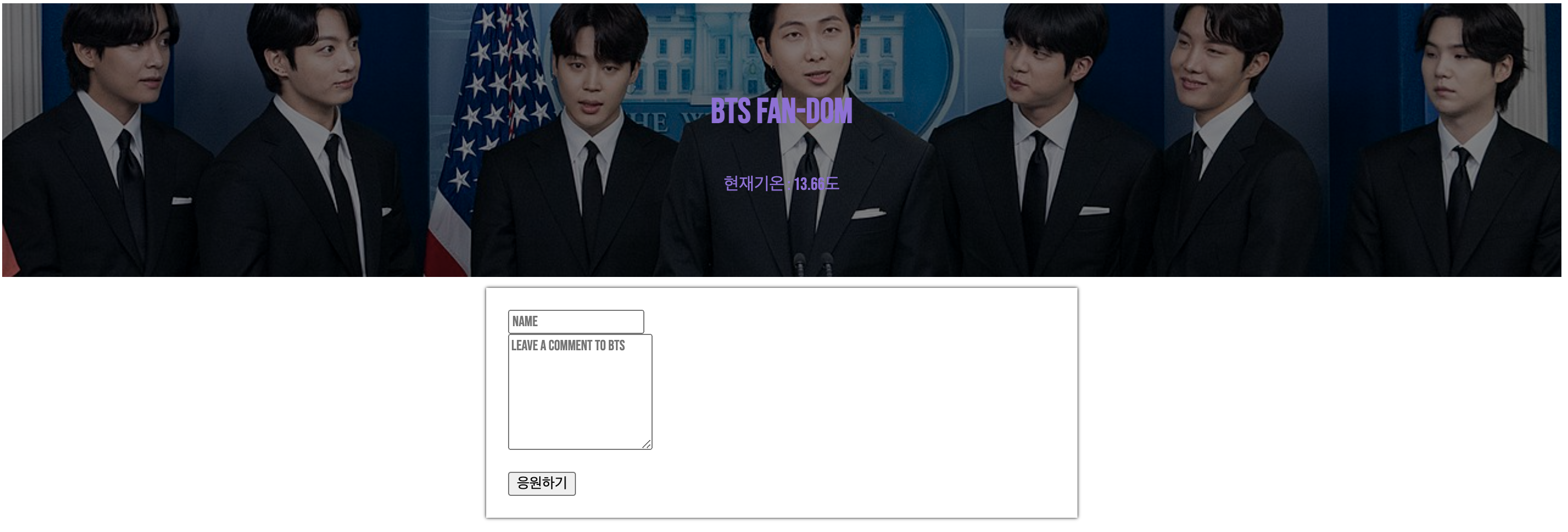
작성한 코드 및 에러 메세지
<!doctype html>
<html lang="en">

<head>
    <meta charset="utf-8">
    <meta name="viewport" content="width=device-width, initial-scale=1, shrink-to-fit=no">

    <link href="https://fonts.googleapis.com/css2?family=Bebas+Neue&family=Dongle:wght@300&display=swap"
          rel="stylesheet">

    <script src="https://ajax.googleapis.com/ajax/libs/jquery/3.5.1/jquery.min.js"></script>
    <script src="https://cdn.jsdelivr.net/npm/bootstrap@5.0.2/dist/js/bootstrap.bundle.min.js"
            integrity="sha384-MrcW6ZMFYlzcLA8Nl+NtUVF0sA7MsXsP1UyJoMp4YLEuNSfAP+JcXn/tWtIaxVXM"
            crossorigin="anonymous"></script>

    <title>BTS FAN-DOM BLOG</title>
    <link href="https://fonts.googleapis.com/css2?family=Bebas+Neue&family=Dongle:wght@300&display=swap"
          rel="stylesheet">

    <style>
        * {
            font-family: 'Bebas Neue', cursive;
        }

        .mytitle {
            width: 100%;
            height: 250px;

            background-image: linear-gradient(0deg, rgba(0, 0, 0, 0.5), rgba(0, 0, 0, 0.5)), url("https://upload.wikimedia.org/wikipedia/commons/thumb/7/73/BTS_during_a_White_House_press_conference_May_31%2C_2022_%28cropped%29.jpg/1280px-BTS_during_a_White_House_press_conference_May_31%2C_2022_%28cropped%29.jpg");
            background-position: center 40%;
            background-size: cover;

            color: mediumpurple;
            display: flex;
            flex-direction: column;
            justify-content: center;
            align-items: center;
        }

        .mypost {
            width: 95%;
            max-width: 500px;
            margin: 20px auto 20px auto;
            margin-top: 10px;

            box-shadow: 0px 0px 3px 0px black;
            padding: 20px;

        }

        .mypost > button {
            margin-top: 15px;
        }

        .mycards {
            width: 95%;
            max-width: 500px;
            margin: 20px auto 20px auto;

        }

        .mycards > .card {
            margin-top: 10px;
            margin-bottom: 10px;
            box-shadow: 0px 0px 3px 0px gray;
        }

    </style>
    <script>
        $(document).ready(function () {
             $.ajax({
                type: "GET",
                url: "http://spartacodingclub.shop/sparta_api/weather/seoul",
                data: {},
                success: function (response) {
                   let temp = response['temp']
                    $('#temp').text(temp)


                }
            })
        });

    </script>
</head>

<body>
<div class="mytitle">
    <h1> BTS FAN-DOM </h1>
    <P>현재기온 : <span id="temp">00.0</span>도</P>
</div>
<div class="mypost">
    <div class="form-floating mb-3">
        <input type="email" class="form-control" id="floatingInput" placeholder="Name">
        <label for="floatingInput"></label>
    </div>
    <div class="form-floating">
        <textarea class="form-control" placeholder="Leave a comment to BTS  " id="floatingTextarea2"
                  style="height: 100px"></textarea>
        <label for="floatingTextarea2"></label>
    </div>
    <button type="button" class="btn btn-dark">응원하기</button>

</div>
<div class="mycards" id="comment-list">
    <div class="card">
        <div class="card-body">
            <blockquote class="blockquote mb-0">
                <p>“If you can't fly, then run.
                    Today we will survive.
                    If you can't run, then walk.
                    Today we will survive.
                    If you can't walk, then crawl.”
                </p>
                <footer class="blockquote-footer">--BTS</footer>
            </blockquote>
        </div>
    </div>
    <div class="card">

        <div class="card-body">
            <blockquote class="blockquote mb-0">
                <p>“Love myself, love yourself, peace.”
                </p>
                <footer class="blockquote-footer">--BTS</footer>
            </blockquote>
        </div>
    </div>
    <div class="card">

        <div class="card-body">
            <blockquote class="blockquote mb-0">
                <p>“Don't be trapped in someone else's dream.”
                </p>
                <footer class="blockquote-footer">--BTS</footer>
            </blockquote>
        </div>
    </div>

</div>
</body>

</html>
위 코드는 2주차까지 모두 마친 코드 완성작입니다.


댓글 알림
