


* 겪고 있는 문제 상황을 최대한 자세하게 작성해주세요.
* 문제 해결을 위해 어떤 시도를 해보았는지 구체적으로 함께 알려주세요.
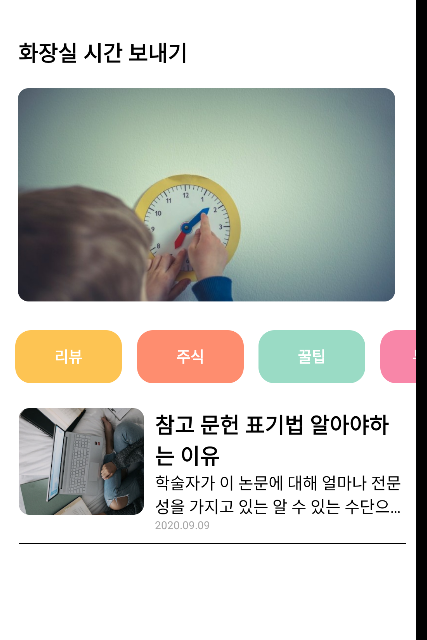
scrollview로 감싸고 있는데
ScrollView style={styles.middleContainer} horizontal indicatorStyle={"white"}>
이부분은 수평 스크롤이 되는데
전체 화면에 위아래 수직 스크롤이 되지 않습니다.
또한 horizontal indicatorStyle={"white"}에서 white는 어떤건가요? yellow,green으로 바꿔도 바뀌는게 보이지 않네요.
참고로 window11유저입니다.
작성한 코드 및 에러 메세지
import React from 'react';
import { StyleSheet, Text, View, Image, TouchableOpacity, ScrollView} from 'react-native';
export default function App() {
return (
<ScrollView style={styles.container}>
<Text style={styles.title}>화장실 시간 보내기</Text>
<Image style={styles.mainImage} source={{uri:main}}/>
<ScrollView style={styles.middleContainer} horizontal indicatorStyle={"white"}>
<TouchableOpacity style={styles.middleButton01}><Text style={styles.middleButtonText}>리뷰</Text></TouchableOpacity>
<TouchableOpacity style={styles.middleButton02}><Text style={styles.middleButtonText}>주식</Text></TouchableOpacity>
<TouchableOpacity style={styles.middleButton03}><Text style={styles.middleButtonText}>꿀팁</Text></TouchableOpacity>
<TouchableOpacity style={styles.middleButton04}><Text style={styles.middleButtonText}>부동산</Text></TouchableOpacity>
</ScrollView>
<View style={styles.cardContainer}>
{/* 하나의 카드 영역을 나타내는 View */}
<View style={styles.card}>
<Image style={styles.cardImage} source={{uri:"https://postfiles.pstatic.net/MjAyMjExMDFfMTQ0/MDAxNjY3MzEwNzU5OTUy.uyxMOqx86KIuJ7yqc5vmp_CLsvLDaL3wXw2CPTYLlJYg.hYAx1LYQuTk3LxGvLe9_i7v9GZ2SGFkwmug3q6-afIEg.PNG.kjhoo9255/%EC%B0%B8%EA%B3%A0%EB%AC%B8%ED%97%8C_%ED%91%9C%EA%B8%B0.png?type=w966"}}/>
<View style={styles.cardText}>
<Text style={styles.cardTitle}>참고 문헌 표기법 알아야하는 이유</Text>
<Text style={styles.cardDesc} numberOfLines={2}>학술자가 이 논문에 대해 얼마나 전문성을 가지고 있는 알 수 있는 수단으로 논문에서 참고한 문헌의 수준을 보며 논문의 수준과 학술자의 수준을 알 수 있고 또한 해당 논문의 신뢰감을 높여줍니다.
관련 링크 uri:"https://blog.naver.com/kjhoo9255/222917074081".</Text>
<Text style={styles.cardDate}>2020.09.09</Text>
</View>
</View>
</View>
</ScrollView>
);
}
const styles = StyleSheet.create({
container: {
//앱의 배경 색
backgroundColor: '#fff',
},
title: {
//폰트 사이즈
fontSize: 20,
//폰트 두께
fontWeight: '700',
//위 공간으로 부터 이격
marginTop:50,
//왼쪽 공간으로 부터 이격'
marginLeft:20
},
mainImage: {
//컨텐츠의 넓이 값
width:'90%',
//컨텐츠의 높이 값
height:200,
//컨텐츠의 모서리 구부리기
borderRadius:10,
marginTop:20,
//컨텐츠 자체가 앱에서 어떤 곳에 위치시킬지 결정(정렬기능)
//각 속성의 값들은 공식문서에 고대로~ 나와 있음
alignSelf:"center"
},
middleContainer:{
marginTop:20,
marginLeft:10,
height:60
},
middleButton01: {
width:100,
height:50,
padding:15,
backgroundColor:"#fdc453",
borderColor:"deeppink",
borderRadius:15,
margin:7
},
middleButton02: {
width:100,
height:50,
padding:15,
backgroundColor:"#fe8d6f",
borderRadius:15,
margin:7
},
middleButton03: {
width:100,
height:50,
padding:15,
backgroundColor:"#9adbc5",
borderRadius:15,
margin:7
},
middleButton04: {
width:100,
height:50,
padding:15,
backgroundColor:"#f886a8",
borderRadius:15,
margin:7
},
middleButtonText: {
color:"#fff",
fontWeight:"700",
//텍스트의 현재 위치에서의 정렬
textAlign:"center"
},
cardContainer: {
marginTop:10,
marginLeft:10
},
card:{
flex:1,
//컨텐츠들을 가로로 나열
//세로로 나열은 column <- 디폴트 값임
flexDirection:"row",
margin:10,
borderBottomWidth:1,
borderBottomColor:"black",
paddingBottom:10
},
cardImage: {
flex:1,
width:100,
height:100,
borderRadius:10,
},
cardText: {
flex:2,
flexDirection:"column",
marginLeft:10,
},
cardTitle: {
fontSize:20,
fontWeight:"700"
},
cardDesc: {
fontSize:15
},
cardDate: {
fontSize:10,
color:"#A6A6A6",
}
});


