커뮤니티

포인트
쿠폰
내 강의실
국비 신청 내역
증명서
계정
로그아웃
학습 질문
개발 일지
나의 활동
답변 완료
5-5 완료 화면이 이상합니다.
undefined주차


박*수
댓글
3
・
추천
0
・
조회수
10
조회수
10
답변 완료
* 겪고 있는 문제 상황을 최대한 자세하게 작성해주세요.
* 문제 해결을 위해 어떤 시도를 해보았는지 구체적으로 함께 알려주세요.
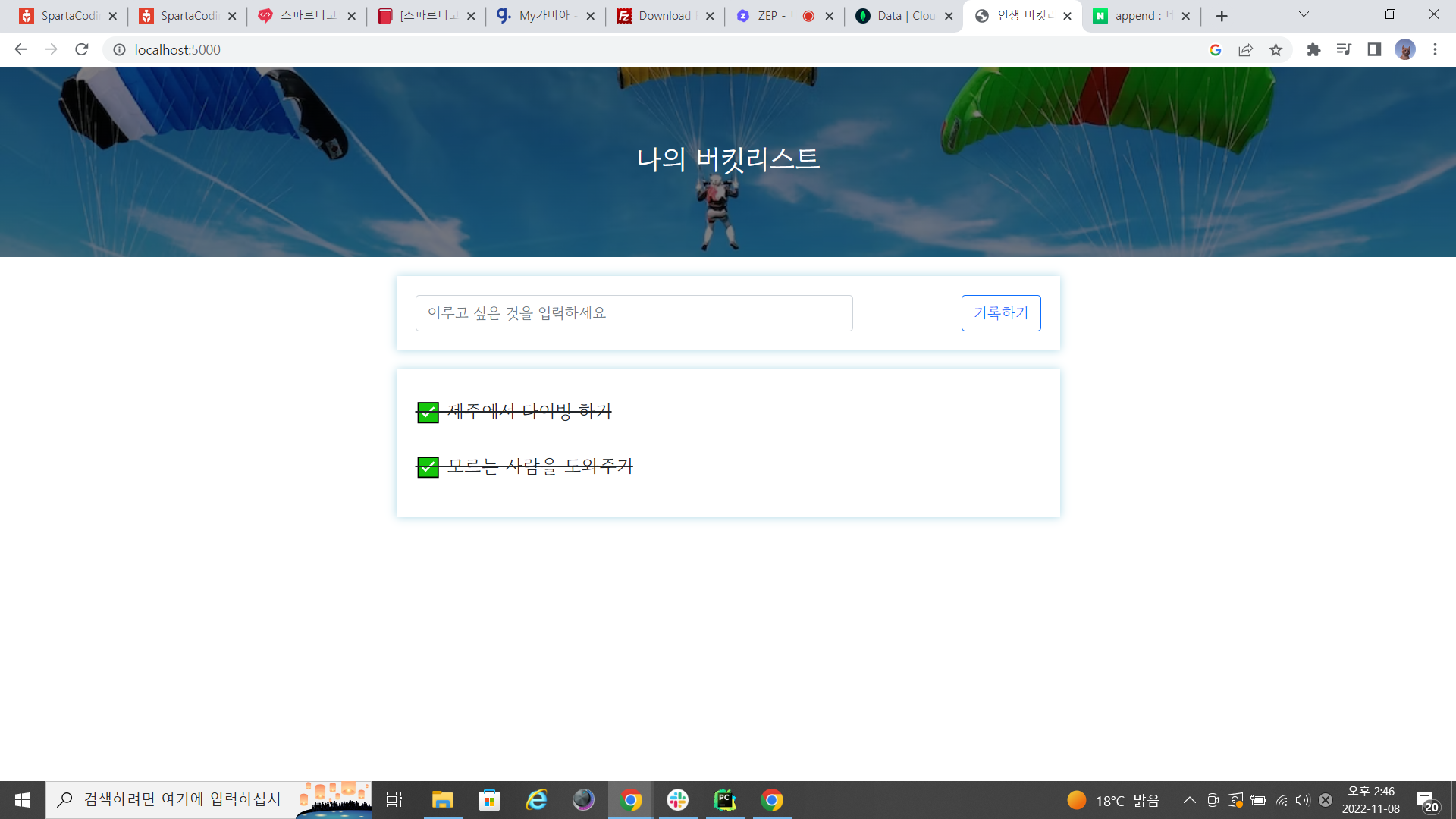
강사님이 보여준 완료 화면이랑 제가 나오는 화면이 달라서 문의드립니다.
제가 완료한 파일에는 저렇게 줄표시가 되는데 이유가 뭘까요?
app.py
from flask import Flask, render_template, request, jsonify
app = Flask(__name__)

from pymongo import MongoClient
client = MongoClient('mongodb+srv://test:sparta@cluster0.6hr307r.mongodb.net/cluster0?retryWrites=true&w=majority')
db = client.dbsparta

@app.route('/')
def home():
    return render_template('index.html')

@app.route("/bucket", methods=["POST"])
def bucket_post():
    bucket_receive = request.form['bucket_give']

    bucket_list = list(db.bucket.find({}, {'_id': False}))
    count = len(bucket_list) + 1

    doc = {
        'num':count,
        'bucket':bucket_receive,
        'done':0
    }
    db.bucket.insert_one(doc)

    return jsonify({'msg': '등록 완료!'})

@app.route("/bucket/done", methods=["POST"])
def bucket_done():
    num_receive = request.form['num_give']
    db.bucket.update_one({'num': int(num_receive)}, {'$set': {'done': 1}})
    return jsonify({'msg': '버킷 완료'})

@app.route("/bucket", methods=["GET"])
def bucket_get():
    bucket_list = list(db.bucket.find({}, {'_id': False}))
    return jsonify({'buckets': bucket_list})

if __name__ == '__main__':
    app.run('0.0.0.0', port=5000, debug=True)
index.html
<!DOCTYPE html>
<html lang="en">
<head>
    <meta charset="UTF-8">
    <meta http-equiv="X-UA-Compatible" content="IE=edge">
    <meta name="viewport" content="width=device-width, initial-scale=1.0">

    <link href="https://cdn.jsdelivr.net/npm/bootstrap@5.0.2/dist/css/bootstrap.min.css" rel="stylesheet"
          integrity="sha384-EVSTQN3/azprG1Anm3QDgpJLIm9Nao0Yz1ztcQTwFspd3yD65VohhpuuCOmLASjC" crossorigin="anonymous">
    <script src="https://ajax.googleapis.com/ajax/libs/jquery/3.5.1/jquery.min.js"></script>
    <script src="https://cdn.jsdelivr.net/npm/bootstrap@5.0.2/dist/js/bootstrap.bundle.min.js"
            integrity="sha384-MrcW6ZMFYlzcLA8Nl+NtUVF0sA7MsXsP1UyJoMp4YLEuNSfAP+JcXn/tWtIaxVXM"
            crossorigin="anonymous"></script>

    <link href="https://fonts.googleapis.com/css2?family=Gowun+Dodum&display=swap" rel="stylesheet">

    <title>인생 버킷리스트</title>

    <style>
        * {
            font-family: 'Gowun Dodum', sans-serif;
        }

        .mypic {
            width: 100%;
            height: 200px;

            background-image: linear-gradient(0deg, rgba(0, 0, 0, 0.5), rgba(0, 0, 0, 0.5)), url('https://images.unsplash.com/photo-1601024445121-e5b82f020549?ixid=MnwxMjA3fDB8MHxwaG90by1wYWdlfHx8fGVufDB8fHx8&ixlib=rb-1.2.1&auto=format&fit=crop&w=1189&q=80');
            background-position: center;
            background-size: cover;

            color: white;

            display: flex;
            flex-direction: column;
            align-items: center;
            justify-content: center;
        }

        .mypic > h1 {
            font-size: 30px;
        }

        .mybox {
            width: 95%;
            max-width: 700px;
            padding: 20px;
            box-shadow: 0px 0px 10px 0px lightblue;
            margin: 20px auto;
        }

        .mybucket {
            display: flex;
            flex-direction: row;
            align-items: center;
            justify-content: space-between;
        }

        .mybucket > input {
            width: 70%;
        }

        .mybox > li {
            display: flex;
            flex-direction: row;
            align-items: center;
            justify-content: center;

            margin-bottom: 10px;
            min-height: 48px;
        }

        .mybox > li > h2 {
            max-width: 75%;
            font-size: 20px;
            font-weight: 500;
            margin-right: auto;
            margin-bottom: 0px;
        }

        .mybox > li > h2.done {
            text-decoration: line-through
        }
    </style>
    <script>
        $(document).ready(function () {
            show_bucket();
        });

        function show_bucket() {
            $.ajax({
                type: "GET",
                url: "/bucket",
                data: {},
                success: function (response) {
                   let rows = response['buckets']
                    for (let i = 0; i < rows.length; i++){
                        let bucket = rows[i]['bucket']
                        let num = rows[i]['num']
                        let done = rows[i]['done']

                        let temp_html = ``
                        if (done == 0){
                            temp_html = `<li>
                                        <h2>✅ ${bucket}</h2>
                                        <button onclick="done_bucket(${num})" type="button" class="btn btn-outline-primary">완료!</button>
                                    </li>`
                        } else {
                            temp_html =`<li>
                                            <h2 class="done">✅ ${bucket}</h2>
                                        </li>`
                        }

                        $('#bucket-list').append(temp_html)
                    }

                }
            });
        }

        function save_bucket() {
            let bucket = $('#bucket').val()

            $.ajax({
                type: "POST",
                url: "/bucket",
                data: {bucket_give: bucket},
                success: function (response) {
                    alert(response["msg"])
                    window.location.reload()
                }
            });
        }

        function done_bucket(num) {
            $.ajax({
                type: "POST",
                url: "/bucket/done",
                data: {num_give: num},
                success: function (response) {
                    alert(response["msg"])
                    window.location.reload()
                }
            });
        }
    </script>
</head>
<body>
<div class="mypic">
    <h1>나의 버킷리스트</h1>
</div>
<div class="mybox">
    <div class="mybucket">
        <input id="bucket" class="form-control" type="text" placeholder="이루고 싶은 것을 입력하세요">
        <button onclick="save_bucket()" type="button" class="btn btn-outline-primary">기록하기</button>
    </div>
</div>
<div class="mybox" id="bucket-list">

</div>
</body>
</html>


댓글 알림
