


* 겪고 있는 문제 상황을 최대한 자세하게 작성해주세요.
* 문제 해결을 위해 어떤 시도를 해보았는지 구체적으로 함께 알려주세요.
구글로그인 되어 있고, AVD 연결까지 했는데 화면이 안떠요.
서버통신 문제인거 같아요.
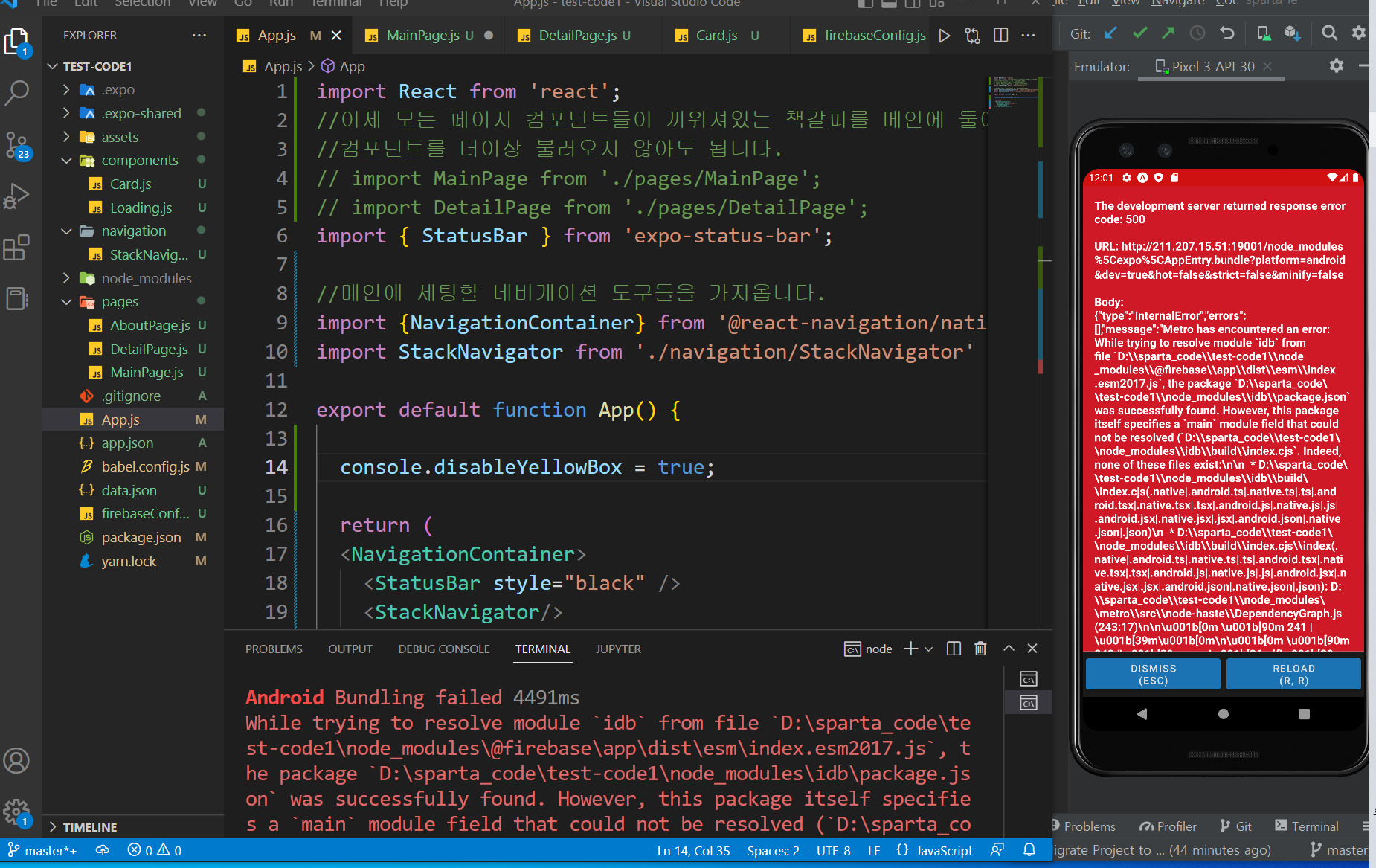
작성한 코드 및 에러 메세지
Android Bundling failed 4491ms
While trying to resolve module `idb` from file `D:\sparta_code\test-code1\node_modules\@firebase\app\dist\esm\index.esm2017.js`, the package `D:\sparta_code\test-code1\node_modules\idb\package.json` was successfully found. However, this package itself specifies a `main` module field that could not be resolved (`D:\sparta_code\test-code1\node_modules\idb\build\index.cjs`. Indeed, none of
these files exist:
* D:\sparta_code\test-code1\node_modules\idb\build\index.cjs(.native|.android.ts|.native.ts|.ts|.android.tsx|.native.tsx|.tsx|.android.js|.native.js|.js|.android.jsx|.native.jsx|.jsx|.android.json|.native.json|.json)
* D:\sparta_code\test-code1\node_modules\idb\build\index.cjs\index(.native|.android.ts|.native.ts|.ts|.android.tsx|.native.tsx|.tsx|.android.js|.native.js|.js|.android.jsx|.native.jsx|.jsx|.android.json|.native.json|.json)
› Reloading apps
Android Bundling failed 2613ms
While trying to resolve module `idb` from file `D:\sparta_code\test-code1\node_modules\@firebase\app\dist\esm\index.esm2017.js`, the package `D:\sparta_code\test-code1\node_modules\idb\package.json` was successfully found. However, this package itself specifies a `main` module field that could not be resolved (`D:\sparta_code\test-code1\node_modules\idb\build\index.cjs`. Indeed, none of
these files exist:
* D:\sparta_code\test-code1\node_modules\idb\build\index.cjs(.native|.android.ts|.native.ts|.ts|.android.tsx|.native.tsx|.tsx|.android.js|.native.js|.js|.android.jsx|.native.jsx|.jsx|.android.json|.native.json|.json)
* D:\sparta_code\test-code1\node_modules\idb\build\index.cjs\index(.native|.android.ts|.native.ts|.ts|.android.tsx|.native.tsx|.tsx|.android.js|.native.js|.js|.android.jsx|.native.jsx|.jsx|.android.json|.native.json|.json)오류 발생 시, 작성한 코드 전체와 에러 메시지를 첨부해 주세요.
Tip 1) </> 아이콘을 눌러 코드박스를 만들어 보세요.
Tip 2) Ctrl+A(맥의 경우 Command+A) 단축키로 코드를 한 번에 선택할 수 있어요!


