커뮤니티

포인트
쿠폰
내 강의실
국비 신청 내역
증명서
계정
로그아웃
학습 질문
개발 일지
나의 활동
답변 완료
카드에 GET방식으로 목록띄우기
undefined주차


허*은
댓글
2
・
추천
0
・
조회수
11
조회수
11
답변 완료
* 겪고 있는 문제 상황을 최대한 자세하게 작성해주세요.
* 문제 해결을 위해 어떤 시도를 해보았는지 구체적으로 함께 알려주세요.
질문완료를 눌러버려서 다시 올립니다 !
GET방식으로 URL에서 (5x3 )15개만 리스트 불러와서
카드에 나타내고 싶은데 이미지도, 와인(wine), 와이품종(winery) 모두 나타지않고
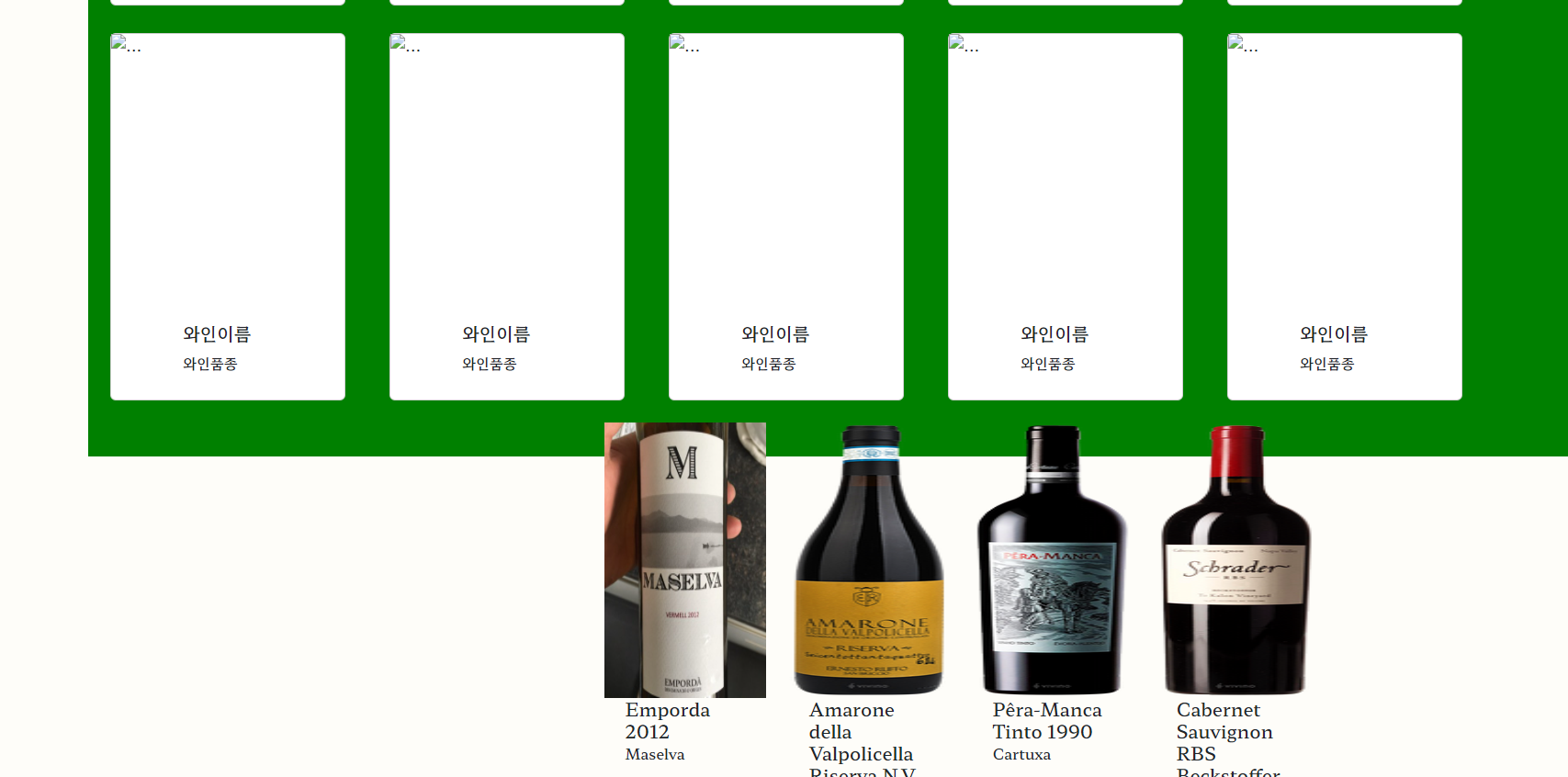
위 사진처럼만 밑에 따로 뜹니다 ㅠㅠ
카드는 누르면 팝업창을 띄우기 위해 만들었습니다.
어떻게 해야하나요?
작성한 코드 및 에러 메세지
index.html
<!DOCTYPE html>
<html lang="en">
<head>
<meta charset="utf-8"/>
<meta name="viewport" content="width=device-width, initial-scale=1"/>
<title>Corkage Free</title>
<link
href="https://cdn.jsdelivr.net/npm/bootstrap@5.2.2/dist/css/bootstrap.min.css"
rel="stylesheet"
integrity="sha384-Zenh87qX5JnK2Jl0vWa8Ck2rdkQ2Bzep5IDxbcnCeuOxjzrPF/et3URy9Bv1WTRi"
crossorigin="anonymous"
src="https://cdn.jsdelivr.net/npm/bootstrap@5.2.2/dist/jsbootstrap/.bundle.min.js"
integrity="sha384-OERcA2EqjJCMA+/3y+gxIOqMEjwtxJY7qPCqsdltbNJuaOe923+mo//f6V8Qbsw3"
crossorigin="anonymous"
>
<script src="https://ajax.googleapis.com/ajax/libs/jquery/3.5.1/jquery.min.js"></script>
<link rel="preconnect" href="https://fonts.googleapis.com"/>
<link rel="preconnect" href="https://fonts.gstatic.com" crossorigin/>
<link
href="https://fonts.googleapis.com/css2?family=Hahmlet:wght@500&display=swap"
rel="stylesheet"
/>
<link rel="preconnect" href="https://fonts.googleapis.com">
<link rel="preconnect" href="https://fonts.gstatic.com" crossorigin>
<link href="https://fonts.googleapis.com/css2?family=Girassol&family=Meddon&display=swap" rel="stylesheet">
<style>
* {
font-family: "Hahmlet", serif;
}
.first-line {
margin-top: 25px;
display: flex;
justify-content: space-between;
}
.first-line > h1 {
font-family: 'Girassol', cursive;
font-size: 80px;
}
.first-line2 > input {
width: 300px;
height: 40px;
border-radius: 20px;
}
.first-line > h1 {
margin-left: 50px;
color: #a81201;
}
.first-line2 {
display: flex;
}
body {
background-color: #fefdf9;
margin: 0;
padding: 0;
}
nav {
height: 100px;
box-shadow: 0px 1px 2px #a81201;
}
#cards-box {
width: 800px;
height: 200px;
margin: 0px auto;
}
img {
width: 80px;
height: 300px;
}
.card-body {
width: 130px;
height: 100px;
margin: 0px auto;
}
.card {
width: 130px;
height: 400px;
margin: 0 1.5em;
}
.cards {
display: flex;
margin-top: 30px;
}
ul {
list-style: none;
display: flex;
justify-content: center;
}
ul li {
margin: 10px 30px;
font-size: 25px;
}
ul li a {
text-decoration: none;
color: rgb(52, 52, 52);
}
ul li a:hover {
color: #a81201;
font-weight: 900;
}
nav a {
display: flex;
justify-content: flex-end;
margin: 0px 10px;
padding-top: 0px;
color: black;
}
nav a:hover {
color: #a81201;
}
.active {
color: #a81201;
}
.sec_top {
background-color: green;
margin-top: 100px;
margin-left: 200px;
width: 100%;
height: 800px;
}
.sec_top > h2 {
font-size: 50px;
}
.sec1 {
background-color: green;
margin-top: 100px;
margin-left: 200px;
width: 100%;
height: 1500px;
}
.sec1 > h2 {
font-size: 50px;
}
.sec1 > h4 {
margin-left: 40px;
}
.btns {
margin-left: 40px;
}
.txt_img {
display: flex;
flex-direction: column;
color: #fefdf9;
font-size: 50px;
}
.background-wrap {
background-image: linear-gradient(0deg, rgba(0, 0, 0, 0.15), rgba(0, 0, 0, 0.15)), url('https://cdn.discordapp.com/attachments/1036843116294053911/1036843202231160862/wine.jpg');
background-size: 1000px 500px;
width: 100%;
height: 350px;
display: flex;
justify-content: center;
align-items: center;
margin-top: 600px;
}
</style>
<script>
$(document).ready(function () {
q1()
})
function q1() {
$('#cards-box').empty
$.ajax({
type: "GET",
url: "https://api.sampleapis.com/wines/reds/?_limit=15",
data: {},
success: function (response) {
let rows = response
for (let i = 0; i < rows.length; i++) {
let winery = rows[i]['winery']
let wine = rows[i]['wine']
let average = rows[i]['rating']['average']
let location = rows[i]['lacation']
let image = rows[i]['image']
let temp_html = `<div class="col">
<div class="w-card">
<img src="${image}" class="card-img-top" alt="...">
<div class="card-body">
<h5 class="card-title">${wine}</h5>
<p class="card-text">${winery}</p>
<p class="card-text">${average}</p>
<p class="card-text">${location}</p>
</div>
</div>
</div>`
$('#cards-box').append(temp_html)
}
}
})
}
</script>
</head>
<body>
<div>
</div>
<nav>
<div class="first-line">
<h1>Corkage Free</h1>
<div class="first-line2">
<input class="form-control me-2" type="search" placeholder='🔍search any wine'>
<a href="#">
<svg
xmlns="http://www.w3.org/2000/svg"
width="30"
height="30"
fill="currentColor"
class="bi bi-person-circle"
viewBox="0 0 16 16"
>
<path d="M11 6a3 3 0 1 1-6 0 3 3 0 0 1 6 0z"/>
<path
fill-rule="evenodd"
d="M0 8a8 8 0 1 1 16 0A8 8 0 0 1 0 8zm8-7a7 7 0 0 0-5.468 11.37C3.242 11.226 4.805 10 8 10s4.757 1.225 5.468 2.37A7 7 0 0 0 8 1z"
/>
</svg>
</a>
</div>
</div>
<ul>
<li><a href="#" class="active">Wines</a></li>
<li><a href="/community">Community</a></li>
</ul>
</nav>
<main>
<section class="sec_top">
<h2>What's new</h2>
<h4>Updated every Thursday</h4>
<h2>
<button type="button" class="btn btn-outline-danger">Red</button>
<button type="button" class="btn btn-outline-danger">White</button>
<button type="button" class="btn btn-outline-danger">Rose</button>
<button type="button" class="btn btn-outline-danger">Sparkling</button>
</h2>
</section>
<section class="sec1">
<h2>
<svg xmlns="http://www.w3.org/2000/svg" width="35" height="35" fill="#a81201"
class="bi bi-bookmark-star-fill" viewBox="0 0 16 16">
<path fill-rule="evenodd"
d="M2 15.5V2a2 2 0 0 1 2-2h8a2 2 0 0 1 2 2v13.5a.5.5 0 0 1-.74.439L8 13.069l-5.26 2.87A.5.5 0 0 1 2 15.5zM8.16 4.1a.178.178 0 0 0-.32 0l-.634 1.285a.178.178 0 0 1-.134.098l-1.42.206a.178.178 0 0 0-.098.303L6.58 6.993c.042.041.061.1.051.158L6.39 8.565a.178.178 0 0 0 .258.187l1.27-.668a.178.178 0 0 1 .165 0l1.27.668a.178.178 0 0 0 .257-.187L9.368 7.15a.178.178 0 0 1 .05-.158l1.028-1.001a.178.178 0 0 0-.098-.303l-1.42-.206a.178.178 0 0 1-.134-.098L8.16 4.1z"/>
</svg>
Recommend
</h2>
<h4>Updated every Thursday</h4>
<div class="btns">
<h2>
<button type="button" class="btn btn-outline-danger">Red</button>
<button type="button" class="btn btn-outline-danger">White</button>
<button type="button" class="btn btn-outline-danger">Rose</button>
<button type="button" class="btn btn-outline-danger">Sparkling</button>
</h2>
</div>
<!--SEC1 카드만들기-->
<div class="cards-wrap">
<div class="cards">
<div class="card" style="width: 16rem;">
<img src="..." class="card-img-top" alt="...">
<div class="card-body">
<div class="cols">
<div class="w-card">
<img src="${image}" class="card-img-top" alt="...">
<div class="card-body">
<h5 class="card-title">${wine}</h5>
<p class="card-text">${winery}</p>
</div>
</div>
</div>
</div>
</div>
<div class="card" style="width: 16rem;">
<img src="..." class="card-img-top" alt="...">
<div class="card-body">
<h5 class="card-title">와인이름</h5>
<p class="card-text">와인품종</p>
</div>
</div>
<div class="card" style="width: 16rem;">
<img src="..." class="card-img-top" alt="...">
<div class="card-body">
<h5 class="card-title">와인이름</h5>
<p class="card-text">와인품종</p>
</div>
</div>
<div class="card" style="width: 16rem;">
<img src="..." class="card-img-top" alt="...">
<div class="card-body">
<h5 class="card-title">와인이름</h5>
<p class="card-text">와인품종</p>
</div>
</div>
<div class="card" style="width: 16rem;">
<img src="..." class="card-img-top" alt="...">
<div class="card-body">
<h5 class="card-title">와인이름</h5>
<p class="card-text">와인품종</p>
</div>
</div>
</div>
<div class="cards">
<div class="card" style="width: 16rem;">
<img src="..." class="card-img-top" alt="...">
<div class="card-body">
<h5 class="card-title">와인이름</h5>
<p class="card-text">와인품종</p>
</div>
</div>
<div class="card" style="width: 16rem;">
<img src="..." class="card-img-top" alt="...">
<div class="card-body">
<h5 class="card-title">와인이름</h5>
<p class="card-text">와인품종</p>
</div>
</div>
<div class="card" style="width: 16rem;">
<img src="..." class="card-img-top" alt="...">
<div class="card-body">
<h5 class="card-title">와인이름</h5>
<p class="card-text">와인품종</p>
</div>
</div>
<div class="card" style="width: 16rem;">
<img src="..." class="card-img-top" alt="...">
<div class="card-body">
<h5 class="card-title">와인이름</h5>
<p class="card-text">와인품종</p>
</div>
</div>
<div class="card" style="width: 16rem;">
<img src="..." class="card-img-top" alt="...">
<div class="card-body">
<h5 class="card-title">와인이름</h5>
<p class="card-text">와인품종</p>
</div>
</div>
</div>
<div class="cards">
<div class="card" style="width: 16rem;">
<img src="..." class="card-img-top" alt="...">
<div class="card-body">
<h5 class="card-title">와인이름</h5>
<p class="card-text">와인품종</p>
</div>
</div>
<div class="card" style="width: 16rem;">
<img src="..." class="card-img-top" alt="...">
<div class="card-body">
<h5 class="card-title">와인이름</h5>
<p class="card-text">와인품종</p>
</div>
</div>
<div class="card" style="width: 16rem;">
<img src="..." class="card-img-top" alt="...">
<div class="card-body">
<h5 class="card-title">와인이름</h5>
<p class="card-text">와인품종</p>
</div>
</div>
<div class="card" style="width: 16rem;">
<img src="..." class="card-img-top" alt="...">
<div class="card-body">
<h5 class="card-title">와인이름</h5>
<p class="card-text">와인품종</p>
</div>
</div>
<div class="card" style="width: 16rem;">
<img src="..." class="card-img-top" alt="...">
<div class="card-body">
<h5 class="card-title">와인이름</h5>
<p class="card-text">와인품종</p>
</div>
</div>
</div>
</div>
<div class="mycards">
<div class="row row-cols-1 row-cols-md-4 g-4" id="cards-box">
</div>
</div>
</div>
</section>
</main>
</div>
<p>
<div class="text-on-img">
<div class="background-wrap">
<div class="txt_img">
<span>Discover the Right Wine</span>
</div>
</div>
</div>
</p>
</body>
</html>
app.py
from flask import Flask, render_template, request, jsonify
app = Flask(__name__)

@app.route('/')
def home():
    return render_template('index.html')

if __name__ == '__main__':
    app.run('0.0.0.0', port=5000, debug=True)


댓글 알림
