


* 겪고 있는 문제 상황을 최대한 자세하게 작성해주세요.
* 문제 해결을 위해 어떤 시도를 해보았는지 구체적으로 함께 알려주세요.
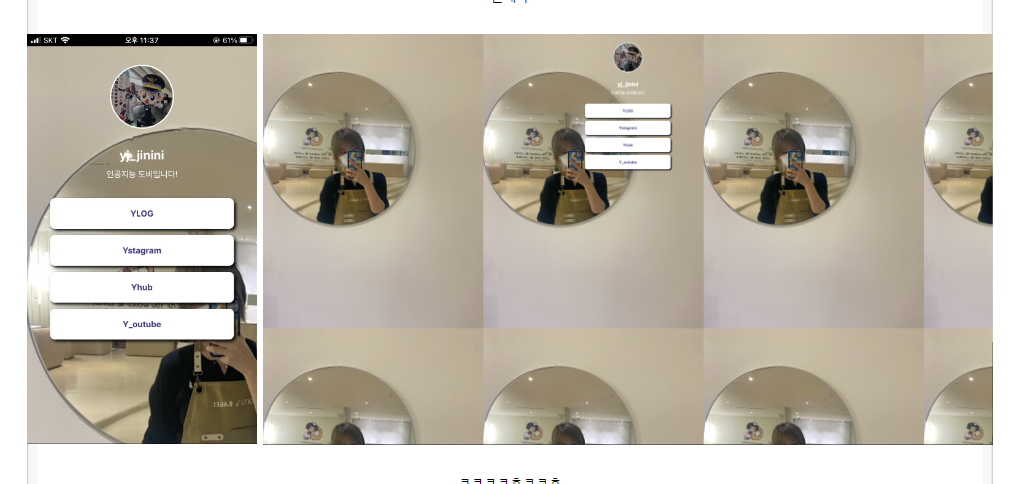
모바일 화면과 pc 화면에서 이미지가 진짜 가지각색이에요ㅠㅠ
어떻게 해야할까요?
<!DOCTYPE html>
<html>
<head>
<meta charset="UTF-8" />
<meta http-equiv="X-UA-Compatible" content="IE=edge" />
<meta name="viewport" content="width=device-width, initial-scale=1.0" />
<meta property="og:title" content="yj_jinini의 모든 것" />
<meta property="og:description" content="얼레벌레 일벌레" />
<meta property="og:image" content="images/image_cuty.jpg" />
<title>yj_jinini</title>
<style>
@import url('https://cdn.jsdelivr.net/gh/orioncactus/pretendard/dist/web/static/pretendard.css');
* {
font-family: "Pretendard",serif;
}
body{
/* width: 100%; */
max-width: 100%
height: 100%;
background: url('images/background.jpg');
background-size: contain;
/* background-repeat : no-repeat;
background-size : cover; */
}
/* body::after{
width: 100%;
height: 100%;
content: "";
position: absolute;
top: 0;
left: 0;
} */
.profile{
width: 100px;
height:100px;
/* background-color: green; */
border-radius: 100%;
border: 2px solid white;
background-image: url('images/image.jpg');
background-position: center;
background-size: cover;
}
.main{
color: white;
font-size: 20px;
margin-top: 30px;
margin-bottom: 10px;
}
.sub{
color: white;
font-size: 14px;
margin-top: 0px;
margin-bottom: 30px;
}
.wrap{
/* background-color: green; */
width: 300px;
margin: 30px auto 0px auto;
display: flex;
flex-direction: column;
justify-content: center;
align-items: center;
}
.wrap > a{
width: 300px;
height: 50px;
background-color: white;
border-radius: 8px;
margin-bottom: 10px;
font-size: 14px;
font-weight: bold;
color: #44398a;
display: flex;
flex-direction: column;
justify-content: center;
align-items: center;
text-decoration: none;
box-shadow: 3px 3px 5px 0px black;
}
.wrap > a:hover{
background-color: #f2f2f2;
}
</style>
</head>
<body>
<div class="wrap">
<div class="profile"></div>
<h1 class="main">yj_jinini</h1>
<p class="sub">인공지능 도비입니다!</p>
<a target="_blank" href="https://blog.naver.com/2322725">YLOG</a>
<a target="_blank" href="https://www.instagram.com/yj_jinini">Ystagram</a>
<a target="_blank" href="https://github.com/YeJinPaark">Yhub</a>
<a target="_blank" href="https://youtube.com/channel/UCIdwe2jh6uZu7VWAG9MBzUw">Y_outube</a>
</div>
</body>
</html>


