


* 겪고 있는 문제 상황을 최대한 자세하게 작성해주세요.
* 문제 해결을 위해 어떤 시도를 해보았는지 구체적으로 함께 알려주세요.
10강, MainPage.js 복붙후 에러 발생
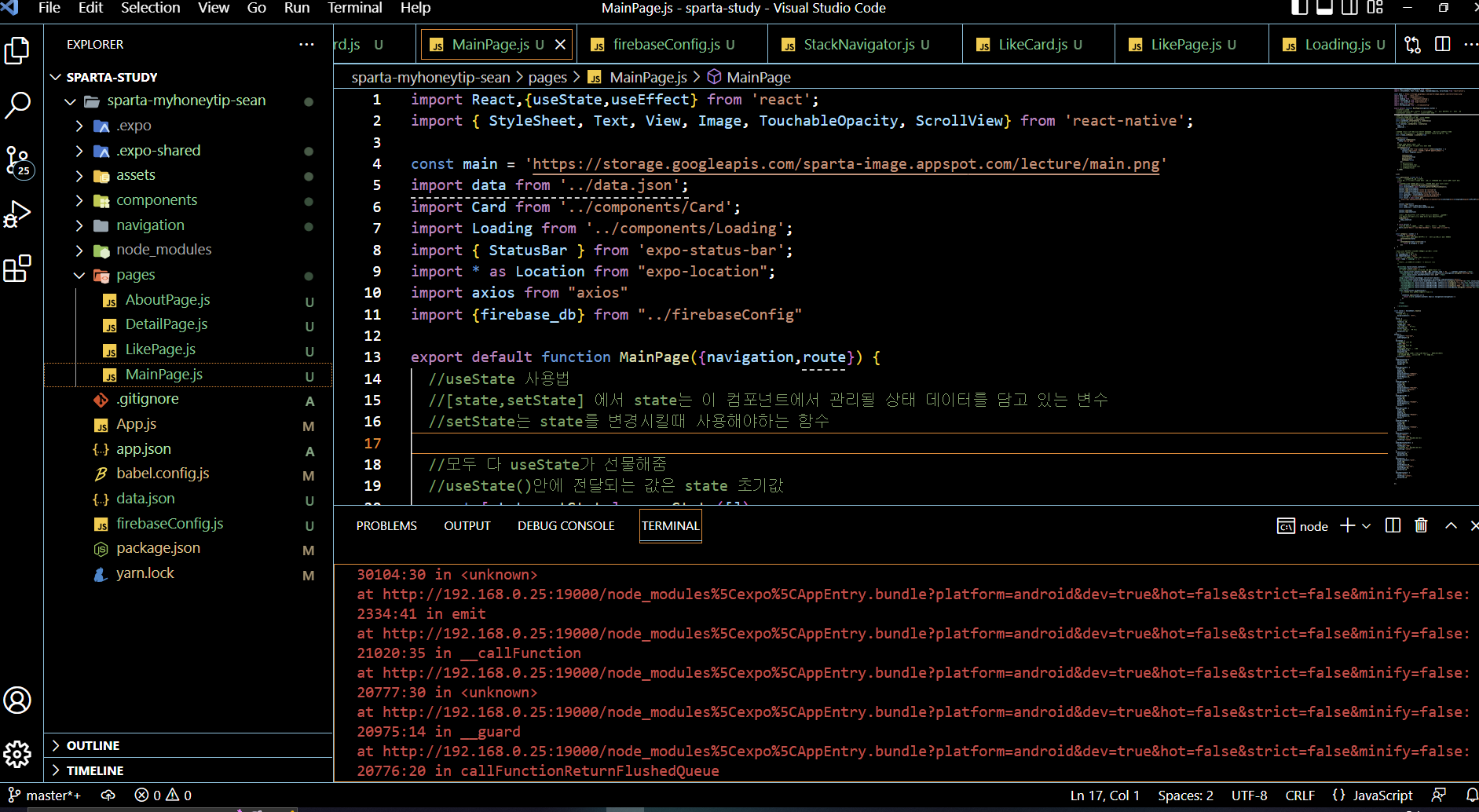
작성한 코드 및 에러 메세지
(Code)
import React,{useState,useEffect} from 'react';
import { StyleSheet, Text, View, Image, TouchableOpacity, ScrollView} from 'react-native';
const main = 'https://storage.googleapis.com/sparta-image.appspot.com/lecture/main.png'
import data from '../data.json';
import Card from '../components/Card';
import Loading from '../components/Loading';
import { StatusBar } from 'expo-status-bar';
import * as Location from "expo-location";
import axios from "axios"
import {firebase_db} from "../firebaseConfig"
export default function MainPage({navigation,route}) {
//useState 사용법
//[state,setState] 에서 state는 이 컴포넌트에서 관리될 상태 데이터를 담고 있는 변수
//setState는 state를 변경시킬때 사용해야하는 함수
//모두 다 useState가 선물해줌
//useState()안에 전달되는 값은 state 초기값
const [state,setState] = useState([])
const [cateState,setCateState] = useState([])
//날씨 데이터 상태관리 상태 생성!
const [weather, setWeather] = useState({
temp : 0,
condition : ''
})
//하단의 return 문이 실행되어 화면이 그려진다음 실행되는 useEffect 함수
//내부에서 data.json으로 부터 가져온 데이터를 state 상태에 담고 있음
const [ready,setReady] = useState(true)
useEffect(()=>{
navigation.setOptions({
title:'나만의 꿀팁'
})
//뒤의 1000 숫자는 1초를 뜻함
//1초 뒤에 실행되는 코드들이 담겨 있는 함수
setTimeout(()=>{
firebase_db.ref('/tip').once('value').then((snapshot) => {
console.log("파이어베이스에서 데이터 가져왔습니다!!")
let tip = snapshot.val();
setState(tip)
setCateState(tip)
getLocation()
setReady(false)
});
// getLocation()
// setState(data.tip)
// setCateState(data.tip)
// setReady(false)
},1000)
},[])
const getLocation = async () => {
//수많은 로직중에 에러가 발생하면
//해당 에러를 포착하여 로직을 멈추고,에러를 해결하기 위한 catch 영역 로직이 실행
try {
//자바스크립트 함수의 실행순서를 고정하기 위해 쓰는 async,await
await Location.requestForegroundPermissionsAsync();
const locationData= await Location.getCurrentPositionAsync();
console.log(locationData)
console.log(locationData['coords']['latitude'])
console.log(locationData['coords']['longitude'])
const latitude = locationData['coords']['latitude']
const longitude = locationData['coords']['longitude']
const API_KEY = "cfc258c75e1da2149c33daffd07a911d";
const result = await axios.get(
`http://api.openweathermap.org/data/2.5/weather?lat=${latitude}&lon=${longitude}&appid=${API_KEY}&units=metric`
);
console.log(result)
const temp = result.data.main.temp;
const condition = result.data.weather[0].main
console.log(temp)
console.log(condition)
//오랜만에 복습해보는 객체 리터럴 방식으로 딕셔너리 구성하기!!
//잘 기억이 안난다면 1주차 강의 6-5를 다시 복습해보세요!
setWeather({
temp,condition
})
} catch (error) {
//혹시나 위치를 못가져올 경우를 대비해서, 안내를 준비합니다
Alert.alert("위치를 찾을 수가 없습니다.", "앱을 껏다 켜볼까요?");
}
}
const category = (cate) => {
if(cate == "전체보기"){
//전체보기면 원래 꿀팁 데이터를 담고 있는 상태값으로 다시 초기화
setCateState(state)
}else{
setCateState(state.filter((d)=>{
return d.category == cate
}))
}
}
//data.json 데이터는 state에 담기므로 상태에서 꺼내옴
// let tip = state.tip;
let todayWeather = 10 + 17;
let todayCondition = "흐림"
//return 구문 밖에서는 슬래시 두개 방식으로 주석
return ready ? <Loading/> : (
/*
return 구문 안에서는 {슬래시 + * 방식으로 주석
*/
<ScrollView style={styles.container}>
<StatusBar style="light" />
{/* <Text style={styles.title}>나만의 꿀팁</Text> */}
<Text style={styles.weather}>오늘의 날씨: {weather.temp + '°C ' + weather.condition} </Text>
<TouchableOpacity style={styles.aboutButton} onPress={()=>{navigation.navigate('AboutPage')}}>
<Text style={styles.aboutButtonText}>소개 페이지</Text>
</TouchableOpacity>
<Image style={styles.mainImage} source={{uri:main}}/>
<ScrollView style={styles.middleContainer} horizontal indicatorStyle={"white"}>
<TouchableOpacity style={styles.middleButtonAll} onPress={()=>{category('전체보기')}}><Text style={styles.middleButtonTextAll}>전체보기</Text></TouchableOpacity>
<TouchableOpacity style={styles.middleButton01} onPress={()=>{category('생활')}}><Text style={styles.middleButtonText}>생활</Text></TouchableOpacity>
<TouchableOpacity style={styles.middleButton02} onPress={()=>{category('재테크')}}><Text style={styles.middleButtonText}>재테크</Text></TouchableOpacity>
<TouchableOpacity style={styles.middleButton03} onPress={()=>{category('반려견')}}><Text style={styles.middleButtonText}>반려견</Text></TouchableOpacity>
<TouchableOpacity style={styles.middleButton04} onPress={()=>{navigation.navigate('LikePage')}}><Text style={styles.middleButtonText}>꿀팁 찜</Text></TouchableOpacity>
</ScrollView>
<View style={styles.cardContainer}>
{/* 하나의 카드 영역을 나타내는 View */}
{
cateState.map((content,i)=>{
return (<Card content={content} key={i} navigation={navigation}/>)
})
}
</View>
</ScrollView>)
}
const styles = StyleSheet.create({
container: {
//앱의 배경 색
backgroundColor: '#fff',
},
title: {
//폰트 사이즈
fontSize: 20,
//폰트 두께
fontWeight: '700',
//위 공간으로 부터 이격
marginTop:50,
//왼쪽 공간으로 부터 이격
marginLeft:20
},
weather:{
alignSelf:"flex-end",
paddingRight:20
},
mainImage: {
//컨텐츠의 넓이 값
width:'90%',
//컨텐츠의 높이 값
height:200,
//컨텐츠의 모서리 구부리기
borderRadius:10,
marginTop:20,
//컨텐츠 자체가 앱에서 어떤 곳에 위치시킬지 결정(정렬기능)
//각 속성의 값들은 공식문서에 고대로~ 나와 있음
alignSelf:"center"
},
middleContainer:{
marginTop:20,
marginLeft:10,
height:60
},
middleButtonAll: {
width:100,
height:50,
padding:15,
backgroundColor:"#20b2aa",
borderColor:"deeppink",
borderRadius:15,
margin:7
},
middleButton01: {
width:100,
height:50,
padding:15,
backgroundColor:"#fdc453",
borderColor:"deeppink",
borderRadius:15,
margin:7
},
middleButton02: {
width:100,
height:50,
padding:15,
backgroundColor:"#fe8d6f",
borderRadius:15,
margin:7
},
middleButton03: {
width:100,
height:50,
padding:15,
backgroundColor:"#9adbc5",
borderRadius:15,
margin:7
},
middleButton04: {
width:100,
height:50,
padding:15,
backgroundColor:"#f886a8",
borderRadius:15,
margin:7
},
middleButtonText: {
color:"#fff",
fontWeight:"700",
//텍스트의 현재 위치에서의 정렬
textAlign:"center"
},
middleButtonTextAll: {
color:"#fff",
fontWeight:"700",
//텍스트의 현재 위치에서의 정렬
textAlign:"center"
},
cardContainer: {
marginTop:10,
marginLeft:10
},
aboutButton: {
backgroundColor:"pink",
width:100,
height:40,
borderRadius:10,
alignSelf:"flex-end",
marginRight:20,
marginTop:10
},
aboutButtonText: {
color:"#fff",
textAlign:"center",
marginTop:10
}
});
(Error)
Android Running app on SM-F926N
Object {
"coords": Object {
"accuracy": 25.332000732421875,
"altitude": 61.80000305175781,
"altitudeAccuracy": 0.9933966398239136,
"heading": 0,
"latitude": 37.3803371,
"longitude": 126.6464687,
"speed": 0,
},
"mocked": false,
"timestamp": 1667114646776,
}
37.3803371
126.6464687
Object {
"config": Object {
"adapter": [Function xhrAdapter],
"data": undefined,
"env": Object {
"Blob": [Function Blob],
"FormData": [Function FormData],
},
"headers": Object {
"Accept": "application/json, text/plain, */*",
},
"maxBodyLength": -1,
"maxContentLength": -1,
"method": "get",
"timeout": 0,
"transformRequest": Array [
[Function transformRequest],
],
"transformResponse": Array [
[Function transformResponse],
],
"transitional": Object {
"clarifyTimeoutError": false,
"forcedJSONParsing": true,
"silentJSONParsing": true,
},
"validateStatus": [Function validateStatus],
"xsrfCookieName": "XSRF-TOKEN",
"xsrfHeaderName": "X-XSRF-TOKEN",
},
"data": Object {
"base": "stations",
"clouds": Object {
"all": 0,
},
"cod": 200,
"coord": Object {
"lat": 37.3803,
"lon": 126.6465,
},
"dt": 1667114649,
"id": 1843564,
"main": Object {
"feels_like": 18.5,
"humidity": 59,
"pressure": 1024,
"temp": 19,
"temp_max": 21.02,
"temp_min": 18.05,
},
"name": "Incheon",
"sys": Object {
"country": "KR",
"id": 8093,
"sunrise": 1667080523,
"sunset": 1667119117,
"type": 1,
},
"timezone": 32400,
"visibility": 10000,
"weather": Array [
Object {
"description": "clear sky",
"icon": "01d",
"id": 800,
"main": "Clear",
},
],
"wind": Object {
"deg": 260,
"speed": 3.09,
},
},
"headers": Object {
"access-control-allow-credentials": "true",
"access-control-allow-methods": "GET, POST",
"access-control-allow-origin": "*",
"connection": "keep-alive",
"content-length": "462",
"content-type": "application/json; charset=utf-8",
"date": "Sun, 30 Oct 2022 07:24:09 GMT",
"server": "openresty",
"x-cache-key": "/data/2.5/weather?lat=37.38&lon=126.65&units=metric",
},
"request": XMLHttpRequest {
"DONE": 4,
"HEADERS_RECEIVED": 2,
"LOADING": 3,
"OPENED": 1,
"UNSENT": 0,
"_aborted": false,
"_cachedResponse": undefined,
"_hasError": false,
"_headers": Object {
"accept": "application/json, text/plain, */*",
},
"_incrementalEvents": false,
"_lowerCaseResponseHeaders": Object {
"access-control-allow-credentials": "true",
"access-control-allow-methods": "GET, POST",
"access-control-allow-origin": "*",
"connection": "keep-alive",
"content-length": "462",
"content-type": "application/json; charset=utf-8",
"date": "Sun, 30 Oct 2022 07:24:09 GMT",
"server": "openresty",
"x-cache-key": "/data/2.5/weather?lat=37.38&lon=126.65&units=metric",
},
"_method": "GET",
"_perfKey": "network_XMLHttpRequest_http://api.openweathermap.org/data/2.5/weather?lat=37.3803371&lon=126.6464687&appid=cfc258c75e1da2149c33daffd07a911d&units=metric",
"_performanceLogger": PerformanceLogger {
"_closed": false,
"_extras": Object {},
"_pointExtras": Object {},
"_points": Object {
"initializeCore_end": 1667114645055,
"initializeCore_start": 1667114645006,
},
"_timespans": Object {
"network_XMLHttpRequest_http://192.168.0.25:19000/logs": Object {
"endExtras": undefined,
"endTime": 1667114645623,
"startExtras": undefined,
"startTime": 1667114645559,
"totalTime": 64,
},
"network_XMLHttpRequest_http://api.openweathermap.org/data/2.5/weather?lat=37.3803371&lon=126.6464687&appid=cfc258c75e1da2149c33daffd07a911d&units=metric": Object {
"endExtras": undefined,
"endTime": 1667114648727,
"startExtras": undefined,
"startTime": 1667114648341,
"totalTime": 386,
},
},
},
"_requestId": null,
"_response": "{\"coord\":{\"lon\":126.6465,\"lat\":37.3803},\"weather\":[{\"id\":800,\"main\":\"Clear\",\"description\":\"clear sky\",\"icon\":\"01d\"}],\"base\":\"stations\",\"main\":{\"temp\":19,\"feels_like\":18.5,\"temp_min\":18.05,\"temp_max\":21.02,\"pressure\":1024,\"humidity\":59},\"visibility\":10000,\"wind\":{\"speed\":3.09,\"deg\":260},\"clouds\":{\"all\":0},\"dt\":1667114649,\"sys\":{\"type\":1,\"id\":8093,\"country\":\"KR\",\"sunrise\":1667080523,\"sunset\":1667119117},\"timezone\":32400,\"id\":1843564,\"name\":\"Incheon\",\"cod\":200}",
"_responseType": "",
"_sent": true,
"_subscriptions": Array [],
"_timedOut": false,
"_trackingName": "unknown",
"readyState": 4,
"responseHeaders": Object {
"Access-Control-Allow-Credentials": "true",
"Access-Control-Allow-Methods": "GET, POST",
"Access-Control-Allow-Origin": "*",
"Connection": "keep-alive",
"Content-Length": "462",
"Content-Type": "application/json; charset=utf-8",
"Date": "Sun, 30 Oct 2022 07:24:09 GMT",
"Server": "openresty",
"X-Cache-Key": "/data/2.5/weather?lat=37.38&lon=126.65&units=metric",
},
"responseURL": "http://api.openweathermap.org/data/2.5/weather?lat=37.3803371&lon=126.6464687&appid=cfc258c75e1da2149c33daffd07a911d&units=metric",
"status": 200,
"timeout": 0,
"upload": XMLHttpRequestEventTarget {},
"withCredentials": true,
},
"status": 200,
"statusText": undefined,
}
19
Clear
While trying to resolve module `idb` from file `C:\Users\shany\Desktop\sparta-study\sparta-myhoneytip-sean\node_modules\@firebase\app\dist\esm\index.esm2017.js`, the package `C:\Users\shany\Desktop\sparta-study\sparta-myhoneytip-sean\node_modules\idb\package.json` was successfully found. However, this package itself specifies a `main` module field that could not be resolved (`C:\Users\shany\Desktop\sparta-study\sparta-myhoneytip-sean\node_modules\idb\build\index.cjs`. Indeed, none of these files exist:
* C:\Users\shany\Desktop\sparta-study\sparta-myhoneytip-sean\node_modules\idb\build\index.cjs(.native|.android.ts|.native.ts|.ts|.android.tsx|.native.tsx|.tsx|.android.js|.native.js|.js|.android.jsx|.native.jsx|.jsx|.android.json|.native.json|.json)
* C:\Users\shany\Desktop\sparta-study\sparta-myhoneytip-sean\node_modules\idb\build\index.cjs\index(.native|.android.ts|.native.ts|.ts|.android.tsx|.native.tsx|.tsx|.android.js|.native.js|.js|.android.jsx|.native.jsx|.jsx|.android.json|.native.json|.json)
Error: While trying to resolve module `idb` from file `C:\Users\shany\Desktop\sparta-study\sparta-myhoneytip-sean\node_modules\@firebase\app\dist\esm\index.esm2017.js`, the package `C:\Users\shany\Desktop\sparta-study\sparta-myhoneytip-sean\node_modules\idb\package.json` was successfully found. However, this package itself specifies a `main` module field that could not be resolved (`C:\Users\shany\Desktop\sparta-study\sparta-myhoneytip-sean\node_modules\idb\build\index.cjs`. Indeed, none of these files exist:
* C:\Users\shany\Desktop\sparta-study\sparta-myhoneytip-sean\node_modules\idb\build\index.cjs(.native|.android.ts|.native.ts|.ts|.android.tsx|.native.tsx|.tsx|.android.js|.native.js|.js|.android.jsx|.native.jsx|.jsx|.android.json|.native.json|.json)
* C:\Users\shany\Desktop\sparta-study\sparta-myhoneytip-sean\node_modules\idb\build\index.cjs\index(.native|.android.ts|.native.ts|.ts|.android.tsx|.native.tsx|.tsx|.android.js|.native.js|.js|.android.jsx|.native.jsx|.jsx|.android.json|.native.json|.json)
at DependencyGraph.resolveDependency (C:\Users\shany\Desktop\sparta-study\sparta-myhoneytip-sean\node_modules\metro\src\node-haste\DependencyGraph.js:243:17)
at Object.resolve (C:\Users\shany\Desktop\sparta-study\sparta-myhoneytip-sean\node_modules\metro\src\lib\transformHelpers.js:129:24)
at resolve (C:\Users\shany\Desktop\sparta-study\sparta-myhoneytip-sean\node_modules\metro\src\DeltaBundler\traverseDependencies.js:396:33)
at C:\Users\shany\Desktop\sparta-study\sparta-myhoneytip-sean\node_modules\metro\src\DeltaBundler\traverseDependencies.js:412:26
at Array.reduce (<anonymous>)
at resolveDependencies (C:\Users\shany\Desktop\sparta-study\sparta-myhoneytip-sean\node_modules\metro\src\DeltaBundler\traverseDependencies.js:411:33)
at processModule (C:\Users\shany\Desktop\sparta-study\sparta-myhoneytip-sean\node_modules\metro\src\DeltaBundler\traverseDependencies.js:140:31)
at addDependency (C:\Users\shany\Desktop\sparta-study\sparta-myhoneytip-sean\node_modules\metro\src\DeltaBundler\traverseDependencies.js:230:18)
at async Promise.all (index 6)
at processModule (C:\Users\shany\Desktop\sparta-study\sparta-myhoneytip-sean\node_modules\metro\src\DeltaBundler\traverseDependencies.js:198:5)
Error: While trying to resolve module `idb` from file `C:\Users\shany\Desktop\sparta-study\sparta-myhoneytip-sean\node_modules\@firebase\app\dist\esm\index.esm2017.js`, the package `C:\Users\shany\Desktop\sparta-study\sparta-myhoneytip-sean\node_modules\idb\package.json` was successfully found. However, this package itself specifies a `main` module field that could not be resolved (`C:\Users\shany\Desktop\sparta-study\sparta-myhoneytip-sean\node_modules\idb\build\index.cjs`. Indeed, none of these files exist:
* C:\Users\shany\Desktop\sparta-study\sparta-myhoneytip-sean\node_modules\idb\build\index.cjs(.native|.android.ts|.native.ts|.ts|.android.tsx|.native.tsx|.tsx|.android.js|.native.js|.js|.android.jsx|.native.jsx|.jsx|.android.json|.native.json|.json)
* C:\Users\shany\Desktop\sparta-study\sparta-myhoneytip-sean\node_modules\idb\build\index.cjs\index(.native|.android.ts|.native.ts|.ts|.android.tsx|.native.tsx|.tsx|.android.js|.native.js|.js|.android.jsx|.native.jsx|.jsx|.android.json|.native.json|.json)
at DependencyGraph.resolveDependency (C:\Users\shany\Desktop\sparta-study\sparta-myhoneytip-sean\node_modules\metro\src\node-haste\DependencyGraph.js:243:17)
at Object.resolve (C:\Users\shany\Desktop\sparta-study\sparta-myhoneytip-sean\node_modules\metro\src\lib\transformHelpers.js:129:24)
at resolve (C:\Users\shany\Desktop\sparta-study\sparta-myhoneytip-sean\node_modules\metro\src\DeltaBundler\traverseDependencies.js:396:33)
at C:\Users\shany\Desktop\sparta-study\sparta-myhoneytip-sean\node_modules\metro\src\DeltaBundler\traverseDependencies.js:412:26
at Array.reduce (<anonymous>)
at resolveDependencies (C:\Users\shany\Desktop\sparta-study\sparta-myhoneytip-sean\node_modules\metro\src\DeltaBundler\traverseDependencies.js:411:33)
at processModule (C:\Users\shany\Desktop\sparta-study\sparta-myhoneytip-sean\node_modules\metro\src\DeltaBundler\traverseDependencies.js:140:31)
at addDependency (C:\Users\shany\Desktop\sparta-study\sparta-myhoneytip-sean\node_modules\metro\src\DeltaBundler\traverseDependencies.js:230:18)
at async Promise.all (index 6)
at processModule (C:\Users\shany\Desktop\sparta-study\sparta-myhoneytip-sean\node_modules\metro\src\DeltaBundler\traverseDependencies.js:198:5)
InternalError Metro has encountered an error: While trying to resolve module `idb` from file `C:\Users\shany\Desktop\sparta-study\sparta-myhoneytip-sean\node_modules\@firebase\app\dist\esm\index.esm2017.js`, the package `C:\Users\shany\Desktop\sparta-study\sparta-myhoneytip-sean\node_modules\idb\package.json` was successfully found. However, this package itself specifies a `main` module field that could not be resolved (`C:\Users\shany\Desktop\sparta-study\sparta-myhoneytip-sean\node_modules\idb\build\index.cjs`. Indeed, none of these files exist:
* C:\Users\shany\Desktop\sparta-study\sparta-myhoneytip-sean\node_modules\idb\build\index.cjs(.native|.android.ts|.native.ts|.ts|.android.tsx|.native.tsx|.tsx|.android.js|.native.js|.js|.android.jsx|.native.jsx|.jsx|.android.json|.native.json|.json)
* C:\Users\shany\Desktop\sparta-study\sparta-myhoneytip-sean\node_modules\idb\build\index.cjs\index(.native|.android.ts|.native.ts|.ts|.android.tsx|.native.tsx|.tsx|.android.js|.native.js|.js|.android.jsx|.native.jsx|.jsx|.android.json|.native.json|.json): C:\Users\shany\Desktop\sparta-study\sparta-myhoneytip-sean\node_modules\metro\src\node-haste\DependencyGraph.js (243:17)
241 |
242 | if (error instanceof InvalidPackageError) {
> 243 | throw new PackageResolutionError({
| ^
244 | packageError: error,
245 | originModulePath: from,
246 | targetModuleName: to,
at http://192.168.0.25:19000/node_modules%5Cexpo%5CAppEntry.bundle?platform=android&dev=true&hot=false&strict=false&minify=false:31248:25 in showCompileError
at http://192.168.0.25:19000/node_modules%5Cexpo%5CAppEntry.bundle?platform=android&dev=true&hot=false&strict=false&minify=false:31177:28 in <unknown>
at http://192.168.0.25:19000/node_modules%5Cexpo%5CAppEntry.bundle?platform=android&dev=true&hot=false&strict=false&minify=false:31388:22 in onmessage
at http://192.168.0.25:19000/node_modules%5Cexpo%5CAppEntry.bundle?platform=android&dev=true&hot=false&strict=false&minify=false:29234:30 in dispatchEvent
at http://192.168.0.25:19000/node_modules%5Cexpo%5CAppEntry.bundle?platform=android&dev=true&hot=false&strict=false&minify=false:30104:30 in <unknown>
at http://192.168.0.25:19000/node_modules%5Cexpo%5CAppEntry.bundle?platform=android&dev=true&hot=false&strict=false&minify=false:21020:35 in __callFunction
at http://192.168.0.25:19000/node_modules%5Cexpo%5CAppEntry.bundle?platform=android&dev=true&hot=false&strict=false&minify=false:20777:30 in <unknown>
at http://192.168.0.25:19000/node_modules%5Cexpo%5CAppEntry.bundle?platform=android&dev=true&hot=false&strict=false&minify=false:20776:20 in callFunctionReturnFlushedQueue


