


* 겪고 있는 문제 상황을 최대한 자세하게 작성해주세요.
* 문제 해결을 위해 어떤 시도를 해보았는지 구체적으로 함께 알려주세요.
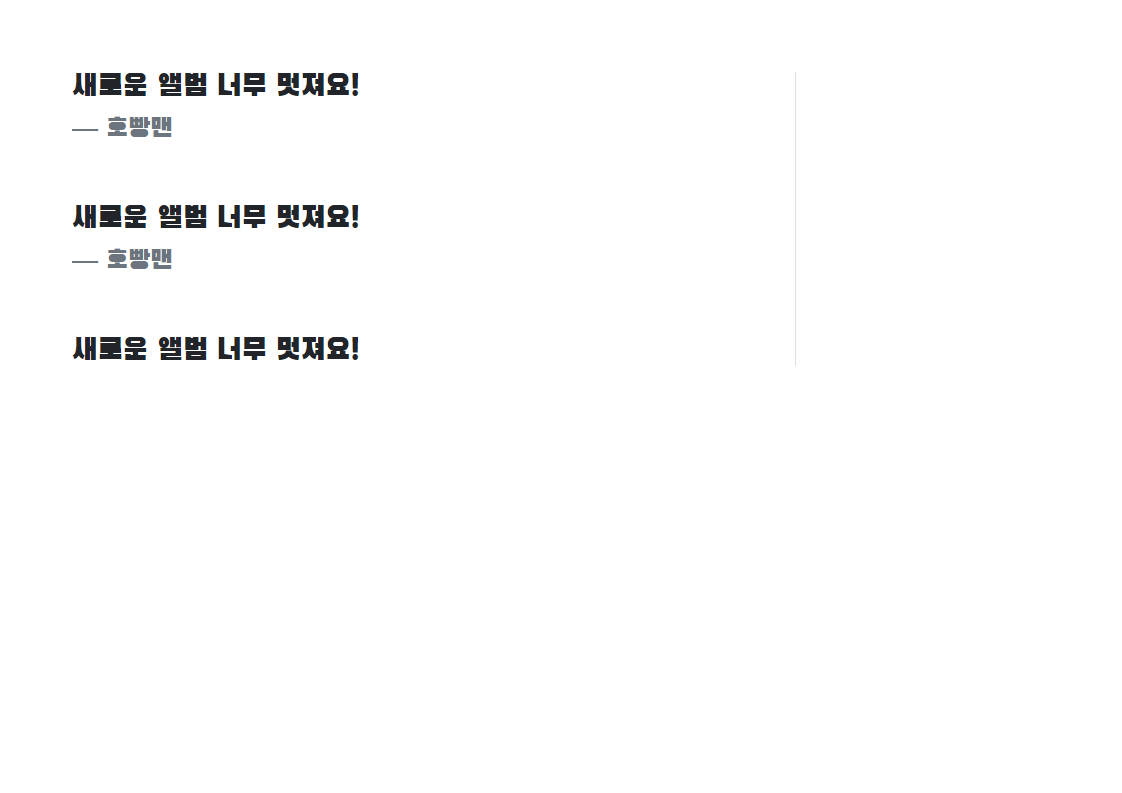
강의의 완성본에는
새로운 앨범 너무 멋져요!
부분이 한칸 한칸 나눠져 보이는데
제가 제출한 숙제에는 뭉쳐서 보이는데 코딩을 아무리 비교해봐도..
뭐가 잘못되었는지 모르겠습니다 ㅠㅠ
작성한 코드 및 에러 메세지
<!doctype html>
<html lang="en">
<head>
<meta charset="utf-8">
<meta name="viewport" content="width=device-width, initial-scale=1, shrink-to-fit=no">
<link href="https://cdn.jsdelivr.net/npm/bootstrap@5.0.2/dist/css/bootstrap.min.css" rel="stylesheet"
integrity="sha384-EVSTQN3/azprG1Anm3QDgpJLIm9Nao0Yz1ztcQTwFspd3yD65VohhpuuCOmLASjC" crossorigin="anonymous">
<script src="https://ajax.googleapis.com/ajax/libs/jquery/3.5.1/jquery.min.js"></script>
<script src="https://cdn.jsdelivr.net/npm/bootstrap@5.0.2/dist/js/bootstrap.bundle.min.js"
integrity="sha384-MrcW6ZMFYlzcLA8Nl+NtUVF0sA7MsXsP1UyJoMp4YLEuNSfAP+JcXn/tWtIaxVXM"
crossorigin="anonymous"></script>
<title>스파르타코딩클럽 | 부트스트랩 연습하기</title>
<link rel="preconnect" href="https://fonts.googleapis.com">
<link rel="preconnect" href="https://fonts.gstatic.com" crossorigin>
<link href="https://fonts.googleapis.com/css2?family=Black+Han+Sans&display=swap" rel="stylesheet">
<style>
* {font-family: 'Black Han Sans', sans-serif;}
.mytitle {
background-color: gray;
width: 100%;
height: 250px;
background-image: linear-gradient(0deg, rgba(0, 0, 0, 0.5), rgba(0, 0, 0, 0.5)), url("https://nimage.newsway.co.kr/photo/2015/11/06/2015110617432539706_20151106174443_1.jpg");
background-position: center 20%;
background-size: cover;
display: flex;
flex-direction: column;
justify-content: center;
align-items: center;
color: white;
}
.mypost{
width:95%;
max-width:500px;
margin: 20px auto 0 auto;
box-shadow: 0px 0px 3px 0px;
padding: 20px
}
.mypost >button {
margin-top: 10px;
}
.mycards {
width: 95%;
max-width: 500px;
margin: 20px auto 0 auto;
}
.mycards > .card {
margin-top: 10px;
margin-bottom: 10px;
}
</style>
</head>
<body>
<
<div class="mytitle">
<h1>조규현 팬명록</h1>
</div>
<div class="mypost">
<div class="form-floating mb-3">
<input type="email" class="form-control" id="floatingInput" placeholder="name@example.com">
<label for="floatingInput">닉네임</label>
</div>
<div class="form-floating">
<textarea class="form-control" placeholder="Leave a comment here" id="floatingTextarea2"
style="height: 100px"></textarea>
<label for="floatingTextarea2">응원댓글</label>
</div>
<button type="button" class="btn btn-dark">응원남기기</button>
</div>
<div class="mycards" id="comment-list">
<div class="card">
<div class="card-body">
<blockquote class="blockquote mb-0">
<p>새로운 앨범 너무 멋져요!</p>
<footer class="blockquote-footer">호빵맨</footer>
</blockquote>
</div>
<div class="card-body">
<blockquote class="blockquote mb-0">
<p>새로운 앨범 너무 멋져요!</p>
<footer class="blockquote-footer">호빵맨</footer>
</blockquote>
</div>
<div class="card-body">
<blockquote class="blockquote mb-0">
<p>새로운 앨범 너무 멋져요!</p>
<footer class="blockquote-footer">호빵맨</footer>
</blockquote>
</div>
</div>
</div>
<
</body>
</html>


