


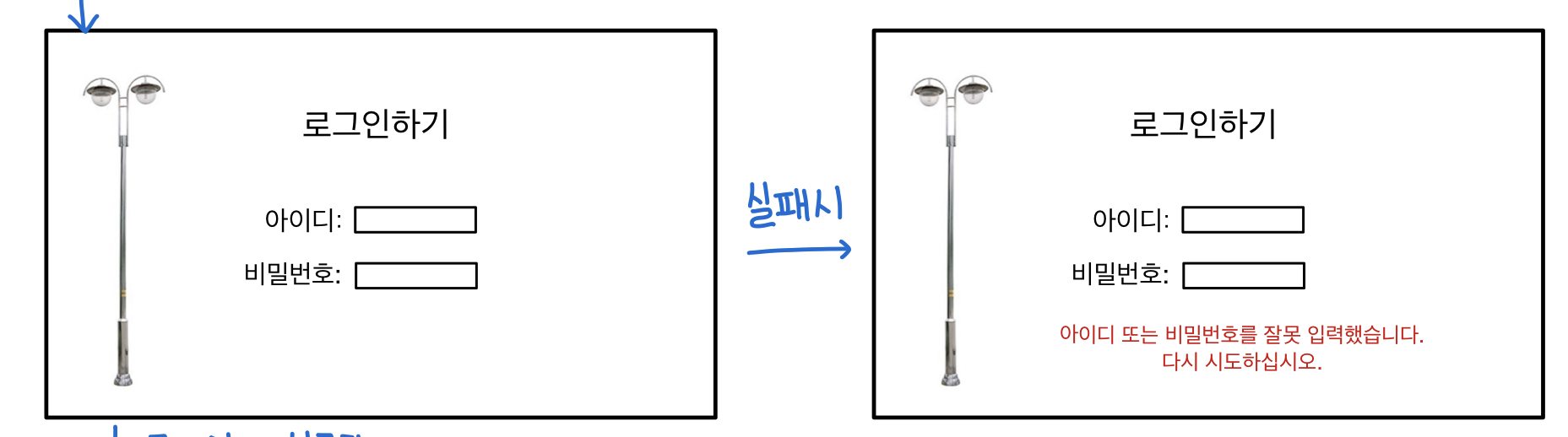
안녕하세요 웹개발 강의 내용을 토대로 응용한 로그인 페이지를 만들어보았습니다 사진과 같이 제가 설정한 아이디와 비번이 아닐 시에 저런 문구를 띄우고 싶은데요 if문을 쓰고 박스에 태그를 걸어서 그 태그가 설정된 아이디,비번이 아닐 시에 저 문구를 추가하는 이벤트?를 걸으면 된다는 건 알거같은데....
1.태그를 어디에 걸어야 할지와
2.그 박스는 뭐라고 지칭해야하는지(if 000=qwer1234에서 000은 뭐라써야 할지)를 모르겠습니다 ㅠㅠ
작성한 코드 및 에러 메세지
<!DOCTYPE html>
<html lang="ko">
<head>
<meta charset="UTF-8">
<meta name="viewport" content="width=device-width, initial-scale=1, shrink-to-fit=no">
<link href="https://cdn.jsdelivr.net/npm/bootstrap@5.0.2/dist/css/bootstrap.min.css" rel="stylesheet"
integrity="sha384-EVSTQN3/azprG1Anm3QDgpJLIm9Nao0Yz1ztcQTwFspd3yD65VohhpuuCOmLASjC" crossorigin="anonymous">
<script src="https://ajax.googleapis.com/ajax/libs/jquery/3.5.1/jquery.min.js"></script>
<script src="https://cdn.jsdelivr.net/npm/bootstrap@5.0.2/dist/js/bootstrap.bundle.min.js"
integrity="sha384-MrcW6ZMFYlzcLA8Nl+NtUVF0sA7MsXsP1UyJoMp4YLEuNSfAP+JcXn/tWtIaxVXM"
crossorigin="anonymous"></script>
<script src="https://ajax.googleapis.com/ajax/libs/jquery/3.4.1/jquery.min.js"></script>
<title>로그인 페이지</title>
<script>
function ming(){
}
</script>
<style>
.mytitle{
padding: 80px;
text-align: center;
}
.mylogin{
width: 600px;
margin: auto;
}
.mylogin>button{
display: flex;
flex-direction: column;
justify-content: center;
align-items: center;
}
.btn-outline-dark{
margin: auto;
}
.col-sm-10{
if()
}
</style>
</head>
<body>
<div style="text-align : start;">
<img
src="http://orangelight.co.kr/web/product/big/20191227/8ebff54795e1acd9223b4dc25e29da66.jpg"
width="300px" height="400px"
>
<h1 class="mytitle">로그인하기</h1>
<form class="mylogin">
<div class="row mb-3">
<label for="inputEmail3" class="col-sm-2 col-form-label">아이디</label>
<div class="col-sm-10">
<input type="email" class="form-control" id="inputEmail3">
</div>
</div>
<div class="row mb-3">
<label for="inputPassword3" class="col-sm-2 col-form-label">비밀번호</label>
<div class="col-sm-10">
<input type="password" class="form-control" id="inputPassword3">
</div>
</div>
<button onclick="window.location.href='/car'" type="button" class="btn btn-outline-dark">로그인하기</button>
</form>
</body>
</html>


