커뮤니티

포인트
쿠폰
내 강의실
국비 신청 내역
증명서
계정
로그아웃
학습 질문
개발 일지
나의 활동
답변 완료
4주차 숙제
undefined주차


윤*재
댓글
26
・
추천
0
・
조회수
25
조회수
25
답변 완료
4주차 숙제 콘솔 상 문제점
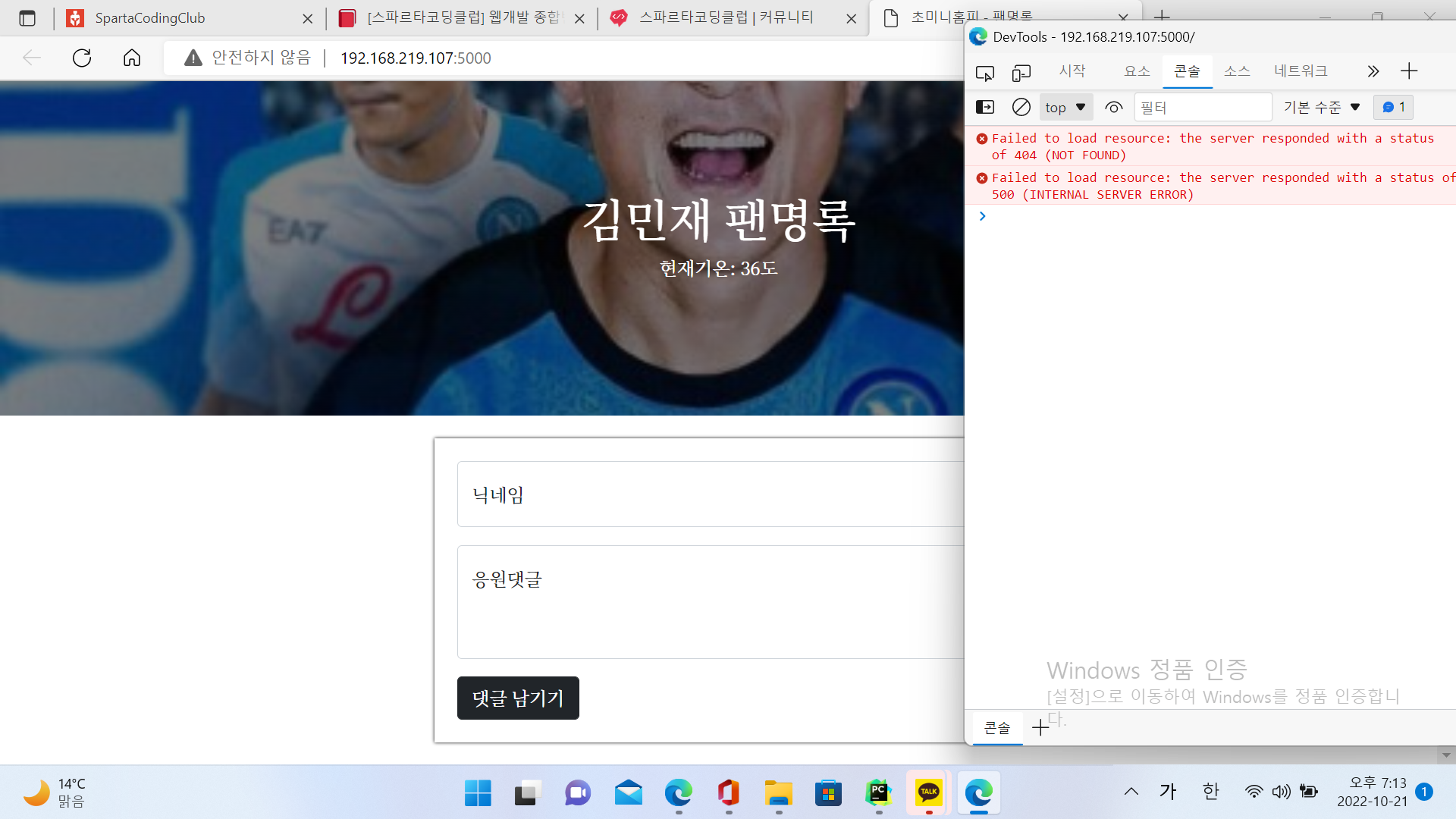
15주차 코드 슬리팻을 붙이고 숙제 해설 강의 선생님 하시는 대로 따라 했는데 console에서 생성이 안되거나 에러가 나요
그래서 숙제 해설 코드 슬리팻을 봤더니 15주차 코드 슬리팻+선생님 해설하고 조금 다르고요.
그래서 숙제 해설 코드 슬리팻을 붙여서 시도해 봤어요
그래도 console이 안뜨네요.. 그리고 기온 소수점도 없어지고요..
거기다 밑의 comment란은 아예 보이지도 안네요.
진도가 안나가서 걱정이에요 ㅠㅠ
from flask import Flask, render_template, request, jsonify
app = Flask(__name__)

from pymongo import MongoClient
client = MongoClient("내 URL")
db = client.sparta

@app.route('/')
def home():
   return render_template('index.html')

@app.route("/homework", methods=["POST"])
def homework_post():
    name_receive = request.form["name_give"]
    comment_receive = request.form["comment_give"]

    doc = {
        'name': name_receive,
        'comment': comment_receive
    }

    db.homework.insert_one(doc)
    return jsonify({'msg':'응원 완료!'})

@app.route("/homework", methods=["GET"])
def homework_get():
    comment_list = list(db.homework.find({},{'_id':False}))
    return jsonify({'comments':comment_list})


if __name__ == '__main__':
   app.run('0.0.0.0', port=5000, debug=True)
<!DOCTYPE html>
<html lang="en">
<head>
    <meta charset="UTF-8">
    <meta http-equiv="X-UA-Compatible" content="IE=edge">
    <meta name="viewport" content="width=device-width, initial-scale=1.0">

    <link href="https://cdn.jsdelivr.net/npm/bootstrap@5.0.2/dist/css/bootstrap.min.css" rel="stylesheet"
        integrity="sha384-EVSTQN3/azprG1Anm3QDgpJLIm9Nao0Yz1ztcQTwFspd3yD65VohhpuuCOmLASjC" crossorigin="anonymous">
    <script src="https://ajax.googleapis.com/ajax/libs/jquery/3.5.1/jquery.min.js"></script>
    <script src="https://cdn.jsdelivr.net/npm/bootstrap@5.0.2/dist/js/bootstrap.bundle.min.js"
        integrity="sha384-MrcW6ZMFYlzcLA8Nl+NtUVF0sA7MsXsP1UyJoMp4YLEuNSfAP+JcXn/tWtIaxVXM"
        crossorigin="anonymous"></script>

    <title>초미니홈피 - 팬명록</title>

    <link href="https://fonts.googleapis.com/css2?family=Noto+Serif+KR:wght@200;300;400;500;600;700;900&display=swap" rel="stylesheet">
    <style>
        * {
            font-family: 'Noto Serif KR', serif;
        }
        .mypic {
            width: 100%;
            height: 300px;

            background-image: linear-gradient(0deg, rgba(0, 0, 0, 0.5), rgba(0, 0, 0, 0.5)), url('https://search.pstatic.net/common/?src=http%3A%2F%2Fblogfiles.naver.net%2FMjAyMjA5MTBfMjM4%2FMDAxNjYyNzg4MjgwOTA4.r7tsSkIhyC-qTZbxuMclCRyLhqOgNRfOuHORlXTeA7Ig.rHiFSNzPZrx7PPbixf0RJP7JDzQ5SobImJEt68zecPMg.JPEG.auddhks6402%2FIMG_7091.jpg&type=sc960_832');
            background-position: center 30%;
            background-size: cover;

            color: white;

            display: flex;
            flex-direction: column;
            align-items: center;
            justify-content: center;
        }

        .mypost {
            width: 95%;
            max-width: 500px;
            margin: 20px auto 20px auto;

            box-shadow: 0px 0px 3px 0px black;
            padding: 20px;
        }

        .mypost > button {
            margin-top: 15px;
        }

        .mycards {
            width: 95%;
            max-width: 500px;
            margin: auto;
        }

        .mycards > .card {
            margin-top: 10px;
            margin-bottom: 10px;
        }
    </style>
    <script>
        $(document).ready(function () {
            show_comment();
        });
        function save_comment() {
            let name = $('#name').val()
            let comment = $('#comment').val()

            $.ajax({
                type: "POST",
                url: "/homework",
                data: {'name_give':name, 'comment_give':comment},
                success: function (response) {
                    alert(response["msg"])
                    window.location.reload()
                }
            });
        }
        function show_comment() {
            $('#comment-list').empty()
            $.ajax({
                type: "GET",
                url: "/homework",
                data: {},
                success: function (response) {
                    let rows = response['comments']
                    for (let i = 0; i < rows.length; i++) {
                        let name = rows[i]['name']
                        let comment = rows[i]['comment']

                        console.log(name,comment)

                    }
                }
            });
        }
    </script>
</head>
<body>
    <div class="mypic">
        <h1>김민재 팬명록</h1>
        <p>현재기온: <span id="temp">36</span>도</p>
    </div>
    <div class="mypost">
        <div class="form-floating mb-3">
            <input type="text" class="form-control" id="name" placeholder="url">
            <label for="floatingInput">닉네임</label>
        </div>
        <div class="form-floating">
            <textarea class="form-control" placeholder="Leave a comment here" id="comment"
                style="height: 100px"></textarea>
            <label for="floatingTextarea2">응원댓글</label>
        </div>
        <button onclick="save_comment()" type="button" class="btn btn-dark">댓글 남기기</button>
    </div>
    <div class="mycards" id="comment-list">
        <div class="card">
            <div class="card-body">
                <blockquote class="blockquote mb-0">
                    <p>새로운 앨범 너무 멋져요!</p>
                    <footer class="blockquote-footer">호빵맨</footer>
                </blockquote>
            </div>
        </div>
        <div class="card">
            <div class="card-body">
                <blockquote class="blockquote mb-0">
                    <p>새로운 앨범 너무 멋져요!</p>
                    <footer class="blockquote-footer">호빵맨</footer>
                </blockquote>
            </div>
        </div>
        <div class="card">
            <div class="card-body">
                <blockquote class="blockquote mb-0">
                    <p>새로운 앨범 너무 멋져요!</p>
                    <footer class="blockquote-footer">호빵맨</footer>
                </blockquote>
            </div>
        </div>
    </div>
</body>
</html>


댓글 알림
