


텍스트 코드스니펙을 복붙했는데요. 어디서 잘못되었는지 앱에 에러화면이 뜨네요.;;
어디에서 제가 잘못한건지 모르겠어요.;
앱화면)
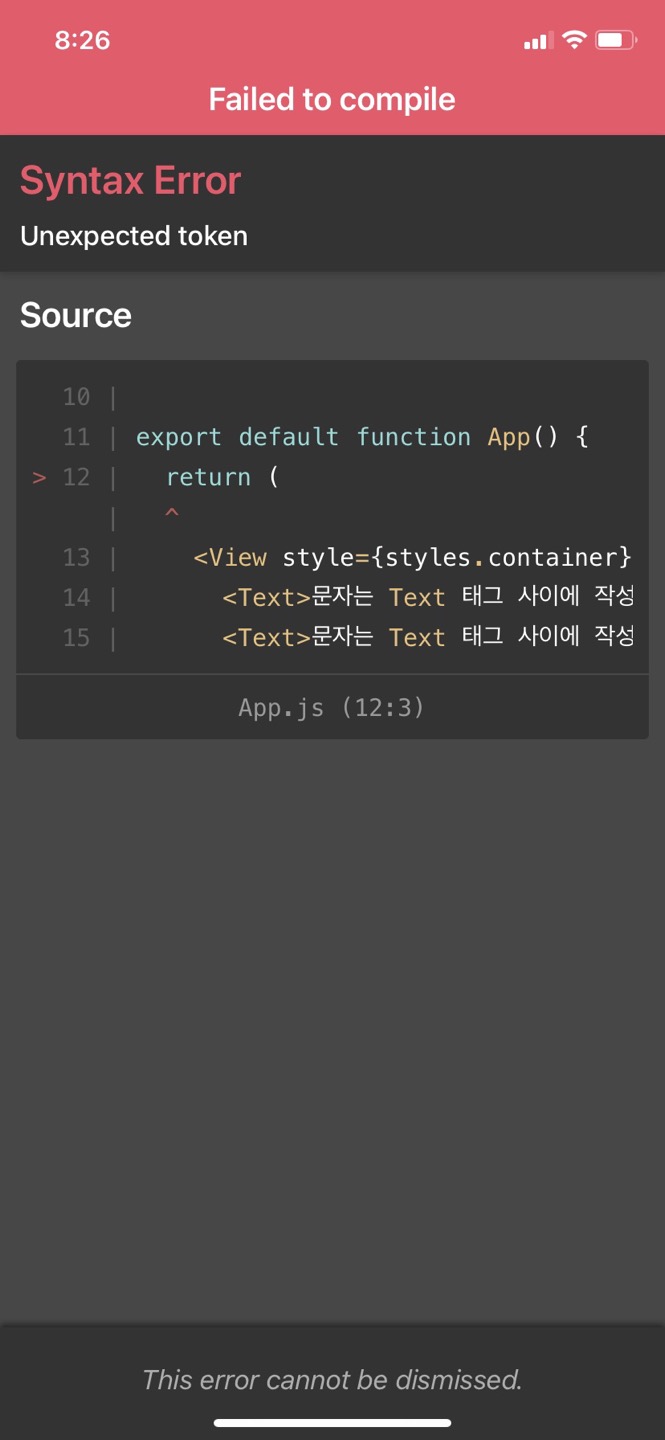
보고 계신 화면
컴퓨터화면)

전체를 캡처해 주시면, 튜터님들이 빠르게 상황을 이해할 수 있어요.
작성한 코드 및 에러 메세지
import { StatusBar } from 'expo-status-bar';
import React from 'react';
import { StyleSheet, Text, View } from 'react-native';
export default function App() {
return (
<View style={styles.container}>
import React from 'react';
import { StyleSheet, Text, View } from 'react-native';
export default function App() {
return (
<View style={styles.container}>
<Text>문자는 Text 태그 사이에 작성!!</Text>
<Text>문자는 Text 태그 사이에 작성!!</Text>
<Text>문자는 Text 태그 사이에 작성!!</Text>
<Text>문자는 Text 태그 사이에 작성!!</Text>
<Text>문자는 Text 태그 사이에 작성!!</Text>
<Text>문자는 Text 태그 사이에 작성!!</Text>
<Text>문자는 Text 태그 사이에 작성!!</Text>
<Text>문자는 Text 태그 사이에 작성!!</Text>
<Text>문자는 Text 태그 사이에 작성!!</Text>
<Text>문자는 Text 태그 사이에 작성!!</Text>
<Text>문자는 Text 태그 사이에 작성!!</Text>
</View>
);
}
const styles = StyleSheet.create({
container: {
flex: 1,
backgroundColor: '#fff',
alignItems: 'center',
justifyContent: 'center',
},
});
</View>
);
}
const styles = StyleSheet.create({
container: {
flex: 1,
backgroundColor: '#fff',
},
subContainerOne: {
flex:1,
backgroundColor:"yellow"
},
subContainerTwo: {
flex:1,
backgroundColor:"green"
}
});
오류 발생 시, 작성한 코드 전체와 에러 메시지를 첨부해 주세요.
Tip 1) </> 아이콘을 눌러 코드박스를 만들어 보세요.
Tip 2) Ctrl+A(맥의 경우 Command+A) 단축키로 코드를 한 번에 선택할 수 있어요!


