커뮤니티

포인트
쿠폰
내 강의실
국비 신청 내역
증명서
계정
로그아웃
학습 질문
개발 일지
나의 활동
답변 완료
3-3 강의 카테고리 기능 코드 붙여넣은 후 렌더 오류가 발생합니다
[왕초보] 나만의 수익성 앱, 앱개발 종합반
3주차


이*훈
댓글
8
・
추천
0
・
조회수
31
조회수
31
답변 완료
* 겪고 있는 문제 상황을 최대한 자세하게 작성해주세요.
3-3 강의 카테고리 기능 코드를 복사 붙여넣기만 했는데도 렌더 오류가 발생합니다, 이래저래 찾아보다가도 도저히 모르겠어서 문의 남깁니다..ㅠㅠ
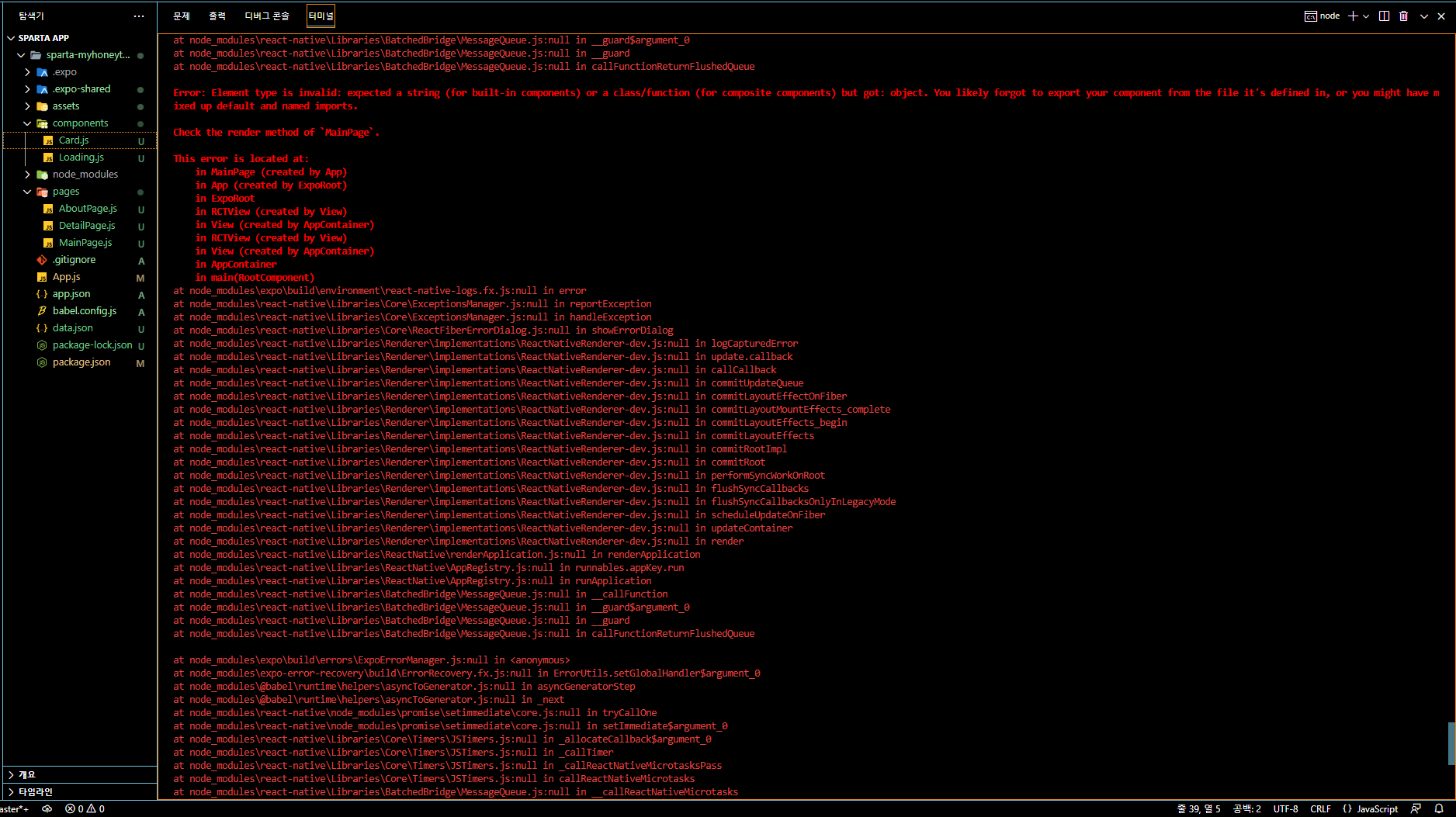
Error: Element type is invalid: expected a string (for built-in components) or a class/function (for composite components) but got: object. You likely forgot to export your component from the file it's defined in, or you might have mixed up default and named imports.


Check the render method of `MainPage`.


This error is located at:

  in MainPage (created by App)

  in App (created by ExpoRoot)

  in ExpoRoot

  in RCTView (created by View)

  in View (created by AppContainer)

  in RCTView (created by View)

  in View (created by AppContainer)

  in AppContainer

  in main(RootComponent)

at node_modules\expo\build\environment\react-native-logs.fx.js:null in error

at node_modules\react-native\Libraries\Core\ExceptionsManager.js:null in reportException

at node_modules\react-native\Libraries\Core\ExceptionsManager.js:null in handleException

at node_modules\react-native\Libraries\Core\setUpErrorHandling.js:null in handleError

at node_modules\expo\build\errors\ExpoErrorManager.js:null in errorHandler

at node_modules\expo\build\errors\ExpoErrorManager.js:null in <anonymous>

at node_modules\expo-error-recovery\build\ErrorRecovery.fx.js:null in ErrorUtils.setGlobalHandler$argument_0

at node_modules\@babel\runtime\helpers\asyncToGenerator.js:null in asyncGeneratorStep

at node_modules\@babel\runtime\helpers\asyncToGenerator.js:null in _next

at node_modules\react-native\node_modules\promise\setimmediate\core.js:null in tryCallOne

at node_modules\react-native\node_modules\promise\setimmediate\core.js:null in setImmediate$argument_0

at node_modules\react-native\Libraries\Core\Timers\JSTimers.js:null in _allocateCallback$argument_0

at node_modules\react-native\Libraries\Core\Timers\JSTimers.js:null in _callTimer

at node_modules\react-native\Libraries\Core\Timers\JSTimers.js:null in _callReactNativeMicrotasksPass

at node_modules\react-native\Libraries\Core\Timers\JSTimers.js:null in callReactNativeMicrotasks

at node_modules\react-native\Libraries\BatchedBridge\MessageQueue.js:null in __callReactNativeMicrotasks

at node_modules\react-native\Libraries\BatchedBridge\MessageQueue.js:null in __guard$argument_0

at node_modules\react-native\Libraries\BatchedBridge\MessageQueue.js:null in __guard

at node_modules\react-native\Libraries\BatchedBridge\MessageQueue.js:null in flushedQueue
에러 코드
import React from "react"
import {View,Text,Image,StyleSheet} from "react-native";


//비구조 할당 방식으로 넘긴 속성 데이터를 꺼내 사용함
export default function Card({content}) {
    return (<View style={styles.card}>
        <Image style={styles.cardImage} source={{uri:content.image}}/>
        <View style={styles.cardText}>
          <Text style={styles.cardTitle} numberOfLines={1}>{content.title}</Text>
          <Text style={styles.cardDesc} numberOfLines={3}>{content.desc}</Text>
          <Text style={styles.cardDate}>{content.date}</Text>
        </View>
      </View>)
}


const styles = StyleSheet.create({


  card:{
    flex:1,
    //컨텐츠들을 가로로 나열
    //세로로 나열은 column <- 디폴트 값임
    flexDirection:"row",
    margin:10,
    borderBottomWidth:0.5,
    borderBottomColor:"#eee",
    paddingBottom:10


  },
  cardImage: {
    flex:1,
    width:100,
    height:100,
    borderRadius:10,
  },
  cardText: {
    flex:2,
    flexDirection:"column",
    marginLeft:10,
  },
  cardTitle: {
    fontSize:20,
    fontWeight:"700"
  },
  cardDesc: {
    fontSize:15
  },
  cardDate: {
    fontSize:10,
    color:"#A6A6A6",
  }
})
Card.js 코드
import React,{useState,useEffect} from 'react';
import { StyleSheet, Text, View, Image, TouchableOpacity, ScrollView} from 'react-native';


const main = 'https://storage.googleapis.com/sparta-image.appspot.com/lecture/main.png'
import data from '../data.json';
import Card from '../components/Card';
import Loading from '../components/Loading';
export default function MainPage() {
  //useState 사용법
  //[state,setState] 에서 state는 이 컴포넌트에서 관리될 상태 데이터를 담고 있는 변수
  //setState는 state를 변경시킬때 사용해야하는 함수


  //모두 다 useState가 선물해줌
  //useState()안에 전달되는 값은 state 초기값
  const [state,setState] = useState([])
  const [cateState,setCateState] = useState([])


  //하단의 return 문이 실행되어 화면이 그려진다음 실행되는 useEffect 함수
  //내부에서 data.json으로 부터 가져온 데이터를 state 상태에 담고 있음
  const [ready,setReady] = useState(true)


  useEffect(()=>{

    //뒤의 1000 숫자는 1초를 뜻함
    //1초 뒤에 실행되는 코드들이 담겨 있는 함수
    setTimeout(()=>{
        setState(data.tip)
        setCateState(data.tip)
        setReady(false)
    },1000)


  },[])


  const category = (cate) => {
    if(cate == "전체보기"){
        //전체보기면 원래 꿀팁 데이터를 담고 있는 상태값으로 다시 초기화
        setCateState(state)
    }else{
        setCateState(state.filter((d)=>{
            return d.category == cate
        }))
    }
}


  //data.json 데이터는 state에 담기므로 상태에서 꺼내옴
  // let tip = state.tip;
  let todayWeather = 10 + 17;
  let todayCondition = "흐림"
  //return 구문 밖에서는 슬래시 두개 방식으로 주석
  return ready ? <Loading/> :  (
    /*
      return 구문 안에서는 {슬래시 + * 방식으로 주석
    */
    <ScrollView style={styles.container}>
      <Text style={styles.title}>나만의 꿀팁</Text>
       <Text style={styles.weather}>오늘의 날씨: {todayWeather + '°C ' + todayCondition} </Text>
      <Image style={styles.mainImage} source={{uri:main}}/>
      <ScrollView style={styles.middleContainer} horizontal indicatorStyle={"white"}>
      <TouchableOpacity style={styles.middleButtonAll} onPress={()=>{category('전체보기')}}><Text style={styles.middleButtonTextAll}>전체보기</Text></TouchableOpacity>
        <TouchableOpacity style={styles.middleButton01} onPress={()=>{category('생활')}}><Text style={styles.middleButtonText}>생활</Text></TouchableOpacity>
        <TouchableOpacity style={styles.middleButton02} onPress={()=>{category('재테크')}}><Text style={styles.middleButtonText}>재테크</Text></TouchableOpacity>
        <TouchableOpacity style={styles.middleButton03} onPress={()=>{category('반려견')}}><Text style={styles.middleButtonText}>반려견</Text></TouchableOpacity>
        <TouchableOpacity style={styles.middleButton04} onPress={()=>{category('꿀팁 찜')}}><Text style={styles.middleButtonText}>꿀팁 찜</Text></TouchableOpacity>
      </ScrollView>
      <View style={styles.cardContainer}>
         {/* 하나의 카드 영역을 나타내는 View */}
         {
          cateState.map((content,i)=>{
            return (<Card content={content} key={i}/>)
          })
        }

      </View>

    </ScrollView>)
}


const styles = StyleSheet.create({
  container: {
    //앱의 배경 색
    backgroundColor: '#fff',
  },
  title: {
    //폰트 사이즈
    fontSize: 20,
    //폰트 두께
    fontWeight: '700',
    //위 공간으로 부터 이격
    marginTop:50,
    //왼쪽 공간으로 부터 이격
    marginLeft:20
  },
weather:{
    alignSelf:"flex-end",
    paddingRight:20
  },
  mainImage: {
    //컨텐츠의 넓이 값
    width:'90%',
    //컨텐츠의 높이 값
    height:200,
    //컨텐츠의 모서리 구부리기
    borderRadius:10,
    marginTop:20,
    //컨텐츠 자체가 앱에서 어떤 곳에 위치시킬지 결정(정렬기능)
    //각 속성의 값들은 공식문서에 고대로~ 나와 있음
    alignSelf:"center"
  },
  middleContainer:{
    marginTop:20,
    marginLeft:10,
    height:60
  },
  middleButtonAll: {
    width:100,
    height:50,
    padding:15,
    backgroundColor:"#20b2aa",
    borderColor:"deeppink",
    borderRadius:15,
    margin:7
  },
  middleButton01: {
    width:100,
    height:50,
    padding:15,
    backgroundColor:"#fdc453",
    borderColor:"deeppink",
    borderRadius:15,
    margin:7
  },
  middleButton02: {
    width:100,
    height:50,
    padding:15,
    backgroundColor:"#fe8d6f",
    borderRadius:15,
    margin:7
  },
  middleButton03: {
    width:100,
    height:50,
    padding:15,
    backgroundColor:"#9adbc5",
    borderRadius:15,
    margin:7
  },
  middleButton04: {
    width:100,
    height:50,
    padding:15,
    backgroundColor:"#f886a8",
    borderRadius:15,
    margin:7
  },
  middleButtonText: {
    color:"#fff",
    fontWeight:"700",
    //텍스트의 현재 위치에서의 정렬
    textAlign:"center"
  },
  middleButtonTextAll: {
    color:"#fff",
    fontWeight:"700",
    //텍스트의 현재 위치에서의 정렬
    textAlign:"center"
  },
  cardContainer: {
    marginTop:10,
    marginLeft:10
  },


});
MainPage.js 코드


댓글 알림
