커뮤니티

포인트
쿠폰
내 강의실
국비 신청 내역
증명서
계정
로그아웃
학습 질문
개발 일지
나의 활동
답변 완료
4주차 숙제 팬명록 저장한 데이터 보이기
undefined주차


변*주
댓글
3
・
추천
0
・
조회수
9
조회수
9
답변 완료
숙제 진행 과정에서 닉네임과 코멘트를 저장하고 mongoDB에서 저장된 것까진 확인했는데, 정작 페이지에선 저장된 데이터 카드가 보이지 않습니다. 콘솔창에서도 딱히 다른 에러는 나타나지 않는데 저장된 글이 보이려면 어떻게 해야 할까요?
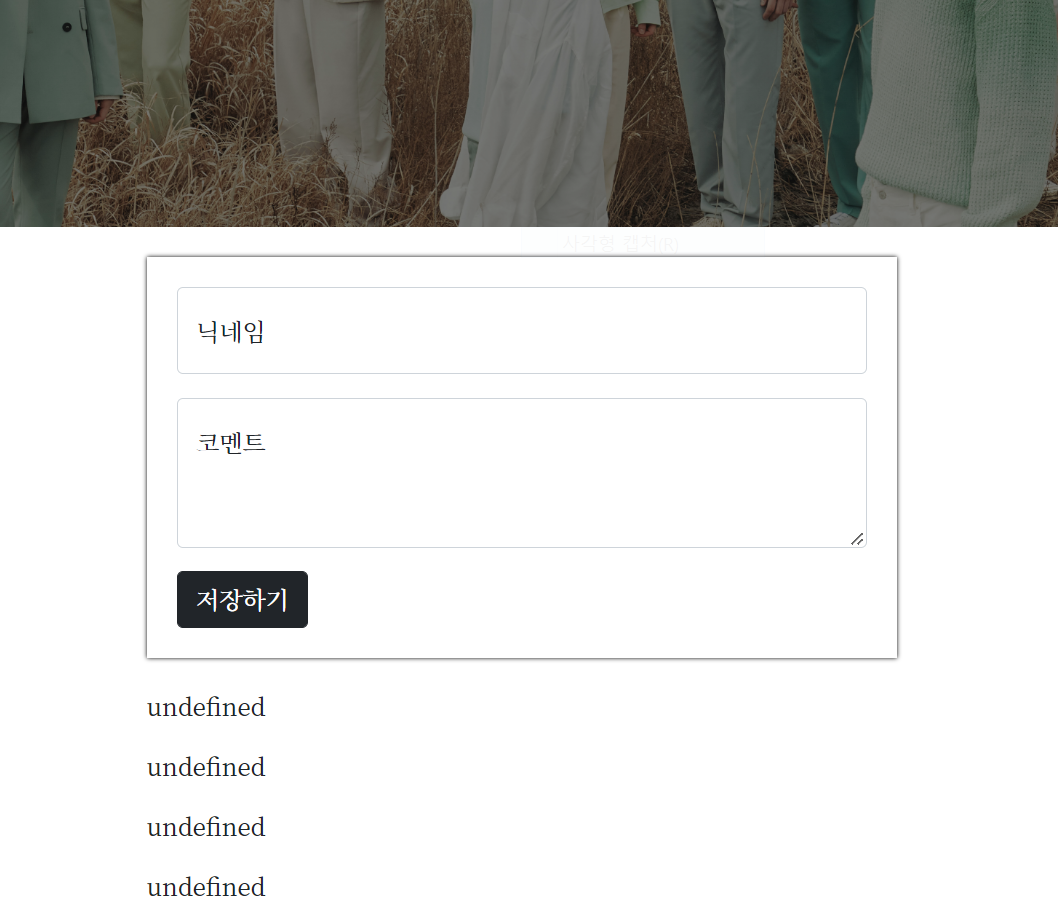
작성한 코드 및 에러 메세지
index HTML 파일
<!DOCTYPE html>
<html lang="en">
<head>
    <meta charset="UTF-8">
    <meta http-equiv="X-UA-Compatible" content="IE=edge">
    <meta name="viewport" content="width=device-width, initial-scale=1.0">

    <link href="https://cdn.jsdelivr.net/npm/bootstrap@5.0.2/dist/css/bootstrap.min.css" rel="stylesheet"
        integrity="sha384-EVSTQN3/azprG1Anm3QDgpJLIm9Nao0Yz1ztcQTwFspd3yD65VohhpuuCOmLASjC" crossorigin="anonymous">
    <script src="https://ajax.googleapis.com/ajax/libs/jquery/3.5.1/jquery.min.js"></script>
    <script src="https://cdn.jsdelivr.net/npm/bootstrap@5.0.2/dist/js/bootstrap.bundle.min.js"
        integrity="sha384-MrcW6ZMFYlzcLA8Nl+NtUVF0sA7MsXsP1UyJoMp4YLEuNSfAP+JcXn/tWtIaxVXM"
        crossorigin="anonymous"></script>

    <title>13명이지만 세븐틴</title>

    <link href="https://fonts.googleapis.com/css2?family=Noto+Serif+KR:wght@200;300;400;500;600;700;900&display=swap" rel="stylesheet">
    <style>
        * {
            font-family: 'Noto Serif KR', serif;
        }
        .mypic {
            width: 100%;
            height: 450px;

            background-image: linear-gradient(0deg, rgba(0, 0, 0, 0.5), rgba(0, 0, 0, 0.5)), url('https://www.pledis.co.kr/_data/file/bbsData/20f43cadcfdeacc474250232ee6a4192.jpg');
            background-position: bottom;
            background-size: cover;

            color: white;

            display: flex;
            flex-direction: column;
            align-items: center;
            justify-content: center;
        }

        .mypost {
            width: 95%;
            max-width: 500px;
            margin: 20px auto 20px auto;

            box-shadow: 0px 0px 3px 0px black;
            padding: 20px;
        }

        .mypost > button {
            margin-top: 15px;
        }

        .mycards {
            width: 95%;
            max-width: 500px;
            margin: auto;
        }

        .mycards > .card {
            margin-top: 10px;
            margin-bottom: 10px;
        }
    </style>
    <script>
        $(document).ready(function(){
            set_temp()
            show_comment()
        });
        function set_temp(){
            $.ajax({
                type: "GET",
                url: "http://spartacodingclub.shop/sparta_api/weather/seoul",
                data: {},
                success: function (response) {
                    let tempo = response["temp"]
                    $('#temp').append(tempo)
                }
            })
        }
        function save_comment(){
            let name = $('#name').val()
            let comment = $('#comment').val()

            $.ajax({
                type: 'POST',
                url: '/homework',
                data: {name_give: name, comment_give: comment},
                success: function (response) {
                    alert(response['msg'])
                    window.location.reload()
                }
            })
        }
        function show_comment(){
            // $('#comment-list').empty()
            $.ajax({
                type: "GET",
                url: "/homework",
                data: {},
                success: function (response) {
                    let rows = response['comment']
                    for (let i=0; i<rows.length; i++) {
                        let name = rows[i]['name']
                        let comment = rows[i]['comment']

                        let temp_html = `<div className="card">
                                            <div className="card-body">
                                                <blockquote className="blockquote mb-0">
                                                    <p>${comment}</p>
                                                    <footer className="blockquote-footer">${name}</footer>
                                                </blockquote>
                                            </div>
                                        </div>`
                        $('#comment-list').append(temp_html)
                    }
                    // alert(response["msg"])
                }
            });
        }
    </script>
</head>
<body>
    <div class="mypic">
        <h1>세븐틴 캐럿명록</h1>
        <p>현재기온: <span id="temp"></span>도</p>
    </div>
    <div class="mypost">
        <div class="form-floating mb-3">
            <input type="text" class="form-control" id="name" placeholder="url">
            <label for="floatingInput">닉네임</label>
        </div>
        <div class="form-floating">
            <textarea class="form-control" placeholder="Leave a comment here" id="comment"
                style="height: 100px"></textarea>
            <label for="floatingTextarea2">코멘트</label>
        </div>
        <button onclick="save_comment()" type="button" class="btn btn-dark">저장하기</button>
    </div>
    <div class="mycards" id="comment-list">
        <div className="card">
            <div className="card-body">
                <blockquote className="blockquote mb-0">
                    <p>comment</p>
                    <footer className="blockquote-footer">name</footer>
                </blockquote>
            </div>
        </div>
    </div>
</body>
</html>
app 파이썬 파일
from flask import Flask, render_template, request, jsonify
app = Flask(__name__)

from pymongo import MongoClient
client = MongoClient('mongodb+srv://test:sparta@cluster0.bmtqei1.mongodb.net/Cluster0?retryWrites=true&w=majority')
db = client.dbsparta

@app.route('/')
def home():
   return render_template('index.html')

@app.route("/homework", methods=["POST"])
def homework_post():
    name_receive = request.form['name_give']
    comment_receive = request.form['comment_give']

    doc = {
        'name': name_receive,
        'comment': comment_receive
    }
    db.homework.insert_one(doc)

    return jsonify({'msg':'저장 완료!'})

@app.route("/homework", methods=["GET"])
def homework_get():
    comment_list = list(db.homework.find({}, {'_id':False}))
    return jsonify({'comment':'GET 연결 완료!'})

if __name__ == '__main__':
   app.run('0.0.0.0', port=5000, debug=True)


댓글 알림
