


1-4 링크만들기 하고 있는데 .main에서 margin-top 이 먹히지 않아요
.wrap에서는 먹히고 있는데 .warp를 벗어나면 margin 코드가 실행이 안되네요
어떻게 해야 하나요?
보고 계신 화면 전체를 캡처해 주시면, 튜터님들이 빠르게 상황을 상황을 이해할 수 있어요.
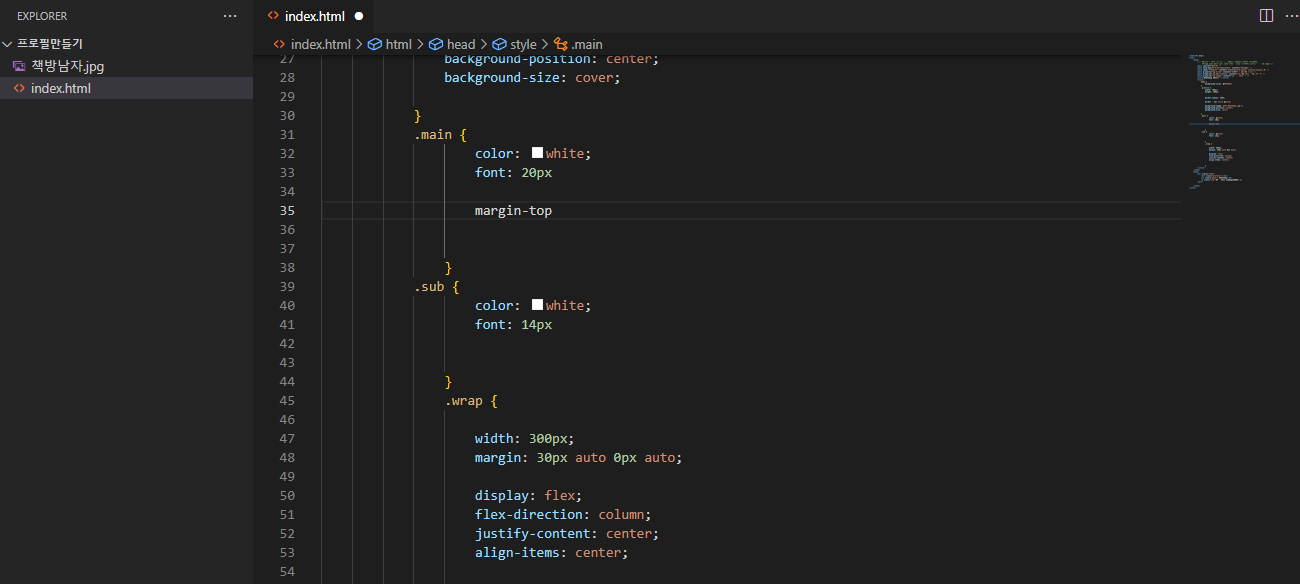
작성한 코드 및 에러 메세지
<!DOCTYPE html>
<html>
<head>
<!-- 웹페이지 보이지는 않지만, 필요한 설정을 해두는 곳이에요.
우리가 집을 위해 미리 생각 해놓은 것을 적어두는 곳이라고 할 수 있죠!-->
<meta charset="UTF-8" />
<meta http-equiv="X-UA-Compatible" content="IE=edge" />
<meta name="viewport" content="width=device-width, initial-scale=1.0" />
<meta property="og:title" content="르탄이 - 프로필 링크" />
<meta property="og:description" content="어서와 코딩은 처음이지?" />
<meta property="og:image" content="공유할 이미지" />
<title>책방남자 책방창고</title>
<style>
body {
background-color: #44398A;
}
.profile {
width: 100px;
height: 100px;
border-radius: 100%;
border : 2px solid white;
background-image: url('책방남자.jpg');
background-position: center;
background-size: cover;
}
.main {
color: white;
font: 20px
margin-top
}
.sub {
color: white;
font: 14px
}
.wrap {
width: 300px;
margin: 30px auto 0px auto;
display: flex;
flex-direction: column;
justify-content: center;
align-items: center;
}
</style>
</head>
<body>
<div class="wrap">
<div class="profile"></div>
<h1 class="main"> 책방남자</h1>
<p class="sub">책은 인생 공략집입니다</p>
</div>
</body>
</html>오류 발생 시, 작성한 코드 전체와 에러 메시지를 첨부해 주세요.
Tip 1) </> 아이콘을 눌러 코드박스를 만들어 보세요.
Tip 2) Ctrl+A(맥의 경우 Command+A) 단축키로 코드를 한 번에 선택할 수 있어요!


