커뮤니티

포인트
쿠폰
내 강의실
국비 신청 내역
증명서
계정
로그아웃
학습 질문
개발 일지
나의 활동
답변 완료
삭제 기능 오류
undefined주차


정*훈
댓글
1
・
추천
0
・
조회수
34
조회수
34
답변 완료
삭제 기능을 사용하고 싶은데 삭제 버튼을 누르면 오류가 납니다.
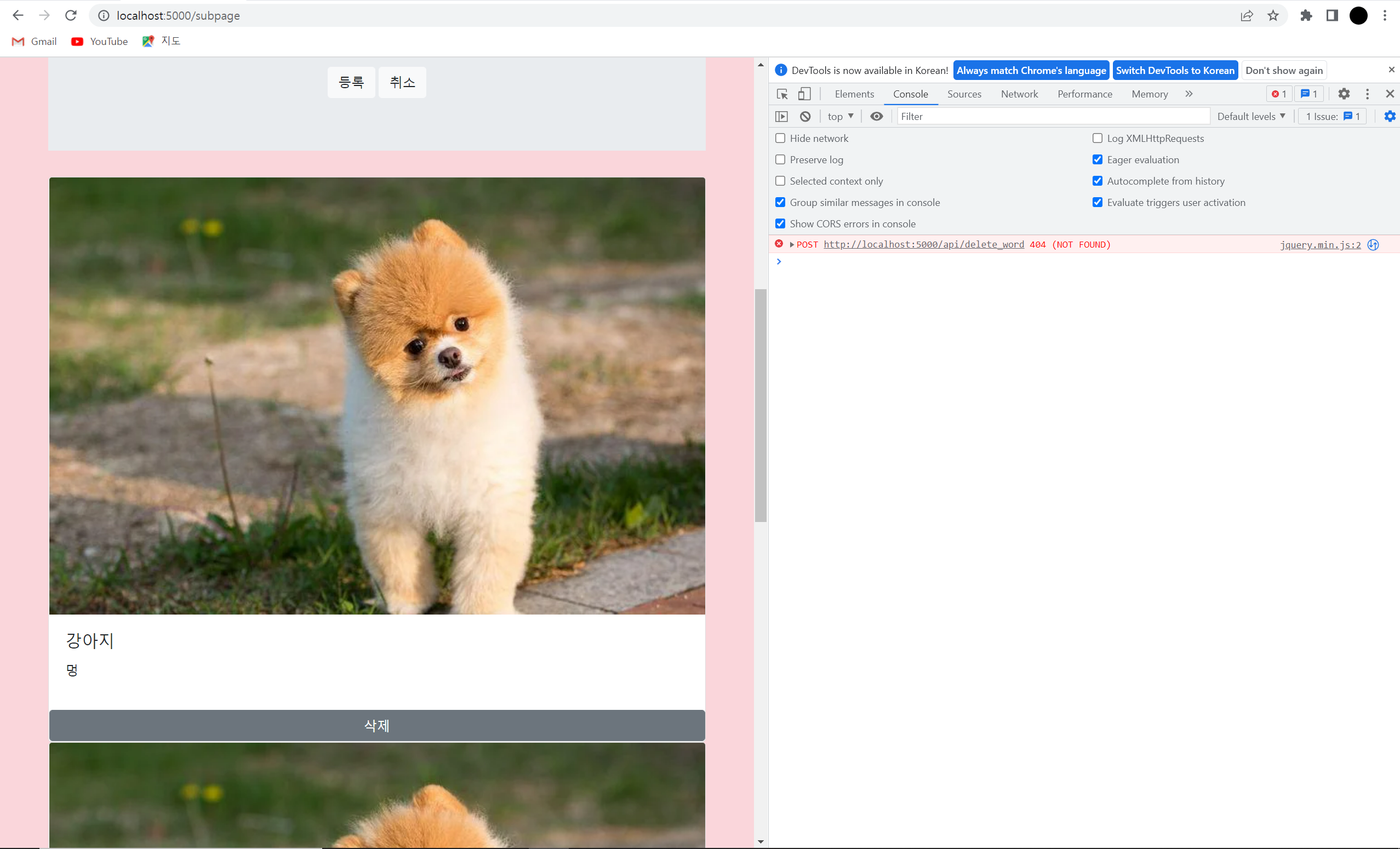
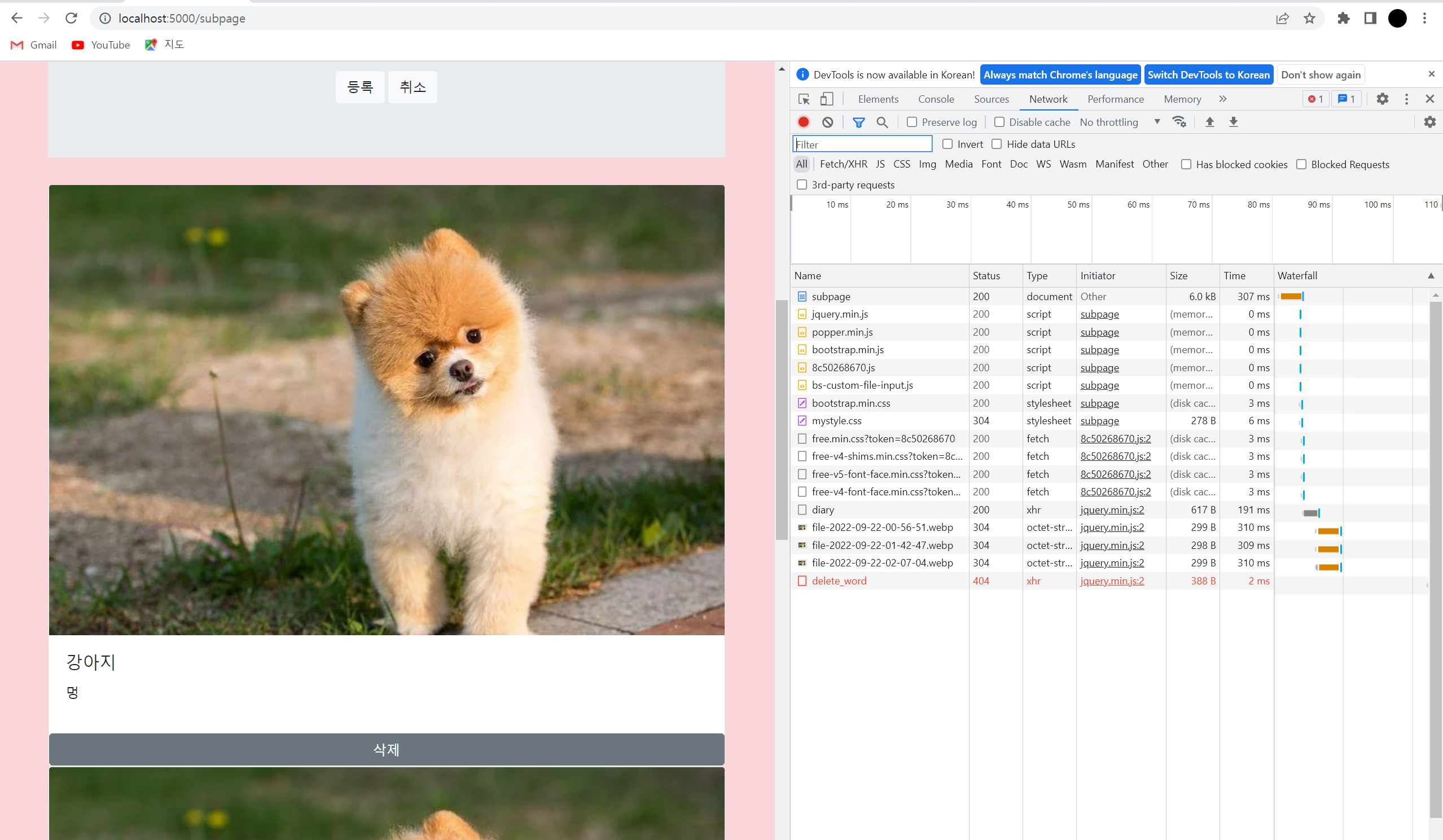
작성한 코드 및 에러 메세지
from pymongo import MongoClient
import jwt
import datetime
import hashlib
from flask import Flask, render_template, jsonify, request, redirect, url_for
from werkzeug.utils import secure_filename
from datetime import datetime, timedelta

app = Flask(__name__)
app.config["TEMPLATES_AUTO_RELOAD"] = True
app.config['UPLOAD_FOLDER'] = "./static/profile_pics"

SECRET_KEY = 'SPARTA'

client = MongoClient('localhost', 27017)
# client = MongoClient('내AWS아이피', 27017, username="아이디", password="비밀번호")
db = client.hanghae99_1


# -----------------------------로그인&회원가입 시작------------------------------------
@app.route('/')
def home():
    token_receive = request.cookies.get('mytoken')
    try:
        payload = jwt.decode(token_receive, SECRET_KEY, algorithms=['HS256'])
        user_info = db.users.find_one({"username": payload["id"]})
        return render_template('index.html', user_info=user_info)

    except jwt.ExpiredSignatureError:
        return redirect(url_for("login", msg="로그인 시간이 만료되었습니다."))
    except jwt.exceptions.DecodeError:
        return redirect(url_for("login", msg="로그인 정보가 존재하지 않습니다."))


@app.route('/login')
def login():
    msg = request.args.get("msg")
    return render_template('login.html', msg=msg)


@app.route('/sign_in', methods=['POST'])
def sign_in():
    # 로그인
    username_receive = request.form['username_give']
    password_receive = request.form['password_give']

    pw_hash = hashlib.sha256(password_receive.encode('utf-8')).hexdigest()
    result = db.users.find_one({'username': username_receive, 'password': pw_hash})

    if result is not None:
        payload = {
         'id': username_receive,
         'exp': datetime.utcnow() + timedelta(seconds=60 * 60 * 24)  # 로그인 24시간 유지
        }
        token = jwt.encode(payload, SECRET_KEY, algorithm='HS256').decode('utf-8')

        return jsonify({'result': 'success', 'token': token})
    # 찾지 못하면
    else:
        return jsonify({'result': 'fail', 'msg': '아이디/비밀번호가 일치하지 않습니다.'})


@app.route('/sign_up/save', methods=['POST'])
def sign_up():
    username_receive = request.form['username_give']
    password_receive = request.form['password_give']
    password_hash = hashlib.sha256(password_receive.encode('utf-8')).hexdigest()
    doc = {
        "username": username_receive,                               # 아이디
        "password": password_hash,                                  # 비밀번호
        "profile_name": username_receive,                           # 프로필 이름 기본값은 아이디
        "profile_pic": "",                                          # 프로필 사진 파일 이름
        "profile_pic_real": "profile_pics/profile_placeholder.png", # 프로필 사진 기본 이미지
        "profile_info": ""                                          # 프로필 한 마디
    }
    db.users.insert_one(doc)
    return jsonify({'result': 'success'})


@app.route('/sign_up/check_dup', methods=['POST'])
def check_dup():
    username_receive = request.form['username_give']
    exists = bool(db.users.find_one({"username": username_receive}))
    return jsonify({'result': 'success', 'exists': exists})
# --------------------------------로그인&회원가입 끝----------------------------------------------

#--------------------------------메인페이지 가기----------------------------------------------
@app.route('/diary', methods=['GET'])
def show_diary():
    diaries = list(db.diary.find({}, {'_id': False}))
    return jsonify({'all_diary': diaries})


# ---------------------------------------메인페이지 끝--------------------------------------------


@app.route('/subpage')
def subpage():
    return render_template("subpage.html")


@app.route('/diary', methods=['POST'])
def save_diary():
    title_receive = request.form['title_give']
    content_receive = request.form['content_give']

    file = request.files["file_give"]

    extension = file.filename.split('.')[-1]

    today = datetime.now()
    mytime = today.strftime('%Y-%m-%d-%H-%M-%S')

    filename = f'file-{mytime}'

    save_to = f'static/{filename}.{extension}'
    file.save(save_to)

    doc = {
        'title':title_receive,
        'content':content_receive,
        'file': f'{filename}.{extension}',
        'time': today.strftime('%Y.%m.%d')
    }

    db.diaries.insert_one(doc)

    return jsonify({'msg': '저장 완료!'})


@app.route('/api/diary', methods=['post'])
def delete_diary():
    diaries = request.form["diary"]
    db.diaries.delete_one({"diary": diaries})
    return jsonify({'result': 'success', 'msg' : '글 삭제'})
<!DOCTYPE html>
<html lang="en">
<head>
    <meta charset="UTF-8">

    <!-- Required meta tags -->
    <meta charset="utf-8">
    <meta name="viewport" content="width=device-width, initial-scale=1, shrink-to-fit=no">

    <!-- Bootstrap CSS -->
    <link rel="stylesheet" href="https://maxcdn.bootstrapcdn.com/bootstrap/4.0.0/css/bootstrap.min.css"
          integrity="sha384-Gn5384xqQ1aoWXA+058RXPxPg6fy4IWvTNh0E263XmFcJlSAwiGgFAW/dAiS6JXm" crossorigin="anonymous">
    <link href="{{ url_for('static', filename='mystyle.css') }}" rel="stylesheet">

    <!-- Optional JavaScript -->
    <!-- jQuery first, then Popper.js, then Bootstrap JS -->
    <script src="https://ajax.googleapis.com/ajax/libs/jquery/3.5.1/jquery.min.js"></script>
    <script src="https://cdnjs.cloudflare.com/ajax/libs/popper.js/1.12.9/umd/popper.min.js"
            integrity="sha384-ApNbgh9B+Y1QKtv3Rn7W3mgPxhU9K/ScQsAP7hUibX39j7fakFPskvXusvfa0b4Q"
            crossorigin="anonymous"></script>
    <script src="https://maxcdn.bootstrapcdn.com/bootstrap/4.0.0/js/bootstrap.min.js"
            integrity="sha384-JZR6Spejh4U02d8jOt6vLEHfe/JQGiRRSQQxSfFWpi1MquVdAyjUar5+76PVCmYl"
            crossorigin="anonymous"></script>

    <!--폰트 어썸-->
    <script src="https://kit.fontawesome.com/8c50268670.js" crossorigin="anonymous"></script>


    <title>facedog</title>

    <script src="https://cdn.jsdelivr.net/npm/bs-custom-file-input/dist/bs-custom-file-input.js"></script>

    <style>
        .wrap {
            width: 100%;
            max-width: 800px;
            margin: 50px auto;
        }

        .wrap2 {
            margin-top: 40px;
            text-align: center;
        }

        .form-group > .form-control {
            height: 500px;
        }

        .card-deck {
            width: 100%;
            max-width: 1000px;
            margin: 50px auto;


        }

        .wrap3 {
            text-align: center;
        }
    </style>
    <script>
        $(document).ready(function () {
            bsCustomFileInput.init()
            listing()
        })

        function listing() {
            $.ajax({
                type: "GET",
                url: "/diary",
                data: {},
                success: function (response) {
                    let diaries = response['all_diary']
                    for (let i = 0; i < diaries.length; i++) {
                        let title = diaries[i]['title']
                        let content = diaries[i]['content']
                        let file = diaries[i]['file']

                        let temp_html = `<div class="card">
                                                <img class="card-img-top" src="../static/${file}" alt="Card image cap">
                                                <div class="card-body">
                                                    <h5 class="card-title">${title}</h5>
                                                    <p class="card-text">${content}</p>
                                                    <p class="card-text"><small class="text-muted"></small></p>
                                                </div>
                                                <button type="button" class="btn btn-secondary" onclick="delete_word()"> 삭제 </button>
                                            </div>`
                        $('#cards-box').append(temp_html)
                    }
                }
            })
        }

        function posting() {
            let title = $('#title').val()
            let content = $("#content").val()

            let file = $('#file')[0].files[0]
            let form_data = new FormData()

            form_data.append("file_give", file)
            form_data.append("title_give", title)
            form_data.append("content_give", content)

            $.ajax({
                type: "POST",
                url: "/diary",
                data: form_data,
                cache: false,
                contentType: false,
                processData: false,
                success: function (response) {
                    alert(response["msg"])
                    window.location.reload()
                }
            });
        }

        function delete_word() {
            $.ajax({
                type: "POST",
                url: `/api/delete_word`,
                data: {
                    word_give: "{{ word }}"
                },
                success: function (response) {
                    alert(response["msg"])
                }
            });
        }


    </script>
</head>

<body>

<div class="wrap">
    <div class="jumbotron jumbotron-fluid">
        <div class="container">
            <h2 class="wrap3">글 작성하기</h2><br>
            <div class="form-group row">
                <label for="title" class="col-sm-2 col-form-label"><b>제목</b></label>
                <div class="col-sm-10">
                    <input type="email" class="form-control" id="title" aria-describedby="emailHelp">
                </div>
            </div>

            <div class="custom-file">
                <input type="file" class="custom-file-input" id="file">
                <label class="custom-file-label" for="file">사진선택하기</label>
            </div>
            <p></p>
            <div class="form-group">
                <label for="content">내용</label>
                <textarea class="form-control" id="content" rows="3"></textarea>
            </div>

            <div class="wrap2">
                <button onclick="posting()" type="button" class="btn btn-light">등록</button>
                <button type="button" class="btn btn-light" onclick='window.location.href = "/"'>취소</button>
            </div>
        </div>
    </div>

    <div id="cards-box">

    </div>
</div>

</body>
</html>
오류 발생 시, 작성한 코드 전체와 에러 메시지를 첨부해 주세요.
Tip 1) </> 아이콘을 눌러 코드박스를 만들어 보세요.
Tip 2) Ctrl+A(맥의 경우 Command+A) 단축키로 코드를 한 번에 선택할 수 있어요!


댓글 알림
