


프로젝트를 진행중에 강의 듣고 공식문서보는 것 말곤 정말 아무것도 할 수 없는 상태가 된 것 같습니다 ㅠ
로그인 구현한 깃다운 받아서 테스터해보고 debug mode: off상태되었다가 소스트리로 pull한 번 하고나서 충돌있고서 venv파일 몇개 내용물 에러나더니 파이참으로든 vscode로든 강의 들으며 정상구동한 것과 프로젝트 정상구동한 것들 페이지 전부 app.py실행하면 계속 가상환경venv까지 빨간폴더가 되고 해본 방법들을 토대로 생각하되 flask에러라는 원인으로 404 not found가 계속 뜨고 있습니다!
vscode에선 설치한 라이브러리 몇들이 잘 되는가 싶더니 설치해제되면서 설치거부반응 일으키고 설치해봐도 설치가 계속 안 되고, 복사하거나 직접 손으로 다시 전부 쓰면서 실행해봐도 404 not found페이지가 뜹니다. 그래서 파이참도 파이썬도 다시 깔아서 debug mode:off문제는 해결했지만 404 not found 문제를 해결못하고 10시간째 구글링이나 팀원분과 머리맞대며 flask에러, 구성편집에서 환경도 확인하고, 인터프리터에서 가상환경도 다시 구성해주고 시스템 속성에서 환경변수도 갖추는 방법, 가상환경 손상, 가상환경 빨간폴더, 가상환경 에러/오류, 찾을 수 있는 것들 다 찾아봤지만 계속 사진 같은 빨간폴더나 최근 프로젝트의 에러, rom waitress import serve
serve(app, host="0.0.0.0", port=8080) 등의 포트 수정 등 해봤는데 일단 다 안 되서 프로젝트진행하다 실행, html view, 기능구현을 get된 모습이 확인이 안 되고 404 not found에러가 계속 떠서 어떻게 해야할 지 모르겠어서요. 포맷이 제일 깔끔하긴할텐데
협업환경도 맹글어졌는데 협업을 할 수도 없고 기능구현한 모습도 빨리 보고 싶은데 볼 수가 없어서 너모 슬프네유 8.8..
프로젝트도 삭제하고 다시 쓰고 복붙도 해보고 포트도 변경해보고 vscode로도 파이참에서 해본 것들 해봤는데 라이브러리 설치가 되었다가 풀립니다..
pip업데이트도 해보고 pip install --upgrade 등 구글링에서 해보라던 거 해본 것 같은데 말이죠..
py파일에서
rom waitress import serve
serve(app, host="0.0.0.0", port=8080)로 잡아주면 그래도 뜨는게 있다가 다른 페이지가 404not found에러가 납니다!
보고 계신 화면 전체를 캡처해 주시면, 튜터님들이 빠르게 상황을 상황을 이해할 수 있어요.
작성한 코드 및 에러 메세지
- 아래 사진에서 모든 프로젝트의 venv가 빨간 폴더인 상태고 다른 폴더의 파일들은 이상이 없습니다.
- venv를 다시 해주거나 새 프로젝트 제작도 해보고 venv환경을 정상적으로 다시 만들어주고 색이 원래 상태여도
route잡아주고 본래 index페이지를 접속해도 404not found페이지로 계속 뜹니다.
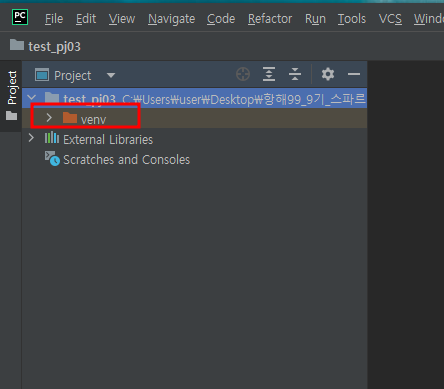
- 아래 이미지는 최근 진행한 프로젝트 중 의심되는 바로는 유튜브 영상을 가져온 바 이후로 뜨는 것 같은데 말이죠.. 이외에도 이 오류가 아닌
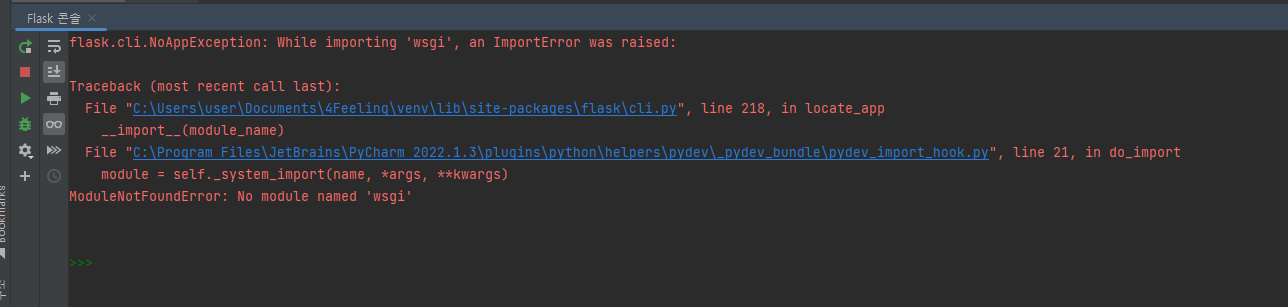
아래 html, py파일 조합은 특정 프로젝트 것입니다! 위 사진의 에러가 났기도 했고요!
html
<!doctype html>
<html lang="en">
<head>
    <meta charset="utf-8">
    <meta name="viewport" content="width=device-width, initial-scale=1">

    <link href="https://cdn.jsdelivr.net/npm/bootstrap@5.0.2/dist/css/bootstrap.min.css" rel="stylesheet"
    integrity="sha384-EVSTQN3/azprG1Anm3QDgpJLIm9Nao0Yz1ztcQTwFspd3yD65VohhpuuCOmLASjC" crossorigin="anonymous">
    <script src="https://ajax.googleapis.com/ajax/libs/jquery/3.5.1/jquery.min.js"></script>
    <script src="https://cdn.jsdelivr.net/npm/bootstrap@5.0.2/dist/js/bootstrap.bundle.min.js"
    integrity="sha384-MrcW6ZMFYlzcLA8Nl+NtUVF0sA7MsXsP1UyJoMp4YLEuNSfAP+JcXn/tWtIaxVXM"
    crossorigin="anonymous"></script>

    <title>노 - 희노애락</title>
    <link href="https://fonts.googleapis.com/css2?family=Gowun+Dodum&display=swap" rel="stylesheet">
    <style>
        html, body,
        header, section, article, footer,
        ul, li, ol, dl, div, aside, button, textarea, input, label, address {
            margin: 0;
            padding: 0;
            border: 0;
            outline: 0;
        }

        body {
            background-color: #FBF8F1;
        }

        a {
            text-decoration: none;
            text-align: center;
            color: #1D140F;
            font-size: 20px;
        }

        ul, li, ol {
            list-style: none;
        }

        * {
            font-family: 'Gowun Dodum', sans-serif;
        }
        .mytitle{
            height: 250px;
            width: 100%;

            background-image: linear-gradient(0deg, rgba(0, 0, 0, 0.5), rgba(0, 0, 0, 0.5)), url("http://jjal.today/data/file/gallery/athumb-2039173703_NFba5HmK_d01ba2496178c7f3f3e5f8f148459b3a72309427.jpg");
            background-position: center;
            background-size: cover;

            color: white;

            display: flex;
            flex-direction: column;
            justify-content: center;
            align-items: center;
        }
        .mytitle > button {
            width: 200px;
            height: 50px;

            background-color: transparent;
            color: white;

            border-radius: 50px;
            border: 1px solid white;

            margin-top: 10px;
        }
        .mytitle > button:hover {
            border: 2px solid white;
        }
        .mycomment {
            color: gray;
        }
        .wrap {
            max-width: 1200px;
            width: 95%;
            margin: 20px auto 0px auto;

        }
        .mypost {
            max-width: 500px;
            width: 95%;


            margin: 20px auto 0px auto;
            box-shadow: 0px 0px 3px 0px gray;
            padding: 20px;

            display: none;
        }
        .mybtn {
            display: flex;
            flex-direction: row;
            justify-content: center;
            align-items: center;

            margin-top: 10px;
        }
        .mybtn > button {
            margin-right: 10px;
        }

        .category {
            margin-top: 10px;
        }

        /* 노래 카드 */
        .cardwrap {
            margin-top: 20px;
            padding-right: 0;

            display: flex;
            flex-direction: row;
            justify-content: center;
            align-items: center;
        }
        .cardBox {
            width: 280px;
            /*height: 300px;*/
            margin-right: 10px;
            padding-left: 10px;

            display: flex;
            flex-direction: row;
            justify-content: center;
            align-items: center;
        }
        .card {
            max-width: 768px;
            width: 116%;
            max-width: 375px;
            width: 100%;

            margin: 0 auto;
            /*padding-right: 4px;*/
        }
        .iframeBox {
            width: 252px;
            max-height: 768px;
            height: 200px;

            margin: 0 auto;

            display: flex;
            flex-direction: column;
            justify-items: center;
            align-items: center;
        }
        iframe {
            margin: 0 auto;
            width: 252px;
            height: 200px;
        }
    </style>
    <script>
        $(document).ready(function () {
            listing();
        });

        function listing() {
            $.ajax({
                type:'GET',
                url:'/angry',
                data: {},
                success:function(response) {
                    let rows = response['angrys'];
                    console.log(response);
                    for (let i = 0; i < rows.length; i++){
                        let url = rows[i]['url'];
                        let title = rows[i]['title'];
                        let name = rows[i]['name'];
                        let feeling = rows[i]['feeling'];
                        let comment = rows[i]['comment'];

                        let temp_html = `<div class="col cardBox">
                                            <div class="card">
                                                    <div class="iframeBox">
                                                        ${url}
                                                    </div>
                                                <div class="card-body">
                                                    <h4 class="vedio_title">${title}</h4>
                                                    <h5 class="card-title">${name}</h5>
                                                    <p class="feelings">${feeling}</p>
                                                    <p class="card-text">${comment}</p>
                                                </div>
                                            </div>
                                        </div>`;
                        $('#cards_box').prepend(temp_html);

                }
            });
        }

        {# 추천하기버튼 클릭 시 #}
        function posting_btn() {
            let url = $('#url').val();
            let title = $('#title').val();
            let name = $('#name').val();
            let feeling = $('#feeling').val();
            let comment = $('#comment').val();

            $.ajax({
                type: 'POST',
                url: '/angry',
                data: {url_give: url,
                       title_give: title,
                       name_give: name,
                       feeling_give: feeling,
                       comment_give: comment},
                success: function(response) {
                    alert(response['msg']);
                    window.location.reload();
                }
            });
        }

        function open_box(){
            $('#post-box').show()
        }
        function close_box(){
            $('#post-box').hide()
        }

    </script>
</head>

<body>
    <div class="mytitle">
        <h1>내 생에 최고의 음악들</h1>
        <button onclick="open_box()">음악 추천하기</button>
        <div class="category">
            <button type="button" class="btn btn-primary">희</button>
            <button type="button" class="btn btn-danger" onclick="location.href='/angry'">노</button>
            <button type="button" class="btn btn-warning">애</button>
            <button type="button" class="btn btn-light">락</button>
        </div>
    </div>
    <div class="mypost" id="post-box">
        <div class="form-floating mb-3">
            <input id="url"type="email" class="form-control" placeholder="url">
            <label for="email">유튜브 공유 -> 퍼가기 URL</label>
        </div>
        <div class="input-group mb-3">
            <span class="input-group-text name">영상제목</span>
            <input id="name" type="text" class="form-control">
        </div>
        <div class="input-group mb-3">
            <span class="input-group-text name">노래제목</span>
            <input id="name" type="text" class="form-control">
        </div>
        <div class="input-group mb-3">
            <label class="input-group-text" for="inputGroupSelect01">기분</label>
            <select class="form-select" id="feeling">
                <option selected>---선택하기---</option>
                <option value="1">기쁨</option>
                <option value="2">분노</option>
                <option value="3">슬픔</option>
                <option value="4">즐거움</option>

            </select>
        </div>
        <div class="form-floating">
            <textarea class="form-control mycomment" placeholder="Leave a comment here" id="comment"
                      style="height: 100px"></textarea>
            <label for="floatingTextarea2">코멘트</label>
        </div>
        <div class="mybtn">
        <button onclick="posting_btn()" type="button" class="btn btn-dark" >추천하기</button>
        <button onclick="close_box()" type="button" class="btn btn-outline-dark">닫기</button>
        </div>

    </div>
    <div class="wrap">
        <div id="cards_box" class="row row-cols-1 row-cols-md-4 g-4 cardwrap">
            <div class="col cardBox">

            </div>
            <div class="col cardBox">
                <div class="card">
                        <div class="iframeBox">
                            <iframe width="220" height="300" src="https://www.youtube.com/embed/SCVCLChPQFY"
                                title="YouTube video player" frameborder="0"
                                allow="accelerometer; autoplay; clipboard-write; encrypted-media; gyroscope; picture-in-picture"
                                allowfullscreen></iframe>
                        </div>
                    <div class="card-body">
                        <h4 class="vedio_title">영상제목</h4>
                        <h5 class="card-title">노래제목</h5>
                        <p class="feelings">기분</p>
                        <p class="card-text">추천이유 or 코멘트</p>
                    </div>
                </div>
            </div>
        </div>

    </div>

</body>

</html>
py파일
from flask import Flask, render_template, request, jsonify
app = Flask(__name__)

from pymongo import MongoClient
client = MongoClient('mongodb+srv://test:sparta@cluster0.oqxmexp.mongodb.net/Cluster0?retryWrites=true&w=majority')
db = client.dbsparta

@app.route('/')
def index():
    return render_template('angry.html')

@app.route("/angry", methods=["POST"])
def angry_post():
    url_receive = request.form['url_give']
    title_receive = request.form['title_give']
    name_receive = request.form['name_give']
    feeling_receive = request.form['feeling_give']
    comment_receive = request.form['comment_give']

    doc = {
        'url': url_receive,
        'title': title_receive,
        'name': name_receive,
        'feeling': feeling_receive,
        'comment': comment_receive
    }
    db.angrys.insert_one(doc)

    return jsonify({'msg':'추천 완료!'})

@app.route("/angry1", methods=["GET"])
def angry_get():
    angry_list = list(db.angrys.find({}, {'_id': False}))
    return jsonify({'angrys': angry_list})


if __name__ == '__main__':
    app.run('0.0.0.0', port=5000, debug=True)
Tip 1) </> 아이콘을 눌러 코드박스를 만들어 보세요.
Tip 2) Ctrl+A(맥의 경우 Command+A) 단축키로 코드를 한 번에 선택할 수 있어요!


