


터미널에서 expo start --tunnel로 실행을하면 phone에서 아래 사진과 같은 에러가 나옵니다
그전에 expo start --tunnel로 실행 했을때는 안나왔던 메세지가 나오는데
Port 19000 is
Use port 19001 instead? y&n 에서 y를 해줘야지만 아래로 진행 합니다.
이 사진은 QR CODE를 스켄해서 동작 했을때 나오는 화면 입니다.
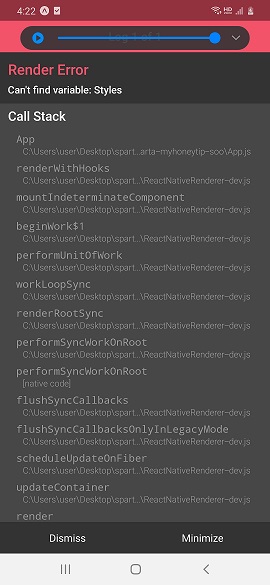
작성한 코드 및 에러 메세지
ReferenceError: Can't find variable: Styles
This error is located at:
in App (created by ExpoRoot)
in ExpoRoot
in RCTView (created by View)
in View (created by AppContainer)
in RCTView (created by View)
in View (created by AppContainer)
in AppContainer
in main(RootComponent)
at node_modules\expo\build\environment\react-native-logs.fx.js:null in error
at node_modules\react-native\Libraries\Core\ExceptionsManager.js:null in reportException
at node_modules\react-native\Libraries\Core\ExceptionsManager.js:null in handleException
at node_modules\react-native\Libraries\Core\setUpErrorHandling.js:null in handleError
at node_modules\expo\build\errors\ExpoErrorManager.js:null in errorHandler
at node_modules\expo\build\errors\ExpoErrorManager.js:null in <anonymous>
at node_modules\expo-error-recovery\build\ErrorRecovery.fx.js:null in ErrorUtils.setGlobalHandler$argument_0
at node_modules\@babel\runtime\helpers\asyncToGenerator.js:null in asyncGeneratorStep
at node_modules\@babel\runtime\helpers\asyncToGenerator.js:null in _next
at node_modules\promise\setimmediate\core.js:null in tryCallOne
at node_modules\promise\setimmediate\core.js:null in setImmediate$argument_0
at node_modules\react-native\Libraries\Core\Timers\JSTimers.js:null in _allocateCallback$argument_0
at node_modules\react-native\Libraries\Core\Timers\JSTimers.js:null in _callTimer
at node_modules\react-native\Libraries\Core\Timers\JSTimers.js:null in _callReactNativeMicrotasksPass
at node_modules\react-native\Libraries\Core\Timers\JSTimers.js:null in callReactNativeMicrotasks
at node_modules\react-native\Libraries\BatchedBridge\MessageQueue.js:null in __callReactNativeMicrotasks
at node_modules\react-native\Libraries\BatchedBridge\MessageQueue.js:null in __guard$argument_0
at node_modules\react-native\Libraries\BatchedBridge\MessageQueue.js:null in __guard
at node_modules\react-native\Libraries\BatchedBridge\MessageQueue.js:null in flushedQueue
ReferenceError: Can't find variable: Styles
This error is located at:
in App (created by ExpoRoot)
in ExpoRoot
in RCTView (created by View)
in View (created by AppContainer)
in RCTView (created by View)
in View (created by AppContainer)
in AppContainer
in main(RootComponent)
at node_modules\expo\build\environment\react-native-logs.fx.js:null in error
at node_modules\react-native\Libraries\Core\ExceptionsManager.js:null in reportException
at node_modules\react-native\Libraries\Core\ExceptionsManager.js:null in handleException
at node_modules\react-native\Libraries\Core\ReactFiberErrorDialog.js:null in showErrorDialog
at node_modules\react-native\Libraries\Renderer\implementations\ReactNativeRenderer-dev.js:null in logCapturedError
at node_modules\react-native\Libraries\Renderer\implementations\ReactNativeRenderer-dev.js:null in update.callback
at node_modules\react-native\Libraries\Renderer\implementations\ReactNativeRenderer-dev.js:null in callCallback
at node_modules\react-native\Libraries\Renderer\implementations\ReactNativeRenderer-dev.js:null in commitUpdateQueue
at node_modules\react-native\Libraries\Renderer\implementations\ReactNativeRenderer-dev.js:null in commitLayoutEffectOnFiber
at node_modules\react-native\Libraries\Renderer\implementations\ReactNativeRenderer-dev.js:null in commitLayoutMountEffects_complete
at node_modules\react-native\Libraries\Renderer\implementations\ReactNativeRenderer-dev.js:null in commitLayoutEffects_begin
at node_modules\react-native\Libraries\Renderer\implementations\ReactNativeRenderer-dev.js:null in commitLayoutEffects
at node_modules\react-native\Libraries\Renderer\implementations\ReactNativeRenderer-dev.js:null in commitRootImpl
at node_modules\react-native\Libraries\Renderer\implementations\ReactNativeRenderer-dev.js:null in commitRoot
at node_modules\react-native\Libraries\Renderer\implementations\ReactNativeRenderer-dev.js:null in performSyncWorkOnRootat node_modules\react-native\Libraries\Renderer\implementations\ReactNativeRenderer-dev.js:null in flushSyncCallbacks
at node_modules\react-native\Libraries\Renderer\implementations\ReactNativeRenderer-dev.js:null in flushSyncCallbacksOnlyInLegacyMode
at node_modules\react-native\Libraries\Renderer\implementations\ReactNativeRenderer-dev.js:null in scheduleUpdateOnFiberat node_modules\react-native\Libraries\Renderer\implementations\ReactNativeRenderer-dev.js:null in updateContainer
at node_modules\react-native\Libraries\Renderer\implementations\ReactNativeRenderer-dev.js:null in render
at node_modules\react-native\Libraries\ReactNative\renderApplication.js:null in renderApplication
at node_modules\react-native\Libraries\ReactNative\AppRegistry.js:null in runnables.appKey.run
at node_modules\react-native\Libraries\ReactNative\AppRegistry.js:null in runApplication
at node_modules\react-native\Libraries\BatchedBridge\MessageQueue.js:null in __callFunction
at node_modules\react-native\Libraries\BatchedBridge\MessageQueue.js:null in __guard$argument_0
at node_modules\react-native\Libraries\BatchedBridge\MessageQueue.js:null in __guard
at node_modules\react-native\Libraries\BatchedBridge\MessageQueue.js:null in callFunctionReturnFlushedQueue
Cannot connect to Metro.
Try the following to fix the issue:
- Ensure that Metro is running and available on the same network
- Ensure that your device/emulator is connected to your machine and has USB debugging enabled - run 'adb devices' to see a list of connected devices
- If you're on a physical device connected to the same machine, run 'adb reverse tcp:8081 tcp:8081' to forward requests
from your device
- If your device is on the same Wi-Fi network, set 'Debug server host & port for device' in 'Dev settings' to your machine's IP address and the port of the local dev server - e.g. 10.0.1.1:8081
URL: qt-5mf.byungsoo.sparta-myhoneytip-soo.exp.direct:80
Error: null
at node_modules\expo\build\environment\react-native-logs.fx.js:null in warn
at node_modules\react-native\Libraries\Utilities\HMRClient.js:null in setHMRUnavailableReason
at node_modules\react-native\Libraries\Utilities\HMRClient.js:null in client.on$argument_1
at node_modules\metro-runtime\src\modules\vendor\eventemitter3.js:null in emit
at node_modules\metro-runtime\src\modules\HMRClient.js:null in _ws.onerror
at node_modules\event-target-shim\dist\event-target-shim.js:null in EventTarget.prototype.dispatchEvent
at node_modules\react-native\Libraries\WebSocket\WebSocket.js:null in _eventEmitter.addListener$argument_1
at node_modules\react-native\Libraries\vendor\emitter\_EventEmitter.js:null in EventEmitter#emit
at node_modules\react-native\Libraries\BatchedBridge\MessageQueue.js:null in __callFunction
at node_modules\react-native\Libraries\BatchedBridge\MessageQueue.js:null in __guard$argument_0
at node_modules\react-native\Libraries\BatchedBridge\MessageQueue.js:null in __guard
at node_modules\react-native\Libraries\BatchedBridge\MessageQueue.js:null in callFunctionReturnFlushedQueue
오류 발생 시, 작성한 코드 전체와 에러 메시지를 첨부해 주세요.
Tip 1) </> 아이콘을 눌러 코드박스를 만들어 보세요.
Tip 2) Ctrl+A(맥의 경우 Command+A) 단축키로 코드를 한 번에 선택할 수 있어요!


