


<View style={styles.container}>
{/*이미지 태그 soruce 부분에 가져온 미지 이름을 넣습니다 */}
<Image
source={favicon}
// 사용설명서에 나와 있는 resizeMode 속성 값을 그대로 넣어 적용합니다
resizeMode={"cover"} //org repeat
style={styles.imageStyle}
/>
</View>
강의 내용대로 repeat 로 실행한후 cover로 바꾼후 실행하면 그냥 전에 것만 나옵니다
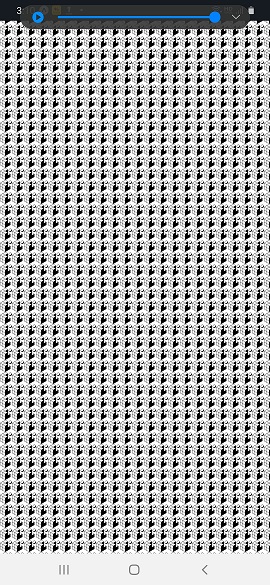
그런데 컴에서 w(open wep) 으로 실행하면 컴화면엔 결과가 제대로 나옵니다.
실습 초기부터 계속 이런게 반복 되서 뭘 만지다보면 다시 되고 하는데 원인을 제대로 알고
싶습니다
PS C:\Users\user\Desktop\sparta-study\sparta-myhoneytip-soo> expo start --tunnel
This command is being executed with the global Expo CLI. Learn more: https://blog.expo.dev/the-new-expo-cli-f4250d8e3421
To use the local CLI instead (recommended in SDK 46 and higher), run:
› npx expo start
Starting project at C:\Users\user\Desktop\sparta-study\sparta-myhoneytip-soo
Some dependencies are incompatible with the installed expo package version:
- react-dom - expected version: 18.0.0 - actual version installed: 18.2.0
Your project may not work correctly until you install the correct versions of the packages.
To install the correct versions of these packages, please run: expo doctor --fix-dependencies,
or install individual packages by running expo install [package-name ...]
Starting Metro Bundler
Successfully ran `adb reverse`. Localhost URLs should work on the connected Android device.
Using legacy dev server: false
Tunnel connected.
Tunnel ready.
라고 메세지가 나오고 QR코드가 나옵니다.


