커뮤니티

포인트
로딩중
쿠폰
내 강의실
국비 신청 내역
증명서
계정
로그아웃
학습 질문
개발 일지
나의 활동
답변 완료
html 파일이 안 뜨고 json 형식으로 데이터가 띄워질 때
undefined주차


오*은
댓글
23
・
추천
0
・
조회수
160
조회수
160
답변 완료
안녕하세요! 무신사 실시간 랭킹 데이터를 크롤링하여 목록을 보여주고, 상품별로 후기 페이지를 만들어 후기를 작성하게 만들고 싶습니다.
각 페이지로 들어가면
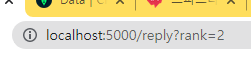
해당 이미지 처럼 ?rank=2 형식으로 두 번째 상품을 클릭 했을 때 그 상품의 페이지로 들어가게 만들었는데요!
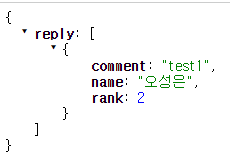
원래라면 팬명록 처럼 떠야 할 html 파일이 안 뜨고
밑의 이미지 처럼 json 형식으로 데이터가 화면에 띄워집니다 ㅠㅠ
왜 이런 걸까요?
app.py 파일입니다.
@app.route('/reply?rank=<int:rank>')
def reply(rank):
    print(rank)
    return render_template("reply.html", rank=rank)


@app.route("/reply", methods=["POST"])
def reply_post(rank):
    name_receive = request.form['name_give']
    comment_receive = request.form['comment_give']
    doc = {
        'rank': int(rank),
        'name': name_receive,
        'comment': comment_receive
    }

    db.reply.insert_one(doc)

    return jsonify({'msg': '후기 작성 완료!'})


@app.route("/reply", methods=["GET"])
def show_comment():
    rank = int(request.args["rank"])

    comment_list = list(db.reply.find({'rank': rank}, {'_id': False}))
    return jsonify({'reply': comment_list})
javascript.js 파일입니다.
function show_comment(rank) {

    console.log(rank);

    $('#comment-list').empty()
    $.ajax({
        type: "GET",
        url: `/reply?rank=${rank}`,
        data: {},
        success: function (response) {
            let rows = response['reply']
            for (let i = 0; i < rows.length; i++) {
                let num = rows[i]['num']
                let name = rows[i]['name']
                let comment = rows[i]['comment']
                if(rank === num) {
                   let temp_html = `<div class="card-body">
                                        <blockquote class="blockquote mb-0">
                                            <p>${comment}</p>
                                            <footer class="blockquote-footer">${name}</footer>
                                        </blockquote>
                                    </div>`

                    $('#comment-list').append(temp_html)
                }

            }
        }
    });
}
index.html 파일 입니다.
<body>
<div class="nav-bar">
    <div class="nav-wrap">
        <h2><a href="/">MUSINSA</a></h2>
        <div class="weather">
            <div class="CurrIcon"></div>
            <div class="CurrTemp"></div>
        </div>
    </div>
</div>
<div class="mypost">
    <div class="form-floating mb-4">
        <img src="" alt="">
    </div>
<!--    <div class="input-group mb-3">-->
<!--        <input type="text" class="form-control" id="title" placeholder="title" name="title" disabled>-->
<!--    </div>-->
    <div class="form-floating mb-4">
        <input type="text" class="form-control" id="name" placeholder="name">
        <label for="floatingInput">이름</label>
    </div>
    <div class="form-floating">
<textarea class="form-control" placeholder="Leave a comment here" id="comment"
          style="height: 100px"></textarea>
        <label for="floatingTextarea2">후기</label>
    </div>
    <button onclick="save_comment()" type="button" class="btn btn-dark">후기 남기기</button>
</div>
<div class="mycards" id="comment-list">

</div>
</body>


댓글 알림
