커뮤니티

포인트
쿠폰
내 강의실
국비 신청 내역
증명서
계정
로그아웃
학습 질문
개발 일지
나의 활동
답변 완료
해당 제품의 후기를 읽어오는 과정에서 문제가 있습니다
undefined주차


가*우
댓글
7
・
추천
0
・
조회수
24
조회수
24
답변 완료
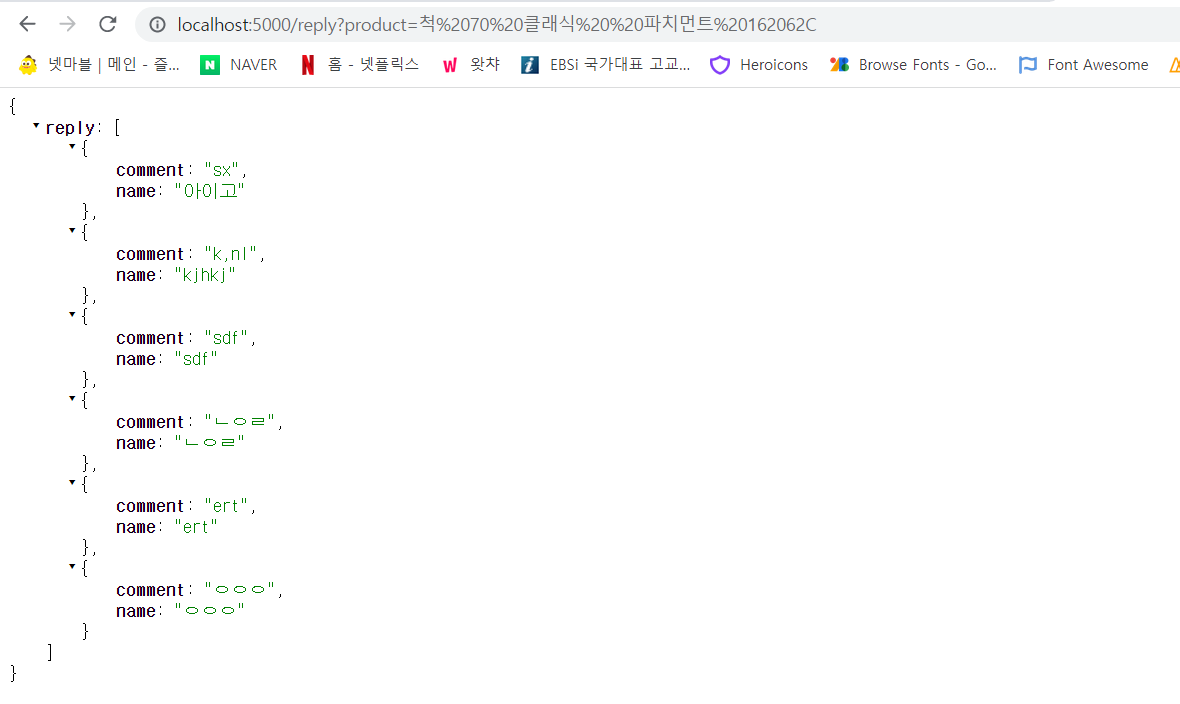
각각의 제품이 고유한 값을 가지게 하기위해
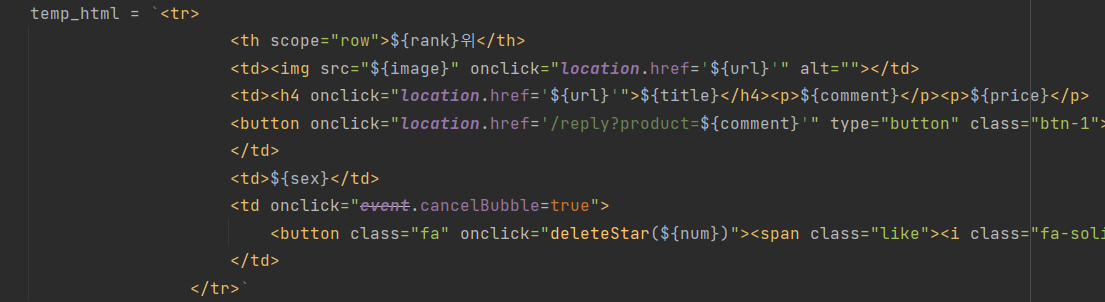
이런식으로 만들었는데요
이렇게하면 첫번째 사진처럼 후기창을 만드는 html과 css가 읽어와지질 않습니다 ㅠㅠ
js코드
$(document).ready(function () {
    listing();
});

function listing() {
    $('#cards-box').empty()
    $.ajax({
        type: 'GET',
        url: '/musinsa',
        data: {},
        success: function (response) {
            let rows = response['musinsas']
            for (let i = 0; i < rows.length; i++) {
                let rank = rows[i]['rank']
                let comment = rows[i]['comment']
                let title = rows[i]['title']
                let image = rows[i]['image']
                // let like = rows[i]['like']
                let price = rows[i]['price']
                let sex = rows[i]['sex']
                let url = rows[i]['url']
                let num = rows[i]['num']
                let dune = rows[i]['dune']
                let temp_html = ``
                if (dune == 0) {
                    temp_html = `<tr>
                                        <th scope="row">${rank}위</th>
                                        <td><img src="${image}" onclick="location.href='${url}'" alt=""></td>
                                        <td><h4 onclick="location.href='${url}'">${title}</h4><p>${comment}</p><p>${price}</p>
                                        <button onclick="location.href='/reply?product=${comment}'" type="button" class="btn-1">후기</button>
                                        </td>
                                        <td>${sex}</td>
                                        <td onclick="event.cancelBubble=true">
                                            <button class="fa" onclick="done_musinsa(${num})"><span class="like"><i class="fa-regular fa-star"></i></span></button>
                                        </td>
                                    </tr>`

                } else {
                    temp_html = `<tr>
                                        <th scope="row">${rank}위</th>
                                        <td><img src="${image}" onclick="location.href='${url}'" alt=""></td>
                                        <td><h4 onclick="location.href='${url}'">${title}</h4><p>${comment}</p><p>${price}</p>
                                        <button onclick="location.href='/reply?product=${comment}'" type="button" class="btn-1">후기</button>
                                        </td>
                                        <td>${sex}</td>
                                        <td onclick="event.cancelBubble=true">
                                            <button class="fa" onclick="deleteStar(${num})"><span class="like"><i class="fa-solid fa-star"></i></span></button>
                                        </td>
                                    </tr>`
                }
                $('#cards-box').append(temp_html)
            }
        }
    })
}

$(document).ready(function () {
    let weatherIcon = {
        '01': 'fas fa-sun',
        '02': 'fas fa-clouds-sun',
        '03': 'fas fa-cloud',
        '04': 'fas fa-cloud-meatball',
        '09': 'fas fa-cloud-sun-rain',
        '10': 'fas fa-cloud-showers-heavy',
        '11': 'fas fa-poo-storm',
        '13': 'fas fa-snowflake',
        '50': 'fas fa-smog'
    };

    $.ajax({
        url: 'http://api.openweathermap.org/data/2.5/weather?q=Seoul&appid=bc93a7cbed56048a9a9214bd29ef4b25&units=metric',
        dataType: 'json',
        type: 'GET',
        success: function (data) {
            var $Icon = (data.weather[0].icon).substr(0, 2);
            var $Temp = Math.floor(data.main.temp) + '°';
            var $City = data.name;

            $('.CurrIcon').append('<i class="' + weatherIcon[$Icon] + '"></i>');
            $('.CurrTemp').prepend($Temp);
            // $('.City').append($City);
        }
    })
});

function getPost(rank) {
    $.ajax({
        type: "GET",
        url: `/reply?=${rank}`,
        data: {},
        success: (response) => {
            const {rank, title, content,} = response;

            $("#rank").append(`<p>${title}</p>`)
            $("#title").append(`<p>작성자 -${title}</p>`)
            $("#content").append(`<p>${content}</p>`)
        }
    })
}

function done_musinsa(num) {
    $.ajax({
        type: "POST",
        url: "/musinsa/done",
        data: {num_give: num},
        success: function (response) {
            alert(response["msg"])
            window.location.reload()
        }
    });
}

function deleteStar(num) {
    $.ajax({
        type: 'POST',
        url: '/musinsa/delete',
        data: {'num_give': num},
        success: function (response) {
            alert(response['msg']);
            window.location.reload()
        }
    });
}
app.py코드
from flask import Flask, render_template, request, jsonify

app = Flask(__name__)
import requests
from bs4 import BeautifulSoup
from pymongo import MongoClient

client = MongoClient('mongodb+srv://test:sparta@cluster0.lz7dp3a.mongodb.net/?retryWrites=true&w=majority')
db = client.dbsparta
url = 'https://www.musinsa.com/ranking/best'

response = requests.get(url)

if response.status_code == 200:
    html = response.text
    soup = BeautifulSoup(html, 'html.parser')
    ul = soup.select_one('#goodsRankList')
    titles = ul.select('p.item_title > a')
    rank = ul.select_one('p.txt_num_rank').text[0:20].strip()
    image = ul.select('div.list_img > a > img')
    comment = ul.select('p.list_info > a')
    price = ul.select('div.article_info > p.price')
    sex = ul.select('div.icon_group > ul > li')
    url = ul.select('div.list_img > a')

    # for i, title in enumerate(titles):
    #     print(str(i + 1) + f"위", title.text, image[i]["data-original"], comment[i]["title"],
    #           price[i].text[10:38].strip().replace("\n", "").replace(" ", ""), sex[i]['title'], url[i]['href'])

    for i, title in enumerate(titles):
        titles[i] = title.text.strip()
        title = titles[i]
        rank = str(i + 1)
        musinsa_list = list(db.musinsa.find({}, {'_id': False}))
        count = len(musinsa_list) + 1
        doc = {
            'num': count,
            'dune': 0,
            'rank': rank,
            'title': title,
            'image': image[i]["data-original"],
            'comment': comment[i]["title"],
            'price': price[i].text[10:38].strip().replace("\n", "").replace(" ", ""),
            'sex': sex[i]["title"],
            'url': url[i]['href']
        }
        # print(rank, title, image[i]["data-original"], comment[i]["title"], price[i].text[10:38].strip(), sex[i]['title'])
        db.musinsa.insert_one(doc)
else:
    print(response.status_code)


@app.route('/')
def home():
    return render_template('index.html')

@app.route('/reply?product=<string:comment>')
def reply(comment):
    print(comment)
    return render_template("reply.html", comment=comment)


@app.route("/musinsa", methods=["GET"])
def musinsa_get():
    musinsa_list = list(db.musinsa.find({}, {'_id': False}))

    return jsonify({'musinsas': musinsa_list})


@app.route("/reply", methods=["POST"])
def reply_post():
    name_receive = request.form['name_give']
    comment_receive = request.form['comment_give']
    doc = {
        'name': name_receive,
        'comment': comment_receive
    }

    db.reply.insert_one(doc)

    return jsonify({'msg': '후기 작성 완료!'})


@app.route("/reply", methods=["GET"])
def reply_get():
    comment_list = list(db.reply.find({}, {'_id': False}))
    return jsonify({'reply': comment_list})

@app.route("/musinsa/done", methods=["POST"])
def musinsa_done():
    num_receive = request.form['num_give']
    db.musinsa.update_one({'num': int(num_receive)}, {'$set': {'dune': 1}})
    return jsonify({'msg': '찜하기 완료!'})

@app.route('/musinsa/delete', methods=['POST'])
def delete_star():
    num_receive = request.form['num_give']
    db.musinsa.update_one({'num': int(num_receive)}, {'$set': {'dune': 0}})
    return jsonify({'msg': '찜하기 취소!'})

if __name__ == '__main__':
    app.run('0.0.0.0', port=5000, debug=True)


댓글 알림
